

Building software that customers access through browsers instead of installing on their computers – that’s SaaS development in one sentence. But there’s way more complexity hiding beneath that simple definition.
Understanding what is SaaS development matters whether you’re a founder planning your first product or a developer joining a SaaS team. The subscription model, cloud infrastructure, and continuous deployment change how you approach everything from architecture to pricing.
This guide breaks down SaaS development from technical requirements to business considerations. You’ll learn about multi-tenant architecture, scaling strategies, security fundamentals, development team structure, and the tools that power successful SaaS platforms like Salesforce and Slack.
By the end, you’ll know exactly what building software as a service actually involves.
What is SaaS Development?
SaaS Development is the process of creating software applications that are hosted on the cloud and accessed via the internet. It involves building scalable, multi-tenant systems where users subscribe rather than install. Key aspects include cloud infrastructure, APIs, security, and continuous updates.
What Makes It Different
Traditional software? You buy it once, install it, and deal with updates yourself. SaaS flips that model completely.
You pay a subscription fee (monthly or yearly). The provider handles updates, security patches, and server maintenance while you sleep.
This is fundamentally different from traditional software development where users manage their own installations.
Key Characteristics of SaaS Products
Multi-Tenancy Architecture
One application serves multiple customers. It’s like an apartment building where everyone has their own space, but they share the same structure.
Each tenant’s data stays completely separate. You’ll never see another company’s information, even though you’re technically using the same software instance.
This architecture makes scaling cheaper and faster than giving each customer their own dedicated server.
Browser-Based Access
No downloads. No installations. Just open Chrome or Firefox and start working.
Web apps have become the standard delivery method for SaaS products. You can access them from any device with an internet connection.
Some SaaS products also offer mobile versions, but the core experience happens in the browser.
Automatic Updates
Remember manually installing software updates? Yeah, SaaS eliminates that headache.
The provider pushes updates to the cloud infrastructure. Next time you log in, boom, new features appear automatically.
Everyone uses the same version at the same time. No more compatibility issues between different user versions.
Scalability on Demand
Your startup suddenly got featured on TechCrunch? The system adjusts to handle 10,000 new users without breaking.
SaaS platforms scale vertically (more powerful servers) or horizontally (more servers). The architecture supports growth without requiring you to buy new hardware.
Cloud computing makes this possible. Resources expand and contract based on actual usage.
Common Examples and Use Cases
Salesforce pioneered the model. HubSpot built on it. Now? Pretty much every business tool follows the SaaS playbook.
Project management tools like Asana and Monday live entirely in the cloud. You don’t install anything-you just create an account and invite your team.
Business Software
CRM systems moved to SaaS years ago. Sales teams access customer data from anywhere, updated in real time.
Accounting software (QuickBooks Online, Xero) replaced desktop versions. Your bookkeeper can log in from their home office instead of using your computer.
Email marketing platforms like Mailchimp started as SaaS and never looked back.
Productivity Tools
Slack changed how teams communicate. Google Workspace replaced Microsoft Office for millions of users.
Zoom became essential overnight (thanks, 2020). Dropbox made file sharing stupidly simple.
These tools share common traits: accessible anywhere, subscription pricing, constant improvements.
Specialized Industry Solutions
Healthcare has its own SaaS platforms for patient management. Restaurants use cloud-based POS systems.
Real estate agents rely on SaaS for listings and client management. Lawyers use cloud-based case management tools.
Every industry now has dedicated SaaS solutions. The subscription model works across all verticals.
The SaaS Development Process
Planning and Strategy Phase
Market Research and Validation
You need to know if people actually want what you’re building. Seriously, this step matters more than your tech stack.
Talk to potential customers before writing a single line of code. Ask what problems they face daily at work.
Look at existing solutions. What do they do well? Where do they fall short?
Survey data helps, but real conversations reveal the problems people will actually pay to solve. When analyzing your findings, consider SaaS marketing stats to understand broader adoption trends and industry benchmarks.
Defining Your Target Audience
“Everyone” is not a target audience. You need specifics.
Are you building for freelancers or enterprise teams? Developers or marketers? Small businesses or Fortune 500 companies?
Each group has different needs, budgets, and technical abilities. A tool for graphic designers looks nothing like one for data scientists.
Your UI/UX design decisions flow directly from understanding who will actually use this thing.
Feature Prioritization and MVP Scope
The hardest part? Deciding what NOT to build initially.
Your MVP (Minimum Viable Product) should solve one core problem really well. Not ten problems poorly.
Write down every feature idea. Then ruthlessly cut 80% of them. Save those features for version 2.0.
Spotify didn’t launch with podcasts. Slack started as a gaming company’s internal tool. Start small, prove the concept, then expand.
Business Model Decisions
Monthly or annual billing? Tiered pricing? Usage-based fees?
Stripe makes payment processing easier, but you still need to decide your pricing strategy first.
Some SaaS products offer free tiers to attract users. Others go straight to paid plans. There’s no universal right answer.
Look at app pricing models that work in your industry. Then pick what fits your costs and customer expectations.
Technical Architecture Decisions
Choosing Your Tech Stack

This decision haunts you for years, so choose wisely.
React dominates frontend development, but Vue.js and Angular have loyal followings. Pick what your team knows best.
Node.js works great for real-time features. Python (with Django or Flask) excels at data-heavy applications. Ruby on Rails still powers thousands of successful SaaS products.
The “best” stack is the one your team can actually build and maintain. Fancy technologies mean nothing if you can’t ship features quickly. Thoughtful choices here are key when designing a scalable SaaS that can handle future growth.
Database Design for Multi-Tenancy
PostgreSQL and MongoDB both work for SaaS applications. The choice depends on your data structure.
You have three main approaches: separate databases per tenant, shared database with separate schemas, or shared database with shared schema (using tenant IDs).
Most startups begin with a shared schema approach. It’s simpler and cheaper when you’re small.
As you scale, you might move high-value customers to dedicated databases. Flexibility matters more than perfection at launch.
API-First Development Approach
Build your API integration capabilities from day one. Every SaaS product eventually needs to connect with other tools.
RESTful APIs remain the standard, though GraphQL is gaining ground for complex data requirements.
Your API becomes a product feature itself. Customers want to integrate your tool into their existing workflows.
Design the API before building the user interface. It forces you to think clearly about your data model and business logic.
Microservices vs Monolithic Architecture

Monoliths get a bad reputation, but they work fine for early-stage SaaS products. One codebase, simpler deployment, faster initial development.
Microservices architecture shines when you need different parts of your application to scale independently. Think Netflix-level complexity.
Starting with a monolith doesn’t trap you forever. Many successful companies begin monolithic and break things apart as needed.
Don’t over-engineer for scale you don’t have yet. Build what you need now, not what you might need in five years.
Design and User Experience
Creating Intuitive Onboarding Flows
First impressions determine if users stick around or bounce immediately.
Show value within 60 seconds of signup. Don’t make people wade through setup screens before they see what your product actually does.
Tooltips help, but don’t bombard new users with 47 pop-ups. Guide them to one “aha moment” quickly.
Track where users drop off during onboarding. That spot? That’s where your UX is failing.
Dashboard and Interface Design Principles
Clean beats clever. Every. Single. Time.
Put the most important information above the fold. Users shouldn’t need to scroll to see their critical metrics.
White space isn’t wasted space. It makes interfaces readable and reduces cognitive load.
Use consistent patterns throughout your application. If clicking a button opens a modal in one place, it should work the same way everywhere.
Mobile Responsiveness Requirements
Half your users will access your SaaS product from their phones. Maybe more.
Mobile application development isn’t just shrinking your desktop interface. Mobile users have different needs and behaviors.
Test on actual devices, not just browser dev tools. What looks fine in Chrome’s mobile emulator might be unusable on a real iPhone.
Some features work better on desktop. That’s okay. But core functionality should work smoothly on any screen size.
Accessibility Considerations
Accessibility isn’t optional. It’s basic respect for all users.
Use proper color contrast. Add alt text to images. Make sure keyboard navigation works.
Screen readers should be able to navigate your entire application. If they can’t, you’re excluding paying customers.
Many accessibility features help everyone, not just users with disabilities. Captions benefit people in loud coffee shops. Keyboard shortcuts speed up power users.
Development and Testing
Agile Development Methodology
Ship small improvements frequently instead of massive releases quarterly.
Two-week sprints work well for most teams. Short enough to maintain focus, long enough to complete meaningful features.
Daily standups keep everyone aligned. Fifteen minutes, no rambling, just quick status updates.
Following software development methodologies like Agile helps teams coordinate without constant meetings.
Version Control and Collaboration

Git isn’t negotiable. Every modern development team uses it.
GitHub or GitLab hosts your repositories and manages pull requests. Code reviews catch bugs before they reach production.
Branch naming conventions seem trivial until you’re managing 30 active feature branches. Establish standards early.
Source control saves your bacon when something breaks in production. You can roll back to any previous version instantly.
Automated Testing Strategies
Manual testing doesn’t scale. Period.
Unit testing catches bugs at the function level. Integration testing verifies that different parts work together correctly.
Write tests for critical user paths first. Authentication, payment processing, data export, these features cannot fail. During SaaS testing, make sure your automated processes cover real-world usage scenarios, not just ideal workflows.
Test-driven development sounds dogmatic, but it produces more reliable code. Write the test first, then make it pass.
Beta Testing with Real Users
Your team is too close to the product. You need fresh eyes.
Recruit 10-20 beta users who represent your target audience. Not friends and family-actual potential customers.
Watch them use your product without explaining anything. Where do they get confused? What feels clunky?
Feedback collected during beta testing is worth more than assumptions made in conference rooms.
Deployment and Infrastructure
Cloud Hosting Options
| Attribute | Amazon Web Services (AWS) | Microsoft Azure | Google Cloud Platform (GCP) |
|---|---|---|---|
| Market Position | Leading cloud provider with 32% market share globally | Second-largest cloud provider with 23% market share | Third-largest cloud provider with 11% market share |
| Service Count | Over 200 fully featured services | Over 200 cloud services | Over 100 cloud services |
| Global Infrastructure | 33 geographic regions with 105 availability zones | 60+ regions with 300+ availability zones worldwide | 40 regions with 121 availability zones |
| Compute Services | EC2 (Elastic Compute Cloud), Lambda for serverless, ECS for containers | Virtual Machines, Azure Functions for serverless, AKS for Kubernetes | Compute Engine, Cloud Functions for serverless, GKE for Kubernetes |
| Storage Solutions | S3 object storage, EBS block storage, EFS file storage, Glacier archival | Blob Storage, Disk Storage, Azure Files, Archive Storage | Cloud Storage buckets, Persistent Disk, Filestore, Archive Storage |
| Database Options | RDS (relational), DynamoDB (NoSQL), Aurora, Redshift (data warehouse) | SQL Database, Cosmos DB (NoSQL), Azure Synapse Analytics | Cloud SQL, Firestore (NoSQL), Spanner, BigQuery (analytics) |
| AI/ML Capabilities | SageMaker for machine learning, Rekognition for image analysis, Bedrock for generative AI | Azure Machine Learning, Cognitive Services, Azure OpenAI Service integration | Vertex AI platform, AutoML, TensorFlow integration, Gemini AI models |
| Primary Advantage | Most mature platform with extensive service catalog and largest ecosystem | Seamless integration with Microsoft enterprise products and hybrid cloud capabilities | Superior data analytics, competitive pricing, strong open-source integration |
| Pricing Model | Pay-as-you-go with per-second billing for compute, reserved instances, savings plans | Pay-as-you-go with per-minute billing, reserved instances, hybrid benefit for Windows | Pay-as-you-go with per-second billing, sustained use discounts, committed use contracts |
| Enterprise Integration | Strong third-party integrations, AWS Organizations for multi-account management | Native integration with Active Directory, Office 365, Dynamics 365, on-premises systems | Integration with Google Workspace, strong API ecosystem, Anthos for hybrid deployment |
| Compliance Certifications | SOC 1/2/3, ISO 27001, HIPAA, PCI DSS, FedRAMP, GDPR compliant | SOC 1/2/3, ISO 27001, HIPAA, PCI DSS, FedRAMP, GDPR compliant, extensive government certifications | SOC 1/2/3, ISO 27001, HIPAA, PCI DSS, FedRAMP, GDPR compliant |
| Best Suited For | Startups to enterprise requiring comprehensive services, flexibility, global reach | Enterprises using Microsoft technologies, hybrid cloud deployments, Windows workloads | Data-intensive applications, machine learning projects, organizations seeking cost efficiency |
AWS dominates the market. It’s powerful, flexible, and has services for everything.
Microsoft Azure integrates seamlessly if you’re building for enterprise customers already using Microsoft products. Google Cloud Platform offers competitive pricing and excellent Kubernetes support.
Start with one provider. Multi-cloud sounds smart but adds unnecessary complexity for early-stage products.
Managed services cost more but save countless hours. Don’t manage your own database servers unless you absolutely have to.
CDN Setup for Performance
Content Delivery Networks cache your static assets (images, CSS, JavaScript) on servers worldwide.
Users in Sydney get files from Australian servers. Users in London get them from European servers. Everyone experiences faster load times.
Cloudflare offers a free tier that works fine for new SaaS products. Upgrade when traffic justifies it.
Page speed affects conversions. A site that loads in 2 seconds converts better than one that takes 5.
Load Balancing and Redundancy
One server fails. What happens to your application?
Load balancers distribute traffic across multiple servers. If one goes down, others handle the requests.
High availability means planning for failure. Because failure will happen.
Database replication keeps your data safe even if a server crashes. Regular backups catch what replication misses.
Monitoring and Logging Systems
You can’t fix problems you don’t know exist.
Datadog and New Relic monitor application performance in real time. They alert you before users start complaining.
Log aggregation tools (Loggly, Papertrail) collect errors from all your servers in one place. Debugging becomes possible instead of nightmarish.
Set up alerts for critical metrics: error rates, response times, server CPU usage. Then tune those alerts so they’re not crying wolf every day.
Technical Requirements for SaaS Products
Security Fundamentals
Data Encryption at Rest and in Transit
Your customers trust you with their data. Don’t screw this up.
HTTPS encrypts data moving between users and your servers. If you’re not using SSL certificates in 2025, what are you even doing?
Encrypt database contents too. AWS and other cloud providers make this relatively straightforward.
Never store passwords in plain text. Ever. Use bcrypt or Argon2 for password hashing. This is not negotiable.
User Authentication Methods
| Authentication Method | Primary Function | Implementation Complexity | Best Use Case for SaaS |
|---|---|---|---|
| OAuth 2.0 | Delegates authorization to third-party providers without exposing user credentials through token-based access control | Moderate-requires OAuth client registration, token management, and secure token storage mechanisms | API authorization for B2B SaaS platforms needing third-party integrations with services like Slack, Google Workspace, or Microsoft 365 |
| OpenID Connect | Provides identity verification layer on top of OAuth 2.0 protocol, returning standardized user profile information via ID tokens | Moderate-extends OAuth 2.0 with identity claims validation and JSON Web Token (JWT) processing requirements | Social login implementations for consumer-facing SaaS applications requiring verified identity attributes from Google, Facebook, or Apple accounts |
| SAML 2.0 | Exchanges XML-based authentication assertions between identity provider and service provider for enterprise federation | High-demands XML signature validation, certificate management, and strict assertion processing rules | Enterprise SaaS serving large organizations with existing Active Directory, Okta, or OneLogin identity infrastructure |
| Multi-Factor Authentication | Requires multiple independent verification factors including possession (authenticator apps), knowledge (passwords), or biometric markers | Low to Moderate-implementation ranges from SMS codes to TOTP algorithms or hardware security keys | Security-critical SaaS platforms handling financial data, healthcare records, or compliance-regulated information |
| Passwordless Authentication | Eliminates password dependency through magic links, biometric verification, or cryptographic key pairs (WebAuthn/FIDO2) | Moderate-requires WebAuthn implementation, public key cryptography infrastructure, or secure email delivery systems | Modern consumer SaaS prioritizing user experience, reducing password fatigue, and minimizing credential theft attack vectors |
| Single Sign-On | Enables one authentication session to access multiple related applications within the same security domain or organization | Moderate to High-requires identity provider configuration, session management across domains, and protocol implementation (often SAML or OpenID Connect) | Enterprise SaaS ecosystems where employees access multiple internal tools, reducing authentication friction and improving productivity |
Passwords alone don’t cut it anymore. Add two-factor authentication as an option minimum, requirement for sensitive data maximum.
Token-based authentication (JWT) works well for APIs. Users log in once, get a token, use it for subsequent requests.
OAuth lets users sign in with Google or Microsoft accounts. Less friction during signup, fewer passwords to manage.
Session management matters too. Automatically log out inactive users. Let them manually revoke access from their devices list.
Role-Based Access Control
Not everyone needs access to everything.
Admins can delete accounts. Managers can view reports. Regular users can only edit their own stuff.
Design your permission system before building features. Retrofitting RBAC into an existing product is painful.
Enterprise customers demand granular permissions. They want to control exactly who sees what within their organization.
Compliance Requirements
GDPR isn’t optional if you have European users. CCPA applies if you serve Californians.
SOC 2 certification matters for enterprise sales. Customers won’t sign contracts without it.
HIPAA compliance becomes necessary if you handle health data. PCI DSS applies if you process credit cards (though Stripe handles most of this).
Budget for legal and compliance costs. They’re not small, but they’re required.
Performance and Reliability
Uptime Expectations and SLAs
“Five nines” (99.999% uptime) sounds impressive. It means about 5 minutes of downtime per year.
Most SaaS products promise 99.9% uptime (about 8 hours of downtime annually). That’s reasonable and achievable.
Service Level Agreements (SLAs) often include financial penalties for missed targets. Don’t promise what you can’t deliver.
Monitor your actual uptime religiously. Customers will notice every outage, even brief ones.
Caching Strategies
Database queries are slow. Caching makes them fast.
Redis stores frequently accessed data in memory. Your homepage dashboard? Cache it instead of hitting the database every time.
Set appropriate expiration times. Some data can be cached for hours. Other data needs to be fresh within seconds.
App scaling often starts with smarter caching before adding more servers.
Database Optimization
Indexes speed up queries. Missing indexes slow everything to a crawl.
Analyze slow queries regularly. PostgreSQL’s EXPLAIN command shows exactly where bottlenecks exist.
Denormalization trades storage space for query speed. Sometimes storing redundant data makes sense.
Connection pooling prevents your database from getting overwhelmed when traffic spikes.
Handling Traffic Spikes
Black Friday hits and your servers melt. You just lost a fortune in sales.
Auto-scaling adds servers automatically when traffic increases. Cloud platforms make this straightforward.
Rate limiting prevents abuse. One user shouldn’t be able to crash your entire system with excessive requests.
Queue systems (RabbitMQ, Redis) handle background jobs asynchronously. Email sending and report generation happen outside the main request cycle.
Integration Capabilities
RESTful API Development
Every SaaS product needs an API. Customers want to build their own integrations.
Use consistent naming conventions. /api/v1/users not /api/getUserList. REST standards exist for good reasons.
Return proper HTTP status codes. 200 for success, 404 for not found, 500 for server errors. Don’t return 200 with an error message in the body.
API versioning lets you make changes without breaking existing integrations. Start with v1 and increment when you make breaking changes.
Webhooks for Real-Time Updates
Polling APIs wastes resources. Webhooks push data to customers when events happen.
User signs up? Fire a webhook. Payment processes? Another webhook. Let customers react to events instantly.
Include retry logic for failed webhook deliveries. Networks fail. Customer servers go down. Your system should try again automatically.
Provide webhook logs so customers can debug integration issues themselves.
Third-Party Service Connections
Your SaaS product won’t exist in isolation. Plan for integrations from day one.
Zapier and Make connect your product to thousands of other tools. Build native integrations for the most popular services in your industry.
Authentication flows matter here. OAuth 2.0 is standard. Store access tokens securely.
API gateways manage authentication, rate limiting, and routing for complex integration scenarios.
Authentication Protocols
OAuth 2.0 handles third-party authentication. OpenID Connect adds identity on top.
Single Sign-On (SSO) is mandatory for enterprise customers. They want employees to use corporate credentials, not create new passwords.
SAML authentication integrates with corporate identity providers (Active Directory, Okta). It’s complex but necessary for large customers.
API keys work for server-to-server communication. Just make sure they’re long, random, and properly secured.
Data Management
Backup and Disaster Recovery
Backups happen automatically. Testing those backups? That’s where most teams fail.
Daily automated backups should run at minimum. Critical data might need hourly backups.
Store backups in a different region than your primary data. An AWS outage in us-east-1 shouldn’t take down your backups too.
Have a documented recovery procedure. When disaster strikes, you need a checklist, not panic.
Data Migration Tools
Customers want to import existing data from spreadsheets or competitors’ products.
CSV import works for basic needs. More complex migrations need dedicated tools or services.
Validate imported data before committing it. Garbage in, garbage out applies to SaaS products too.
Provide clear error messages when imports fail. “Row 47: invalid date format” helps. “Import failed” doesn’t.
Export Functionality
Don’t trap customer data. They should be able to export everything, anytime.
CSV exports work for simple data. JSON or XML handles complex relationships better.
Schedule automated exports for customers who want regular backups. Email them a download link weekly.
Data portability isn’t just good practice. GDPR requires it.
Data Retention Policies
How long do you keep deleted data? Forever? 30 days? Define this upfront.
Soft deletes mark records as deleted without removing them immediately. Users can recover accidentally deleted items.
Hard deletes remove data permanently. Some regulations require this for privacy reasons.
Document your retention policy clearly. Customers need to know what happens to their data.
Business Aspects of SaaS Development
Pricing Models

Tiered Subscription Plans
Basic, Pro, Enterprise. You’ve seen this pattern everywhere.
Each tier unlocks more features or increases usage limits. The cheapest tier gets people in the door. The expensive tier is where profit lives.
Salesforce perfected this model. Small teams start on basic plans, grow into enterprise contracts worth millions.
Price anchoring works. When users see a $299/month plan next to a $99/month plan, the middle option suddenly looks reasonable.
Usage-Based Pricing
Pay for what you actually use. AWS popularized this approach for infrastructure.
API calls, storage space, active users-pick your metric. Customers love it because costs scale with their business.
Implementation is tricky. You need accurate usage tracking and clear billing explanations.
Predictable revenue becomes harder. Some months customers use more, some months less. Your CFO will have opinions about this.
Freemium Strategies
Free tier gets users hooked. Paid tiers make money.
Slack nails this. Free version works great for small teams. Once you hit message limits or need advanced features, upgrade becomes inevitable.
Most freemium users never convert. That’s fine. They still generate word-of-mouth marketing and network effects.
Set free tier limits carefully. Too generous and nobody upgrades. Too restrictive and users bounce before seeing value.
Annual vs Monthly Billing
Monthly billing means lower commitment. Users can cancel anytime.
Annual plans offer discounts (usually 15-20%) in exchange for upfront payment. Your cash flow improves. Customer retention increases.
Offer both options. Some customers prefer flexibility. Others want the discount and budget certainty.
Require annual contracts for enterprise deals. Large companies expect this anyway.
Customer Acquisition
Free Trial Implementations
14 days or 30 days? Both work.
Credit card required trials convert better but attract fewer signups. No credit card trials get more users but lower quality leads.
Trial length depends on your product complexity. Simple tools need shorter trials. Complex platforms need more time for users to see value.
Send reminder emails as trial expiration approaches. Many users forget they signed up until day 13.
Demo Environments
Pre-populated data shows what your product looks like with actual usage.
Empty dashboards don’t impress anyone. Sample data helps users envision their own workflows.
B2B products often need custom demos. Sales teams walk prospects through specific use cases relevant to their industry.
Self-service demos work for simpler products. Let users explore without scheduling calls.
Self-Service Signup Flows
Remove friction. Every extra form field reduces conversion rates.
Email and password should be enough to start. Collect additional information later, after users see value.
Social login (Google, Microsoft) speeds things up. Fewer passwords to remember, faster onboarding.
Email verification prevents fake accounts but adds friction. Consider performing form validation during registrations instead of blocking access immediately.
Payment Gateway Integration
Stripe dominates for good reason. Simple API, handles compliance, supports global payments.
PCI compliance becomes Stripe’s problem, not yours. They handle card tokenization and secure storage.
Offer multiple payment methods. Credit cards are standard. ACH transfers matter for enterprise deals.
Failed payment recovery matters more than you think. Automated retry logic and email reminders save subscriptions that would otherwise churn.
Customer Retention Features
User Analytics and Tracking
You can’t improve what you don’t measure.
Track feature usage. Which tools get clicked daily? Which ones never get touched?
User cohorts reveal patterns. Users who complete onboarding in one session stick around longer than those who abandon halfway through.
Identify power users and understand their behavior. They’re showing you the product’s full potential.
In-App Notifications
Updates, tips, feature announcements-communicate without relying on email.
Context-aware notifications work best. Show the tip when users encounter the feature, not randomly.
Don’t spam. Too many notifications get ignored or train users to close them reflexively.
Let users control notification preferences. Some want everything. Others prefer silence.
Customer Support Systems
Email support is table stakes. Live chat increases satisfaction scores significantly.
Knowledge base articles reduce support tickets. Users can solve problems themselves at 3 AM.
Ticket routing sends questions to the right specialist. Frontend issues go to frontend developers. Billing questions reach finance team.
Response time SLAs matter for enterprise customers. They expect replies within hours, not days.
Feature Request Management
Users will ask for everything. You can’t build it all.
Public roadmap shows what’s coming next. Reduces duplicate requests and manages expectations.
Voting systems let customers prioritize features. Build what the majority actually wants, not what one loud user demands.
Some feature requests reveal deeper problems. “Can you add 50 custom fields?” might mean your data model is too rigid.
Metrics That Matter
Monthly Recurring Revenue
MRR is your heartbeat. Growing MRR means healthy business. Flat or declining MRR signals problems.
Calculate it simply: total of all monthly subscriptions. Annual plans count as their monthly equivalent.
New MRR, expansion MRR, churned MRR-track all three components. They tell different stories about your business health.
Investors care about MRR growth rate more than absolute numbers. 10% monthly growth gets attention.
Churn Rate Tracking
Customer churn measures how many subscriptions cancel. Revenue churn measures how much money you lose.
5% monthly churn sounds small. Compound it over a year and you’ve lost most customers.
Negative revenue churn (impossible with customers but possible with revenue) happens when expansion revenue exceeds lost revenue. HubSpot and Salesforce achieve this regularly.
Track why customers leave. Exit surveys reveal fixable problems versus structural issues you can’t solve.
Customer Acquisition Cost
CAC divides total sales and marketing expenses by new customers acquired.
If CAC is $500 and customers pay $50/month, you need 10 months to break even. That’s fine if they stick around for years.
CAC should decrease over time as you optimize marketing channels and referrals increase.
Enterprise CAC runs higher than SMB CAC. Sales cycles are longer, deals require demos and negotiations. But contract values justify the cost.
Lifetime Value
LTV predicts total revenue from a customer relationship.
Simple calculation: average monthly revenue × average customer lifespan in months.
More sophisticated models account for expansion revenue and discount future cash flows.
LTV should be at least 3× CAC. Otherwise you’re spending too much to acquire customers who don’t stick around long enough.
Development Team Structure
Required Roles
Full-Stack Developers
Can work on frontend, backend, and everything between. Startups run on full-stack developers.
JavaScript ecosystem makes full-stack work possible. React on frontend, Node.js on backend, same language everywhere.
Specialists often outperform generalists in specific areas. But full-stack developers move faster when building new features.
Early-stage SaaS products need speed over perfection. Full-stack developers provide that speed.
DevOps Engineers
The bridge between development and operations teams. They make deployments smooth and infrastructure reliable.
Containerization with Docker and orchestration with Kubernetes are standard DevOps tools now.
CI/CD pipelines automate testing and deployment. Code goes from developer laptop to production without manual steps.
Infrastructure as code treats servers like software. Version control for your entire infrastructure setup.
UI/UX Designers
Design isn’t decoration. It’s how your product works.
Good designers understand user psychology. They know where eyes go first, what buttons invite clicks, how color affects perception.
Wireframing happens before development starts. Catching UX problems on paper costs nothing compared to redesigning built features.
Designer-developer collaboration determines product quality. Siloed teams build mediocre products.
Product Managers
Decide what gets built and why. Balance user requests against technical constraints and business goals.
Product roadmaps translate vision into deliverable features. They answer “what are we building next quarter?”
Customer feedback flows through product managers. They filter noise from signal.
Good PMs say no more often than yes. Protecting the team’s focus from feature creep is half the job.
Team Size Considerations
Starting with a Small Team
Two developers and a designer can launch a SaaS product. Seriously.
Instagram had 13 employees when Facebook acquired them for a billion dollars. Small teams move fast.
Everyone wears multiple hats initially. Developers handle deployment. Designers write support docs. Founders do everything else.
Limited resources force prioritization. You can’t build 50 features, so you build the five that actually matter.
When to Hire Specialists
First specialized hire? Usually DevOps or dedicated designer.
Backend developers who don’t enjoy CSS finally get relief. Frontend developers stop pretending to understand database optimization.
Security specialists become necessary when you handle sensitive data or chase enterprise contracts.
Sales and customer success roles matter once product-market fit is proven. Before that, founders handle sales.
Outsourcing vs In-House Development
Outsourcing works for defined projects with clear specifications. Build this feature, here’s the mockup, done.
Core product development usually stays in-house. You need tight feedback loops and deep product knowledge.
Custom app development agencies can accelerate initial builds. But maintaining code written by contractors gets expensive.
Offshore teams offer cost savings but timezone differences slow communication. Nearshore often provides better balance.
Remote Team Management
Remote works if you build for it. Requires documentation, async communication, and clear processes.
Slack and Zoom are minimum requirements. GitHub for code, Notion or Confluence for docs.
Overlap hours matter more than full timezone alignment. Four hours of overlap enables collaboration.
Remote-first companies often outperform hybrid ones. Hybrid creates two-tier culture. Remote-first treats everyone equally.
Skill Sets Needed
Frontend Frameworks
React dominates job postings and new projects. Component-based architecture makes complex UIs manageable.
Vue.js offers simpler learning curve. Smaller teams often prefer it.
Angular serves enterprise applications well. TypeScript integration and opinionated structure suit large codebases.
Pick one and get really good at it. Framework-hopping wastes time.
Backend Languages
Node.js lets frontend developers work backend too. Same language, shared code possible.
Python with Django or Flask powers data-heavy applications beautifully. ML integration comes naturally.
Ruby on Rails prioritizes developer happiness. Rapid prototyping remains its strength.
Go performs well under load. Microservices often use Go for efficiency.
Database Expertise
PostgreSQL handles most use cases. JSON support, full-text search, mature ecosystem.
MongoDB works for unstructured data. Flexible schemas help during rapid iteration.
Redis caches everything. Sessions, frequently accessed data, background job queues.
MySQL still powers huge applications (WordPress, Shopify). Don’t dismiss it because it’s old.
Cloud Platform Knowledge
One team member needs deep AWS knowledge. S3 for storage, EC2 for compute, RDS for databases.
Azure makes sense if you’re targeting Microsoft-heavy enterprises. Active Directory integration sells itself.
Google Cloud Platform offers competitive pricing. BigQuery handles analytics at scale.
Multi-cloud sounds smart but doubles operational complexity. Master one platform first.
Tools and Technologies
Development Tools
IDEs and Code Editors
Visual Studio Code won the editor wars. Free, fast, extensions for everything.
JetBrains IDEs (WebStorm, PyCharm) offer more features out of the box. Worth the cost for large projects.
Vim and Emacs users will tell you their choice is superior. They’re probably right for their workflow.
Editor choice barely matters. Code quality depends on the developer, not the tool.
Version Control Systems
Git is the only game in town. Alternatives exist but nobody uses them.
Branching strategies matter. Gitflow works for scheduled releases. Trunk-based development suits continuous deployment.
Commit messages should explain why, not what. Code shows what changed. Messages explain reasoning.
.gitignore files prevent committing secrets and dependencies. First thing you set up in any project.
Project Management Software
Jira dominates enterprise. Powerful but complex.
Linear offers simpler, faster alternative. Tech companies love it.
Asana and Monday work for teams who aren’t entirely technical. Project managers prefer these interfaces.
Tool doesn’t matter as much as consistent usage. Pick something and actually use it.
Communication Platforms
Slack channels organize conversations by topic. Keeps random chatter separate from critical alerts.
Threads prevent channel chaos. Reply to messages instead of posting new ones.
Status updates and bot integrations make Slack powerful. GitHub updates in dev channel, sales notifications in sales channel.
Email still matters for external communication. Don’t let Slack become another silo.
Frontend Technologies
JavaScript Frameworks
Already covered React, Vue, Angular. These three dominate.
Svelte compiles to vanilla JavaScript. Smaller bundle sizes, faster runtime.
Next.js adds server-side rendering to React. SEO and performance improvements matter for public-facing pages.
Gatsby builds static sites from React components. Marketing pages and blogs work great.
CSS Frameworks and Component Libraries
Tailwind CSS lets you style without leaving HTML. Utility classes everywhere.
Bootstrap still ships with millions of websites. Recognizable but sometimes generic-looking.
Material-UI implements Material Design. Ant Design offers comprehensive component set.
Custom design systems beat frameworks for established products. Frameworks speed up early development.
State Management Solutions
React’s built-in useState and Context often suffice. Don’t add complexity unnecessarily.
Redux standardizes state management for complex applications. Middleware handles async operations.
Zustand offers simpler alternative to Redux. Less boilerplate, easier learning curve.
MobX takes reactive approach. State updates automatically propagate to components.
Build Tools and Bundlers
Webpack bundles JavaScript, CSS, and assets. Configuration can get complex.
Vite builds faster than Webpack during development. Hot module replacement feels instant.
Rollup optimizes for libraries. Tree-shaking removes unused code efficiently.
esbuild compiles TypeScript and JavaScript insanely fast. Written in Go, not JavaScript.
Backend Technologies
Server Frameworks
Express.js runs most Node.js backends. Minimal, flexible, huge ecosystem.
NestJS adds structure to Node.js. TypeScript first, dependency injection built-in.
Django includes everything. ORM, admin panel, authentication-batteries included.
Flask offers Python minimalism. Add only what you need.
Database Systems
PostgreSQL handles transactional data reliably. ACID compliance, mature replication.
MongoDB stores documents instead of rows. Schema flexibility helps during rapid iteration.
Redis keeps hot data in RAM. Sub-millisecond response times.
Elasticsearch powers search features. Full-text search, autocomplete, complex queries.
Authentication Services
Auth0 handles authentication for you. Social login, MFA, user management.
Firebase Authentication integrates seamlessly with other Firebase services.
Rolling your own auth is possible but risky. Security is hard. Specialists do it better.
Passwordless authentication (magic links, OAuth) reduces friction. Users appreciate one less password.
Background Job Processors
Sidekiq handles Ruby background jobs. Simple, reliable, Redis-backed.
Celery processes Python tasks. Distributed task queue with multiple workers.
Bull runs Node.js jobs. Redis-backed, supports priorities and delays.
Email sending, report generation, data imports-anything slow goes into background queue.
DevOps and Infrastructure
Container Technologies
Docker packages applications with dependencies. Same container runs on laptop and production servers.
Kubernetes orchestrates containers at scale. Auto-scaling, load balancing, self-healing.
Docker Compose suffices for simple deployments. Kubernetes adds complexity that small teams don’t need initially.
Container registries (Docker Hub, Amazon ECR) store images. Pull them during deployment.
CI/CD Pipelines
GitHub Actions runs tests and deploys code automatically. YAML configuration, integrated with repositories.
Jenkins offers more flexibility. Self-hosted, plugin ecosystem handles any workflow.
CircleCI and GitLab CI provide hosted solutions. Pay per build minute.
Every push to main branch should trigger automated deployment. Manual deploys are error-prone.
Monitoring Tools
New Relic tracks application performance. Shows slow database queries and external API calls.
Datadog monitors infrastructure and applications. Unified dashboards across entire stack.
Sentry captures errors with full context. Stack traces, user actions, environment details.
Set up monitoring before launch. You can’t fix problems you don’t know exist.
Error Tracking Services
Sentry dominates error tracking. Integrates with every major framework.
Error grouping prevents alert fatigue. Same error from 100 users shows as one issue.
Release tracking links errors to deployments. Spike after deployment? You know which commit caused it.
Source map upload shows original code in stack traces. Minified JavaScript otherwise makes debugging impossible.
Scaling Your SaaS Application
Horizontal vs Vertical Scaling
When to Scale Up vs Scale Out

Vertical scaling means bigger servers. More CPU, more RAM, same machine.
Horizontal scaling adds more servers. Load gets distributed across multiple machines.
Vertical scaling hits physical limits eventually. You can’t buy infinitely powerful hardware.
Horizontal scaling works indefinitely. Add another server when needed.
Auto-Scaling Configurations
Cloud platforms detect load spikes and spin up additional servers automatically.
AWS Auto Scaling monitors CPU usage and request counts. Threshold exceeded? New instances launch.
Set minimum and maximum instance counts. Prevents scaling too low (outages) or too high (bankruptcy).
Scale-in policies matter as much as scale-out. Shut down unnecessary servers when traffic drops.
Cost Implications
Bigger servers cost more. Pretty straightforward.
Multiple small servers often cost less than one giant server. Plus you get redundancy.
Reserved instances save money if you know baseline capacity needs. Commit to one year, pay 30-40% less.
Spot instances offer massive discounts for workloads that can handle interruptions. Background jobs work great on spot.
Performance Trade-Offs
Horizontal vs vertical scaling affects more than just cost.
Vertical scaling keeps things simple. One database, no distributed systems complexity.
Horizontal scaling requires load balancing, session management, distributed caching. Your architecture gets complicated.
Most SaaS products eventually need both. Start vertical, add horizontal as growth demands.
Database Scaling Strategies
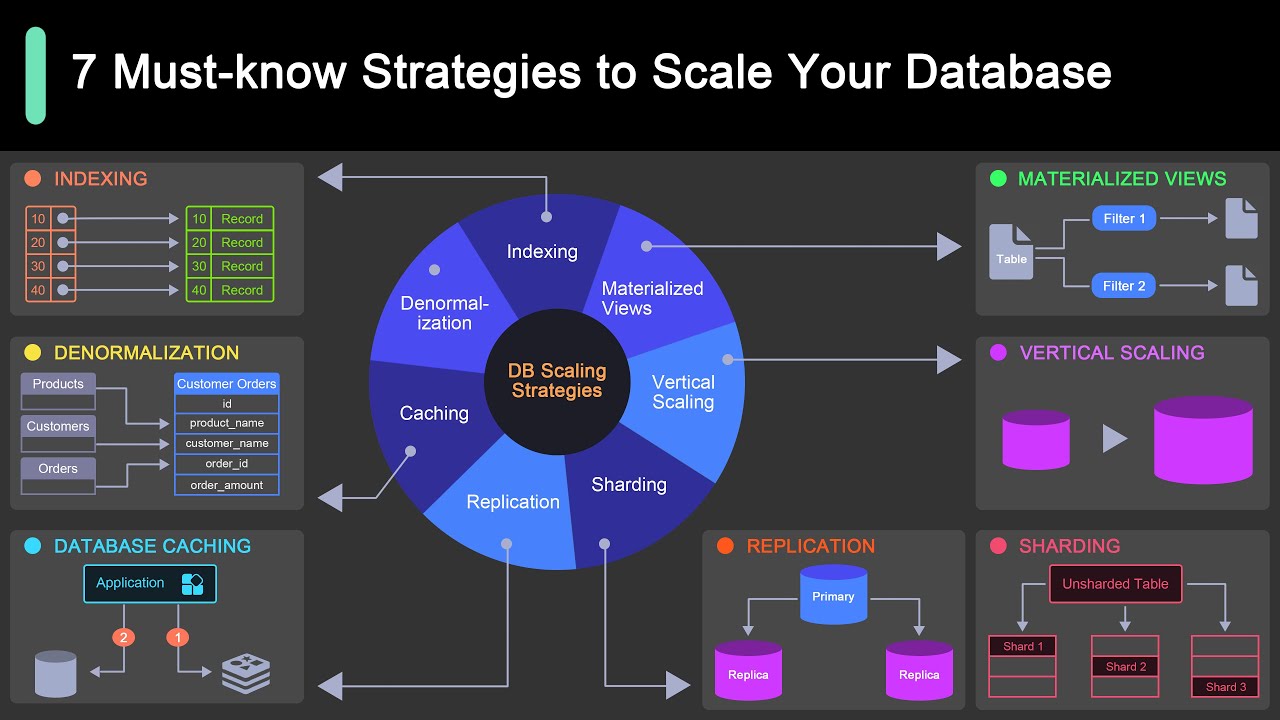
Read Replicas
Primary database handles writes. Replicas handle reads.
PostgreSQL replication copies data to multiple servers. Read-heavy applications benefit massively.
Replication lag means replicas run slightly behind primary. Usually milliseconds, sometimes seconds during heavy load.
Route analytics queries to replicas. Keep primary database responsive for user transactions.
Sharding Approaches
Split data across multiple databases. Each shard holds a subset of records.
Shard by customer ID, geography, or date ranges. Depends on your access patterns.
Application code gets more complex. You need logic to route queries to correct shard.
Cross-shard queries become painful. Design your schema to avoid them.
Caching Layers
Redis sits between application and database. Frequently accessed data lives in RAM.
Cache invalidation is the hard part. When does cached data expire? How do you ensure freshness?
Read-through caching fetches from database on cache miss, then stores result. Write-through updates cache and database simultaneously.
Cache hit rates above 90% dramatically reduce database load.
Query Optimization
Slow queries kill performance. EXPLAIN ANALYZE shows exactly where time gets spent.
Indexes speed up SELECT queries but slow down INSERT and UPDATE operations. Balance matters.
N+1 queries happen when you fetch related records one at a time. Use JOIN or batch loading instead.
Database connection pooling prevents connection exhaustion. Limited connections get reused efficiently.
Code Optimization
Profiling Application Performance
Can’t fix what you don’t measure.
Production environment profiling reveals real bottlenecks. Local development doesn’t show actual usage patterns.
Flame graphs visualize where CPU time goes. Wide bars indicate hot code paths worth optimizing.
Measure before and after optimization attempts. Sometimes “improvements” make things worse.
Reducing API Response Times
Faster responses mean happier users. Every 100ms matters.
Database queries often dominate response time. Cache aggressively, optimize indexes.
External API calls block responses. Make them asynchronous or cache results.
Pagination prevents loading huge datasets. Return 50 items per page, not 50,000.
Asset Optimization
Minify JavaScript and CSS. Remove whitespace and comments.
Image compression reduces bandwidth without visible quality loss. WebP format saves 30% compared to JPEG.
Lazy loading defers offscreen images. Load them when users scroll down.
Bundle splitting loads only needed code. Home page doesn’t need account settings JavaScript.
Maintenance and Updates
Continuous Deployment
Rolling Updates Without Downtime
Old version runs while new version deploys. Traffic gradually shifts to new servers.
Blue-green deployment maintains two identical environments. Switch traffic from blue to green instantly.
Health checks ensure new servers work before receiving traffic. Failed deployments automatically roll back.
Database migrations need special care. Schema changes must work with both old and new code versions.
Feature Flags and Gradual Rollouts
Feature flagging deploys code without activating features immediately.
Toggle features on for 5% of users first. Monitor error rates and performance.
Canary deployment tests changes on small user subset before full release. Catches problems before they affect everyone.
Kill switches disable problematic features instantly without redeploying code.
Rollback Procedures
Things break. Accept it and plan accordingly.
Rollback in deployment means reverting to the previous version quickly.
Keep last working version readily available. One command should restore it.
Database rollbacks get tricky. You can’t always undo schema changes without data loss.
Version Management
Semantic versioning communicates change impact. Major.minor.patch format tells users what to expect.
Major version increments mean breaking changes. Minor versions add features. Patches fix bugs.
Tag releases in Git. Each deployment should correspond to a specific commit.
Release notes explain what changed. Users deserve to know what’s new.
Bug Fixes and Patches
Issue Tracking Systems
Jira tracks bugs alongside feature work. GitHub Issues works for smaller teams.
Severity levels prioritize fixes. Critical bugs block deployment. Minor issues can wait.
Reproduction steps make bugs fixable. “It doesn’t work” helps nobody.
Link issues to commits and pull requests. Full history of how problems got solved.
Prioritization Frameworks
Not all bugs deserve immediate attention. Triage ruthlessly.
Security vulnerabilities get fixed now. No exceptions.
Bugs affecting many users take priority over edge cases. One angry customer doesn’t justify delaying other work.
User-reported bugs versus internal findings need different handling. Customers who report problems expect updates.
Hotfix Procedures
Critical bug in production? Skip normal release cycle.
Branch from current production code. Fix only the specific problem.
Abbreviated testing on hotfixes is acceptable. But don’t skip testing entirely.
Document why the hotfix bypassed normal procedures. Post-mortem reveals how to prevent similar emergencies.
Testing Before Deployment
Regression testing confirms fixes don’t break existing functionality.
Automated test suites catch obvious problems. Manual testing finds subtle issues.
Staging environments mimic production. Test there before deploying to real users.
Production testing happens despite best efforts. Keep monitoring dashboards open during deployments.
Feature Development
User Feedback Collection
In-app feedback widgets capture frustration in the moment.
Support ticket analysis reveals pain points. Same complaint from multiple customers signals priority.
User interviews uncover needs customers can’t articulate. Watch them use your product.
Analytics show what features get ignored. Usage data beats opinions.
Roadmap Planning
Quarter-long planning horizons work for most SaaS products. Balance predictability with flexibility.
Theme-based roadmaps beat feature lists. “Improve onboarding” gives teams latitude to find best solutions.
Customer-facing roadmaps manage expectations. But don’t promise specific dates too far out.
Internal roadmaps can be more aggressive. External communication needs buffer time.
A/B Testing New Features
Split users into control and experimental groups. Measure which version performs better.
Sample sizes matter. 50 users isn’t enough for statistical significance.
Test one variable at a time. Changing button color and copy simultaneously makes results ambiguous.
Run tests long enough to account for weekly patterns. Monday behavior differs from Friday behavior.
Documentation Updates
Code comments explain why, not what. Future developers need context.
API documentation updates happen alongside code changes. Outdated docs are worse than no docs.
Changelog entries let users know what changed. Version numbers only help if you explain what each version brings.
Screenshots in help articles need regular updates. Nothing screams “outdated” like old UI in documentation.
Legal and Compliance Considerations
Terms of Service and Agreements
User Agreements and Policies
Privacy policy explains data collection and usage. Legally required in most jurisdictions.
Terms of service define acceptable use. Protect yourself from abuse and clarify limitations.
Cookie policy necessary if you track users. GDPR requires explicit consent for non-essential cookies.
Templates exist but get lawyer review. Generic terms miss important industry-specific issues.
Service Level Agreements
SLAs promise specific uptime percentages. Failing to meet them costs money.
99.9% uptime allows 43 minutes of monthly downtime. 99.99% permits only 4 minutes.
Define what counts as downtime. Planned maintenance usually doesn’t.
Credit clauses specify compensation for outages. Usually service credits, not refunds.
Data Processing Agreements
GDPR requires DPAs with customers. You’re processing their data on their behalf.
Define data handling procedures, security measures, breach notification timelines.
Sub-processor lists disclose third-party services touching customer data. Stripe, AWS, email providers all count.
Update DPAs when adding new sub-processors. Customers have the right to object.
Acceptable Use Policies
Spell out prohibited activities. Spam, illegal content, abuse, resource hogging.
Enforcement mechanisms matter. How do you handle violations?
Automated detection catches some abuse. Manual review necessary for others.
Account suspension procedures need documentation. Users deserve to know what triggers bans.
Data Protection Regulations
GDPR Compliance Requirements
Applies to EU residents regardless of where your company operates.
Right to access means users can request all data you hold about them.
Right to deletion (right to be forgotten) requires data removal within 30 days.
Data portability lets users export their information in machine-readable format.
CCPA and State Privacy Laws
California Consumer Privacy Act covers California residents. Other states copying similar laws.
Opt-out rights differ from GDPR’s opt-in requirements. Users can decline data selling.
“Do Not Sell My Personal Information” links required on websites serving California users.
Privacy notices must disclose data categories collected and business purposes.
Data Residency Considerations
Some countries require data storage within borders. Russia, China have strict localization laws.
EU data transfer restrictions limit moving personal data outside Europe. Standard contractual clauses provide workaround.
Multi-region deployments cost more but unlock markets. Azure and AWS offer regional data centers worldwide.
Know where customer data physically lives. Cloud services abstract this, but compliance auditors care.
User Consent Management
Cookie consent banners annoy everyone but remain legally necessary.
Granular consent options (analytics, marketing, essential) give users control.
Consent withdrawal must be as easy as granting it. One-click process, not buried in settings.
Document consent timestamps and methods. Proof matters during audits.
Intellectual Property
Code Ownership
Who owns code written by employees? Usually the employer, but confirm in contracts.
Contractor agreements need explicit IP assignment clauses. Work-for-hire provisions transfer ownership.
Open source contributions from employees need company approval. Avoid accidentally giving away proprietary code.
Customer data belongs to customers. Your code belongs to you. Keep these separate.
Open Source License Compliance
MIT and Apache licenses permit commercial use. Just include original copyright notices.
GPL requires releasing your source code if you distribute GPL-covered software. SaaS typically avoids distribution, sidestepping this.
AGPL closes the SaaS loophole. Network use counts as distribution, forcing code release.
License scanning tools detect problematic dependencies. Catch issues before they become legal problems.
API Usage Rights
Your API terms govern how others can use it. Rate limits, attribution requirements, prohibited uses.
Competitors scraping your API need explicit prohibition in terms of service.
Partners might get special access tiers. Document these arrangements.
Trademark protection extends to API naming. Competitors can’t pretend their product is yours.
Trademark Considerations
Register your product name. Generic names offer weak protection.
Domain name matching trademark simplifies enforcement. Consistency across platforms matters.
Monitor for infringement. Failing to defend trademark weakens it legally.
Cease and desist letters usually resolve violations. Lawyers cost less than you think for basic trademark defense.
Cost Considerations
Development Costs
Initial Development Investment
Building an MVP takes 3-6 months with a small team. Budget accordingly.
Developer salaries vary wildly by location. San Francisco != Poland != India.
Quality costs money. Cheap development often requires expensive rewrites.
Software development plan helps estimate realistic budgets and timelines.
Ongoing Development Expenses
Maintenance requires 15-20% of initial development cost annually. Feature development costs extra.
Technical debt accumulates. Eventually you must pay it down or development slows to crawl.
Security updates never stop. Dependencies need regular updates for vulnerability patches.
Staff turnover means knowledge loss. Documentation and code quality reduce this impact.
Designer and Developer Rates
Senior developers command $100-200+ per hour freelance. Full-time salaries equivalent to 2,000 billable hours annually.
Designers range $75-150/hour. Good ones worth every penny.
Offshore rates run $25-75/hour. Quality varies dramatically.
Cheap hourly rates often mean slower delivery. Total cost matters more than hourly rate.
Tool and Software Subscriptions
GitHub for code hosting. AWS for infrastructure. Slack for communication. Costs add up.
Free tiers work until they don’t. Budget for paid plans before hitting limits.
Each developer needs their own license for paid tools. Ten developers = 10× licensing cost.
Annual prepayment discounts offset cash flow timing. Evaluate trade-offs.
Infrastructure Costs
Cloud Hosting Expenses
AWS bills for compute, storage, bandwidth, and dozens of other services separately.
Development environment costs matter. Running staging servers 24/7 wastes money if you only use them during business hours.
Database costs grow with data volume. Storage cheap, compute expensive.
Egress bandwidth (data leaving AWS) costs more than ingress. CDNs reduce these charges.
Bandwidth and Storage
Storage costs pennies per gigabyte. Until you reach petabytes.
Hot storage (frequently accessed) costs more than cold storage (archives).
Bandwidth to users costs money. Video streaming and large file downloads add up quickly.
Compression reduces bandwidth costs. Gzip text content, optimize images.
Third-Party Services
Stripe takes 2.9% + $0.30 per transaction. Adds up at scale but beats building payment processing.
Email services (SendGrid, Mailgun) charge per message sent. Notification-heavy apps pay attention here.
Authentication services, SMS delivery, image processing-specialized services solve problems but cost money.
Build vs buy calculations shift as you scale. Custom solutions make sense at sufficient volume.
Scaling Cost Projections
Costs grow with users, but not linearly. Economies of scale kick in.
First 1,000 users cost more per user than next 10,000. Optimization pays off at scale.
Model infrastructure costs at different user counts. Understand your unit economics.
Sudden viral growth can bankrupt startups. Cost alerts prevent surprise bills.
Getting Started with Your SaaS Project
Validating Your Idea

Market Research Techniques
Google searches reveal existing solutions. Competitors prove market demand exists.
Reddit, Twitter, LinkedIn groups show people complaining about current tools. Complaints reveal opportunities.
Industry reports quantify market size. TAM (Total Addressable Market) matters for fundraising.
Keyword search volumes indicate demand. But high search volume often means saturated markets.
Competitor Analysis
Use competitor products. Actually pay for them. Understand their strengths and weaknesses.
Read competitor reviews on G2, Capterra, TrustRadius. Users explain exactly what they love and hate.
Pricing pages reveal positioning. Enterprise focus versus SMB focus shows in pricing structure.
Feature comparison charts show capability gaps. Missing features in popular products indicate opportunities.
Customer Interviews
Interview 20-30 potential customers before building anything.
Ask about current workflows. “How do you solve this problem today?” reveals real behavior.
“What would make you switch?” uncovers decision criteria. Price rarely tops the list.
Record interviews (with permission). Rewatch them later. You miss details during conversations.
Prototype Testing
Clickable prototypes cost nothing and validate assumptions quickly.
Figma mockups work fine. InVision adds interactivity. Users click through workflows.
Watch users attempt tasks. Where do they get confused? What feels unnatural?
Feedback on prototypes is cheaper than feedback on built features. Iterate in Figma, not code.
Building an MVP

Core Features Only
Your MVP needs one killer feature done exceptionally well.
Authentication, basic CRUD operations, core workflow-that’s it. Everything else waits.
Lean software development principles apply. Build minimum required to test hypothesis.
Stripe launched with basic payment processing. Features expanded after proving the concept worked.
Quick Launch Strategies
Three months from start to launch is reasonable. Six months is too long.
Pick proven technologies. Now isn’t the time to learn new frameworks.
Skip non-essential features. User profiles? Later. Team collaboration? Version 2.0.
Perfect design can wait. Functional and clean beats beautiful but late.
Gathering Early Feedback
Launch to small group first. Friends, industry contacts, beta list subscribers.
Ask specific questions. “Does this solve your problem?” beats “What do you think?”
Track everything users do. Where do they click? Where do they abandon workflows?
Weekly iterations based on feedback show users you’re listening. Momentum builds trust.
Iterating Based on Data
Analytics reveal what users actually do versus what they say they’ll do.
Feature usage statistics show what matters. Rarely-used features probably weren’t that important.
A/B testing removes guesswork. Let data decide between design options.
Fast iteration cycles beat perfect planning. Ship, measure, adjust, repeat.
Choosing Development Approach
Custom Development From Scratch
Full control over every decision. No compromises.
Software development process requires planning, design, development, testing, deployment.
Takes longest and costs most. But results perfectly match your vision.
Team needs full-stack capability. Frontend and backend development skills both required.
Using SaaS Boilerplates
Starter templates include authentication, payments, and basic infrastructure.
Jump straight to building your unique features. Common functionality comes pre-built.
Still requires solid development skills. Templates provide foundation, not finished product.
Popular options include Bullet Train (Rails), SaaS Pegasus (Django), Shipped (Node.js).
No-Code/Low-Code Platforms
Bubble, Webflow, Adalo let non-developers build functional apps.
Speed and low cost make this attractive initially. Get to market in weeks.
Customization hits limits eventually. Complex features often impossible.
Vendor lock-in poses risk. Migrating off platforms is painful.
Hybrid Approaches
Start with boilerplate, customize extensively. Gets best of both approaches.
Use no-code for MVP validation. Rebuild properly after proving concept.
Outsource initial development. Bring technical team in-house later.
Backend as a Service handles infrastructure. You focus on frontend and business logic.
Launch Preparation
Pre-Launch Checklist
Domain registered and DNS configured. SSL certificate installed.
Email sending configured and tested. Transactional emails (signup, password reset) working.
Payment processing tested with real transactions. Refund process documented.
Error tracking and monitoring configured. Know when things break.
Beta User Recruitment
Email list built during validation phase. These people already interested.
Product Hunt, Reddit, industry forums reach relevant audiences.
Offer early adopter benefits. Lifetime discounts, founder tier, input on roadmap.
Limit beta size. 50-100 users provides enough feedback without overwhelming support.
Marketing Preparation
Landing page explains value proposition clearly. What problem does this solve?
SEO basics covered. Title tags, meta descriptions, fast load times.
Social media accounts created. Consistent branding across platforms.
Content plan ready. Blog posts, tutorials, case studies build awareness.
Support System Setup
Help documentation written. Common questions answered before anyone asks.
Support email configured. Ticket system optional initially but helpful at scale.
Response time targets set. 24 hours maximum for initial response.
Canned responses prepared for common issues. Speeds up support dramatically.
FAQ on What Is SaaS Development
What is SaaS development?
SaaS development is building cloud-based applications that users access through browsers via subscription. The software runs on remote servers (AWS, Azure, Google Cloud) instead of user devices. Developers handle updates, security, and infrastructure while customers pay recurring fees for access.
How is SaaS development different from traditional software development?
Traditional software gets installed on individual computers. SaaS runs in the cloud with browser access. Users subscribe instead of buying licenses. Automatic updates replace manual installations. Multi-tenant architecture serves multiple customers from one application instance.
What programming languages are best for SaaS development?
JavaScript (Node.js, React) dominates SaaS development. Python with Django or Flask works well for data-heavy apps. Ruby on Rails remains popular for rapid prototyping. PostgreSQL and MongoDB handle most database needs. Choose what your team knows best.
How much does it cost to develop a SaaS product?
MVP development costs $50,000-$150,000 with a small team over 3-6 months. Ongoing costs include cloud hosting ($500-$5,000+ monthly), developer salaries, and third-party services like Stripe. Enterprise features and scaling increase costs significantly.
What is multi-tenant architecture in SaaS?
One application instance serves multiple customers simultaneously. Each tenant’s data stays completely isolated despite sharing infrastructure. Think apartment building where everyone shares the structure but has separate spaces. Reduces costs and simplifies updates compared to dedicated instances.
How long does it take to build a SaaS application?
Simple MVP takes 3-6 months with a focused team. Complex platforms need 12-18 months. Timeline depends on feature scope, team size, and technical complexity. Most successful startups launch basic versions quickly then iterate based on feedback.
What security measures are essential for SaaS products?
SSL encryption, password hashing (bcrypt), and token-based authentication are mandatory. Add two-factor authentication and role-based access control. GDPR and SOC 2 compliance required for enterprise sales. Regular security audits and penetration testing catch vulnerabilities early.
What tech stack should I use for SaaS development?
React or Vue.js for frontend. Node.js, Python, or Ruby for backend. PostgreSQL for database. Docker and Kubernetes for deployment. AWS, Azure, or Google Cloud for hosting. Pick proven technologies your team understands rather than chasing trends.
How do I scale a SaaS application?
Start with vertical scaling (bigger servers). Add horizontal scaling (more servers) as growth demands. Implement caching with Redis. Use database read replicas. Auto-scaling handles traffic spikes automatically. CDNs reduce bandwidth costs and improve global performance.
What metrics matter most for SaaS products?
Monthly recurring revenue (MRR) shows business health. Churn rate reveals customer satisfaction. Customer acquisition cost (CAC) versus lifetime value (LTV) determines profitability. Track feature usage to guide development priorities. These metrics drive every decision.
Conclusion
Understanding what is SaaS development means recognizing it’s both a technical challenge and a business model. You’re building subscription software that lives in the cloud and serves customers through browsers.
The technical side demands solid architecture decisions. Multi-tenant databases, API integrations, automated testing, and continuous deployment separate functional products from broken ones.
Business considerations matter equally. Pricing strategies, customer onboarding, churn reduction, and monthly recurring revenue determine success. Technology enables the product but customer value drives growth.
Start with focused MVPs. Validate assumptions before building extensively. Use proven tools like React, Node.js, and PostgreSQL rather than experimenting with unfamiliar technologies.
Security and compliance aren’t negotiable. GDPR, data encryption, and proper authentication protect both customers and your business reputation.
The SaaS model rewards products that solve real problems consistently. Build something people actually need, charge fairly, iterate based on feedback, and scale infrastructure as demand grows.

- 5 Best NinjaOne Alternatives for Focused Endpoint Management - October 10, 2026
- venv vs conda vs poetry: Which One for Which Project - October 9, 2026
- How to Prepare for a Web Design Project Before Hiring an Agency - October 9, 2026


