

Your app works fine with 1,000 users. Then 50,000 show up on launch day and everything breaks. That’s a scaling problem, and it’s more common than most teams expect.
So what is app scaling, exactly? It’s the process of adjusting your application’s infrastructure, compute resources, and architecture to handle changing levels of demand without crashing or slowing down.
Whether you’re running a custom app on cloud infrastructure or managing a high-traffic software system, scaling decisions shape everything from performance to cost.
This article covers vertical and horizontal scaling, auto-scaling mechanics, database strategies, serverless models, monitoring, and the mistakes that catch most teams off guard.
What Is App Scaling

App scaling is the process of adjusting an application’s infrastructure and resources to handle changing levels of demand. When more users hit your app, you need more compute power, memory, and bandwidth to keep things running without lag or crashes.
That’s it. That’s the core idea.
But the way teams approach scaling varies a lot. Some throw more hardware at a single server. Others spread the load across dozens of machines. The right call depends on your architecture, your budget, and honestly, how much traffic you’re actually getting.
Gartner forecasts global public cloud spending will hit $723.4 billion in 2025, up from $595.7 billion in 2024. A huge chunk of that goes toward infrastructure that supports app scaling, whether through auto-scaling groups, container orchestration, or serverless functions.
According to a 2024 Forrester survey, 75% of organizations listed infrastructure scaling as a key factor for cloud success, right alongside security and uptime.
The thing is, scaling isn’t just about growth. It’s about staying alive during traffic spikes. Shopify merchants know this well. Every Black Friday, Shopify’s platform needs to handle millions of checkout requests in bursts that would flatten most systems. Their approach combines microservices architecture with aggressive horizontal scaling to keep storefronts responsive under pressure.
And scaling isn’t strictly a back-end development concern, either. Your front-end development choices (how assets are served, whether you use a CDN, how client-side caching works) all affect how well your app handles load at the edges.
If you’re building any kind of cloud-based app, scaling should be part of the conversation from day one. Not something you bolt on after the first outage.
Vertical Scaling vs. Horizontal Scaling

Two paths. Pick one, or eventually, use both.
Vertical scaling (scaling up) means upgrading the hardware on a single machine. More CPU cores, more RAM, faster storage. You keep the same architecture and just make the box bigger.
Horizontal scaling (scaling out) means adding more machines and distributing the workload across them. Each server handles a piece of the traffic, and a load balancer sits in front to route requests.
| Factor | Vertical Scaling | Horizontal Scaling |
|---|---|---|
| Complexity | Low, no architecture changes | Higher, needs distributed design |
| Cost curve | Exponential at upper limits | More linear, commodity hardware |
| Downtime risk | Possible during upgrades | Minimal with rolling deploys |
| Fault tolerance | Single point of failure | Built-in redundancy |
| Ceiling | Physical hardware limits | Near-limitless with more nodes |
IT Desk’s 2025 cloud data shows 87% of organizations cite scalability and flexibility as the top reasons they use cloud infrastructure. Both approaches play into that, just at different stages.
Most teams start vertical. It’s faster, cheaper upfront, and you don’t need to rethink your codebase. But there’s a ceiling. You can only make a single server so powerful before the cost gets ridiculous or you hit the physical limits of available hardware.
Amazon’s approach during Prime Day is a good example of horizontal scaling at work. They spin up thousands of additional ECS instances across multiple regions, with each microservice scaling independently based on its own load patterns.
Hardware Limits and Vertical Scaling Ceilings
Vertical scaling hits a wall. Always.
Even the beefiest cloud instances (think AWS’s u-24tb1.metal with 24 TB of RAM) have finite capacity. And the pricing jumps at the high end are steep. Going from a medium to a large instance might double your cost. Going from a large to a 4xlarge? That’s often a 4x to 8x jump.
Upgrading also means downtime in many setups. You’re swapping instance types, restarting services, potentially migrating storage volumes. For a production environment serving real users, even a few minutes of downtime during a traffic spike is bad.
N2W’s 2025 research found that 32% of cloud budgets are wasted, largely from overprovisioned or idle resources. Vertical scaling contributes to this when teams buy massive instances “just in case” rather than right-sizing based on actual demand.
That’s why most growing applications eventually transition to horizontal scaling, or at least a hybrid model where the database scales vertically while the application layer scales horizontally.
How Auto-Scaling Works

Auto-scaling removes the guesswork. Instead of manually spinning up servers when traffic climbs, you set rules, and the cloud platform handles the rest.
Every major cloud provider offers this. AWS has Auto Scaling Groups. Google Cloud has its Managed Instance Group Autoscaler. Azure offers Virtual Machine Scale Sets. The basic idea is the same across all of them.
How it works in practice:
- You define metrics that trigger scaling actions (CPU usage above 70%, request count per target, memory pressure, custom application metrics)
- When a threshold is crossed, the auto-scaler launches new instances automatically
- When demand drops, it terminates the extra instances to cut costs
- Cooldown periods prevent the system from thrashing between scale-out and scale-in events
Datadog’s 2025 State of Containers report found that over 64% of Kubernetes organizations have adopted Horizontal Pod Autoscaler (HPA). And 86% of those HPA users apply it across most of their clusters, not just a few workloads.
Here’s what most people get wrong, though. They set auto-scaling and forget it. But 46% of unscaled workloads showed multiple significant CPU spikes per day, according to the same Datadog report. Those are missed opportunities where auto-scaling should have been configured but wasn’t.
There’s also the difference between dynamic scaling and scheduled scaling. Dynamic reacts to real-time metrics. Scheduled scales based on known patterns, like ramping up every morning at 9 AM when users log in, or scaling out before a marketing email blast. Smart teams use both together.
The whole setup ties directly into your DevOps practices and how your build pipeline handles deployments. If your deployment process can’t handle rolling updates to a fleet of instances, auto-scaling becomes a headache fast.
Load Balancers and Traffic Distribution

Horizontal scaling without a load balancer is just a collection of servers nobody can reach evenly.
Load balancers sit between users and your server fleet. They route each incoming request to a healthy instance using algorithms like round-robin, least connections, or weighted distribution.
Health checks are the underrated part. The load balancer constantly pings each instance. If one fails to respond, it’s pulled from rotation automatically. No user ever hits a dead server.
Session persistence (sticky sessions) is tricky. If your app stores user session data locally on a server, the load balancer needs to route that user back to the same server every time. This limits scaling flexibility. The better approach is going stateless (more on that next) and storing sessions externally.
Tools like NGINX, HAProxy, and AWS Application Load Balancer handle this. A reverse proxy configuration can layer additional caching and SSL termination on top.
Stateless vs. Stateful Applications in Scaling

This is where scaling gets either easy or painful. And the decision is usually made early in the software development process, often without thinking about scaling at all.
Stateless applications treat every request independently. No server remembers who you are between requests. All session data lives externally, in Redis, Memcached, or a database. Any server can handle any request.
This is the dream for horizontal scaling. Add ten more servers behind a load balancer, and they all work immediately. No coordination needed. RESTful APIs are stateless by design, which is one reason they scale so well.
Stateful applications are different. They hold user data in memory on specific servers. Think WebSocket connections, in-memory shopping carts, or real-time collaborative editors. Scaling these means you need shared state management, and that adds complexity.
| Characteristic | Stateless | Stateful |
|---|---|---|
| Horizontal scaling | Simple, add instances freely | Requires shared state layer |
| Session handling | External store (Redis, DB) | In-memory, server-specific |
| Fault tolerance | High, any server can replace another | Lower, server loss can drop sessions |
| Example | REST API, static site backend | Chat app, game server |
The CNCF 2024 Annual Survey found that 80% of organizations now run Kubernetes in production. Kubernetes was built with stateless workloads in mind, and its scheduling model works best when pods can be created and destroyed without worrying about local state.
That said, Kubernetes does support stateful workloads through StatefulSets. But if you’ve ever tried scaling a StatefulSet compared to a Deployment, you know it’s a different experience. Took me a while to figure out the right persistent volume claims setup for a clustered Redis deployment. Not fun.
Connection pooling is the other bottleneck people hit. Every new application instance opens connections to the database. Scale to 50 instances, and suddenly your PostgreSQL server is drowning in connection requests. Tools like PgBouncer sit between your app and the database to manage this.
Database Scaling Strategies
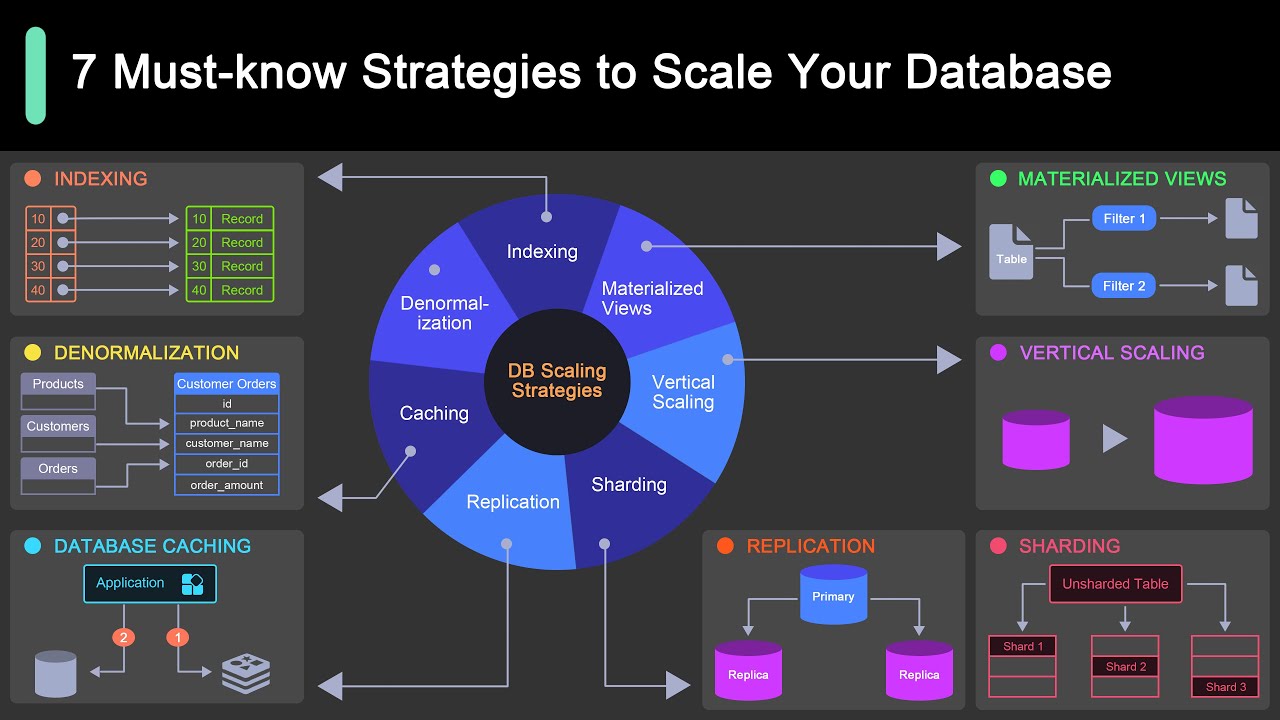
The database is almost always the hardest thing to scale. Your application layer can multiply across servers all day long, but if all those instances are hammering one database, you’ve just moved the bottleneck.
OpenAI published a detailed breakdown of how they scale PostgreSQL for ChatGPT’s 800 million users. Their primary PostgreSQL instance remains unsharded, handling all writes, while read traffic gets distributed to replicas. They explicitly noted that sharding their existing workloads would require changes to hundreds of application endpoints and could take months or years.
That gives you a sense of how complex database scaling really gets.
Read Replicas and Caching
Read replicas are the first step most teams take. You create copies of your primary database that handle read-only queries. Since most applications are read-heavy (often 80-90% reads), this offloads massive pressure from the primary server.
AWS RDS, Google Cloud SQL, and Azure Database for PostgreSQL all support read replicas out of the box. You point your application’s read queries at the replica, writes go to the primary. Done.
Caching layers add another buffer. Redis or Memcached store frequently accessed data in memory, so the database doesn’t get hit at all for common requests. This is where most of your performance gains come from before you ever need to think about sharding.
Sharding and Partitioning
When a single database server genuinely can’t handle the volume, sharding splits data across multiple independent databases.
Slack, Shopify, and Salesforce all use directory-based sharding. Uber and Google use geographic sharding to keep data close to users in specific regions.
IDC projects global data volume will reach 175 zettabytes by 2025, which puts enormous pressure on database systems to scale efficiently.
But sharding is hard. Cross-shard queries become complicated. Distributed transactions need coordination protocols. Resharding (adding new shards later) can require significant downtime or data migration. This is why software scalability needs to be planned from the architecture phase, not bolted on later.
Connection pooling tools like PgBouncer and ProxySQL reduce direct database hits. They manage a pool of connections that application instances share, preventing the “too many connections” error that kills database performance under load.
App Scaling on Cloud Platforms

Cloud platforms turned scaling from a hardware procurement project into a configuration task. But each provider does it differently, and the details matter more than most teams realize.
AWS Scaling Options
EC2 Auto Scaling: The classic approach. Define launch templates, set scaling policies, and EC2 instances spin up and down based on CloudWatch metrics.
ECS and Fargate: For containerized workloads, ECS handles task scheduling while Fargate removes the need to manage the underlying servers entirely. You define CPU and memory per task, and AWS handles placement.
Lambda: Serverless scaling at the function level. Each request gets its own execution environment. No capacity planning at all. AWS handles everything.
AWS still leads the cloud market with a 31-32% share and roughly $100 billion in projected 2024 revenue, according to N2W’s analysis of cloud market data.
Google Cloud Scaling Options
Google Cloud offers the Compute Engine autoscaler for VM-based workloads. Cloud Run, their managed container platform, auto-scales to zero when idle, meaning you pay nothing during quiet periods.
GKE (Google Kubernetes Engine) supports the Horizontal Pod Autoscaler plus Cluster Autoscaler, which adds or removes nodes from the cluster itself.
Google’s approach leans heavily into managed services. Cloud Run in particular has become popular for teams that want container-based scaling without the operational overhead of full Kubernetes management.
Azure Scaling Options
Virtual Machine Scale Sets: Azure’s answer to EC2 Auto Scaling. Automatically adjusts VM count based on demand or schedules.
Azure Functions: Their serverless platform. In early 2024, Azure Functions added gRPC support, reducing communication latency between serverless functions and microservices.
AKS (Azure Kubernetes Service): Managed Kubernetes with built-in autoscaling at both the pod and node levels.
OpenAI runs on Azure infrastructure for ChatGPT’s backend, which gives you some idea of the scale Azure can handle. Their PostgreSQL setup processes millions of queries per second across the platform.
Choosing Between Platforms
Cost is the biggest variable. And it’s surprisingly easy to get wrong.
Harness’s 2025 FinOps report found that an estimated 21% of enterprise cloud infrastructure spend, roughly $44.5 billion, is wasted on underused resources. The report also noted that 55% of developers say purchasing commitments end up based on guesswork.
Reserved instances and savings plans can cut costs by 40-60% if your workload patterns are predictable. Spot instances offer even bigger discounts (up to 90% off on-demand pricing) but can be interrupted with short notice, so they only work for fault-tolerant workloads.
Choosing the right tech stack for app development includes making these infrastructure decisions early. Your scaling strategy is part of the architecture, not a separate concern.
If your team follows infrastructure as code practices using tools like Terraform or Pulumi, scaling policies become version-controlled and reproducible across environments. That matters a lot when you’re managing scaling rules across staging, production, and disaster recovery setups.
Serverless as a Scaling Model

Serverless flips the scaling question on its head. Instead of asking “how many servers do I need?”, you just write functions and the cloud provider handles the rest.
AWS Lambda, Google Cloud Functions, and Azure Functions all work this way. Each incoming request gets its own execution environment. No capacity planning. No idle servers burning money.
MarketsandMarkets projects the serverless computing market will grow from $21.9 billion in 2024 to $44.7 billion by 2029, at a 15.3% CAGR. That growth tracks with how many teams are ditching traditional server management for event-driven patterns.
AWS states that fewer than 1% of Lambda invocations experience a cold start. But that remaining 1% can add 100ms to over a second of latency depending on your runtime and dependencies. Java and .NET functions tend to be the worst offenders here.
When Serverless Fits
Good candidates:
- Event-driven workloads (file uploads triggering processing, webhook handlers)
- Bursty traffic patterns with long quiet periods between spikes
- API integration layers that connect services together
Poor candidates:
- Long-running processes (Lambda has a 15-minute execution limit)
- High-throughput, steady-state APIs where you’re paying per invocation anyway
- Workloads that need persistent connections like WebSockets
Netflix uses serverless for media encoding pipelines and event processing across its streaming infrastructure. The workloads are inherently bursty, which makes pay-per-invocation pricing more cost-effective than running always-on containers.
Cost Tradeoffs
Serverless pricing is per-invocation plus compute time. At low to moderate traffic, it’s cheaper than running EC2 instances 24/7.
But costs can surprise you. Once you’re processing millions of requests daily, the per-invocation model sometimes costs more than reserved container capacity. The Harness 2025 FinOps report found that 55% of developers say their purchasing commitments are based on guesswork. Serverless doesn’t fix that problem, it just changes the shape of the bill.
Since August 2025, AWS bills the Lambda INIT phase the same way it bills invocation duration. For functions with heavy startup logic, this can increase spend by 10-50%, according to Edge Delta’s analysis. That turned cold starts from a pure performance issue into a budget line item.
Teams building web apps or mobile application backends should run the numbers both ways before committing to serverless for everything. A hybrid approach (serverless for bursty workloads, containers for steady-state APIs) often ends up being the smartest play.
Scaling Metrics and Monitoring

You can’t scale what you can’t measure. And scaling based on the wrong metrics is how teams end up either overprovisioned (wasting money) or underprovisioned (dropping requests).
The observability market was estimated at roughly $12 billion in 2024 and growing at about 20% annually, according to Dash0’s analysis. That spend reflects how seriously teams take monitoring as a part of infrastructure.
What to Track
| Metric | What It Tells You | Scaling Signal |
|---|---|---|
| CPU utilization | How hard your processors are working | Scale out above 70–80% |
| Memory pressure | RAM consumption trends | Scale up or add instances |
| Request latency (p95/p99) | Slowest user experiences | Investigate before scaling blindly |
| Requests per second | Throughput capacity | Compare against known limits |
| Error rate | Percentage of failed requests | Spikes often precede outages |
Most teams default to CPU-based auto-scaling. Datadog’s 2025 report found that 4 out of 5 HPA deployments use CPU or memory for scaling triggers. Only 20% use custom metrics like queue depth or request rate.
That’s a missed opportunity. CPU might be sitting at 40% while your database connection pool is maxed out. Custom metrics give you a more accurate picture of actual application health.
Monitoring Tools
Datadog: Full-stack observability platform with over 600 integrations. Dominant market position. Gets expensive at scale.
Prometheus + Grafana: Open-source combo. Grafana’s 2025 survey shows 67% of organizations use Prometheus in production. Free, flexible, but needs a team that knows how to run it.
CloudWatch / Azure Monitor / Cloud Operations: Native tools from each cloud provider. Good enough for basic monitoring. Limited when you need cross-cloud visibility.
New Relic: Strong for application performance monitoring with a usable free tier. Good middle ground between Datadog and open-source stacks.
Choosing the right monitoring stack is part of broader software development best practices. The collaboration between dev and ops teams matters here, since developers need to instrument their code with the right metrics, and operations needs to build dashboards and alerts around them.
Load Testing Before You Need It
ITIC’s 2024 research found that a single hour of downtime costs over $300,000 for 90%+ of mid-size and large enterprises. For 41% of large organizations, it’s between $1 million and $5 million per hour.
Load testing tools like k6, Locust, and JMeter simulate demand before it happens. You find the breaking points in staging, not production.
The best time to run load tests is before major launches, after significant code refactoring, and whenever you change scaling policies. Most teams know this. Most teams still skip it when deadlines get tight.
Common App Scaling Mistakes
Scaling looks straightforward on paper. In practice, teams keep hitting the same walls. Here’s what goes wrong, and it’s usually not the technology.
Scaling Compute but Ignoring the Database
This is the most common one. A team adds more application servers to handle traffic, but every single one of those servers connects to the same database instance.
The result? The database becomes the bottleneck. Response times climb. Connections get exhausted. Adding more app servers actually makes things worse because each new instance opens more connections to an already-stressed database.
CockroachDB’s research notes that 30% of leaders identify the database as the first point of failure in overload scenarios. Fixing this means adding read replicas, caching layers, and connection pooling before you scale compute.
Not Designing for Statelessness
If your application stores session data in local memory, horizontal scaling will break user sessions. A user logs in on server A, their next request routes to server B, and suddenly they’re logged out.
This should be caught during the design document phase, well before code gets written. Moving session state to Redis or an external store is the fix, but retrofitting it into an existing app is painful.
Over-Provisioning Out of Fear
Flexera’s research across 750+ technical professionals shows 27% of cloud spend is wasted. A Stacklet 2024 survey puts it even higher, with 78% of organizations estimating they waste between 21% and 50% of their cloud budget.
Teams buy massive instances “just in case.” They configure auto-scaling with aggressive scale-out rules but never set scale-in policies. The bill grows. Nobody notices until quarterly reviews.
Right-sizing instances, using spot instances for fault-tolerant workloads, and actually configuring scale-in rules would fix most of this. But it requires someone watching the numbers, not just the uptime dashboard.
Skipping Load Tests Before Launch
The 2024 ITIC survey is blunt: configuration and deployment mistakes are among the top causes of costly downtime. Many of those failures are detectable during a properly designed load test weeks before launch.
Load testing isn’t glamorous work. But neither is rolling back a launch at 2 AM because the checkout page times out under real traffic. Tools like k6 integrate with continuous integration pipelines, so there’s no excuse for shipping untested capacity.
Treating Scaling as a One-Time Project
Your traffic patterns change. Your app lifecycle evolves. Features get added. User behavior shifts. The scaling config that worked six months ago might be completely wrong today.
Scaling is post-deployment maintenance, not a launch task. It lives in the same category as software reliability and maintainability. The teams that get scaling right are the ones that review their metrics monthly, adjust their auto-scaling rules quarterly, and run load tests before every major release.
That’s the boring answer. It’s also the correct one.
FAQ on What Is App Scaling
What is the difference between horizontal and vertical scaling?
Vertical scaling adds more CPU, RAM, or storage to one server. Horizontal scaling adds more servers and splits traffic across them using a load balancer. Most growing applications use both, starting vertical and shifting horizontal as demand increases.
When should I start thinking about app scaling?
From day one. Scaling decisions affect your architecture, database design, and session management. Retrofitting a stateful app for horizontal scaling later is painful and expensive. Build with scalability in mind during the initial planning phase.
Does serverless replace traditional scaling?
Not entirely. Serverless (AWS Lambda, Google Cloud Functions) handles bursty, event-driven workloads well. But long-running processes and high-throughput steady-state APIs often cost less on containers or reserved instances. A hybrid model usually works best.
What is auto-scaling and how does it work?
Auto-scaling automatically adds or removes server instances based on metrics like CPU utilization or request count. Cloud platforms like AWS, Google Cloud, and Azure all offer auto-scaling groups that trigger scaling actions when configurable thresholds are crossed.
What are the most common app scaling mistakes?
Scaling application servers while ignoring the database bottleneck. Storing session state locally instead of externally. Over-provisioning resources out of caution. Skipping load tests before launches. Treating scaling as a one-time setup rather than ongoing work.
How much does app scaling cost on cloud platforms?
It depends on instance types, regions, and pricing models. Reserved instances save 40-60% over on-demand. Spot instances offer up to 90% savings for fault-tolerant workloads. Around 27-32% of cloud budgets are wasted on overprovisioned resources, according to industry research.
What role does the database play in scaling?
The database is typically the hardest component to scale. Read replicas handle read-heavy traffic. Sharding splits data across servers. Caching with Redis or Memcached reduces direct database hits. Connection pooling tools like PgBouncer prevent connection exhaustion under load.
What metrics should I monitor for scaling decisions?
Track requests per second, response latency (p95 and p99), CPU and memory utilization, error rates, and database connection counts. Custom application metrics like queue depth give more accurate scaling signals than CPU alone.
Can I scale a monolithic application?
Yes, but it’s harder. Monoliths scale vertically more easily than horizontally. Breaking a monolith into containerized microservices allows each component to scale independently. That said, the migration itself is a significant undertaking.
What tools do teams use for load testing before scaling?
k6, Locust, and JMeter are the most popular options. They simulate concurrent users hitting your application to find breaking points. Running load tests in staging before every major release prevents surprises when real traffic arrives.
Conclusion
Understanding what is app scaling comes down to one thing: matching your infrastructure to real demand without overspending or underdelivering. The concepts aren’t complicated. The execution is where teams stumble.
Start with the right architecture. Stateless design, external session stores, and connection pooling set you up for horizontal scaling when traffic grows. Get those wrong early, and you’ll pay for it later.
Pick your cloud platform deliberately. AWS, Google Cloud, and Azure each handle horizontal vs vertical scaling differently, and cost structures vary more than most teams realize.
Monitor everything. Scale based on data, not guesswork. Run load tests before launches, not after outages.
Scaling isn’t a feature you ship once. It’s an ongoing part of high availability and configuration management that evolves alongside your application and user base.

- What Is the Google Play Integrity API? - August 30, 2026
- C++ Cheat Sheet - August 28, 2026
- How to Connect to a GitHub Repository From VS Code - August 26, 2026


