

Gmail in a browser tab and Word installed on a workstation that saves to a cloud server both get called cloud software. Sources don’t agree on which one earns the label, and honestly that disagreement explains why so many definitions of the term feel slightly off.
Teams and consumers mostly use this kind of software for email, file storage and sharing, CRM, order entry and word processing.
NIST SP 800-145 (September 2011) names a thin client such as a web browser, or a program interface, as the two access routes for SaaS, and gives web-based email as its example. By that reading a browser-only product counts as cloud software. Other sources keep the label for apps with a local component.
What Is a Cloud-Based App?
Software that runs its logic and keeps its data on a provider’s remote servers fits the description, and users reach it over the internet instead of installing and maintaining the full program on their own device.
TechTarget’s March 2024 definition page treats the category as software where cloud-hosted and local components work together. The local end might be a browser tab or a phone app. The same page adds inventory management, data collection and financial accounting to the usual list of tasks.
Cloud computing is a wider thing, and the two terms get mixed up a lot. NIST SP 800-145 (September 2011) defines cloud computing as on-demand network access to a shared pool of configurable resources, and lists applications beside networks, servers and storage as part of that pool.
How a Cloud-Based App Works

The work gets split between a client the user touches and servers in a provider’s data center. The client sends requests, the servers run the logic and hold the data, and the result travels back over the internet.
Following a single request through makes the split easier to see.
- The user acts in a browser, a mobile app or an API client.
- The client sends a request over HTTPS to the provider’s servers.
- A routing layer passes the request to an available app server.
- The app server runs the business logic and reads or writes the database.
- The response returns to the client, which renders it.
- Other signed-in devices see the change the next time they fetch or receive an update.
The routing step relies on load balancing, which spreads incoming requests across several servers. TechTarget adds that the back end also keeps the app running, secures it and supports several access methods.
Client and Server Split
The client side is the interface the user sees. That could be a browser, a mobile app, or a program calling an API.
Everything else is server side. Application logic, the database and the integrations all run in a data center operated by the cloud provider.
Providers pool those servers across customers. NIST SP 800-145 calls this resource pooling and describes it as a multi-tenant model.
Multi-tenancy is an architecture choice, not a defining feature of SaaS. Microsoft Learn’s Azure Architecture Center states that many SaaS solutions use a multitenant architecture and that SaaS solutions might use different multitenancy models or approaches, because SaaS is a business model while multitenancy is an architecture concept for sharing components between customers.
Data Storage and Sync
The server holds the authoritative copy of the data.
A phone, a laptop and a browser tab all read from that one copy, so an edit on one device shows up on the others. TechTarget cites Dropbox as an example of a storage and synchronization service built this way.
It breaks down offline, though. A change made without a connection can’t reach the server until the device reconnects, and how much the app can do in the meantime depends on what it keeps in a local cache.
Access Through Browser, Mobile App, and API
NIST SP 800-145 names two access routes for SaaS: a thin client interface such as a web browser, and a program interface.
The browser route needs nothing installed and works on any operating system with a modern browser. A mobile app is just an installed client talking to the same servers, and an API lets other software call the app directly.
That last route matters beyond convenience. Cloud-based apps hand work to other services through API integrations, and TechTarget points out that this keeps the app itself smaller, since heavy processing moves to back-end services that return the results.
Cloud-Based App vs Web App: Where the Sources Disagree
Sources draw the line between the two in different places. NIST gives web-based email as its SaaS example, while TechTarget files Gmail under web applications and reserves the cloud label for software with local processing.
Under NIST’s reading, any app delivered from provider-run infrastructure and reached through a thin client or a program interface is SaaS, so browser-only products qualify.
TechTarget sees it differently. A web app needs a continuous connection and processes everything on the server, while a cloud app does some processing locally and uses the connection mainly to move data.
The same TechTarget page also opens by saying cloud apps rely on remote servers for processing logic. It contradicts itself on where processing happens.
The split is also hard to apply in practice, because many products ship a browser version and an installed client side by side. Zoom and Microsoft Office 365 Word, installed on a workstation and saving to a cloud server, both count as cloud applications in TechTarget’s examples.
Salesforce, reached through a browser under a SaaS subscription, lands in TechTarget’s web app column, even though the same page lists Salesforce among its SaaS examples.
For this article, the boundary is where the data and shared logic live. A web app running on a cloud provider’s servers falls inside the category, and one running on a single company’s own server does not.
| Dimension | Cloud-based app | Web app | Desktop app |
|---|---|---|---|
| Where logic runs | Provider servers, sometimes plus a local component | Servers, through a browser | The user’s machine |
| Installation | None, or an optional client | None, browser only | One install per device |
| Updates | Pushed by the provider | Applied once on the server | Applied per device, hard to enforce |
| Offline use | Varies by design | Needs a connection | Runs offline |
Rows follow TechTarget’s comparisons of cloud, web and desktop apps (March 2024), adjusted to the boundary above.
If the provider’s server goes down, a browser-only web app stops working. An app with a local component keeps running but can’t sync until the server returns (TechTarget, March 2024).
TechTarget stresses that desktop apps need a separate build for each operating system, and that every device carries its own installation, so nobody can force all users onto the same version.
Service Models: SaaS, PaaS, and IaaS
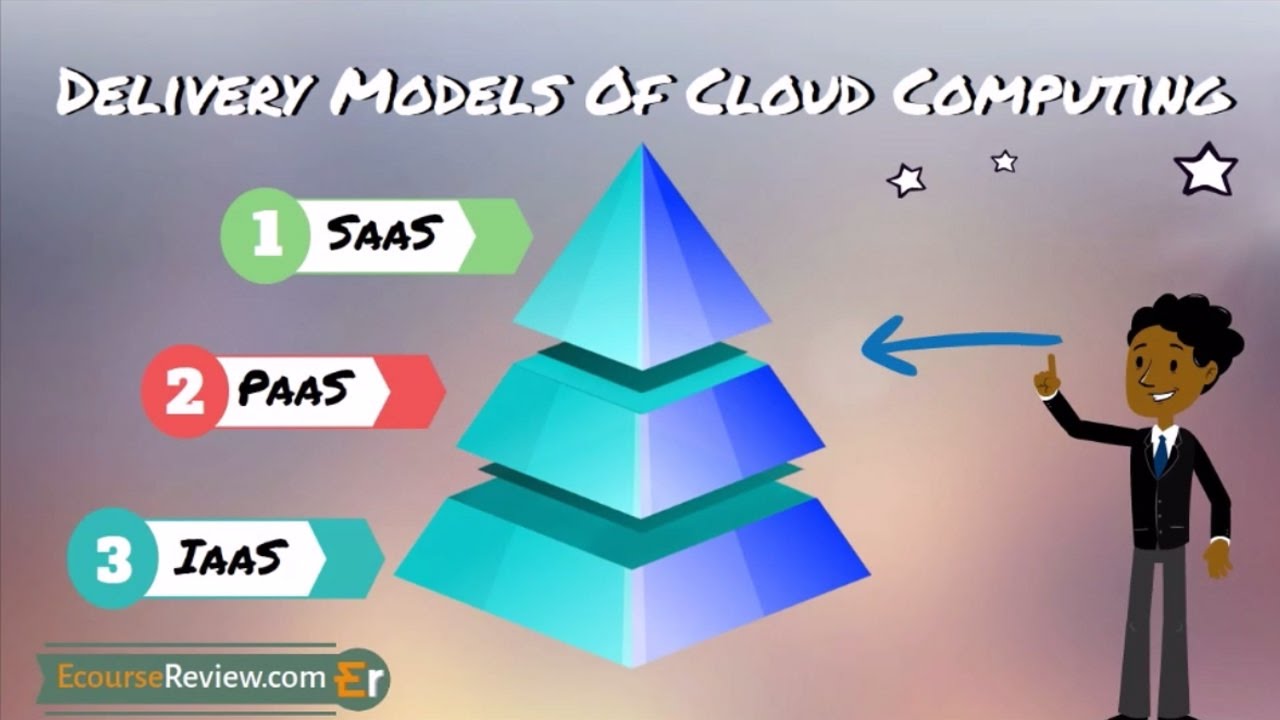
NIST SP 800-145 sorts cloud delivery into SaaS, PaaS and IaaS. With SaaS the provider runs the whole application. PaaS lets customers deploy their own apps on a provider platform, and IaaS lets them rent computing resources and run their own software.
SaaS is what most people mean by a cloud-based app. TechTarget calls it the most common type.
- With SaaS, the customer uses the provider’s application and controls only limited user-level settings. Dropbox, Salesforce and Google Docs all work this way.
- PaaS customers deploy their own app and control it, plus possibly hosting settings (Google App Engine, Azure App Service, Heroku).
- On IaaS the customer provisions processing, storage and networks, then controls the operating system, storage and deployed apps. AWS, Microsoft Azure and Google Compute Engine are the usual names.
IaaS customers typically rent virtual machines and then install and patch the operating system themselves. Under SaaS that job belongs to the provider.
Deployment models are about who the infrastructure serves. NIST lists public, private, community and hybrid.
Hybrid is far from a niche option. Flexera’s 2026 State of the Cloud Report (753 respondents, surveyed in winter 2025) found that 73% of organizations operate hybrid cloud estates.
NIST SP 800-145 was published in September 2011 by Peter Mell and Timothy Grance and runs 7 pages. It lists five characteristics (on-demand self-service, broad network access, resource pooling, rapid elasticity, measured service), the three service models above, and four deployment models (private, community, public, hybrid).
Examples of Cloud-Based Apps and Who Hosts Them
Behind every cloud-based app sit the vendor that sells the software and the provider whose servers run it. Slack, Evernote and Wix are vendors, while AWS, Microsoft Azure and Google Cloud are the large providers that host many of them.
| Layer | Role | Examples |
|---|---|---|
| App vendor | Sells and maintains the software | Slack, Evernote, Wix |
| Infrastructure host | Runs the servers | AWS, Microsoft Azure, Google Cloud |
| Both layers | Sells the app and runs the servers | Google (Workspace and Google Cloud) |
Evernote and Wix come from TechTarget’s list of SaaS examples.
Slack shows the split from the other side. In a June 2020 announcement with AWS, Slack confirmed AWS as its preferred cloud provider.
A buyer picks Slack, and Slack had already picked AWS.
Flexera’s 2026 State of the Cloud Report found that 83% of respondents run some or significant workloads on AWS and 79% on Azure, with Google Cloud in third place and well behind.
For SaaS buyers the host is the vendor’s choice, so the useful questions are where the data sits and which audit reports the vendor holds. PaaS and IaaS customers buy the host themselves.
How Is a Cloud-Based App Priced?
Subscriptions are the usual route. Some apps bill by metered usage instead, and plenty start with a free tier that converts to paid later. Desktop software, TechTarget notes, usually carries an upfront license instead, often one per device.
| Model | Billed by | Main risk |
|---|---|---|
| Subscription | Seat or plan, on a recurring cycle | Paying for seats nobody uses |
| Pay-as-you-go | Metered usage such as storage, processing, bandwidth | Bills rise with consumption |
| Free tier | Nothing, until credits or limits run out | Expiry, restricted services |
NIST SP 800-145 lists active user accounts next to storage, processing and bandwidth as units a provider can meter. That blurs the line between a per-seat subscription and metered billing.
For the full range of options vendors weigh, see this overview of app pricing models.
Free tiers change without much notice. As of AWS’s July 15, 2025 update, new accounts choose a free plan with up to $200 in credits ($100 at sign-up, $100 more from completing activities) that ends after six months or when the credits run out, whichever comes first.
Accounts created before that date stay on the legacy Free Tier.
Waste is the bigger story. In Flexera’s 2026 report, estimated wasted spend on IaaS and PaaS rose to 29%, the first increase in five years, which Flexera ties to added cost complexity from AI and new PaaS and SaaS offerings.
Subscriptions keep billing after usage drops, and metered plans keep billing while resources sit idle. Both are easy to forget about.
Is a Cloud-Based App Secure?

Partly, and which part depends on who is responsible for what. Security is split between the provider and the customer. The provider secures the infrastructure, and the customer keeps responsibility for its own data and identities in every service model, according to Microsoft Learn.
AWS words the same split as security of the cloud versus security in the cloud, and says what falls on the customer depends on the services it selects.
| Responsibility | IaaS | PaaS | SaaS |
|---|---|---|---|
| Customer data | Customer | Customer | Customer |
| Identities and users | Customer | Customer | Customer |
| Applications | Customer | Shared | Shared |
| Network controls | Customer | Shared | Microsoft |
Matrix from Microsoft Learn’s Azure shared responsibility documentation. AWS publishes its own variant.
In SaaS, the customer’s remaining work is accounts, data handling and settings. That work does not disappear, whichever model the app uses.
A provider’s security claims are only as good as the evidence behind them, and that evidence ties into the customer’s own software compliance obligations.
- A SOC 2 report comes from an independent CPA firm that tests the provider’s controls against the AICPA trust services criteria. Security is the core category while availability, processing integrity, confidentiality and privacy are supplemental, so check which ones the report covers, and prefer Type 2 over Type 1 (TechTarget).
- The Cloud Security Alliance’s STAR Registry lists provider controls assessed against its Cloud Controls Matrix. Level 1 is a self-assessment and Level 2 adds a third-party audit, so a Level 1 entry is the vendor’s own claim.
- On the legal side, GDPR Article 83 sets the higher fine tier at EUR 20 million or 4% of worldwide annual turnover, whichever is higher. Microsoft Learn lists compliance with data governance requirements among the duties customers always keep.
Region choice is the practical lever. In its 2020 announcement with AWS, Slack said it would use AWS’s global infrastructure to offer enterprises data residency options by country or region.
CSA’s Security Guidance v5 (July 2024) covers the shared responsibility model but cut back its coverage of laws and regulations, so legal questions go to the regulation text itself.
When a Cloud-Based App Is the Wrong Choice
Skip the cloud app when your connection is unreliable or when data has to sit somewhere the provider can’t guarantee. Steady, large-scale usage can also make renting cost more than owning. For shared data on a reliable connection, it remains the default.
Offline Use and Connection Dependence
Offline support is a design choice, not a property of the category.
TechTarget’s definition page says cloud apps can function offline, then says in its desktop comparison that they require an internet connection to operate. Both statements sit in the same March 2024 article.
Browser-based apps get offline behavior from progressive web app techniques. A service worker sits between the app and the network, and web.dev’s PWA training shows cached resources loading through it without a connection.
The limit is anything that needs the server, such as another user’s latest edit, which waits until the connection returns.
Lock-In, Outages, and Data Residency
The provider’s problems become the customer’s problems.
AWS’s own post-event summary dates one us-east-1 disruption from 11:48 PM PDT on October 19 to 2:20 PM PDT on October 20, 2025, with three distinct periods of impact to customer applications. The root cause was a latent race condition in the DynamoDB DNS management system.
An app built on one region goes down with it. Designing for high availability across regions limits that exposure, at the price of more infrastructure to run.
Cost is the other failure condition, and it shows up at scale. 37signals paid $3.2 million for cloud services in 2022, then moved seven apps, including HEY, off AWS onto its own hardware. By late 2024 it reported that its cloud bill had fallen to about $1.3 million a year, a cut of almost $2 million (The Register, October 2024).
Its CTO, David Heinemeier Hansson, cautioned that results vary.
On data residency, NIST SP 800-145 says a customer generally has no control or knowledge of where pooled resources sit, beyond choosing a country, state or data center. A workload that must stay in one jurisdiction needs a provider that lets the customer fix that choice.
Choosing Between a Cloud-Based App and a Desktop App
| Situation | Better fit |
|---|---|
| Several people edit the same data from different devices | Cloud-based app |
| One person, unreliable connection, offline-heavy work | Desktop app |
| Steady, heavy usage on a large cloud bill | Price owned hardware against the bill |
| Data must stay in one country or region | Provider with region control, or self-hosting |
As a rough rule, shared data on a reliable connection points to the cloud, and solo, offline-heavy work points to the desktop. Everything else comes down to a cost or compliance calculation.
Cloud-Based App FAQ
Is Google Docs a cloud-based app?
Yes, TechTarget lists Google Docs among its SaaS examples, and the documents live on Google’s servers.
Offline editing works only in Chrome or Edge with the Google Docs Offline extension switched on, per Google’s Docs Editors Help.
What is the difference between cloud-based and cloud-native?
Cloud-based is about where an app runs. Cloud-native is about how it is built, usually as small services in containers designed to scale across a provider’s infrastructure.
A legacy program moved onto a rented server is cloud-based without being cloud-native.
Is a mobile app a cloud-based app?
Sometimes. It counts when it relies on a provider’s servers for data or logic.
An app that talks to the same back end as the browser version qualifies, and a standalone app that keeps everything on the device does not.
Is cloud storage the same as a cloud-based app?
No. Cloud storage holds files on a provider’s servers, while a cloud-based app runs logic on top of that data, such as editing, sharing rules or search.
Storage sold to developers as raw capacity falls under IaaS, which NIST lists beside processing and networks.
How to Check a Vendor’s Cloud-Based App Claim
A vendor’s cloud-based app claim holds up when the data and shared logic run on provider-run servers, and the vendor can name the host and produce audit evidence. Work through the checks in this order.
- Ask which provider hosts the app, and in which region
- Request a SOC 2 report and read its scope
- Look up the vendor’s CSA STAR level
Hosting comes first because it decides which audit documents apply. The report outranks the registry entry because it is tested by an outside examiner.
Combined, the strongest evidence a vendor can show is a SOC 2 Type 2 report that covers availability and confidentiality, plus a STAR Level 2 entry. TechTarget rates Type 2 as the stronger assurance, and CSA labels Level 1 a self-assessment.
The trade-off is a shorter vendor list, since a vendor holding only a Type 1 report or a Level 1 entry fails that test.

- How Software Teams Write SOPs for Releases and Deployments - October 22, 2026
- Notepad++ Android Options: Apps That Come Close - October 21, 2026
- Data Management Services: A Practical Guide for Growing Companies - October 21, 2026


