GitHub is a web-based code hosting platform. It keeps Git repositories online and layers pull requests, issue tracking and workflow automation over them, which is why developers use it to share source code, review changes and ship software together.
Underneath sits Git, the distributed version control system Linus Torvalds wrote in 2005. What GitHub adds is a way to turn every change into a proposal a teammate can read and push back on.
That review step carries the volume. Developers merged an average of 43.2 million pull requests per month in 2025, up 23% from the year before (GitHub Octoverse 2025).
What Is GitHub?

Source code lives in one shared place on GitHub, every change gets tracked, and work is reviewed before it goes live. The service is Git hosting with a layer of collaboration tools on top.
All of it rests on version control, which just means recording every change so any earlier state can be restored.
The repository is the unit everything revolves around. One holds the source files and the full commit history, usually a README written in Markdown, and the issues, pull requests and workflow files tied to that project.
Public repositories are visible to anyone. Private ones only show up for the collaborators you pick.
GitHub Free gives personal accounts unlimited public repositories with the full feature set, plus unlimited private repositories with a limited one (GitHub Docs).
It isn’t a programming language or a code editor, and it isn’t the version control system itself. Git does that part.
How Is GitHub Different From Git?
Git is the version control tool, and it lives on your own computer. The online service that hosts Git repositories and adds collaboration on top is GitHub.
| Aspect | Git | GitHub |
|---|---|---|
| Type | Distributed version control system | Hosting and collaboration platform |
| Where it runs | On your own machine | On the web, in GitHub’s cloud |
| Origin | Written by Linus Torvalds in 2005 | Built on Git by GitHub, Inc. |
| Account needed | No | Yes |
What Git Does Alone
Git runs entirely on your machine, so commits, branches and merges all work offline.
Linus Torvalds wrote Git in 2005, after the Linux kernel community lost free access to the BitKeeper tool, according to the Pro Git book.
You can commit changes, create and merge branches and browse project history without ever touching a GitHub account.
What GitHub Adds
The basic addition is a shared remote copy of the repository that every collaborator can reach. On top of that come pull requests, which put a review step in front of any merge, and issues, which attach bug reports and tasks to the code they concern.
Workflows built with GitHub Actions can also run on every push.
Other hosts run the same Git underneath. GitLab and Bitbucket are the two best known.
A separate guide compares Git and GitHub in more detail.
How Does GitHub Work?

A local Git repository gets synced with a shared remote copy, and every change then passes through a branch, a pull request and a review before it merges.
- Create a branch from the main branch so the work stays isolated.
- Commit changes locally with a message that explains them.
- Push the branch to the remote repository on GitHub.
- Open a pull request that proposes merging the branch into main.
- Review the changes, comment, and request fixes until the work is approved.
- Merge the pull request and delete the finished branch.
Most beginners stall at the push step, and a guide on how to push a local project to GitHub covers it.
Repositories and Branches
A repository holds the project files and their history, and a branch is a parallel line of work inside it. People with write access branch directly.

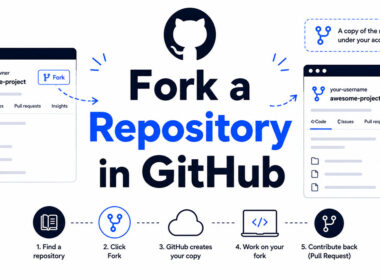
Outside contributors can’t push to the original, so they fork it, which gives them a personal copy of someone else’s repository.
Cloning copies a remote repository to your machine. Push and pull then sync changes in both directions.
Pull Requests and Code Review
The pull request is where GitHub does its most useful work.
It shows the exact lines a branch changes and keeps the discussion attached to them. Reviewers comment line by line, then approve or request changes.
Opening one takes a few clicks, and a walkthrough on creating a pull request in GitHub covers the form fields.
A merge conflict appears when two branches change the same lines. Git cannot pick a winner, so a person edits the file and commits the resolution.
Issues and Project Boards
Issues track bug reports, feature requests and tasks. Projects then group issues and pull requests into boards and tables.
Linking a pull request to an issue closes the issue automatically when the pull request merges.
What Tools Does GitHub Add Beyond Code Hosting?

Past the repository itself, GitHub bundles Actions for automation, Pages for static sites, Packages for package storage, Codespaces for cloud development environments and Copilot for AI coding help.
GitHub Actions
GitHub Actions runs workflows when something happens in a repository. Each workflow is a YAML file that defines jobs such as build, test and deploy.
A separate guide explains what GitHub Actions are and how workflows are written.
A push to a branch or a new or updated pull request will start one, and so will a fixed schedule.
Standard GitHub-hosted runners are free in public repositories. Private repositories draw on a monthly allowance, which is 2,000 minutes on GitHub Free, and Windows and macOS runners cost more per minute than Linux (GitHub Docs).
GitHub Pages
GitHub Pages publishes a static website straight from a repository, and Jekyll builds the site by default. On GitHub Free the source repository must be public.
| Limit | Value |
|---|---|
| Published site size | 1 GB maximum |
| Bandwidth | 100 GB per month (soft limit) |
| Builds | 10 per hour (soft limit, custom Actions workflows excluded) |
| Deployment time | Times out after 10 minutes |
Sites that outgrow these limits get a nudge from GitHub Support toward a CDN or another host (GitHub Docs).
GitHub Copilot
GitHub Copilot is an AI coding assistant. It suggests code, answers questions in chat and edits files from inside the editor.
A separate guide covers what GitHub Copilot is in more depth.
Copilot Free gives limited access to a selection of Copilot features, capped at 2,000 completions per month, with an allowance of GitHub AI Credits and auto model selection only (GitHub Docs).
Paid plans come with larger monthly allowances of GitHub AI Credits and access to a wider selection of models (GitHub Docs).
Packages, Codespaces and Dependabot
GitHub Packages hosts software packages next to the code that produces them, with 500 MB of storage on GitHub Free.
Codespaces is a development environment that runs in the cloud and opens in the browser or in Visual Studio Code. Personal Free accounts get 120 core hours and 15 GB of storage per month, which equals 60 hours on a 2-core machine.
Dependabot opens pull requests that update outdated dependencies, and the GitHub CLI brings pull requests, issues and workflows into the terminal.
One catch on Codespaces: the Free, Team and Enterprise plans for organizations include no free use at all (GitHub Docs).
Who Uses GitHub and What Do They Use It For?

Open source maintainers, product teams, students and solo builders all use GitHub, though most of the activity happens in private repositories.
GitHub’s Octoverse 2025 report put numbers on the scale.
- 180 million+ developers on the platform
- 630 million total repositories
- 121 million new repositories created in 2025
- 63% of repositories are public
- 81.5% of contributions land in private repositories
The last two figures say something the headline totals hide. Public projects make up most of the repositories, yet private work absorbs most of the contributions.
Stack Overflow’s 2025 Developer Survey points the same way: GitHub replaced Jira as the most desired tool for code documentation and collaboration. In practice GitHub works more as a company’s internal workspace than as a showcase for open source.
- Open source contributors fork a project, fix a bug and send a pull request to the maintainers.
- Product teams rely on shared repositories, review rules and issue tracking.
- A public profile with pinned repositories doubles as a work sample for employers.
- Instructors and students submit assignments and practice version control there.
- Analysts and engineers store scripts, datasets and documentation.
A longer rundown of what GitHub is used for in practice sits in its own guide.
Who Owns GitHub and How Did It Start?
Microsoft does. It announced the deal on June 4, 2018, paying $7.5 billion in Microsoft stock, and closed it on October 26 of that year (Microsoft News Center, 2018).
Chris Wanstrath, Tom Preston-Werner, PJ Hyett and Scott Chacon built the service. Wanstrath was CEO and co-founder when the sale was announced.
Published sources split between 2007 and 2008 for the founding date of the company, which started as Logical Awesome LLC. The site itself launched publicly in April 2008.
- In 2008 the site went public as a Git hosting service.
- Microsoft announced the acquisition in June 2018.
- The deal closed in October 2018, and Nat Friedman became CEO, reporting to Scott Guthrie.
- In 2020 GitHub bought npm, a JavaScript package vendor, and closed the deal in April (Wikipedia).
Microsoft’s announcement promised that GitHub would keep operating independently as an open platform.
How Much Does GitHub Cost?
GitHub is free for individuals and small teams. Paid plans start at $4 per user per month for Team and $21 for Enterprise, as of October 2026 (GitHub pricing page).
The pricing page labels both seat prices as applying for the first 12 months and marks them with an asterisk, so check the footnote before budgeting.
| Plan | Price | Adds | Fits |
|---|---|---|---|
| Free | $0 | Community support | Solo developers, small teams |
| Team | $4 per user per month | Code owners, multiple reviewers per pull request | Growing teams with review rules |
| Enterprise | $21 per user per month | SAML single sign-on, Enterprise Managed Users, SCIM provisioning | Companies with identity and compliance needs |
How the Team Plan Got to $4
On April 14, 2020, GitHub made private repositories with unlimited collaborators free and cut the Team plan from $9 to $4 per user per month (GitHub Blog, 2020).
Before that date, any organization that wanted private development had to subscribe to a paid plan.
Copilot Pricing
Copilot Free is meant for individuals who do not get Copilot through an organization or enterprise, and Copilot Student is free for verified students. Copilot Pro costs $10 per month, Pro+ is $39 and Max is $100.
Organizations pay per seat. Copilot Business is $19 per granted seat per month, while Copilot Enterprise is $39 per granted seat per month and is designed for enterprises on GitHub Enterprise Cloud.
Copilot usage is now metered in GitHub AI Credits. The monthly base allowance is 1,000 credits on Pro, 3,900 on Pro+, 10,000 on Max, 1,900 per user on Business and 3,900 per user on Enterprise. The older premium-request model is documented as legacy (GitHub Docs).
Which Plan to Pick
Teams that need required code owners or several reviewers per pull request should look at Team. SAML single sign-on or managed user accounts points to Enterprise. If neither applies, Free is enough.
Enterprise costs more than five times the Team seat price, so a team that needs neither feature set should not buy it.
How Does GitHub Compare With GitLab and Bitbucket?

GitHub, GitLab and Bitbucket all host Git repositories and come with built-in CI/CD. GitHub fits open source and broad ecosystem reach best, GitLab bundles the most DevOps tooling, and Bitbucket suits teams already working in Jira.
| Platform | Owner | CI/CD included at paid entry tier | Best fit |
|---|---|---|---|
| GitHub | Microsoft | GitHub Actions, 3,000 minutes on Team | Open source, broad ecosystem |
| GitLab | GitLab Inc. | GitLab CI/CD, 10,000 minutes on Premium | One-platform DevOps, self-managed option |
| Bitbucket | Atlassian | Pipelines, 2,500 minutes on Standard | Jira-centric teams |
All three are source control management platforms built on Git, so the choice rarely turns on repository features.
GitHub vs GitLab
GitLab Premium costs $29 per user per month, billed annually (GitLab pricing page).
Set against GitHub Team at $4, that is more than seven times the seat price for more than three times the CI minutes, 10,000 against 3,000. Both bundle continuous integration, so build and test jobs run next to the code.
GitLab calls pull requests merge requests. Both vendors offer a self-hosted route, GitHub Enterprise Server and GitLab Self-Managed, so hosting control does not separate them.
Whether the extra spend pays off depends on how much of the toolchain a team wants inside one product.
GitHub vs Bitbucket
Bitbucket’s free plan covers up to 5 users with 50 build minutes per month. Standard and Premium raise that to 2,500 and 3,500 minutes (Atlassian).
Every plan connects to Jira Software through issue keys in commit messages.
Bitbucket wins when Jira already runs the planning. Everywhere else, GitHub’s ecosystem is the stronger pull.
When Is GitHub Not the Right Fit?
GitHub falls short for teams that store large binary files, need on-premises AI tooling, or work under strict data residency rules.
Large files hit limits quickly. GitHub warns at 50 MiB, blocks files above 100 MiB and caps browser uploads at 25 MiB (GitHub Docs).
Git LFS lifts the file limit but meters usage. Included storage and bandwidth is 10 GiB each per month on Free and 250 GiB each on Team and Enterprise Cloud, with extra bandwidth billed at $0.0875 per GiB.
Older documentation listed 1 GiB of free storage and bandwidth under the retired prepaid data-pack model. GitHub’s billing documentation says data packs were replaced by metered billing. The pricing page still advertises a $5 pack for 50 GB of storage and 50 GB of bandwidth, so rely on the billing documentation.
Every LFS change pushes a new copy of the whole file, and each copy counts in full against storage. For distributing large files, the docs point to releases instead of the repository.
Copilot isn’t available on GitHub Enterprise Server, regional data residency requires Enterprise Cloud, and design files, video and datasets grow a repository fast.
Teams working under software compliance rules need the Enterprise Cloud tier for regional data residency, which the pricing page lists as an Enterprise feature.
GitHub FAQ
What programming language is GitHub written in?
The platform was originally built with Ruby on Rails and Erlang, according to Wikipedia’s entry on GitHub, whose infobox now lists Ruby, JavaScript, Go, C and Rust.
Git, the tool underneath it, is written primarily in C.
Is GitHub open source?
No. GitHub’s platform code is proprietary.
Git, the version control system underneath, is free software under the GNU General Public License version 2, and the projects hosted on GitHub can be open source.
What is GitHub Gist?
Gist is a GitHub feature for sharing a single code snippet or note without creating a full repository.
Each gist is itself a Git repository, so it keeps a revision history and can be forked.
What does starring a repository do?
A star bookmarks the repository on your profile and tells the maintainers the project has support.
It also gives you one click access to projects you follow.
Is GitHub safe for private code?
Yes, when access and secrets are managed correctly. Private repositories restrict access to the collaborators you choose, while anything in a public repository is visible to everyone, API keys included.
A separate guide examines whether GitHub is safe for different kinds of projects.
Is GitHub free for students?
Yes. Students get the GitHub Student Developer Pack, which bundles cloud resources, programming tools and support (TechTarget).
Verified students can also use Copilot at no cost under the Copilot Student plan, which is limited to auto model selection (GitHub Docs).
Do I need the command line to use GitHub?
No. GitHub Desktop is a graphical client for Windows and Mac, and the website handles file edits, branches and pull requests directly.
Installing Desktop also installs a command-line version of Git, so the terminal stays optional.
How do I fix a merge conflict on GitHub?
Open the conflicted file, keep the lines you want, delete the conflict markers Git inserted, and commit the result.
GitHub’s web editor shows the same markers when a pull request cannot merge automatically, and a step-by-step guide covers how to resolve conflicts in GitHub.
Where a New GitHub User Should Start

Start on GitHub Free. Get authentication working, create one small repository, and open a pull request before paying for anything.
Authentication comes first because GitHub stopped accepting account passwords for Git operations on August 13, 2021, so a push fails until an SSH key or personal access token is in place (GitHub Blog, 2021). GitHub Desktop is unaffected.
The repository comes next, and a guide on creating a repository in GitHub covers each form field. The pull request comes last because it runs the full review loop on a project where a mistake costs nothing.
Verified October 4, 2026: GitHub’s Copilot documentation now meters usage in GitHub AI Credits and describes the earlier premium-request model as legacy, so confirm Copilot costs on the plans page before budgeting for it.

- MongoDB Cheat Sheet - October 20, 2026
- Adding AI Video Generation to a Software Product: Architecture, Cost Guardrails and QA - October 20, 2026
- Show Hidden Characters, Spaces, and Line Endings in Notepad++ - October 19, 2026