

Every request hitting your website passes through something before it reaches your server. If you’ve ever used Cloudflare, NGINX, or a CDN, you’ve already used a reverse proxy, whether you realized it or not.
So what is a reverse proxy, exactly? It’s a server that sits between the internet and your backend, intercepting client requests and forwarding them to the right origin server. It handles load balancing, SSL termination, caching, and security filtering, all before your application code ever runs.
This guide covers how reverse proxies work, why they exist, the most common tools (NGINX, HAProxy, Envoy, Cloudflare), and when you actually need one. And just as importantly, when you don’t.
What Is a Reverse Proxy

A reverse proxy is a server that sits between client devices and one or more backend servers. It intercepts incoming requests from the internet and forwards them to the appropriate origin server on behalf of that server.
The client never communicates directly with the backend. It only sees the reverse proxy’s IP address.
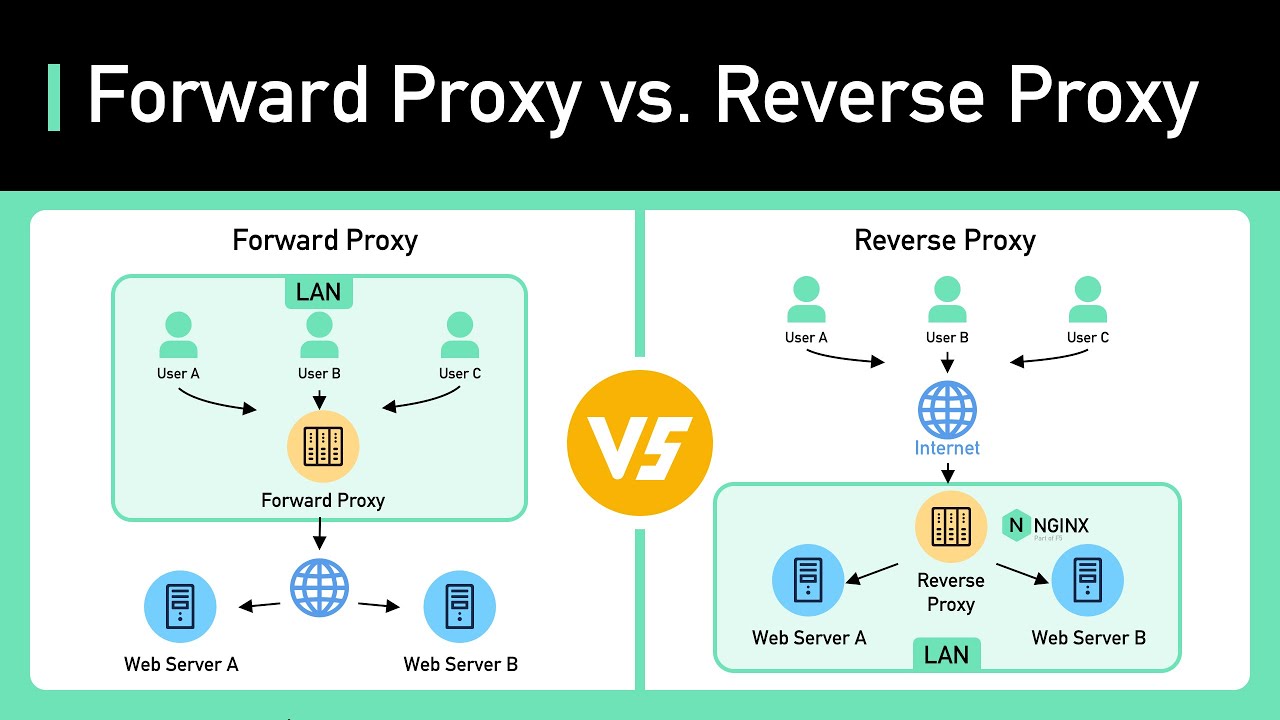
This is different from a forward proxy, which acts on behalf of the client. A forward proxy helps users reach external resources (like accessing blocked websites). A reverse proxy works in the opposite direction, protecting and managing traffic headed toward the server.
According to DemandSage, Cloudflare alone is used by 81.5% of websites that use reverse proxies, accounting for roughly 20.4% of all websites globally. About 75% of websites still don’t use any reverse proxy service at all.
Forward Proxy vs. Reverse Proxy
| Feature | Forward Proxy | Reverse Proxy |
|---|---|---|
| Acts on behalf of | The client | The server |
| Hides | Client’s IP address | Server’s IP address |
| Placed | In front of users | In front of web servers |
| Common use | Content filtering, anonymity | Load balancing, caching, security |
A forward proxy knows who the client is but hides it from the destination. A reverse proxy knows where the backend server is but hides it from the client.
Took me a while to internalize this distinction early on, honestly. The naming feels backwards until it clicks.
How the Request Flow Works
Step one: the client’s browser sends an HTTP or HTTPS request. DNS resolution points the domain name to the reverse proxy’s IP, not the origin server’s IP directly.
Step two: the reverse proxy receives the request and evaluates it. It checks headers, URL paths, cookies, and any configured routing rules.
Step three: the proxy forwards the request to the correct upstream server. If content caching is active and a valid cached response exists, the proxy may skip this step entirely and serve a stored copy.
Step four: the backend processes the request and sends the response back through the proxy. The proxy then relays it to the client.
That whole loop happens in milliseconds, and the user has no idea they’re not talking directly to the origin server. The connection between client and proxy is separate from the connection between proxy and backend. Two separate TCP connections, stitched together by the proxy.
Why Reverse Proxies Exist

Origin servers exposed directly to the public internet face three problems at once: security risks, traffic overload, and no real fallback when something fails.
Before reverse proxies became standard, every web server had to handle everything by itself. Encryption, request routing, traffic spikes, attack mitigation. All of it.
That breaks down fast at scale. A single server processing raw client connections can’t keep up with thousands of concurrent users while also managing SSL handshakes and filtering out malicious traffic.
Reverse proxies were the answer. Drop a layer between the internet and the backend, and suddenly you can solve these problems without rewriting your codebase or rebuilding back-end development infrastructure from scratch.
Cloudflare, Fastly, and Akamai built entire businesses around this concept. Cloudflare’s network now handles roughly 20% of all global web traffic, according to DemandSage. That’s the scale of the problem reverse proxies were built to solve.
The CDN market (which relies heavily on distributed reverse proxy architecture) was valued at approximately $23.5 billion in 2024, according to Fact.MR research, and it’s projected to grow at a CAGR of 11.8% through 2034.
Companies didn’t adopt reverse proxies because they were trendy. They adopted them because without one, a single traffic spike or targeted attack could take down everything.
How a Reverse Proxy Handles Incoming Traffic

The mechanics of how a reverse proxy processes each request explain why it’s such a useful piece of server infrastructure. It’s not just a pass-through. It makes decisions.
DNS and IP Masking
When someone types your domain into a browser, the DNS lookup doesn’t resolve to your origin server. It resolves to the reverse proxy’s IP address.
Your actual server’s IP stays hidden from the public internet. That’s not a minor detail. Attackers can’t target what they can’t find.
Cloudflare’s network, for instance, spans more than 330 cities in over 120 countries. When your domain points to Cloudflare, the user connects to whichever proxy node is geographically closest, not to your server sitting in a single data center somewhere.
Request Routing and Backend Selection
Once the reverse proxy receives a request, it has to decide where to send it. This is where configuration management plays a real role.
Path-based routing: requests to /api/ go to the API server, while /images/ hits the static asset server.
Header-based routing: specific headers or cookies can route traffic to different backend pools (useful for A/B testing or canary deployments).
Weighted distribution: newer or less powerful servers get a smaller share of traffic until they’re proven stable.
The proxy reads the incoming request’s URL path, host header, query parameters, and sometimes the client’s geographic region before making a routing call. All of this happens before any backend server sees the request.
Response Caching at the Proxy Layer
If the reverse proxy already has a valid cached copy of the requested resource, the backend server doesn’t get touched at all.
This is the single biggest performance win of running a reverse proxy. Static content like images, CSS files, and JavaScript bundles get served directly from the proxy’s cache. The backend never even knows a request came in.
Cache behavior depends on HTTP headers: Cache-Control, ETag, and Expires tell the proxy what to cache, how long to keep it, and when to revalidate.
For teams working on front-end development specifically, this means static assets can be aggressively cached at the proxy layer, dramatically cutting page load times without any changes to the application code.
Load Balancing Through Reverse Proxies
One of the primary reasons organizations deploy a reverse proxy is to distribute traffic across multiple backend servers. Running a single server is fine until it isn’t. And when it fails, there’s nothing to catch the traffic.
A load balancer (which is often a reverse proxy with distribution logic) splits incoming requests across a pool of upstream servers. No single server bears the full weight.
How Load Balancing Algorithms Work
| Algorithm | How It Works | Best For |
|---|---|---|
| Round Robin | Cycles through servers sequentially | Homogeneous server pools |
| Least Connections | Sends to the server with fewest active connections | Variable request duration |
| IP Hash | Routes based on client IP for session stickiness | Stateful applications |
| Weighted | Assigns proportional traffic based on server capacity | Mixed hardware environments |
Most teams I’ve worked with start with round robin because it’s simple. But if your backends aren’t identical in specs, weighted distribution actually makes more sense from day one.
Health Checks and Failover
The reverse proxy doesn’t just blindly send traffic. It continuously monitors backend servers through health checks, typically sending periodic HTTP requests to a predefined endpoint.
If a server stops responding or returns errors, the proxy automatically removes it from the active pool. Traffic reroutes to healthy servers without any downtime from the user’s perspective.
This is what high availability actually looks like in practice. Not redundant hardware sitting idle, but a proxy that knows which servers are alive and acts accordingly.
NGINX, HAProxy, AWS Elastic Load Balancer, and Envoy all handle this pattern. NGINX alone has a market share of about 33-38% in the global web server space, according to multiple 2025 industry reports, and it’s used by over 5.4 million companies worldwide (6sense data).
Netflix is a well-known case. Their traffic routing through Zuul (a custom reverse proxy and gateway) manages request distribution across thousands of microservice instances. When one instance degrades, it’s pulled from the rotation within seconds.
Security Benefits of a Reverse Proxy

Security is where reverse proxies pay for themselves fast. They reduce the attack surface of your backend infrastructure by acting as the only public-facing layer in your network.
DDoS attacks nearly doubled in 2024. Cloudflare’s Q4 2024 report shows they mitigated 21.3 million DDoS attacks across the year, a 53% jump compared to 2023. The largest single attack recorded hit 5.6 Tbps.
Without a reverse proxy absorbing that kind of traffic, a typical origin server would collapse instantly.
SSL/TLS Termination
Encryption is expensive for backend servers. Every TLS handshake requires CPU, memory, and time. When you’re dealing with thousands of concurrent connections, that overhead adds up quickly.
SSL/TLS termination moves that work to the reverse proxy. The proxy handles the encrypted connection with the client, decrypts it, and forwards plain HTTP to the backend over a trusted internal network.
According to Grokipedia research, TLS operations can consume 50-70% of CPU capacity on backend servers under heavy encrypted traffic. Terminating at the proxy frees those resources, allowing backends to handle 2-3 times more concurrent connections per server.
Huntress notes that approximately 90% of web traffic is now encrypted using SSL/TLS. That makes termination at the proxy layer not optional for most production setups. It’s practically a requirement.
Certificate management also gets simpler. Instead of installing and renewing certificates on every backend server, you manage them in one place: the proxy. Teams running a continuous deployment pipeline especially benefit from this, because adding new backend instances doesn’t require certificate provisioning each time.
DDoS Protection and Rate Limiting
A reverse proxy acts as the first line of filtering before any traffic reaches your application servers.
Rate limiting caps the number of requests a single client can send within a given time window. Bots and automated scripts get throttled before they can overwhelm the backend.
Web Application Firewall (WAF) rules at the proxy layer inspect incoming requests for SQL injection, cross-site scripting, and other common attack patterns.
Bot detection identifies non-human traffic based on behavioral signals, header anomalies, and fingerprinting. Cloudflare’s 2024 data shows that 29.7% of all internet traffic is generated by bots.
Zayo’s DDoS report found that attacks surged 81.7% from 2023 to 2024, climbing from 90,000 to nearly 165,000 incidents. The financial cost is real, too: each minute of DDoS-related downtime costs an estimated $22,000, according to G2 research.
This is exactly where services like API rate limiting and API throttling come in. Configuring these at the proxy level protects both your web-facing applications and any RESTful APIs exposed through the same infrastructure.
Reverse Proxies and Content Caching
Caching at the reverse proxy layer is one of the most measurable performance improvements you can make. It reduces server load, cuts response times, and saves bandwidth, all without changing application code.
Static Asset Caching
Images, stylesheets, JavaScript files, fonts. These resources rarely change between deployments.
A reverse proxy stores copies of these assets and serves them directly to clients. The origin server doesn’t process these requests at all. For high-traffic sites, this alone can cut backend load by 60-80%, depending on the content mix.
In a typical web app setup, the bulk of HTTP requests hit static resources. Letting the proxy handle those means your application servers only deal with dynamic, user-specific requests.
Dynamic Content Caching
Caching dynamic content is trickier but possible. Personalized pages, API responses with user-specific data, authenticated content. These can’t just be stored and served to everyone.
Short TTL caching: store a dynamic response for 5-10 seconds. In a site getting 1,000 requests per second, even a 5-second cache prevents 4,999 redundant backend calls.
Vary headers: allow the proxy to cache multiple versions of the same resource based on request characteristics (like language or device type).
Cache invalidation: the hard part. When the underlying data changes, stale cache entries need to be purged. Most reverse proxy tools support purge APIs, but getting the invalidation logic right takes effort. And getting it wrong is worse than not caching at all.
CDN Integration
A content delivery network is basically a distributed system of reverse proxies placed at edge locations worldwide.
When you use Cloudflare, Fastly, or Akamai, your static and cached content gets replicated across hundreds of points of presence (PoPs). A user in Tokyo hits a Tokyo edge server. A user in London hits a London edge server. The origin stays quiet.
Grand View Research valued the CDN market at $31.52 billion in 2025, with a projected CAGR of 19.7% through 2033. That growth is driven by video streaming, e-commerce, and the expanding need for software scalability at the edge.
Cloudflare processes an average of over 63 million HTTP requests per second, plus 42 million DNS queries per second, according to their own 2024 Year in Review. Those numbers only work because of distributed reverse proxy caching at a massive scale.
For teams handling app deployment across multiple regions, tying into a CDN through your reverse proxy config is one of the fastest wins for global performance. You configure cache headers in your production environment and the CDN handles the rest.
Common Reverse Proxy Software and Services

The reverse proxy you pick depends on what you’re actually building. A small site running on a single VPS has different needs than a distributed microservices architecture serving millions of requests per hour.
Here’s a quick breakdown of what dominates the space right now.
Open-Source Reverse Proxies
NGINX is the most widely deployed reverse proxy on the internet. It holds roughly 33-38% of the global web server market depending on which tracking source you check (W3Techs, Netcraft, 6sense all report slightly different numbers). Over 5.4 million companies use it worldwide, according to 6sense 2026 data.
It handles reverse proxying, load balancing, SSL/TLS termination, and static content caching. Most teams that work with backend infrastructure have touched an NGINX config file at some point.
HAProxy is the other heavyweight. It commands 41.15% market share in proxy servers (6sense) and was named a G2 Leader in 26 categories in Fall 2025, with a perfect satisfaction score of 100. Around 14,781 companies use it globally.
Apache HTTP Server with modproxy still runs on plenty of legacy systems. Its market share has been declining steadily (now around 24-26%), but it’s still the second most common web server overall.
| Tool | Primary Strength | Market Position |
|---|---|---|
| NGINX | Versatile reverse proxy + web server | #1 web server globally |
| HAProxy | High-performance TCP/HTTP load balancing | #1 in G2 load balancing |
| Apache | Flexible, modular, well-documented | Declining but still widespread |
| Envoy | Cloud-native, service mesh ready | Growing fast in Kubernetes |
Roblox and Infobip both publicly praised HAProxy Enterprise WAF at HAProxyConf 2025, highlighting its low-latency performance and zero false positives in production.
Cloud and Managed Reverse Proxy Services
Not every team wants to manage proxy infrastructure themselves. Cloud providers bundle reverse proxy functionality into managed services that handle scaling, updates, and failover automatically.
- AWS: Elastic Load Balancer (ALB/NLB) and CloudFront for CDN-layer proxying
- Google Cloud: Cloud Load Balancer with global anycast support
- Azure: Application Gateway with built-in WAF
Then there are the dedicated proxy-as-a-service platforms. Cloudflare serves over 20% of all websites and had 238,000 paying customers in 2024 (DemandSage). Fastly and Akamai round out the top tier, particularly for media streaming and e-commerce.
AWS Elastic Load Balancer dominates the dedicated load balancer market with 67.54% share, per 6sense data. That’s not surprising since most teams already running on AWS pick the native option by default.
Reverse Proxies in Microservices and API Gateway Architecture

In modern distributed systems, a reverse proxy is rarely just a single box sitting in front of a single server. It’s usually the entry point into a mesh of services.
CNCF survey data shows 80% of organizations deployed Kubernetes in production in 2024, up from 66% in 2023. Kubernetes holds a 92% market share in container orchestration. That’s the environment where reverse proxies now live.
An API gateway is a specialized reverse proxy. Kong, Traefik, AWS API Gateway, and Envoy Gateway all function this way. They accept incoming requests, apply authentication and rate limiting, then route traffic to the right backend service based on path, header, or hostname.
Docker Hub itself uses Envoy Gateway to route all internal traffic, according to the Envoy Gateway project site. Tencent Cloud, Rackspace, and SenseTime use it for similar purposes.
How Reverse Proxies Fit Into Service Meshes
A service mesh like Istio or Linkerd uses reverse proxies at both the edge (north-south traffic) and between services (east-west traffic).
North-south: external client requests enter through the reverse proxy (the gateway), which handles TLS termination, authentication, and routing to internal services.
East-west: sidecar proxies (typically Envoy) sit next to each service instance, encrypting and managing traffic between microservices inside the cluster.
Envoy Proxy went GA as a Kubernetes Gateway API implementation in March 2024. The DEV Community’s 2026 analysis noted that Envoy has become the standard data plane for cloud-native architectures, with multiple API gateway projects building their control planes on top of it.
For teams doing containerization in development, the reverse proxy is baked into the orchestration layer. You don’t set it up separately. You define it in your infrastructure as code templates, and Kubernetes handles the rest.
How to Set Up a Basic Reverse Proxy
NGINX is the most common starting point. A basic reverse proxy configuration takes about 10 lines of config and a few minutes to get running.
Basic NGINX Reverse Proxy Configuration

The core directive is proxypass. It tells NGINX where to forward incoming requests.
A minimal setup inside /etc/nginx/sites-available/ looks like this:
serverblock: defines which port and domain NGINX listens on (typically port 80 or 443)location /block: catches all incoming request pathsproxypass: points to the upstream backend (e.g.,http://localhost:3000)proxysetheader: forwards the original client IP and host header to the backend
The upstream block becomes relevant when you’re distributing traffic across multiple backends. You define a named group of servers and reference it inside proxypass.
After editing, run nginx -t to test the config syntax before reloading. I’ve watched people skip this step and take down a live site. Don’t be that person.
Troubleshooting Common Setup Issues
Forgetting to pass the client IP is the most common mistake. Without proxysetheader X-Forwarded-For, your backend sees the proxy’s IP instead of the real client’s. That breaks logging, geo-targeting, and rate limiting.
Timeout misconfiguration shows up when backend responses take longer than NGINX expects. Default proxy timeout is 60 seconds. For slow API endpoints or long-running uploads, you’ll need to adjust proxyreadtimeout and proxyconnecttimeout.
WebSocket connections drop because NGINX doesn’t upgrade HTTP connections to WebSocket by default. You need to explicitly set the Upgrade and Connection headers.
Most of these issues come up in the first software development process iteration, during the initial integration testing phase. Catching them before production saves hours of debugging under pressure.
When You Do Not Need a Reverse Proxy

Not every project benefits from adding a reverse proxy. Sometimes the added complexity isn’t worth the tradeoff.
Low-Traffic Single-Server Setups
If your application runs on one server and handles a few hundred requests per day, a reverse proxy doesn’t buy you much.
You’ll add an extra network hop, another piece of software to configure and monitor, and another potential failure point. For a personal blog or internal tool, that overhead is hard to justify.
Your web framework probably already handles HTTP directly. Node.js, Django, Rails. They all serve traffic on their own. Adding NGINX in front just so it’s “there” doesn’t actually improve anything at that scale.
Platform-Managed Infrastructure
Some hosting platforms already handle what a reverse proxy does.
Vercel and Netlify manage SSL, CDN caching, and traffic routing at the platform level. Deploying a separate reverse proxy on top of that is redundant.
Heroku routes all traffic through its own router. You can’t (and don’t need to) place NGINX in front of it in most configurations.
AWS App Runner and similar PaaS products handle load balancing and TLS automatically. For teams using a cloud-based app deployment strategy through these services, the proxy layer is already covered.
If you’re curious whether your particular setup benefits from a reverse proxy, the question is simple. Are you managing your own servers? Do you run multiple backend services behind one domain? Do you need caching, SSL termination, or traffic filtering at the network edge?
If yes to any of those, a reverse proxy makes sense. If your platform handles all of that and you’re running a single application, skip it. You can always add one later when the need is real.
FAQ on What Is A Reverse Proxy
What does a reverse proxy do?
A reverse proxy intercepts client requests and forwards them to backend servers. It handles traffic routing, caching, SSL termination, and security filtering. The client only communicates with the proxy, never directly with the origin server.
What is the difference between a forward proxy and a reverse proxy?
A forward proxy acts on behalf of the client, hiding the user’s IP from external servers. A reverse proxy acts on behalf of the server, hiding the backend’s IP from clients. They sit on opposite sides of the network.
Is NGINX a reverse proxy?
Yes. NGINX is one of the most widely used reverse proxy servers, handling load balancing, content caching, and SSL termination. It currently holds over 33% of the global web server market share.
Do I need a reverse proxy for a small website?
Probably not. If you’re running a single server with low traffic, adding a reverse proxy introduces unnecessary complexity. Frameworks like Node.js or Django serve HTTP directly. Add one when scaling or security demands it.
How does a reverse proxy improve security?
It hides the origin server’s IP address, filters malicious traffic through WAF rules, and handles DDoS protection at the network edge. Rate limiting and bot detection happen before requests ever reach your application.
What is SSL termination at a reverse proxy?
SSL termination means the reverse proxy decrypts HTTPS traffic from clients and forwards plain HTTP to backend servers. This offloads the CPU-heavy encryption work, letting backends handle more concurrent connections.
Is Cloudflare a reverse proxy?
Yes. Cloudflare operates as a distributed reverse proxy network. It sits between users and your origin server, providing caching, DDoS mitigation, and DNS-level routing across more than 330 global locations.
Can a reverse proxy work as a load balancer?
Absolutely. Most reverse proxies include load balancing functionality. NGINX, HAProxy, and Envoy all distribute incoming requests across multiple backend servers using algorithms like round robin or least connections.
What is the difference between a reverse proxy and a CDN?
A CDN is a geographically distributed network of reverse proxies. It caches content at edge locations worldwide. A standalone reverse proxy typically runs in one location in front of your backend servers.
What are the most popular reverse proxy tools?
NGINX, HAProxy, Apache (with modproxy), and Envoy are the leading open-source options. For managed services, Cloudflare, AWS CloudFront, and Fastly dominate. Your choice depends on infrastructure needs and team familiarity.
Conclusion
Understanding what is a reverse proxy comes down to one thing: it’s the layer between your users and your origin server that makes everything work better. Traffic routing, request handling, IP masking, content caching. All of it runs through this single point.
Whether you’re configuring NGINX on a VPS or relying on Cloudflare’s global network, the core function stays the same. The proxy absorbs complexity so your backend doesn’t have to.
For teams managing app scaling, running containerized workloads, or building around a deployment pipeline with multiple services, a reverse proxy isn’t optional. It’s infrastructure.
Start simple. Add a basic proxy_pass config in NGINX. Then layer on health checks, SSL termination, and WAF rules as your traffic grows. The setup scales with you.

- How to Use Claude Code in VS Code - August 20, 2026
- From Offshore Development Team to U.S. Office: What Tech Companies Need to Plan Before Expanding Stateside - August 20, 2026
- What Are the Best Kajabi Alternatives for Growing Your Online Business? - August 19, 2026


