

React.js takes longer to learn than most course landing pages suggest. freeCodeCamp’s own curriculum documentation puts its React-focused Front End Development Libraries certification at roughly 300 hours (freeCodeCamp, 2022), and that’s the certification on its own, not the JavaScript sitting underneath it.
It’s a JavaScript library from Meta that builds interfaces out of small reusable components instead of reloading whole pages. Front-end teams write it mostly in JSX. Progress gets measured by whether components, state, and hooks feel natural to you, not by how much syntax you’ve committed to memory.
What Is React.js
Jordan Walke, an engineer at Facebook, wrote the original prototype. The company open-sourced the library in May 2013, and it’s been maintained by Meta ever since.
What it actually does: renders screens through small, reusable pieces called components, then updates only the parts of the page that changed rather than redrawing everything.
React.js lives in front-end development, the layer a person sees and clicks. It’s built for web apps whose screens change without a full page reload, and the same component model carries over to mobile through a related project called React Native.
People call it a framework out of habit. It isn’t one, at least not on its own.
React renders your interface from component code and re-renders when state changes. That’s roughly the extent of the job it takes on. Routing between pages, talking to a server, bundling the code for production, none of that ships in the box. You wire those up yourself or pick a framework layer that already decided for you.
Stack Overflow’s 2025 Developer Survey lists React as the most used web framework, reported by 44.7% of developers. State of JS 2024 puts front-end adoption even higher, with roughly eight in ten JavaScript developers saying they’ve worked with it.
Netflix and Instagram run production interfaces on it, as do thousands of smaller products you’ve used without noticing.
Prerequisites to Learn Before Starting React.js

Most learners need a working handle on core JavaScript before they open a code editor. React is written in JavaScript, so gaps in the language show up quickly once components get past trivial.
Worth having in place first:
- JavaScript fundamentals, meaning variables, functions, arrays, and objects
- ES6 syntax, particularly arrow functions and destructuring, plus template literals and modules
- HTML structure and semantic markup
- CSS basics, at least selectors, the box model, and either flexbox or grid
- Some sense of how the DOM represents a page, since React exists to manage it more efficiently
JavaScript remains the most used language among developers, reported by 66% of respondents in Stack Overflow’s 2025 Developer Survey. That’s the skill React sits on top of, not a replacement for it.
A JavaScript cheat sheet is worth keeping open during this stage, mostly for array methods and arrow function syntax. Once markup and layout feel comfortable, a CSS cheat sheet saves time when you start styling components, especially for flexbox alignment.
Skipping this stage doesn’t save time. It moves the confusion into the React lessons instead.
Core Concepts You Need to Learn in React.js
A small set of ideas repeats in almost every component you’ll write. Once they settle, React code starts reading the same way no matter whose project you’ve landed in.
JSX and Component Structure

JSX is a syntax extension that lets you write markup directly inside JavaScript. It compiles down to plain JavaScript function calls before the browser sees any of it, so what looks like HTML is really just another way of describing UI.
A component is a JavaScript function that returns JSX. Components come in two forms, functional (the current standard) and class-based (the older pattern, still sitting in legacy codebases). Files usually hold one component each, named to match.
Most tutorials written after 2019 skip class components and teach functional ones from the start.
Props and State

Props are data passed into a component from its parent, read-only as far as the component itself is concerned. State is data a component manages internally, changes over time, and re-renders on when it does.
Mixing the two up is one of the most common early mistakes. Props flow down. State stays local unless you deliberately lift it.
Hooks: useState and useEffect
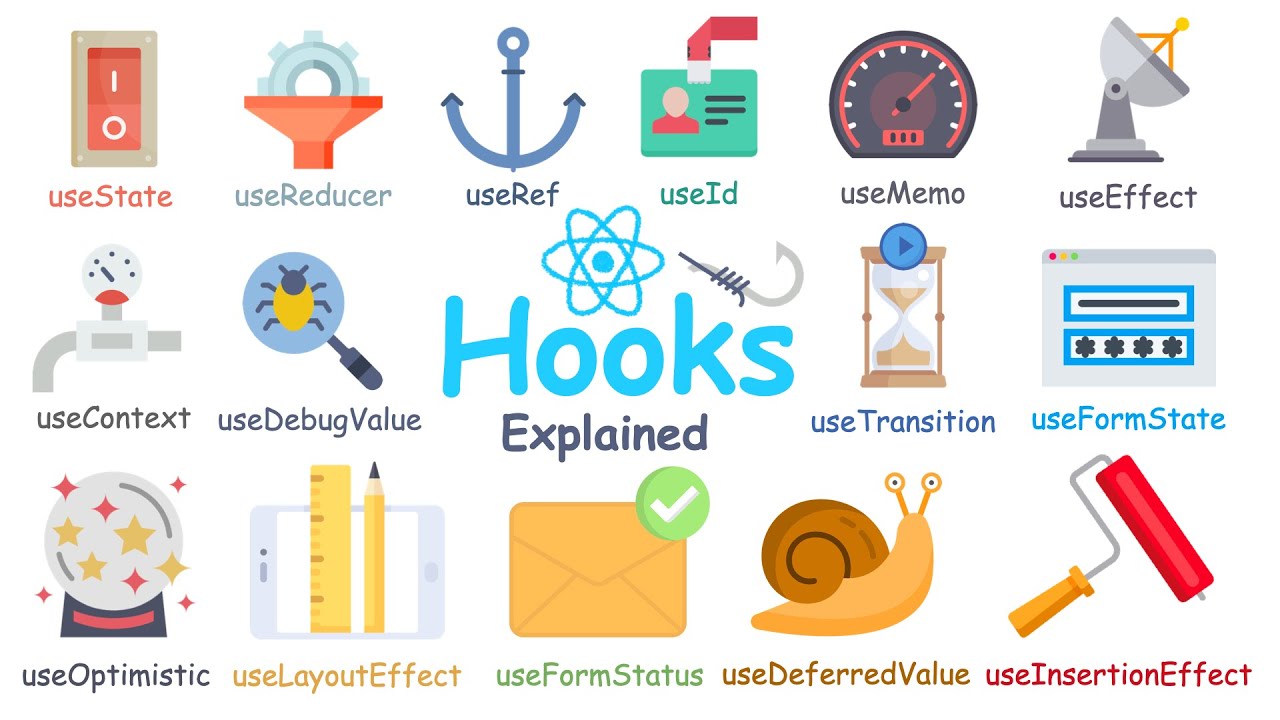
Hooks are functions that let a functional component tap into state and other React features without switching to a class. Two of them carry most of the weight in day-to-day code.
useState stores a piece of state and hands you a function to update it. useEffect runs code in response to a render or a value changing, and it’s where data fetching usually ends up.
We’ve explained React hooks in more depth elsewhere, including the rules around when and how often they run.
Virtual DOM and Rendering

Direct DOM updates are slow. React works around that with a virtual DOM, a lightweight copy of the page kept in memory. When state changes, it compares the new copy against the previous one and touches only the real DOM nodes that actually differ.
That’s the mechanism behind the update-only-what-changed claim from the definition earlier. Not magic, just a diffing algorithm doing the comparison work for you.
Keep a React cheat sheet nearby while these ideas settle. Syntax recall slows almost everyone down at first.
How Long It Takes to Learn React.js
No single number holds up here, though the ranges converge across most structured courses and bootcamp curricula. Prior JavaScript experience moves the estimate more than any resource you pick.
For someone studying a few hours most days, the first two to four weeks cover core syntax, JSX, components, props, and basic state. Somewhere between one and three months in, hooks stop feeling foreign and conditional rendering and simple routing come along with them. Building and shipping small projects independently, API calls included, tends to land in the three to six month window.
Developers who already know JavaScript well compress all of that into two or three weeks, since they’re learning React’s patterns rather than the language.
Mastery, in the sense of handling performance tuning, testing, and larger codebases without help, runs closer to six months to a year.
None of these numbers include the JavaScript prerequisites covered above. Add that time if you’re starting from zero.
Pros and Cons of Learning React.js
React.js rewards the time you put into it. The trade-offs are real enough to name upfront, though.
On the upside, the ecosystem and job market are large, so the skill transfers across employers rather than locking you to one shop. Component thinking carries over to React Native, Next.js, and other tools built on the same model. The community is active enough that most problems you hit already have a documented answer, sometimes several contradictory ones.
The downsides are mostly about churn and decisions. Tooling choices from two years ago are often outdated now. And because routing and state management aren’t included, you make setup calls a more opinionated framework would have made for you. Hooks take genuine time to click for complete beginners, longer than most course descriptions admit.
In Stack Overflow’s 2025 Developer Survey, React was also the framework non-users said they most wanted to learn next, chosen by 30.7% of respondents. That desirability score matters for a beginner. It’s a signal the skill stays useful past whatever course you happen to be taking.
There’s a longer breakdown of React.js pros and cons if you want the extended version, weighed against specific project types. We’ve also laid out the fuller case for why use React.js over the alternatives, for anyone still deciding.
When Learning React.js Does Not Make Sense
React solves a specific problem, which is interactive interfaces that change based on data. Plenty of projects don’t have that problem, and learning React first just delays shipping something simpler.
- A five-page brochure site or portfolio with no dynamic data
- Content-heavy blogs or documentation better served by a static site generator
- A short deadline where a simpler templating approach ships faster than a full component setup
- A team already standardized on a different stack, sometimes for reasons that have nothing to do with technical merit
Then there’s the JavaScript gap from earlier. Jumping into React without solid fundamentals usually means debugging two unfamiliar things at once instead of one.
If your project fits a simpler tool, it’s worth comparing React alternatives before committing weeks of study to a library you won’t end up using. Teams locked into enterprise tooling sometimes find the switching cost isn’t worth it either, and comparisons like React vs Angular lay out where that calculus tends to land.
None of this makes React a bad choice generally. The fit depends on what you’re building.
Best Platforms and Resources to Learn React.js
The official documentation is the strongest starting point, and everything else works best as a supplement to it. React.dev rewrote its interactive tutorial in 2023, and it teaches the same concepts covered above through runnable examples in the browser.
| Platform | Cost | Format | Best for |
|---|---|---|---|
| React.dev | Free | Interactive docs and tutorial | Accurate, up-to-date fundamentals |
| freeCodeCamp | Free | Self-paced curriculum with certification | Structured beginners on a budget |
| Scrimba | Free tier, paid pro plan | Interactive video with in-browser coding | Learners who want to code while watching |
| Codecademy | Free tier, paid pro plan | Guided lessons with instant feedback | Beginners who want structure and hand-holding |
| Udemy | Paid, one-time | Long-form video courses | Deeper dives once fundamentals are solid |
Plenty of self-taught developers start with a React for beginners track before touching the official docs, then circle back once the vocabulary feels familiar.
Free options cover fundamentals well enough on their own. Paid courses mostly earn their price through structure and pacing, not information you can’t find elsewhere.
If you learn better from video, Scrimba or Udemy will suit you. If you’d rather read and keep a reference open, go to React.dev directly. freeCodeCamp is the one that hands you a certificate at the end, if that matters for your resume.
Whichever you pick, plan to land back on the official documentation. It’s the one source that stays current when a course falls a version behind.
The Best Order to Learn React.js
Concepts build on each other here, so learning them out of order creates confusion that has nothing to do with difficulty. The sequence below follows how the pieces depend on one another, not how a course table of contents happens to be organized.
- Close any JavaScript gaps, especially arrays, functions, and ES6 syntax
- Learn JSX and how a component returns markup
- Add props, then state, in that order
- Move to hooks, useState before useEffect
- Add routing once static screens feel routine
- Introduce a state management layer only if prop drilling becomes a real problem
- Build one small full project that touches everything above
A React Router tutorial is worth working through when you reach the routing step, since routing rarely clicks from documentation alone.
If the project outgrows passing props through three or four layers, a piece comparing React context vs Redux will settle which one fits before you commit to either. Skipping that step entirely is a valid choice for small apps. Most beginner projects need neither tool.
Tools You Need to Start Coding in React.js
Writing React.js code takes a small, fairly standard toolchain before the first component renders. Most of it installs once and gets reused on every project afterward.
| Tool | Purpose | Why it matters |
|---|---|---|
| Node.js | JavaScript runtime outside the browser | Runs the build tools and package manager |
| npm | Package manager | Installs React and every library on top of it |
| Vite | Build tool and dev server | Current standard for starting a new project |
| React DevTools | Browser extension | Inspects component trees and state live |
Vite’s own engineering blog reported weekly npm downloads climbing from 7.5 million to 17 million within a year of the Vite 5 release.
That growth lines up with a bigger shift. Meta’s React team officially deprecated Create React App on February 14, 2025, the tool that used to be the default starting point for new projects. It still runs in maintenance mode, but the official documentation now points new projects toward Vite or a framework like Next.js.
Shopify’s Hydrogen storefront framework runs on Vite by default, which says something about where production teams have already moved.
Tutorials assume a code editor too, and VS Code has become the default for JavaScript work specifically. If the editor itself is unfamiliar, a primer on what VS Code is covers the basics before you install your first extension.
Projects to Build While Learning React.js
Tutorials teach syntax. Projects teach what breaks when you’re the one deciding the structure.
Start with a to-do list or a counter app. Neither is exciting, and that’s the point: state updates and event handling with no real complexity in the way.
After that, build something that fetches data from a public API and handles loading and error states. This is where useEffect stops being an abstract idea.
Later on, put together something with routing and a couple of connected screens. A simple recipe browser works. So does a small dashboard.
Each stage should force the concepts from earlier sections into actual use, not just recognition.
For the visual polish pass on any of these, a rundown of the best UI libraries for React beats hand-building every button and modal from scratch.
Once a project works end to end, adding tests is a good next step rather than a separate project. A look at React testing libraries is a reasonable place to start when you’re ready for that.
Common Mistakes Beginners Make Learning React.js

The same errors show up across almost every cohort, and they account for most of the early confusion.
| Mistake | Why it happens | Fix |
|---|---|---|
| Mutating state directly | Feels natural coming from plain JavaScript objects | Always use the setter function, never edit state in place |
| Overusing useEffect | Treated as a catch-all for anything that “should happen” | Ask whether the logic belongs in an event handler instead |
| Prop drilling too far | Passing data through layers that don’t need it | Restructure components, or reach for context once it’s genuinely needed |
| Skipping JavaScript fundamentals | Wanting to get to “the fun part” faster | Go back to arrays, functions, and ES6 syntax before pushing forward |
Component structure is where a lot of this surfaces first. Established component patterns solve most of the organization problems before they start.
Performance issues come later, once an app has enough components for unnecessary re-renders to actually slow things down. The deeper fixes live in a separate piece on React performance optimization, worth a read once the basics feel solid.
None of these mistakes mean you picked the wrong tool. They’re what learning React.js in the real world looks like.
How React.js Skills Lead to a Developer Job
React.js knowledge opens doors on its own, but employers are usually hiring for more than the library.
The U.S. Bureau of Labor Statistics puts the median pay for web developers and digital designers at $95,380 as of May 2024, with employment projected to grow 7% from 2024 to 2034, faster than most occupations.
Airbnb has built parts of its production interfaces on React, which is part of why the skill keeps showing up in job listings years after launch.
What Employers Expect From a Junior React.js Developer
Fluency with the core comes first. Components, hooks, and state management without stopping to look up basic syntax.
Beyond that, most teams write React with types now, so some TypeScript exposure is expected, though how much depends heavily on the company. A junior isn’t going to be asked for advanced generics.
Git and GitHub matter more than people expect. Branching, opening a pull request, reading a diff without hand-holding.
A closer look at React with TypeScript is worth the time before applying anywhere, since it’s rarely optional in practice anymore.
None of this requires years of experience. It requires evidence you can do the work.
Building a Portfolio That Shows React.js Skills
A portfolio beats a certificate list for one simple reason. It shows working code instead of claiming knowledge.
- Deploy every project somewhere live, not just in a local repository
- Include one project that fetches real data from a public API
- Write a short README explaining your decisions, not only the setup steps
- Keep commit history visible instead of squashing everything into one upload
Showing familiarity with a couple of popular React libraries, not just core React, signals more real-world readiness than another to-do app.
Three solid projects with clean commit histories tend to say more than a long list of finished courses.
FAQ on How To Learn React.Js
Do You Need to Learn JavaScript Before React.js, or at the Same Time?
JavaScript comes first. React.js is a library, not a separate language, and JSX assumes fluency with functions, arrays, and ES6 syntax.
Learning both together usually means debugging two unfamiliar systems at once, which slows you down rather than saving time.
Is React.js Harder to Learn Than Vue or Angular?
Vue is the gentlest entry point, with routing and state tools built in. Angular has the steepest curve, driven by TypeScript and dependency injection.
React.js sits in the middle, with fewer defaults than Angular and more setup decisions than Vue.
Do You Need to Learn Redux to Learn React.js?
No. React.js ships with built-in state through useState and the Context API, which covers most small to mid-sized apps.
Redux only earns its complexity in larger applications, where deeply nested state gets shared across many unrelated components.
Is React.js Still Worth Learning Right Now?
Yes. React.js remains the most widely used front-end library, and the skill transfers directly into React Native and Next.js.
The ecosystem around it changes constantly, but the core mental model has stayed stable since hooks replaced class components in 2019.
How Much Does It Cost to Learn React.js?
Learning React.js costs nothing at minimum. React.dev, freeCodeCamp, and Scrimba’s free tier cover the fundamentals without payment.
Paid options like Udemy courses or a Codecademy Pro subscription add a modest fee, mostly buying structure and pacing rather than exclusive information.
What Does the React.js Learning Investment Actually Return?
The math is unusually clean for a self-taught technical skill. Hundreds of study hours set against a median web development salary approaching six figures.
The upfront cost is where people get caught out. The JavaScript fundamentals stage adds real weeks before any visible interface exists, which front-loads the effort and tests patience beginners don’t expect to need.
The next step is hands-on rather than theoretical. A walkthrough on getting React.js installed and running turns this into a working project instead of another set of notes.
That calculus holds as of September 2026. A shift in hiring patterns toward AI-assisted junior roles is the clearest signal to revisit it.

- How to Run a React App in VS Code Step by Step - October 23, 2026
- Transactional or marketing email: which messages your app should send itself - October 23, 2026
- How Software Teams Write SOPs for Releases and Deployments - October 22, 2026


