The Notepad++ project has never released a macOS version. Don Ho, its creator, said so himself on May 1, 2026 (Notepad++ website).
What Mac users can install instead is Nextpad++, a free GPL v3 port of the Windows editor that runs natively on Apple silicon and Intel Macs, with no Wine and no Rosetta 2. Developer Andrey Letov first released it under the Notepad++ name in April 2026, then renamed it Nextpad++ with version 1.0.6 on May 12 after Ho’s trademark objection (GitHub release notes).
Some early coverage presented the port as an official release before Ho’s statement, which it never was. Version 1.1.2 is the current release as of October 2026 (nextpad.org).
Is There an Official Notepad++ for Mac?
No, and Ho says so directly on the project website.
“Notepad++ for Mac” is just what people call Nextpad++, a community port of the Windows editor that runs as a native macOS app.
The original editor is a Win32 application, which is why Mac users spent years running it through Wine, CrossOver or a virtual machine (Notepad++ Community forum). The official site still lists a Windows-only build as its current release, 8.9.8.1, as of October 2026.
Coverage of the port contradicts itself, so it helps to sort the sources by date.
MacRumors, Mactrast and Boing Boing all described a native Notepad++ for Mac in April 2026, and MacRumors added a May 1 update after Ho’s post. That post is the official position. Ho wrote that Notepad++ “has never released a macOS version.” On May 5 he reported the trademark issue resolved and added that ports and forks are welcome but cannot be endorsed.
Guides written before April 2026 that say no Mac version exists were correct when they were published. Today they’re only correct about the official project.
Launch dates differ by a day between outlets. The project’s own release notes date version 1.0.0 to April 7, 2026, while JustGeek reported an April 8 launch.
For reference, the 2026 timeline looks like this:
- March 10, when the port project started (Mactrast)
- April 7, version 1.0.0 shipping as Notepad++ for macOS (Nextpad++ release notes)
- May 1 and May 5, when the Notepad++ website posted the trademark notice and then the clarification
- May 12, version 1.0.6, the first release under the Nextpad++ name (GitHub)
- October 5, version 1.1.2, the seventh release under the new name (nextpad.org)
What Is Nextpad++, the Native Mac Port of Notepad++?
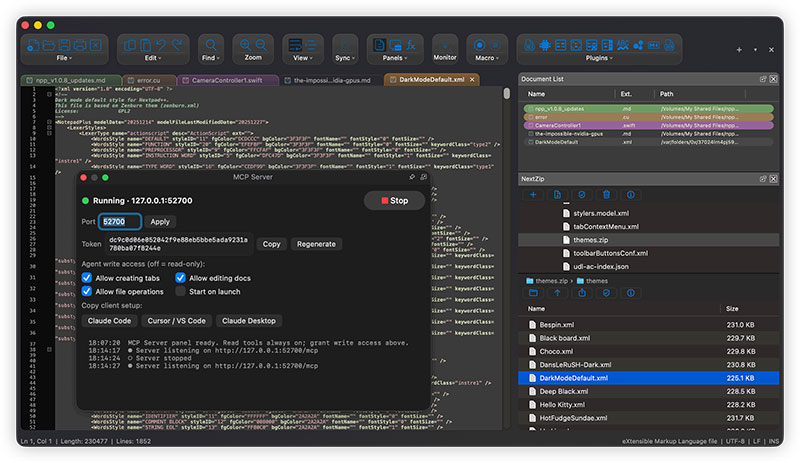
Take the Notepad++ source code, swap the Win32 front end for a Cocoa interface, keep the Scintilla editing engine, and you get Nextpad++. It’s a free text and code editor under GPL v3, with no ads, no subscriptions and no paid tiers.
Letov maintains it, with contributors working in the nextpad-plus-plus GitHub organization (nextpad.org). The code is Objective-C++ on Apple’s Cocoa APIs (MacRumors). It ships as a Universal Binary with arm64 and x86\_64 slices, so Apple silicon Macs don’t need Rosetta 2. It has no affiliation with the Notepad++ project or Don Ho.
Letov released versions 1.0.0 through 1.0.5 as Notepad++ for macOS. Version 1.0.6, published May 12, 2026, was the first under the Nextpad++ name, per the project’s GitHub release notes.
The rename followed a trademark objection. Ho took issue with the Notepad++ name and logo, and with his own biography appearing on the port’s author page (Tom’s Hardware, 2026).
His objection covered branding, not the code, since the GPL v3 permits forks. His May 5 note gives the reason: he cannot take responsibility for the long-term maintenance or security of a project he does not manage.
Letov describes the new name as a nod to NeXT, the company whose operating system became the base of Mac OS X (Born City, 2026).
How to Install Nextpad++ on a Mac
Download the DMG from nextpad.org and drag Nextpad++ into Applications. Apple notarized the build, so Gatekeeper shows no unidentified developer warning on first launch.
- Download the universal DMG from nextpad.org/download or the project’s GitHub releases page. It is about 12 MB, and the installed app takes about 50 MB (nextpad.org, 2026).
- Open the DMG.
- Drag the Nextpad++ icon to the Applications folder.
- Launch it from Applications or Spotlight.
- Optional: verify the signature in Terminal with
codesign -dv --verbose=4 /Applications/Nextpad++.app, thenspctl -a -vvv -t execute /Applications/Nextpad++.app. A healthy install reports source=Notarized Developer ID. - Open Preferences, then File Associations, to make Nextpad++ the default app for your file types (added in v1.1.0).
The app runs natively on Apple silicon (M1 to M5) and on Intel. Plan on 4 GB of RAM at minimum, 8 GB if you have it, and macOS 12 Monterey or later, according to the v1.1.0 and v1.1.2 release notes.
The download page contradicts itself on that last point. Its description says macOS 12+, while its requirements block still lists macOS 11 Big Sur, so check the release notes for the version you download.
Homebrew users can run brew install --cask nextpad++. Direct downloads do not auto-update. The Check for Updates item in the Nextpad++ menu shows a green or yellow light, and v1.1.0 added a daily in-app notification when a new version is out. A newer version means replacing the app with a fresh download, while Homebrew users can run brew upgrade --cask nextpad++ instead.
Stick to nextpad.org or the GitHub repository. Notepad++ Community moderators have deleted links to third-party “alternative” blogs, calling them outdated or possibly malicious downloads.
Which Notepad++ Features and Plugins Work on Mac?
Core editing carries over almost intact. Plugins are the gap, because each one needs its own macOS port.
Core editing features
Nextpad++ ships syntax highlighting for 80+ languages and an interface in 137 languages (nextpad.org, 2026). The editing side covers what Notepad++ regulars expect:
- Regex search, find in files, bookmarks and incremental search
- Split view and tabbed editing
- Macro recording and replay, plus import of macros recorded on Windows from a shortcuts.xml file (v1.0.8)
- Running a saved macro across a whole folder or project (v1.0.7)
- Column selection with multi-cursor editing (v1.0.8)
- The full Windows-parity Character sets menu for encodings (v1.1.0)
One documented limit. The default regex engine works per line, so multi-line patterns and lookbehind need the optional Boost.Regex backend in Preferences, plus a restart (GitHub release notes, v1.0.8).
Plugins and Plugin Admin
Windows plugin DLLs do not load on a Mac.
The plugin system was rebuilt around macOS .dylib extensions, and the community ports plugins one at a time (PurePC, 2026). Plugin Admin installs them from a public registry on GitHub, where each plugin ships as a universal arm64 and x86\_64 build.
The catalog grew from 34 plugins in v1.0.8 (June 16) to 55 in v1.0.9 (July 9) and 60 in v1.1.0 (August 4), per the project’s GitHub release notes.
Ported names include ComparePlus, NppFTP, XML Tools, DSpellCheck and NextZip, a 7-Zip-based archive browser that also ships as a standalone app.
If a plugin you depend on is not in the catalog, it does not work on the Mac. The project says porting all Windows plugins is the plan, and its v1.1.2 notes announce 1.1.3 as the plugin release.
Shortcuts and menus
Menus, dialogs, file pickers and windowing use native Cocoa APIs, so the app behaves like a Mac app even where the editing matches Windows (Mactrast, 2026).
From Windows, it keeps the classic menu layout as the default, an optional flat set of the old toolbar icons (v1.0.9) and a Shortcut Mapper for remapping Scintilla commands.
The Mac side adds an optional macOS-style menu layout, still in beta (v1.0.9), and real macOS defaults shown in the Shortcut Mapper (v1.1.1). Command-P prints, Finder gets an “Open with Nextpad++” item, and Terminal gets an npp command.
Expect macOS shortcut defaults out of the box, then remap whatever you miss from Windows.
When Nextpad++ Is the Wrong Choice
Letov told Ars Technica he built the app and its website largely with an AI coding tool, Claude CLI, running multiple agents (Ars Technica, May 2026, as relayed by Clubic). The project’s own Author page credits multi-agent AI workflows for making a one-person project of this scale practical, as quoted by Daring Fireball in May 2026.
AI authorship is not a defect by itself. What matters for a daily editor is how it behaves, and early reviewers found rough edges.
Daring Fireball’s May 12, 2026 review flagged several of them:
- Document tabs close on mouse down, not on release
- The default font was 10-point Courier New
- An antialiasing menu with four options, where the default is not the one labeled Default
- Promotional screenshots showing 50 toolbar buttons
One of those has a documented fix, since the v1.0.9 release notes set the default font to Menlo 11. The notes say nothing about the tab-close behavior or the antialiasing default.
Maintenance is the quieter risk. Releases on the project’s GitHub page come from one account, Letov’s, and a May report noted his early commits ran only through March and April (Neuronfeed, 2026).
Later activity softens that concern. Version 1.0.9 merged 15 community pull requests, per the GitHub release notes, though the project still describes itself as a one-person effort.
On trust, the project points to Developer ID signing and Apple notarization, plus a no-telemetry statement. It says the app’s only network traffic is Plugin Admin fetching the plugin registry from GitHub (nextpad.org, 2026). Those are the project’s own statements, and the public source code is the way to check them.
If your employer requires software from a named vendor, or your workflow depends on a Windows-only plugin, look elsewhere. Same if you’d rather have a team behind your editor than one person.
Can You Still Run the Windows Notepad++ With Wine, CrossOver or a Virtual Machine?
Yes, all of them still work. Wine and CrossOver lean on Rosetta 2, and a virtual machine needs a Windows license plus an Arm guest.
Wine and Homebrew
The Homebrew route broke in September 2026. The wine-stable cask was disabled on 2026-09-01 because it fails the macOS Gatekeeper check (Homebrew formulae, 2026).
Homebrew 5.0.0 had announced that casks failing Gatekeeper would be disabled in September 2026 (Homebrew blog, November 2025). The cask was also an Intel build, so Apple silicon Macs needed Rosetta 2 to run it.
Apple’s schedule adds a second limit. Rosetta stays available as a general-purpose tool through macOS 27, and later releases narrow it to older unmaintained games (MacRumors, 2026, citing Apple).
On the plus side, Wine is free, needs no Windows license and runs beside native Mac apps (CleverFiles guide). The downsides are bigger. The Homebrew cask is disabled, Apple silicon still depends on Rosetta 2, and minor bugs are expected under Wine (CleverFiles guide). If a wrapper fails on your macOS version, the Notepad++ team says it cannot fix that (older Notepad++ Community forum thread).
CrossOver
CrossOver costs $74 for a license with 12 months of support and upgrades, or $494 for lifetime support, with a 14-day free trial available (CodeWeavers store, June 2026).
CodeWeavers says it runs Windows apps without a second operating system license. Its 2020 Apple silicon announcement described a method built on Rosetta 2 (AppleInsider, 2020), so confirm the vendor’s current plans before paying for the lifetime tier.
You get paid support, no Windows license and a trial to test Notepad++ before buying. The catch is paying to run the Windows build of an editor that now has a free native port.
Virtual machines
| Tool | Cost | Apple silicon note |
|---|---|---|
| Parallels Desktop | Paid | Windows 11 on Arm, Microsoft-authorized |
| VMware Fusion Pro | Free | Arm guests only |
| UTM | Free (App Store build is paid, identical) | Arm64 near native, x86 emulated |
Parallels says it is the only Microsoft-authorized way to run Windows 11 on M-series Macs (Parallels website, 2026). Fusion Pro is free through Broadcom’s support portal, and as of August 2026 its free-use license covers personal, educational and commercial use. The UTM project says its App Store build matches the free download.
Notepad++ publishes an ARM64 installer next to its x64 and x86 builds (Notepad++ downloads page, v8.9.8.1, released September 24, 2026). Inside a Windows 11 on Arm guest, the editor runs without x86 translation.
A virtual machine gives you the official, current build in a full Windows environment, and clipboard sharing between guest and Mac works too (CleverFiles guide). The cost is that Windows needs its own license in every case, and you’re booting an entire guest operating system just for a text editor.
Which Notepad++ Alternatives for Mac Are Worth Using?
The closest clone is NotepadNext. BBEdit is the Mac-native professional option, CotEditor the free lightweight one, Sublime Text follows you across operating systems on one license, and Visual Studio Code suits extension-heavy work.
NotepadNext
NotepadNext reimplements Notepad++ across platforms instead of porting its code, and it has macOS disk images on GitHub. It’s free and the layout feels familiar. Version 0.15 (September 22, 2026) added line search with bookmarking, UTF-16 support and improved macOS text-navigation key bindings.
The downsides are in its own documentation. The README says it should not be considered safe for critically important work, and v0.14 (April 27, 2026) patched CVE-2026-42214, a code execution flaw in filename extension handling.
The README also tells Mac users who see a “damaged” warning to clear the quarantine flag with xattr -d com.apple.quarantine /Applications/NotepadNext.app, because the build is not signed through Apple’s paid developer program. Homebrew deprecated its own –no-quarantine flag in 5.0.0, so expect that extra step with either install route.
BBEdit
John Gruber calls Notepad++ the rough Windows peer of BBEdit (Daring Fireball, 2026), and the feature list backs that up: grep pattern matching, multi-file search and replace, code folding, FTP and SFTP, and Git integration (Bare Bones).
You get a 30-day evaluation, then a free mode with no nag screens. BBEdit 16 requires macOS 14 or later, though, and its exclusive features need a license or Mac App Store subscription.
CotEditor
CotEditor is free, open source and built only for macOS. It comes with more than 60 pre-installed syntax languages, ICU regular expression search, split editing and automatic backup, and it warns you when characters cannot convert to a chosen encoding (CotEditor site). What it lacks is a plugin catalog. It extends through scripts you write in Python, Ruby, Perl, PHP, shell, AppleScript or JavaScript.
Sublime Text
A personal license costs $99 and includes three years of updates, after which an upgrade is required for further updates (Sublime HQ store, 2026). One license key covers all your computers and operating systems, which helps if you split time between Windows and Mac. It’s free to evaluate, but continued use needs a purchase.
Visual Studio Code
VS Code is free, with a Universal build for Apple silicon and Intel, weekly releases with auto-update, and Marketplace extensions for languages and debuggers, plus formatters (VS Code documentation, October 2026). It’s also a full development environment built around workspaces and integrated tooling, which is more than a quick-edit replacement needs.
Which Route Fits Which Mac User?
Install Nextpad++ if you want Notepad++ habits on macOS and rely on no Windows-only plugin. Use a virtual machine if you do rely on one, and pick a native editor if you want vendor support.
| Route | Cost | Apple silicon | Best for |
|---|---|---|---|
| Nextpad++ | Free | Native, no Rosetta 2 | Windows habits, no plugin dependency |
| Wine or CrossOver | Wine free, CrossOver $74 | Through Rosetta 2 | Short-term Windows plugin needs |
| Virtual machine | Fusion Pro and UTM free | Windows 11 on Arm, ARM64 build | Full plugin compatibility |
| Native alternative | CotEditor, VS Code free | Native | Mac workflow, vendor support |
Matching a route to your situation is mostly a plugin question:
- Nextpad++ if you want Windows habits and have no plugin dependency
- A virtual machine running the ARM64 build if a Windows-only plugin is something you cannot drop
- Sublime Text or NotepadNext if you work on Windows and Mac machines side by side
- BBEdit or Visual Studio Code if you need vendor support or a named publisher
- CotEditor if you want something free, light and Mac-like
The obvious advice, buy CrossOver, is the weakest option for this editor. Nextpad++ and NotepadNext are free, and CrossOver keeps you tied to Rosetta 2 while Apple narrows it.
For a plugin that only exists on Windows, a free Fusion Pro or UTM virtual machine beats Wine. It runs the current official ARM64 build and does not depend on Rosetta 2.
Notepad++ for Mac FAQ
Does macOS already include an editor like Notepad++?
Only partly. TextEdit ships with macOS, but it is the counterpart of Windows Notepad, not of Notepad++ (Daring Fireball, 2026).
New TextEdit documents open as rich text, so choose plain text under TextEdit, Settings, New Document before editing code (Apple Support).
Is Nextpad++ available on the Mac App Store?
The project does not list it there. Its download page offers a DMG, a Homebrew cask and a source build.
Releases are signed with a Developer ID certificate, the route for apps distributed outside the App Store (nextpad.org, 2026).
How do I uninstall Nextpad++ from a Mac?
Drag Nextpad++ from Applications to the Trash.
Settings, plugins and backups stay behind, so delete ~/Library/Application Support/Nextpad++ too. The project’s older help text still points to ~/.nextpad++, so check both folders (nextpad.org, 2026).
What is the right way to remove a CrossOver-installed Notepad++?
Delete the bottle that holds it. CrossOver places each Windows app in a bottle, a simulated Windows environment, and CodeWeavers states an app cannot be removed while the bottle stays intact.
Right-click the bottle in the sidebar and choose Delete Bottle.
Where do I change line endings and encoding in Nextpad++?
Open Edit, then EOL Conversion, to switch between Unix LF, Windows CR LF and old Mac CR. The Encoding menu covers UTF-8, UTF-8 with BOM, UTF-16 and Windows or ISO code pages.
Both settings apply per tab and take effect immediately (nextpad.org online help, 2026).
A Fallback Plan if the Notepad++ for Mac Port Stalls
Nextpad++, the port behind Notepad++ for Mac, needs a native fallback editor installed before updates stop. CotEditor fills that role and opens the same plain text files.
The stall signal is measurable. Gaps between the seven releases since May 12, 2026 ran 15 to 35 days, and the newest release was 9 days old on October 14, 2026.
Start with the cheapest check, which is listing your plugins and matching them against Plugin Admin. Then install CotEditor beside Nextpad++. A virtual machine only makes sense if a plugin has no port.
A release gap beyond 35 days is the cue to move daily work to the fallback.
The price of this plan is a second set of shortcuts to learn.

- Notepad++ for Mac: Does It Exist and What to Use Instead - November 13, 2026
- What Communications Teams Should Ask Before Commissioning a Mobile App - November 12, 2026
- How to Install Node JS in VS Code and Run Your First Script - November 11, 2026