Yes, Notepad++ is safe as long as you’re running a current release that came from notepad-plus-plus.org or the project’s GitHub releases page. The 2025 incident happened at the hosting provider. The editor’s code wasn’t the problem.
Between June and December 2, 2025, attackers redirected update traffic from certain targeted users (Notepad++ project, 2026). Kaspersky found three infection chains designed to hit about a dozen machines (Securelist, 2026), so the damage stayed narrow.
Version still matters. Security fixes kept shipping through 8.9.9 in November 2026, and older builds still carry those flaws.
Is Notepad++ safe to use in 2026?
Yes, on a current release downloaded from the official site. The editor itself wasn’t compromised in the 2025 incident.
The project’s own clarification says the app wasn’t hacked. What got abused was the auto-updater, WinGUp, through its former hosting provider’s infrastructure (Notepad++ project, February 2026). The community FAQ adds that the official notepad++.exe and the GitHub installers were not affected by the website compromise.
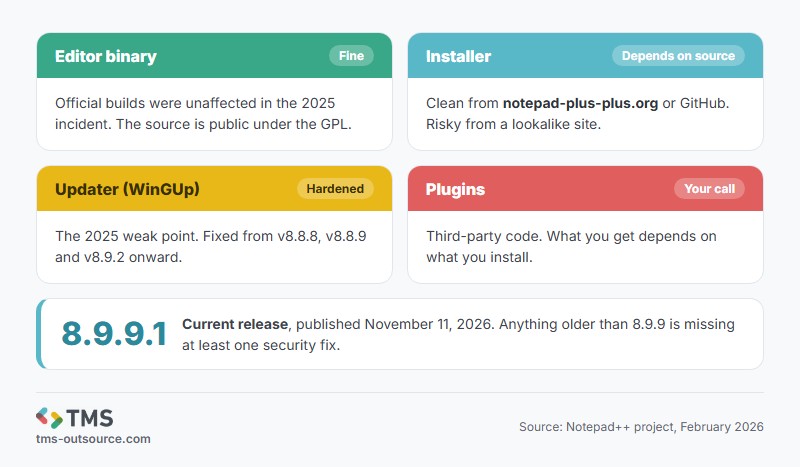
“Safe” means different things depending on which piece you’re asking about. The editor binary is fine as far as the project reports, since official builds were unaffected. The installer is clean when it comes from notepad-plus-plus.org or GitHub and risky when it comes from a lookalike site. The updater was the weak point in 2025, and it has been hardened from v8.8.8, v8.8.9 and v8.9.2 onward. Plugins are third-party code, so what you get there depends on what you install.
As of November 2026, the official downloads page lists version 8.9.9.1 (released November 11, 2026) as the current release.
Older builds are a different story. Security fixes shipped in nearly every release from 8.9.6 through 8.9.9 (May to November 2026), including code execution and privilege escalation bugs plus a few crash flaws. Anything older than 8.9.9 is missing at least one fix and needs a manual update.
Don Ho has maintained the editor since 2003 (PCWorld, 2026), and the source sits in a public GitHub repository under the GPL. Open code means anyone can audit it. Whether anyone actually has is a separate question.
If you’re new to the tool, a short primer on what the editor is built for covers the basics. The safety question mostly comes down to where the file comes from and which version runs.
Where is the official Notepad++ download, and which sites are fake?
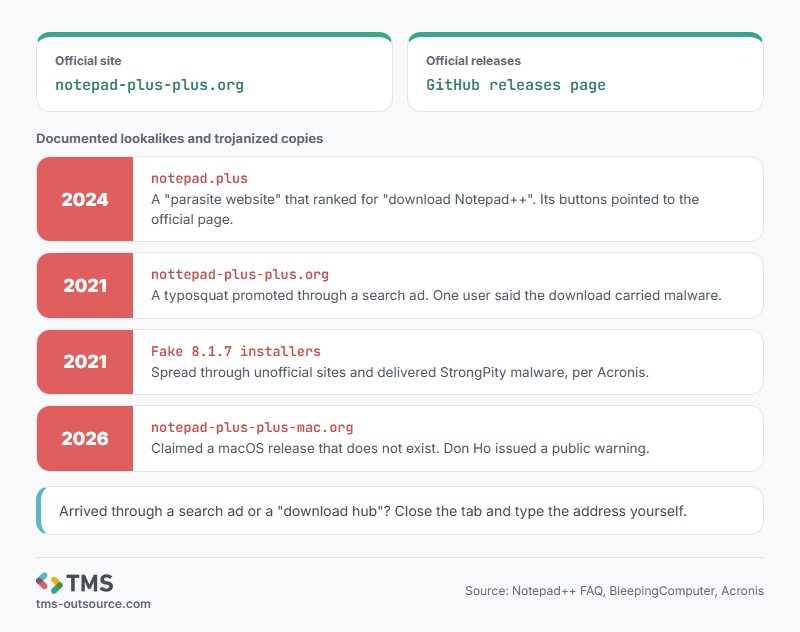
Two places count as official: notepad-plus-plus.org and the project’s GitHub releases page. Everything else is a mirror at best and a trap at worst.
The project’s FAQ points users to the GitHub release page for the recommended installer. If you haven’t pulled a release from there before, the steps for downloading a release from GitHub are short, and each release page also lists the SHA-256 and GPG files.
Every official release page links to a forum thread for reporting malicious ads that sit around the real download button.
Several lookalikes and trojanized copies have been documented over the years, and not all of them were harmless.
- notepad.plus is what the maintainer called a “parasite website” in April 2024. It ranked for “download Notepad++” and pulled traffic away from the real site (BleepingComputer). Its download buttons pointed to the official page when it was reported, so the harm there was confusion and ad-driven traffic diversion, not malware.
- nottepad-plus-plus.org was a typosquat reported on the project forum in January 2021 as a clone of the real site. It was promoted through a search ad, and one user said the download carried malware.
- In 2021, Acronis researchers documented fake Notepad++ installers (version 8.1.7) spread through unofficial sites that delivered StrongPity malware.
- There’s no official macOS release, but a site called notepad-plus-plus-mac.org claimed one and drew a public warning from Don Ho in 2026 (Cyber Security News).
Rule of thumb: if a search ad or a “download hub” brought you to the page, close the tab and type the address yourself.
How to verify a Notepad++ installer
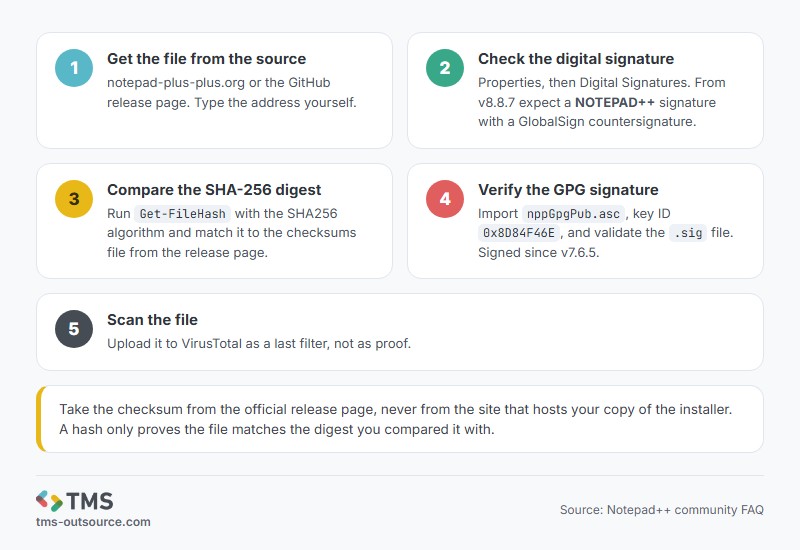
Before launching any installer, check the Windows digital signature, compare the SHA-256 digest, verify the GPG signature, and run the file through a multi-engine scan. The signature check goes first because the project’s own FAQ walks through it.
- Get the file from the source. Use notepad-plus-plus.org or the GitHub release page, and type the address yourself.
- Check the digital signature. Right-click the file, open Properties, then Digital Signatures. For notepad++.exe from v8.8.7 onward, the FAQ says the Embedded Signatures list should show a NOTEPAD++ signature with a GlobalSign countersignature.
- Compare the SHA-256 digest. Each release publishes a checksums file (npp.8.8.9.checksums.sha256 for v8.8.9) that carries its own GPG signature. In PowerShell, run Get-FileHash with the SHA256 algorithm on the installer and compare the result.
- Verify the GPG signature. Download the .sig file next to the package, import the release key (nppGpgPub.asc, key ID 0x8D84F46E) and validate. Packages have been GPG-signed since v7.6.5.
- Scan the file. Upload it to VirusTotal as a last filter, not as proof.
A hash only proves the file matches the digest you compared it with. It says nothing about who published that digest. Take the checksum from the official release page or the GitHub release, never from the site hosting your copy of the installer.
Where the checks fall short
Signatures depend on the version you have. v8.8.2 was not signed at all, and v8.8.3 to v8.8.6 used a self-signed certificate, so the signature check can’t return a clean result on those builds (Notepad++ community FAQ). The project’s advice for them is to run the v8.9.1 installer or newer.
The release GPG key listed in the repository README expires on March 13, 2027. After that date, look in the README for a replacement key before you verify anything.
Scanners only report what their engines recognize today. Kaspersky noted that the variety of infection chains in the 2025 attack made detection difficult.
What happened in the 2025 Notepad++ update hijack?
Attackers compromised the shared server that hosted Notepad++’s update script and redirected update requests from selected users to servers they controlled. The compromise sat in the hosting infrastructure, not in the editor’s code.

It started in June 2025 (Notepad++ project). The public report came on February 2, 2026, although the problem was first flagged with the v8.8.9 release in December 2025. The project’s incident response team went through about 400 GB of logs and found signs of intrusion but no concrete indicators of compromise. Neither the project nor Rapid7 has published a count of affected users.
When did the attack actually end?
Sources give different end dates because they measure different things.
| Date | What it marks | Reported by |
|---|---|---|
| September 2, 2025 | Attackers lose access to the shared hosting server | Hosting provider, via the project |
| November 10, 2025 | Attack activity stops, per a security expert’s analysis | Notepad++ project |
| December 2, 2025 | Retained internal credentials expire, remediation done | Hosting provider, via the project |
| June to November 2025 | Backdoor activity Rapid7 advises hunting for | Rapid7 |
HotHardware reported the hijack as June to September, while Dark Reading described nearly six months. One counts server access and the other counts retained credentials, which is where the gap comes from.
What the attackers delivered
Rapid7 attributed the campaign to Lotus Blossom with moderate confidence and named the payload Chrysalis, a previously undocumented custom backdoor (Rapid7, February 2026).
The only behavior Rapid7 confirmed from an affected machine was notepad++.exe, then GUP.exe, then a suspicious update.exe downloaded from an attacker-controlled server. Analysis of the extracted installer showed update.exe was an NSIS installer that dropped a renamed BluetoothService.exe, which sideloaded a malicious log.dll. A second loader it described ended in a Cobalt Strike beacon.
One thing is still unclear. Rapid7 states it found no definitive artifacts proving that either the plugin-replacement route or the updater itself was exploited. The project’s report ties the redirect to update traffic that older WinGUp versions could not verify.
Most users were never in the crosshairs. Help Net Security reported the general consensus that the attackers picked a small, specific set of targets.
How did Notepad++ fix WinGUp, and which versions are safe?
The full fix arrived in version 8.9.2 and newer, which add a check on a signed update manifest and a separate check on the signed installer. The project’s FAQ calls any valid v8.8.8 or newer safe, so 8.8.8 is the oldest release it vouches for.
How WinGUp decides what to install
With retained credentials, the attackers could redirect update download requests to their own servers and return compromised update URLs (Notepad++ project, 2026).
WinGUp requests a small XML file, reads the version number inside it, and downloads the installer if a newer one exists. The attackers forged that XML, so the updater followed a download location they chose, as Advanced Installer’s write-up explains.
Version-by-version changes
| Version | Date | Updater change |
|---|---|---|
| 8.8.7 and older | Before November 2025 | Unsigned update XML, no installer signature check |
| 8.8.8 | November 18, 2025 | Update procedure fixed so forged XML could no longer send WinGUp to a non-GitHub domain |
| 8.8.9 | December 9, 2025 | WinGUp verifies the installer’s certificate and signature |
| 8.9.2 | February 16, 2026 | Signed update XML (XMLDSig) with mandatory verification, libcurl.dll dependency removed, two insecure cURL SSL options removed |
The project’s own pages disagree on where the line sits. Its incident report says v8.9.1 includes the security enhancement while expecting enforcement in v8.9.2, and the v8.9.2 notes call the signed XML new in that release.
In practice, the 8.8.9 signature check stops a rogue installer from running, and 8.9.2 adds the second lock. Anything older than 8.8.9 needs a manual reinstall, which is what The Register reported the project recommending.
Should you keep auto-update on?
The v8.9.2 notes describe the new design as effectively unexploitable. That’s the vendor’s own assessment, and later releases show the updater still needed work. A Zip Slip path-traversal flaw in WinGUp (CVE-2026-57233) was fixed in 8.9.7, and an Authenticode verification bypass and a TOCTOU issue in the updater were fixed in 8.9.8.
Leave it on if you run the current release and want fixes to arrive without reading release notes. Turn it off if IT deploys the MSI with NOUPDATER=1, or if you uncheck the updater during a manual install. The project documents both routes.
Fixes kept landing through 2026 (see the CVE list below), so an updater switched off without a manual patch routine costs more than it saves.
Notepad++ CVEs and the version that fixes each
The table lists the CVEs that matter most through 8.9.7. Releases 8.9.8, 8.9.8.1 and 8.9.9 added many more fixes, so the practical floor is the current release rather than any older cut-off. A build older than 8.9.9 carries at least one fixed flaw.
| CVE | Flaw | Fixed in |
|---|---|---|
| CVE-2025-49144 | Installer looks for regsvr32 in its own folder before system paths, giving local privilege escalation to SYSTEM | 8.8.2 |
| CVE-2025-15556 | WinGUp updater lacks update integrity verification (CVSS 4.0 score 7.7) | 8.8.9 |
| CVE-2026-25926 | Explorer launched without an absolute path (untrusted search path) | 8.9.2 |
| CVE-2026-46710 | Installer privilege escalation: powershell.exe launched without an absolute path (affects 8.9.4 and 8.9.5 only) | 8.9.6 |
| CVE-2026-48770 | Crash (denial of service) from a malformed WM_COPYDATA message, CVSS 5.0 | 8.9.6.1 |
| CVE-2026-48778 | Unvalidated commandLineInterpreter value in config.xml | 8.9.6.1 |
| CVE-2026-48800 | Same pattern in shortcuts.xml command entries | 8.9.6.1 |
| CVE-2026-52884 | Path-traversal bypass of the CVE-2026-48800 fix | 8.9.6.2 |
| CVE-2026-54758 | Stack buffer overflow in environment-variable expansion, CVSS 7.8 | 8.9.7 |
| CVE-2026-57233 | Zip Slip path traversal in WinGUp plugin extraction, CVSS 8.1 | 8.9.7 |
| CVE-2026-52886 | session.xml backupFilePath validation bypass | 8.9.7 |
| Later fixes | 14 security fixes in 8.9.8 (August 23, 2026), five in 8.9.8.1 (September 24), six in 8.9.9 (November 6); several had no CVE ID at release | 8.9.8 to 8.9.9 |
The two search-path flaws, CVE-2025-49144 and CVE-2026-25926, both carry a CVSS 3.1 base score of 7.3 in the project’s GitHub advisories. CVE-2026-48778 and CVE-2026-48800 both score 7.8 (High) in their CVE records, as mirrored by OSV.
Sources split on two boundaries. AhnLab’s advisory lists CVE-2025-15556 as affecting 8.8.9 and earlier, while the CVE record lists versions below 8.8.9. The project shipped the fix in 8.8.9, so treat 8.8.9 as patched. AhnLab also lists CVE-2026-48800 as fixed in 8.9.6.2, while the project’s 8.9.6.1 notes list the fix there. The difference is the follow-up bypass, CVE-2026-52884, patched in 8.9.6.2, so treat 8.9.6.2 as the first build with both closed.
What the advisories have in common
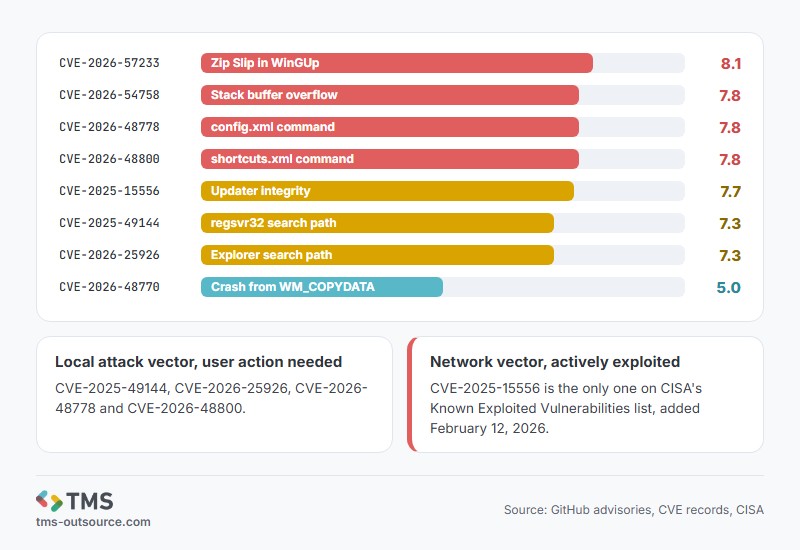
Four of the five CVEs with a retrieved CVSS vector (49144, 25926, 48778 and 48800) have a local attack vector and need a user action. CVE-2025-15556 is the exception. It’s the only one with a network vector, and the only one CISA added to its Known Exploited Vulnerabilities catalog, on February 12, 2026.
The weakness types shifted over time too. Two early flaws are search-path problems (CWE-427, CWE-426), then the 2026 config flaws turn into OS command injection (CWE-78).
Where the local flaws matter most
CVE-2026-48778 needs a config.xml in %APPDATA%\Notepad++ that a lower-privileged process or user can write to. Secure ISS rates the risk higher where configuration locations are shared, redirected or cloud-synced.
On a single-user home PC, the local flaws are low risk once patched. On shared or managed machines, patch them first.
Are Notepad++ plugins safe to install?
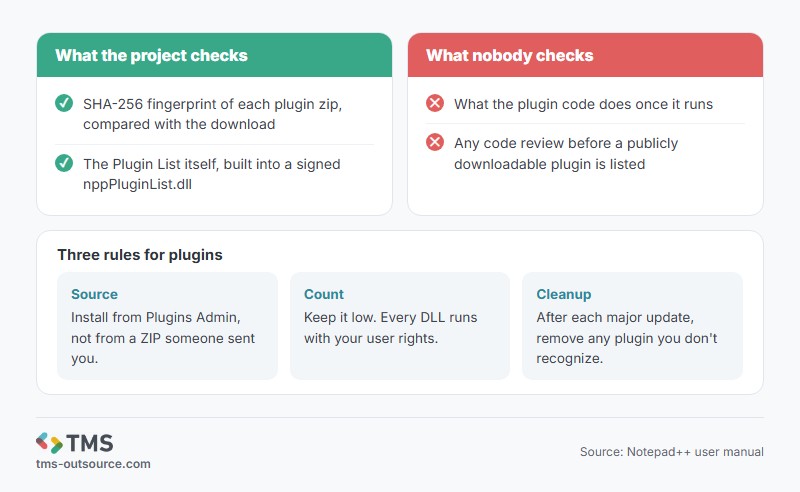
Plugins are the least-vetted part of Notepad++. The official Plugin List accepts any publicly downloadable plugin, and the manual describes only a hash comparison and a signed list build, not a code review.
Plugins are DLLs that sit in a plugins folder inside the install directory, in a subfolder named after the DLL. Adding or removing that DLL is enough to change which plugins load.
The project does check two things. Each Plugin List entry carries the SHA-256 fingerprint of the plugin’s zip, and Notepad++ compares the download against it. The list itself is built into nppPluginList.dll, which is signed before it ships. What nobody checks is what the plugin code does once it runs.
Ukraine’s CERT-UA documented a campaign in July 2026 that distributed an archive holding a legitimate Notepad++ and a malicious DLL disguised as a plugin. The DLL, a fake NppExport.dll called LunchPoke, loaded through the normal plugin mechanism and created a scheduled task for persistence.
That campaign abused plugin loading as a feature rather than exploiting a new Notepad++ flaw. Coverage of the CERT-UA report adds that the Notepad++ team disputes CVE-2025-56383, a DLL-hijacking report against v8.8.3, as standard plugin architecture.
Rules worth following
Install from Plugins Admin, not from a ZIP someone sent you. Keep the plugin count low, because every DLL runs with your user rights. And after each major update, open the plugins folder and remove anything you don’t recognize.
The manual itself says to install a plugin only if you trust its source, and warns that Windows may block downloaded DLLs until you unblock them. Unblocking is a trust decision, so treat it like one. A walkthrough for installing plugins in the editor covers the mechanics.
How to check whether the 2025 hijack affected your PC
Start with the dates: did the updater run inside the attack window? Then look for the process chain Rapid7 documented, and for any contact with servers outside the official update path. A match means a full compromise, not a cleanup job.
Who was in scope
Kaspersky counted three infection chains designed to attack about a dozen machines, so the selection was narrow. Its list included a government organisation in the Philippines and a financial institution in El Salvador, along with an IT service provider in Vietnam. Individuals in Vietnam, El Salvador and Australia were also hit.
The time windows differ by team. Rapid7 gives June to November 2025 for backdoor activity, Kaspersky’s telemetry covers July to October 2025, and the project’s estimate runs to December 2. Each reflects what that team could see.
For builds older than v8.8.2 (June 2025), the project’s FAQ says it is self-evident the auto-updater was not in use, so there’s nothing to worry about.
What to look for on the machine
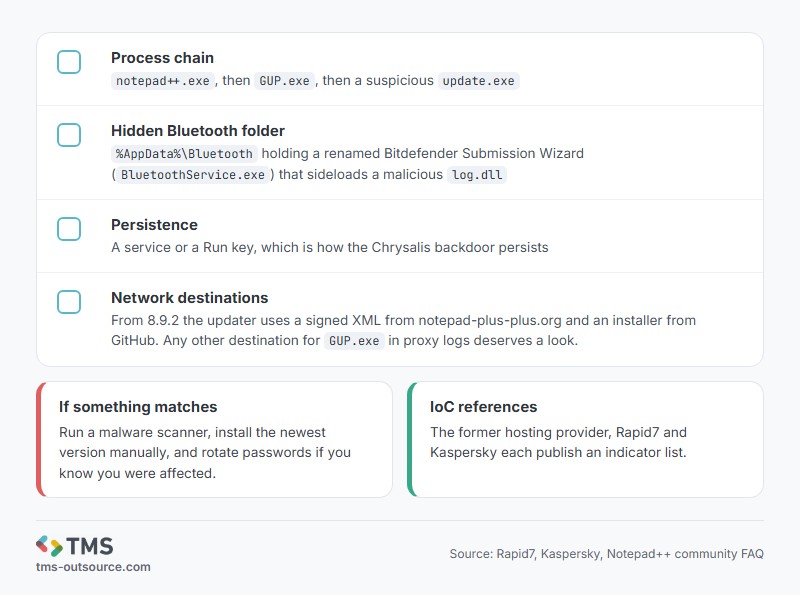
The clearest sign is the process chain: notepad++.exe, then GUP.exe, then a suspicious update.exe. Beyond that, a few other traces are worth a look.
- A hidden %AppData%\Bluetooth folder holding a renamed Bitdefender Submission Wizard (BluetoothService.exe) that sideloads a malicious log.dll.
- A service or a Run key, which is how the Chrysalis backdoor persists.
- Network destinations. From 8.9.2 the updater checks a signed XML from notepad-plus-plus.org and an installer from GitHub, so any other destination for GUP.exe in proxy logs deserves a look.
If something matches
The project’s community FAQ says to run a malware scanner, then install the newest version manually, and to rotate passwords if you know you were affected.
The official clarification page links the IoC lists from the former hosting provider, Rapid7 and Kaspersky but gives no machine-level checks of its own, so those three lists are the reference.
How to stay patched afterward
Compare your installed version with the one on the downloads page after every release announcement. The project publishes its CVE fixes in the GitHub repository, so watching it for releases and security advisories works well too. If you ever find a build older than 8.8.9, reinstall by hand, since its updater cannot verify anything.
Notepad++ Safety FAQ
Does Notepad++ update itself automatically, and how often?
Yes, when you installed it with the installer package. WinGUp checks every 15 days, and the project holds each new release back, often for one to two weeks, to catch regressions (Notepad++ user manual).
The manual update command respects that same delay, so for an urgent security fix, download the installer from the release page yourself.
Is the portable version of Notepad++ safer than the installer?
Partly. The manual ties the auto-updater to the installation package, and forum reports confirm the portable archives omit it, so the WinGUp attack path is absent. The mini-portable edition also ships without plugins or Plugins Admin.
The cost is manual updating, and the download still needs the signature and SHA-256 checks.
Should I uninstall Notepad++ and use Windows Notepad instead?
Only if you don’t need its features. The University of Kentucky’s IT advisory (February 4, 2026) told users to uninstall every version and manually install 8.9.1, and offered uninstalling plus Windows Notepad as the alternative for people who need no Notepad++ specific features.
Version 8.9.1 predates many later CVE fixes, so install the current release instead.
Is an old Notepad++ version safe on an offline PC?
No, not fully. An offline machine avoids update hijacking, which needs network traffic, but local flaws still apply. CVE-2025-49144 affects versions through 8.8.1, CVE-2026-48778 affects versions before 8.9.6.1, and CVE-2026-54758 affects versions before 8.9.7.
Move the installer over on a clean drive after verifying its signature and digest.
Can I install or update Notepad++ with winget?
Yes, with winget install -e --id Notepad++.Notepad++. Keep in mind that a package manager adds a second party between you and the project.
Close Notepad++ before upgrading. The project forum documents winget reporting a successful update while a running Notepad++ blocked the real install.
Is Notepad++ Still Worth Keeping Installed?
Yes. Notepad++ remains a sound choice on the current release, 8.9.9.1. Every release from 8.9.6 through 8.9.9 shipped security fixes, so no older build is a safe floor.
Patch in this order. Verify the signature and SHA-256 digest first, because an unchecked installer undoes every later step. Then install the current 8.9.9.1 build, and remove any plugins you don’t use.
The cost is manual work. Portable builds and MSI installs with NOUPDATER=1 never self-update, so patching depends on you checking the release page.
This position was checked on November 20, 2026, and a new updater or signing flaw in a release after 8.9.9.1 would change it.
Anyone still weighing a switch can read Notepad++ vs Notepad for the feature gap.

- Is Notepad++ Safe? Official Download, Updates, CVEs - November 29, 2026
- How to Evaluate an AI Code Reviewer on Your Own Pull Requests - November 29, 2026
- Outsourcing Medical Device Software Securely - November 28, 2026