BandLab hit 100 million users in 2024. That number says a lot about what people want from a music production app: free access, no friction, and a community built in.
But BandLab isn’t the right fit for everyone. Track limits, no VST plugin support, and browser dependency push producers toward alternatives, whether they need better mixing tools, offline recording, or a more advanced mobile DAW.
This guide covers the best apps like BandLab across every use case: free desktop DAWs, mobile recording studios, online collaboration platforms, and professional-grade tools for producers ready to go deeper.
Whether you’re a bedroom producer, a remote band, or someone who’s simply outgrown BandLab’s feature set, there’s a music creation platform here that fits.
Apps Like BandLab
Whether you’ve hit BandLab’s track limits, want offline recording, or just need more mixing control, there’s a solid list of free DAW apps and mobile recording studios worth looking at. Some are cloud-based. Some are desktop-only. A few cost nothing at all.
Here’s a breakdown of the best options available right now.
GarageBand

GarageBand is a free digital audio workstation built by Apple for Mac, iPhone, and iPad users. It offers multitrack recording (up to 32 tracks), Smart Instruments, session drummers, and a large loop library for home studio music creation.
What Does GarageBand Do?
GarageBand lets users record, mix, and produce music across Apple devices using a full set of virtual instruments, audio effects, and MIDI tools.
How Is GarageBand Similar to BandLab?
Both are free music production apps aimed at beginners and intermediate producers. Both support multitrack recording, loop libraries, and mobile music creation. Neither requires a paid subscription to access core features.
How Is GarageBand Different from BandLab?
GarageBand is Apple-only. No Android, no Windows. BandLab runs in any browser and supports cross-platform collaboration, which GarageBand does not. GarageBand also lacks a built-in music social network or cloud-based music sharing community.
Who Is GarageBand Best For?
GarageBand suits solo musicians on Apple devices who want a high-quality free DAW without needing real-time collaboration or a music sharing platform.
Key Features of GarageBand
- Multitrack recording: Up to 32 tracks per project
- Smart Instruments: Play chords and patterns with no prior instrument knowledge
- Session Drummers: 28+ virtual drummers with customizable styles
- Podcast recording: Built-in templates for audio content creation
Pricing
- Free plan: Yes, fully free on all Apple devices
- Paid plans: None
- Free trial: N/A
FL Studio Mobile
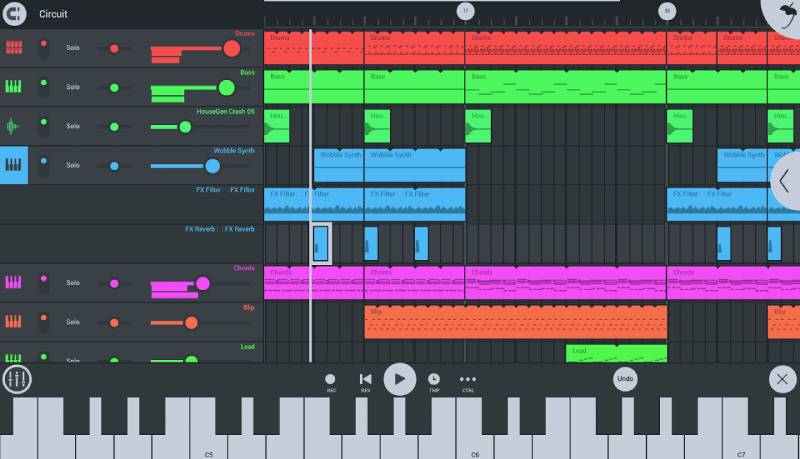
FL Studio Mobile is a paid mobile DAW developed by Image-Line that brings beat making and multitrack production to Android and iOS. It’s one of the most recognized mobile music creation tools for producers who work on the go.
What Does FL Studio Mobile Do?
FL Studio Mobile lets users create beats, record audio, sequence MIDI, and mix full tracks on a smartphone or tablet using a step sequencer, piano roll, and built-in synthesizers.
How Is FL Studio Mobile Similar to BandLab?
Both run on Android and iOS and support multitrack recording and beat making on mobile. Both include loop libraries, virtual instruments, and audio mixing tools built for the bedroom producer audience.
How Is FL Studio Mobile Different from BandLab?
FL Studio Mobile is a one-time paid purchase with no free tier. BandLab is completely free. FL Studio Mobile also lacks the social features and music sharing community that BandLab offers. On the flip side, FL Studio Mobile’s step sequencer and piano roll are significantly more advanced.
Who Is FL Studio Mobile Best For?
FL Studio Mobile suits beat makers and hip hop producers on Android or iOS who want serious music production tools on mobile and don’t need social or collaboration features.
Key Features of FL Studio Mobile
- Step sequencer: Pattern-based beat making workflow
- Piano roll: Detailed MIDI note editing with velocity control
- High-quality synthesizers: Built-in synths including 3xOSC and DirectWave
- Desktop export: Projects export directly to FL Studio desktop
Pricing
- Free plan: No
- Paid plans: $14.99 one-time purchase on iOS and Android
- Free trial: No
Soundtrap
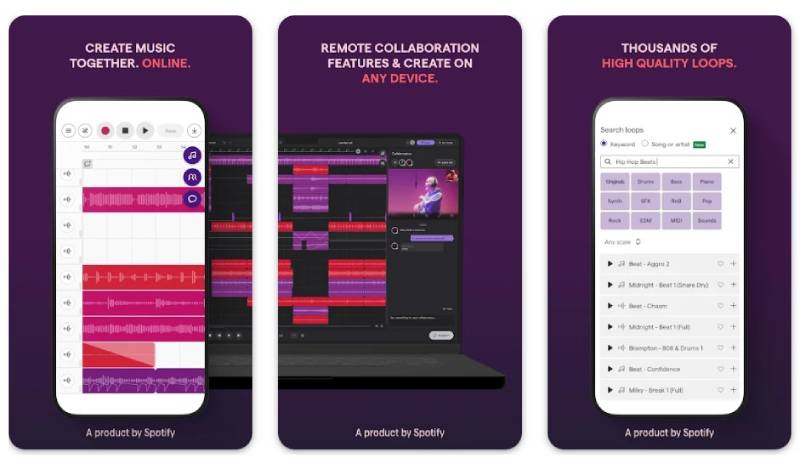
Soundtrap is a cloud-based online DAW owned by Spotify. It runs entirely in the browser and supports real-time music collaboration, podcast recording, and direct Spotify publishing. Popular in education settings and used widely by songwriters and remote bands.
What Does Soundtrap Do?
Soundtrap lets users record, mix, and collaborate on music or podcasts through a browser-based DAW, with access to loops, virtual instruments, and a built-in beat maker.
How Is Soundtrap Similar to BandLab?
Both are browser-based music creation platforms with real-time collaboration tools. Both offer loop libraries, virtual instruments, and free tiers. Both target beginner to intermediate producers looking for accessible online music studio tools.
How Is Soundtrap Different from BandLab?
Soundtrap requires a paid subscription for full access. BandLab is completely free with no premium tier. Soundtrap integrates with Google Classroom and lets podcasters publish directly to Spotify, neither of which BandLab supports. Soundtrap also applies mix-ready presets to tracks by default, which BandLab does not.
Who Is Soundtrap Best For?
Soundtrap suits students, educators, and remote songwriters who need a collaborative online DAW with Google Classroom integration and podcast publishing tools.
Key Features of Soundtrap
- Real-time collaboration: Multiple users editing the same project simultaneously
- Podcast mode: Direct publishing to Spotify
- Google Classroom integration: Assignment management for music education
- Antares Auto-Tune: Built-in pitch correction on higher plans
Pricing
- Free plan: Yes, with limited loops and features
- Paid plans: Starting at $9.99/month
- Free trial: Yes
LMMS

LMMS (Linux MultiMedia Studio) is a free, open-source DAW available on Windows, macOS, and Linux. It’s built around MIDI sequencing and electronic music production, with a workflow that closely mirrors FL Studio. You can even run it off a USB drive.
What Does LMMS Do?
LMMS lets users create beats, sequence MIDI, and produce electronic music using built-in synthesizers, a drum machine, and a piano roll, all without internet access.
How Is LMMS Similar to BandLab?
Both are completely free with no subscription. Both include built-in synthesizers, beat creation tools, and MIDI sequencing. Both target beginner and intermediate music producers who want free music software without upfront costs.
How Is LMMS Different from BandLab?
LMMS is desktop-only and works offline. BandLab is browser-based with cloud storage and social features. LMMS has no music sharing community or collaboration tools. Its interface also has a steeper learning curve and can feel cluttered compared to BandLab’s cleaner layout.
Who Is LMMS Best For?
LMMS suits Windows, macOS, or Linux users focused on electronic music production and MIDI-heavy workflows who don’t need online collaboration or social features.
Key Features of LMMS
- Beat+Bassline Editor: Pattern-based drum and bass sequencing
- Built-in synthesizers: ZynAddSubFX, Triple Oscillator, and more
- VST support: Compatible with most third-party VST plugins
- Portable install: Can run from a USB drive on any supported OS
Pricing
- Free plan: Yes, fully free and open-source
- Paid plans: None
- Free trial: N/A
Audacity

Audacity is a free, open-source audio editing app that’s been around since 2000 and still gets regular updates. It’s not a full DAW in the traditional sense, but it handles multitrack recording, audio editing, and effects processing well. The newer versions added AI-powered noise removal, which is a nice touch.
What Does Audacity Do?
Audacity lets users record, edit, and process audio across multiple tracks on Windows, macOS, and Linux, with support for effects, filters, and spectral analysis tools.
How Is Audacity Similar to BandLab?
Both are free tools that support multitrack recording and audio editing. Both work across major platforms and target users who need accessible audio editing tools without paying a subscription fee.
How Is Audacity Different from BandLab?
Audacity is purely an audio editor with no MIDI sequencing, no loop library, no beat maker, and no social features. BandLab is a full music production platform. Audacity is better suited for podcast editing and audio cleanup than for original music creation.
Who Is Audacity Best For?
Audacity suits podcasters, voice-over artists, and musicians who need a reliable free tool for audio recording and editing without MIDI or beat creation needs.
Key Features of Audacity
- Multitrack recording: Record multiple audio sources simultaneously
- Spectrogram view: Frequency analysis for detailed audio editing
- AI noise removal: Added in recent versions for cleaner recordings
- Cross-platform: Windows, macOS, and Linux support
Pricing
- Free plan: Yes, fully free and open-source
- Paid plans: None
- Free trial: N/A
REAPER
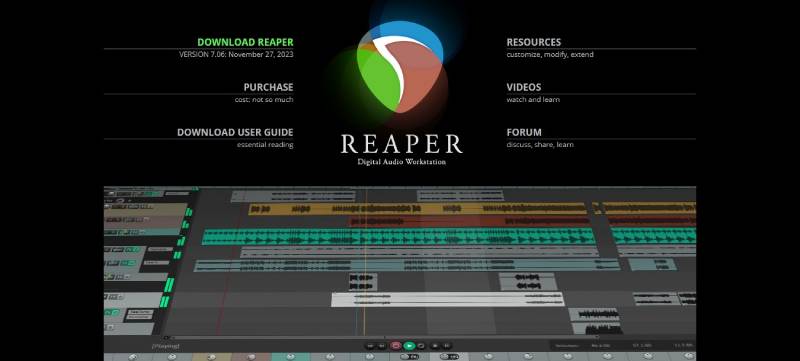
REAPER is a lightweight, highly customizable DAW from Cockos that runs on Windows, macOS, and Linux. At $60 for a personal license, it’s one of the best-value digital audio workstation options available. One purchase covers two full version releases, which often works out to several years of updates.
What Does REAPER Do?
REAPER lets users record unlimited audio and MIDI tracks, mix with professional-grade routing, apply VST/VST3/AU plugins, and customize virtually every aspect of the interface using scripts and macros.
How Is REAPER Similar to BandLab?
Both support multitrack recording, audio mixing, and MIDI sequencing. Both serve music producers looking for capable production tools. REAPER’s 60-day free trial also gives it an accessible entry point similar to BandLab’s free model.
How Is REAPER Different from BandLab?
REAPER is a desktop DAW with no browser access, no cloud sync, and no social features. It’s significantly more advanced than BandLab, with unlimited track counts (versus BandLab’s 16-32 cap), full VST plugin support, and deep audio routing capabilities. It has a steeper learning curve too.
Who Is REAPER Best For?
REAPER suits intermediate to advanced producers, podcasters, and sound designers on any desktop OS who need professional-grade audio tools at a low one-time cost.
Key Features of REAPER
- Unlimited tracks: No cap on audio or MIDI track count
- Plugin support: VST, VST3, AU, LV2, CLAP, and JS formats
- Portable install: Runs from a USB drive on Windows, Mac, or Linux
- Custom scripting: Lua and Python scripting for workflow automation
Pricing
- Free plan: No (60-day free trial with full functionality)
- Paid plans: $60 discounted license / $225 commercial license (one-time)
- Free trial: Yes, 60 days
Cakewalk by BandLab
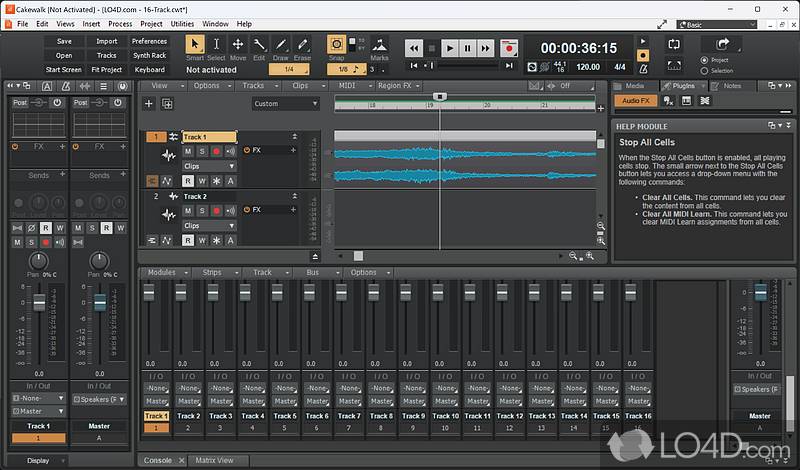
Cakewalk by BandLab is a professional Windows DAW that was originally Sonar, now maintained by BandLab Technologies and offered completely free. It’s one of the most fully featured free recording studio tools available on desktop, and it punches well above its zero price point.
What Does Cakewalk Do?
Cakewalk lets Windows users record, mix, edit, and master professional-quality audio and MIDI projects with full VST support, automation lanes, and console-style channel strips.
How Is Cakewalk Similar to BandLab?
Both are free and made by BandLab Technologies. Both support multitrack recording, MIDI sequencing, and audio mixing. Cakewalk also integrates with BandLab’s cloud for project backup and collaboration.
How Is Cakewalk Different from BandLab?
Cakewalk is Windows-only and desktop-focused. BandLab works cross-platform in a browser. Cakewalk offers significantly more advanced mixing tools, unlimited track counts, and professional plugin support that BandLab’s browser-based DAW can’t match.
Who Is Cakewalk Best For?
Cakewalk suits Windows-based producers who want professional audio mixing capabilities at no cost and don’t need mobile or browser-based access.
Key Features of Cakewalk
- ProChannel: Console-style mixing with EQ, compression, and saturation per track
- VST/AU support: Full third-party plugin compatibility
- Automation lanes: Dynamic control of volume, panning, and effects over time
- BandLab cloud integration: Online project backup and remote collaboration
Pricing
- Free plan: Yes, fully free
- Paid plans: None
- Free trial: N/A
Audiotool
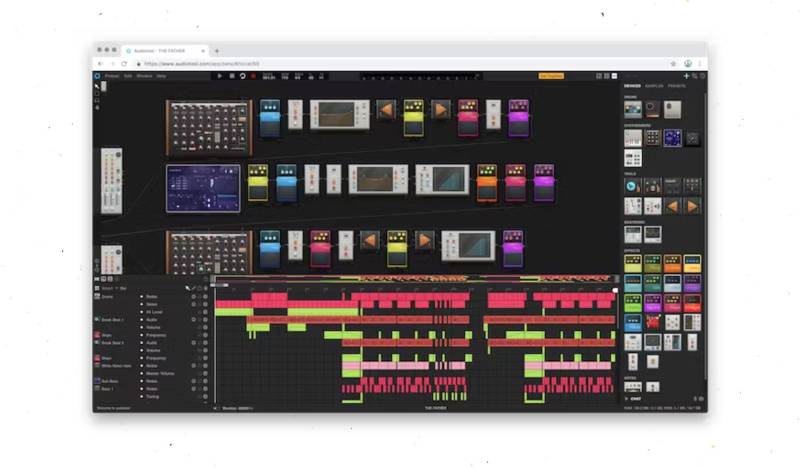
Audiotool is a free browser-based DAW with a distinct modular, hardware-style workflow. It’s completely free with no subscription tiers, which is unusual for an online music studio. The interface is award-winning, and the sample library has over 1,000,000 cloud-based sounds.
What Does Audiotool Do?
Audiotool lets users create and produce music in a browser using a modular signal chain, built-in drum machines, synthesizers, effects, and a large cloud-based loop library.
How Is Audiotool Similar to BandLab?
Both are free, browser-based music production platforms with social and community features. Both include collaboration tools, cloud storage, and music sharing. Audiotool also attempts to connect creators with fans, similar to BandLab’s music social network approach.
How Is Audiotool Different from BandLab?
Audiotool uses a modular signal chain workflow that’s more advanced and less intuitive than BandLab’s standard DAW layout. It targets producers familiar with hardware-style signal routing. BandLab is significantly more beginner-friendly and has a larger active community.
Who Is Audiotool Best For?
Audiotool suits intermediate producers who prefer a hardware-inspired modular workflow and want a completely free browser-based DAW with a massive sample library.
Key Features of Audiotool
- Modular workflow: Hardware-style signal routing between devices
- Sample library: Over 1,000,000 cloud-based audio samples
- Three drum machines: Built-in beat creation tools
- Vintage effects: Emulations of classic hardware effects processors
Pricing
- Free plan: Yes, fully free with no subscription tiers
- Paid plans: None
- Free trial: N/A
Amped Studio

Amped Studio is an online DAW that works in the browser and, unusually for a web app, also works offline as a Progressive Web App via Chrome. It has a free tier with ads and starts at $6.99/month for premium. The Hum and Beatz feature, which converts beatboxed drum patterns into MIDI, makes it stand out for mobile producers.
What Does Amped Studio Do?
Amped Studio lets users create, record, and mix music in a browser-based DAW with MIDI sequencing, virtual instruments, audio effects, and the option to run offline through Chrome’s Progressive Web App support.
How Is Amped Studio Similar to BandLab?
Both are browser-based music creation platforms with free tiers. Both offer loop libraries, MIDI tools, and virtual instruments aimed at beginner to intermediate producers. Both support online project sharing and collaboration features.
How Is Amped Studio Different from BandLab?
Amped Studio’s free tier includes ads and limits exports to MP3. BandLab is fully free with WAV exports and no ads. Amped Studio’s AI stem splitter and Hum and Beatz conversion tools are not available in BandLab. Reviewers also note that Amped Studio still feels less polished than BandLab despite over a decade of development.
Who Is Amped Studio Best For?
Amped Studio suits beat makers and hip hop producers who want a browser-based DAW with AI-assisted tools and offline capability, and don’t mind a paid plan for WAV exports.
Key Features of Amped Studio
- Offline access: Works without internet via Chrome Progressive Web App
- Hum and Beatz: Converts hummed melodies and beatboxed patterns into MIDI
- AI stem splitter: Available on the premium + AI tier ($12.99/month)
- External VST support: Accepts third-party plugins unlike most browser DAWs
Pricing
- Free plan: Yes, with ads and MP3 export only
- Paid plans: $6.99/month (Premium) or $12.99/month (Premium + AI)
- Free trial: Yes, via free tier
Cubasis

Cubasis is Steinberg’s mobile DAW for iOS and Android, designed as a tablet-friendly version of the professional Cubase software. It’s a paid one-time purchase that brings near-desktop-level audio mixing tools to mobile devices. Guitarists will appreciate the Amp Rack and Bass Amp processing added in version 3.8.
What Does Cubasis Do?
Cubasis lets users record, edit, mix, and produce professional-quality audio and MIDI on iOS and Android tablets or phones, with Ableton Link support for syncing with other music apps.
How Is Cubasis Similar to BandLab?
Both run on iOS and Android and support mobile multitrack recording and MIDI sequencing. Both include virtual instruments, audio effects, and tools aimed at producers who record music on a phone or tablet.
How Is Cubasis Different from BandLab?
Cubasis costs $49.99 (one-time). BandLab is free. Cubasis has no social features, no music sharing community, and no collaboration tools. It focuses entirely on production quality over community. The audio editing and mixing tools in Cubasis are more advanced than what BandLab offers on mobile.
Who Is Cubasis Best For?
Cubasis suits solo mobile producers on iOS or Android who want the best-quality mobile recording studio experience and are willing to pay for it.
Key Features of Cubasis
- Ableton Link: Sync with other apps and hardware over WiFi
- Amp Rack: Guitar and bass amp simulation with effects pedals (v3.8+)
- Bluetooth recording: Wireless audio input support added in v3.8
- MIDI time-stretch: Adjust MIDI sequence speed without affecting pitch
Pricing
- Free plan: No
- Paid plans: $49.99 one-time on iOS / $29.99 on Google Play
- Free trial: No
Comparison: Apps Like BandLab at a Glance
| App | Platform | Price | Best For |
| GarageBand | iOS / macOS | Free | Solo Apple users |
| FL Studio Mobile | iOS / Android | $14.99 one-time | Mobile beat makers |
| Soundtrap | Browser / Mobile | Free / from $9.99/mo | Educators, podcasters |
| LMMS | Win / Mac / Linux | Free | Electronic music, MIDI |
| Audacity | Win / Mac / Linux | Free | Podcasters, audio editing |
| REAPER | Win / Mac / Linux | $60 one-time | Advanced desktop producers |
| Cakewalk | Windows only | Free | Pro Windows producers |
| Audio tool | Browser | Free | Modular workflow fans |
| Amped Studio | Browser / PWA | Free / from $6.99/mo | Beat makers with AI needs |
| Cubasis | iOS / Android | $49.99 one-time | Quality-focused mobile producers |
What Is BandLab and What Does It Offer?
BandLab reached 100 million users in March 2024, up from 30 million in 2021, according to Music Business Worldwide.
That growth tells you something: a lot of people are making music on it, and most of them aren’t audio engineers.
At its core, BandLab is a free, cloud-based digital audio workstation with a built-in music social network. You get multitrack recording, a loop library, beat maker, MIDI sequencer, and mobile apps for iOS and Android. No download required. It runs entirely in the browser.
The social layer is what makes BandLab different from a standard free DAW. Users can publish tracks, get comments, crowdsource remixes, and collaborate on projects in real time from different countries. Artist d4vd created “Romantic Homicide” entirely on BandLab in 2022, which peaked at No. 33 on the Billboard Hot 100 and led to a deal with Interscope.
BandLab’s ceiling is real, though. The browser DAW caps tracks at 16-32 depending on project type. No VST plugin support. Mixing tools are basic compared to desktop DAWs. And if your internet drops, your session stops.
Those limits are why people look for alternatives.
| Feature | BandLab Has It | BandLab Lacks It |
| Free access | Yes, fully free | |
| Cloud storage | Unlimited | |
| VST plugin support | Not supported | |
| Unlimited track count | Capped at 16–32 | |
| Offline recording | Browser-dependent |
Which Apps Like BandLab Are Best for Free Music Production?
The global DAW software market hit $1.97 billion in 2025, driven largely by free and freemium tools lowering entry barriers, according to Global Growth Insights.
Independent creators now account for 54% of overall DAW usage, and most of them start with free options.
GarageBand
Best free option for Apple users. GarageBand is fully free on Mac, iPhone, and iPad with no subscription, no ads, and no feature paywalls.
- Up to 32 tracks per project
- 28+ session drummers with adjustable styles
- Smart Instruments for chord and pattern playing
- Podcast recording templates built in
The sound quality and built-in instrument depth beats BandLab’s browser DAW. The hard limit: Apple-only. No Android, no Windows, no cross-platform collaboration.
LMMS
LMMS runs on Windows, macOS, and Linux. Fully free, open-source, and built for MIDI-heavy electronic music production.
The workflow mirrors FL Studio, with a Beat+Bassline Editor, Piano Roll, and built-in synthesizers like ZynAddSubFX. VST plugin support is included, which BandLab completely lacks.
Where it falls short: no social features, no collaboration tools, and the interface can feel cluttered to new users. If you’re coming from BandLab’s clean browser layout, LMMS requires an adjustment period.
Cakewalk by BandLab
Made by the same company. Free. Windows-only. And significantly more powerful than the browser version.
- ProChannel: Console-style mixing with EQ, compression, saturation per track
- VST/AU support: Full third-party plugin compatibility
- Automation lanes: Dynamic control over any parameter over time
Cakewalk integrates with BandLab’s cloud for project backup, so you can sketch ideas in the browser DAW and finish them in Cakewalk on desktop. That workflow is underrated.
Audiotool
Completely free. No subscription tiers. No ads. That’s unusual for a browser-based online music studio with this much depth.
The library holds over 1,000,000 cloud samples. The interface uses a modular, hardware-style signal chain that’s visually distinct from any other online DAW. Real-time collaboration runs through video, audio, and text chat built directly into the platform.
Less beginner-friendly than BandLab, but more interesting for producers who want to go deeper without paying anything.
Audacity
Free, open-source, cross-platform audio editor with a 24-year track record. Recent versions added AI-powered noise removal and music separation tools.
Not a full DAW. No MIDI sequencer, no beat maker, no loop library. Audacity handles recording and audio cleanup well, but it’s the wrong tool if you’re trying to replace BandLab’s song creation workflow. Best suited for podcasters and anyone focused on audio recording rather than music creation from scratch.
| App | Platform | VST Support | Social/Collab |
| GarageBand | Apple only | AU only | No |
| LMMS | Win/Mac/Linux | Yes | No |
| Cakewalk | Windows only | Yes | Via BandLab cloud |
| Audiotool | Browser | No | Yes |
| Audacity | Win/Mac/Linux | No | No |
Which Apps Like BandLab Are Best for Mobile Music Creation?
Mobile DAW downloads on iOS and Android grew 28% in 2023 compared to 2022, with DAW applications collectively recording over 1 million downloads in 2024 alone, according to Market Growth Reports.
The smartphone music production software market is projected to grow at a CAGR of 10% through 2032, per Fortune Business Insights. Mobile-first creation isn’t a niche anymore.
FL Studio Mobile
One-time purchase, $14.99. The most capable beat making app on Android and iOS, full stop.
- Step sequencer built for pattern-based hip hop workflows
- Piano roll with velocity editing and MIDI note control
- Built-in synthesizers including 3xOSC and DirectWave
- Projects export directly to FL Studio desktop
What it doesn’t do: no social features, no music sharing community, no real-time collaboration. You make beats, you export them. That’s it. If you came to BandLab for the community, FL Studio Mobile won’t replace that part.
Cubasis by Steinberg
$49.99 on iOS, $29.99 on Android. Steinberg’s mobile DAW brings near-desktop audio quality to tablets and phones.
Version 3.8 added Amp Rack and Bass Amp simulation with amp models and effects pedals. Bluetooth audio recording, Ableton Link sync, and MIDI time-stretch are all included. The audio editing tools exceed what BandLab offers on mobile, but there are zero social features and no music sharing community.
Producers who record live instruments on a tablet will find Cubasis significantly more capable than BandLab’s mobile app. Everyone else should compare the price against what they actually need.
GarageBand on iOS
Free on iPhone and iPad. Smart Instruments let users with no instrument experience play chords and patterns by tapping the screen.
The iOS version includes most of what the Mac version offers: 32-track recording, session drummers, a loop library, and MIDI editing. The limitation is identical to the desktop version: Apple only, no Android, no cross-platform project sharing with Windows or browser-based collaborators.
Soundtrap Mobile
Soundtrap’s mobile app runs on both iOS and Android. It connects directly to the same browser-based projects, so a session started on desktop continues on phone without any file transfer.
This is the closest mobile equivalent to BandLab’s cross-platform flexibility. Real-time collaboration works on mobile the same way it does in browser. The difference: Soundtrap requires a paid plan ($9.99/month) for full access, while BandLab’s mobile app is completely free.
| App | iOS | Android | Price | Note |
| FL Studio Mobile | Yes | Yes | $14.99 | One-time purchase |
| Cubasis 3 | Yes | Yes | $49.99 iOS / $29.99 Android | Often discounted to $24.99–$29.99 |
| GarageBand | Yes | No | Free | Exclusive to Apple devices |
| Soundtrap | Yes | Yes | Free / from $9.99/mo | Online-based; includes collaboration tools |
Which Apps Like BandLab Are Best for Online Collaboration?
Remote collaboration tools embedded within DAWs recorded a 50% usage surge among professionals working across different countries, according to Market Growth Reports (2024).
72% of music producers preferred cloud-based DAW software in 2023 specifically for its flexibility and collaboration features. That number keeps climbing.
Soundtrap
Owned by Spotify. The closest alternative to BandLab’s collaboration model.
What it adds over BandLab:
- Tracks arrive mix-ready with effects pre-applied, saving time on basic mixing
- Podcast publishing directly to Spotify built in
- Google Classroom integration for education use cases
- Antares Auto-Tune included on higher-tier plans
The trade-off: Soundtrap requires a subscription ($9.99/month) for full access. BandLab gives everything free. Soundtrap focuses on collaboration and recording; it doesn’t have BandLab’s music social network or community discovery features.
Audiotool
Completely free with no subscription. Real-time collaboration runs through video, audio, and text chat built directly into the browser interface.
Audiotool’s approach is more modular and hardware-inspired than BandLab’s. Users connect synthesizers, drum machines, and effects in a signal chain, which suits producers who think in terms of signal flow rather than linear track layouts. The platform’s community features let creators share tracks publicly and connect with listeners, similar to BandLab’s social model.
Amped Studio
Browser-based, but with one feature no other online DAW currently offers: offline access via Chrome as a Progressive Web App.
That matters for producers who want cloud collaboration but can’t always rely on internet access. Amped Studio’s Hum and Beatz tool converts beatboxed rhythms into MIDI, which is a genuinely useful feature for capturing ideas fast. Project sharing and collaboration are included across all tiers.
The free tier adds ads and limits exports to MP3. The premium tier ($6.99/month) removes both restrictions. Not as polished as BandLab or Soundtrap, but the offline capability sets it apart from both.
Which Apps Like BandLab Are Best for Advanced Desktop Production?
Nearly 63% of independent musicians now use DAWs as their primary recording setup, up from 39% five years ago, according to Market Growth Reports (2024).
Most of them start on something free and accessible like BandLab. When they hit the ceiling, they move to a desktop DAW. Here’s what that upgrade looks like.
REAPER vs. Cakewalk: Which Desktop DAW Replaces BandLab Better?
Platform first. Cakewalk is Windows-only. REAPER runs on Windows, macOS, and Linux. If you’re not on Windows, REAPER is the only option here.
Price. Cakewalk is free. REAPER costs $60 for a personal/discounted license (one-time, covers two full version releases). At roughly $1/month over a typical license period, it’s close to free in practice.
What both add over BandLab:
- Unlimited track counts (versus BandLab’s 16-32 cap)
- Full VST/VST3/AU plugin support
- Offline recording with no internet dependency
- Professional-grade audio routing and automation
Where they differ:
- Cakewalk: ProChannel console-style mixing, cleaner interface for beginners, BandLab cloud integration built in
- REAPER: Fully customizable interface, Lua/Python scripting, portable install from USB, runs on Mac and Linux
Checkthat.ai notes that REAPER version 12.3 introduced stability issues in late 2025 on MacBook Pro M2 models. If you’re on Apple Silicon and prioritizing stability, verify the current release before committing.
LMMS for Electronic and MIDI-Heavy Workflows
LMMS sits between BandLab and REAPER on the complexity scale. Free, cross-platform, and MIDI-focused.
The Beat+Bassline Editor and step sequencer make it well-suited for electronic music production and beat making without the learning curve of a professional DAW. Producers moving from BandLab’s beat maker into deeper synthesis will find LMMS’s built-in synthesizer collection (ZynAddSubFX, Triple Oscillator, GameBoy sound emulator) genuinely useful.
Audio recording is weaker than BandLab’s browser DAW, which is an unusual trade-off. LMMS is better for MIDI, worse for recording live audio. Know which you need before switching.
How Do Apps Like BandLab Differ in Pricing?
The music production software market reached $525.6 million in 2024 and is growing at 8.36% annually through 2033, driven in part by a 39% increase in demand for subscription-based DAW platforms in the US, per Global Growth Insights.
Pricing structures across BandLab alternatives split into three clear categories. Knowing which model suits you prevents paying monthly for tools you use once.
Fully free (no limitations):
- GarageBand (Apple devices only)
- LMMS (Windows, macOS, Linux)
- Audacity (all platforms)
- Cakewalk (Windows only)
- Audiotool (browser, no tiers)
One-time paid (no subscription):
- FL Studio Mobile: $14.99
- Cubasis (Android): $29.99
- Cubasis (iOS): $49.99
- REAPER: $60 discounted / $225 commercial
Subscription-based:
- Soundtrap: from $9.99/month
- Amped Studio: $6.99/month (Premium) or $12.99/month (Premium + AI)
Total cost over 36 months tells a different story than monthly price. Soundtrap at $9.99/month costs $359.64 over three years. REAPER at $60 one-time costs $60 for that same period, often covering two full version releases. Subscription models make sense for educators, teams, or producers who need regular feature updates. One-time purchases make sense for everyone else.
BandLab remains the only option in this list that is fully free with no limitations, no ads, and no platform restrictions on core music production features. Every alternative here trades something, whether it’s platform reach, social features, or cost, to gain something else.
FAQ on Apps Like BandLab
What is the best free alternative to BandLab?
GarageBand is the strongest free option for Apple users. On Windows, Cakewalk by BandLab offers professional-grade mixing at no cost. For browser-based music creation with no subscription, Audiotool is fully free with no paywalls or feature limits.
Which apps like BandLab work on Android?
FL Studio Mobile, Soundtrap, Cubasis, and Amped Studio all run on Android. FL Studio Mobile is a one-time purchase. Soundtrap has a free tier. BandLab itself remains one of the strongest free music making apps on Android overall.
Is there a BandLab alternative with VST plugin support?
Yes. REAPER, Cakewalk, and LMMS all support VST plugins on desktop. These are the main features BandLab’s browser DAW lacks. FL Studio Mobile supports some plugins on mobile, though desktop DAWs offer far broader plugin compatibility.
What is the closest app to BandLab for online collaboration?
Soundtrap is the closest match. It supports real-time co-editing in a browser, integrates with Google Classroom, and connects to Spotify for podcast publishing. Audiotool also offers live collaboration with built-in video and audio chat.
Are there free DAW apps that work offline like BandLab alternatives?
GarageBand, LMMS, Audacity, REAPER, and Cakewalk all work fully offline. FL Studio Mobile and Cubasis also run without internet. Amped Studio is the only browser-based DAW that supports offline access via Chrome’s Progressive Web App feature.
Which app like BandLab is best for beat making on mobile?
FL Studio Mobile leads for mobile beat making. Its step sequencer and piano roll are purpose-built for hip hop and electronic music production. On desktop, LMMS offers a similar pattern-based workflow with a built-in drum machine and synthesizers.
What BandLab alternative is best for beginners?
GarageBand and Soundtrap are the most beginner-friendly options. Both offer guided workflows and preset sounds that make music creation approachable fast. LMMS and Audiotool have steeper learning curves but are still free to experiment with at no cost.
Which apps like BandLab support podcast recording?
Soundtrap has a dedicated podcast mode with direct Spotify publishing. Audacity handles podcast editing well for free. GarageBand also includes podcast templates. BandLab supports vocal recording, but these alternatives offer more focused tools for spoken-word audio production.
Is there a BandLab alternative with better audio mixing tools?
Yes. REAPER and Cakewalk both offer professional-grade audio mixing with full plugin support, automation, and advanced routing. They are desktop-only, but the mixing capabilities far exceed what any browser-based online DAW currently provides.
Which app like BandLab is best for music distribution?
BandLab itself added distribution via FUGA in late 2023. For alternatives, Soundtrap connects directly to Spotify for podcast distribution. For full music distribution to streaming platforms, apps like Audiomack and platforms like DatPiff serve music sharing and discovery needs alongside production tools.
Conclusion
This conclusion is for an article presenting apps like BandLab, and the core takeaway is simple: the right tool depends entirely on what you actually need from a music production app.
Need offline recording and VST support? REAPER or Cakewalk. Want a mobile recording studio on Android? FL Studio Mobile. Building tracks with a remote band? Soundtrap or Audiotool.
Free options cover most use cases well. GarageBand, LMMS, Cakewalk, and Audacity all deliver serious capability at zero cost.
The digital audio workstation market has never had more quality choices at every price point. Whether you are a beginner building your first beat or a producer outgrowing browser-based tools, there is a platform here worth trying.
Pick one. Start creating.

- How to Run a React App in VS Code Step by Step - October 23, 2026
- Transactional or marketing email: which messages your app should send itself - October 23, 2026
- How Software Teams Write SOPs for Releases and Deployments - October 22, 2026