
Got a Google Play gift card and not sure what to do with it? You’re not alone.
Learning how to redeem a Google Play gift card takes under a minute once you know where to look. The process differs depending on your device, and a wrong step can leave your Play Store balance sitting at zero.
This guide covers every redemption path: Android, browser, iPhone, and Chromebook. It also explains what your Google Play credit can actually buy, how to fix a code that’s not working, and how to send one as a gift.
What Is a Google Play Gift Card?
A Google Play gift card is a prepaid card that adds credit directly to a Google account, making that balance available for purchases inside the Google Play Store.
It is not a debit card, not a Google Pay balance, and not linked to a bank. The credit lives inside your Google account’s payment profile and is labeled “Google Play balance” once redeemed.
Cards come in 2 forms:
- Physical cards: Sold at retail stores like Walmart, Target, Best Buy, CVS, and Amazon. A scratch-off panel on the back reveals the 16-character redemption code.
- Digital cards: Purchased online and delivered by email. The code arrives in the message body and is ready to enter immediately.
Digital gift cards redeem in 16.8 days on average, compared to 35.3 days for physical cards (Capital One Shopping, 2024). If you’re buying for immediate use, digital is the faster option.
US denominations run from $5 to $200. Amounts vary by country.
The balance applies to apps, games, movies, books, in-app purchases, and eligible subscriptions including Google One and YouTube Premium. It does not apply to Google Store hardware (Pixel phones, Nest devices) or Google Ads.
| Card Type | Where to Buy | Average Time to Redeem |
|---|---|---|
| Physical | Walmart, Target, Best Buy, CVS | 35.3 days |
| Digital | Google Play Store website, Amazon, email delivery | 16.8 days |
What Do You Need Before Redeeming a Google Play Gift Card?
4 things need to be in place before the redemption process works.
- Active Google account: Signed in on the device or browser you’re using to redeem
- Valid 16-character code: Format is typically XXXX-XXXX-XXXX-XXXX on physical cards
- Country match: The card’s country must match the billing country set in your Google account’s payment profile
- Internet connection: Required during code validation; the Play Store pings Google’s servers to verify the code
The country match requirement catches a lot of people off guard. Google Play gift cards are geo-restricted and can only be redeemed in the country where they were purchased (Google Play Help). A US card will not work on a UK or Nigerian account, no exceptions.
Age matters too. Users under 18 need a supervised Google account or a Family Link setup to redeem. Standard redemption is blocked on unsupervised child accounts.
How Do You Redeem a Google Play Gift Card on Android?
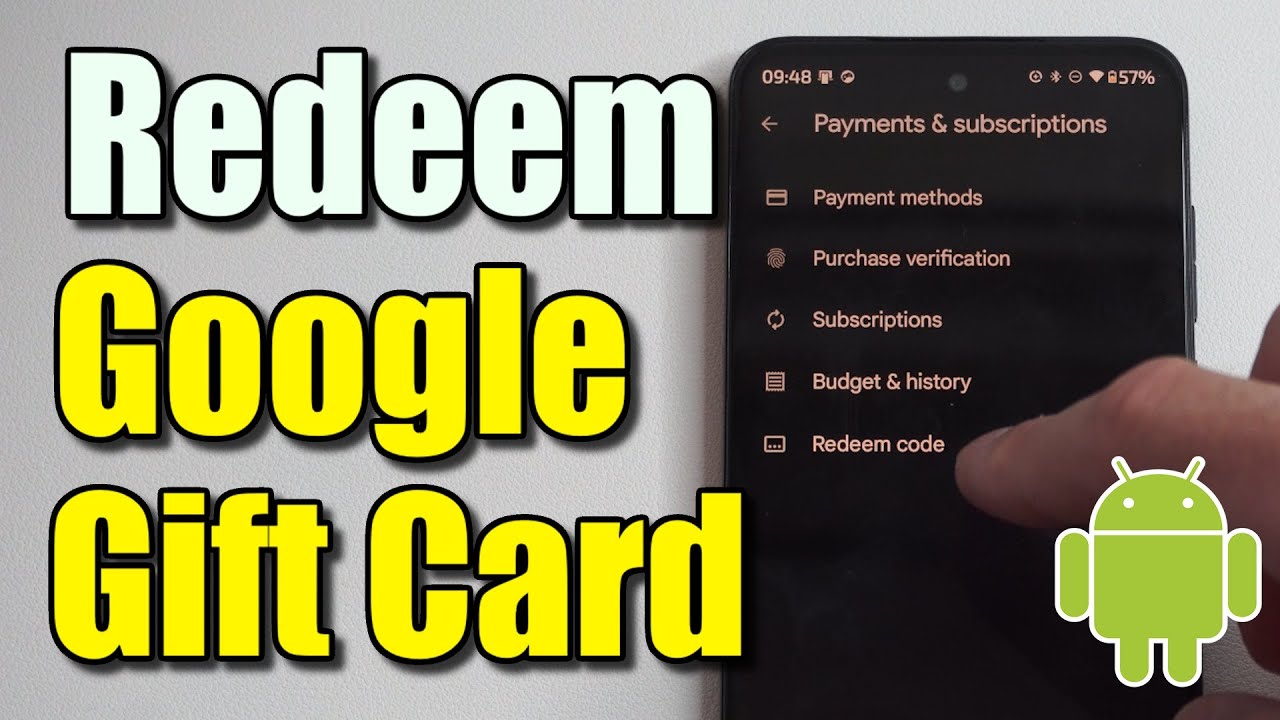
Android is the primary redemption path. 3.6 billion Android users worldwide have direct Play Store access built into their devices (DemandSage, 2025), making the app the most common starting point.
Steps to redeem on Android:
- Open the Google Play Store app
- Tap your profile icon (top right corner)
- Select “Payments & subscriptions”
- Tap “Redeem gift code”
- Enter the 16-character code or use the camera scan option
- Tap “Redeem” to confirm
A confirmation screen shows the credit amount before it posts. The balance reflects immediately under “Payment methods” in your Play Store account.
Works on Android phones, tablets, and Android TV devices that have Play Store access installed.
How to Scan a Google Play Gift Card Code on Android
Scanning skips manual entry entirely. On the redeem screen, tap “Use camera” and hold the physical card flat under good lighting.
The camera reads the barcode or code printed on the card and auto-fills the field. Manual entry is the fallback if the camera fails.
Two situations where scanning fails: the card surface is scratched badly enough to obscure the barcode, or the device camera has difficulty with glare. Tilt the card slightly to reduce reflection.
How Do You Redeem a Google Play Gift Card on a Web Browser?
The web redemption path works on any browser and any device. Useful for desktop users, iPhone owners, and anyone who received a digital gift card by email.
Go to play.google.com/redeem while signed into the correct Google account.
Enter the 16-character code in the input field and click “Redeem.” The credit posts immediately to the Google account.
Works on Chrome, Firefox, Safari, and Edge. No app download required.
Key difference from the app flow:
- App flow: opens inside the Play Store, already tied to the signed-in account
- Web flow: requires confirming which Google account is active in the browser before redeeming
If you’re signed into multiple Google accounts in the same browser, double-check which account is active before entering the code. The credit goes to whichever account is currently selected.
How Do You Redeem a Google Play Gift Card on iPhone or iPad?

The Google Play app on iOS does not have a redemption screen. iPhone and iPad users must redeem through a browser.
Open Safari or Chrome on the device, go to play.google.com/redeem, sign in to the correct Google account, and enter the code.
The balance posts to the Google account, not the Apple device. It is available for Android apps, subscriptions, and digital content purchased through Google Play, not through the Apple App Store.
This trips up a lot of first-time users. Google Play credit cannot be spent in the Apple App Store. The two ecosystems are separate. A Google Play balance only works on purchases made through Google’s platform.
| Device | Redemption Method | App or Browser |
|---|---|---|
| Android phone or tablet | Play Store app or play.google.com/redeem | Either |
| iPhone or iPad | play.google.com/redeem only | Browser only |
| Chromebook | Play Store app or play.google.com/redeem | Either |
| Windows or Mac desktop | play.google.com/redeem only | Browser only |
How Do You Redeem a Google Play Gift Card on Chromebook?
Chromebooks running Chrome OS 64 or later have the Google Play Store app built in.
Use the same steps as Android: open the Play Store app, tap the profile icon, go to “Payments & subscriptions,” then “Redeem gift code.”
If the Play Store app is not available on the Chromebook, use play.google.com/redeem in the Chrome browser instead. Both methods post the credit to the same Google account.
One issue specific to Chromebooks: Family Link restrictions can block redemption for child accounts. If the Play Store shows a permission error during redemption, the account is likely managed through Family Link. The parent account needs to approve the redemption from the Family Link app.
Where Does Google Play Credit Appear After Redemption?
The credit appears as “Google Play balance” under “Payment methods” in the Play Store.
Find it in 2 places:
- Play Store app: tap profile icon, then “Payments & subscriptions”
- Browser: sign in at pay.google.com and check under “Payment methods”
The balance is tied to the Google account, not the device. Sign into the same account on a different Android phone and the balance is still there.
Multiple gift cards stack. Redeeming a $25 card on top of an existing $10 balance gives $35 total. There is no limit to how many cards you can redeem over time, but there is a daily balance cap per country. Once that cap is reached, redeem after spending down the current balance or wait 24 hours (Google Play Help).
Balance expiration: Google Play credit does not expire in the US. Expiration policies vary by country, so check local terms if redeeming outside the US.
What Can You Buy With Google Play Credit?
Google Play balance covers 6 main purchase categories inside the Google Play Store ecosystem.
| Category | Examples | Notes |
|---|---|---|
| Apps and games | Minecraft, Adobe Lightroom, Nova Launcher | Paid downloads and premium upgrades |
| In-app purchases | Roblox Robux, Clash of Clans gems, PokéCoins | In-game currency and content unlocks |
| Subscriptions | Google One, YouTube Premium, YouTube Music | Monthly or annual billing |
| Movies and TV | New releases, rentals, classic films | Rentals last 48 hours once started |
| Books and audiobooks | Google Play Books store titles | Not compatible with Kindle devices |
Mobile gaming is the biggest driver of Google Play spending. Strategy games alone generated $17.5 billion in in-app purchase revenue in 2024, with RPG games at $16.8 billion (Giftcards.com, citing mobile gaming statistics).
The balance cannot be used for Google Store hardware (Pixel phones, Nest devices), Google Ads, or purchases made in physical shops through Google Pay.
Also off-limits: buying other gift cards using Play balance. Google explicitly blocks this on the Play Store app (Google Play Help).
Why Is a Google Play Gift Card Code Not Working?

Most redemption failures come down to 4 causes. Match your error message to the right fix before contacting support.
- Code already redeemed: Each 16-character code is single-use. Check your Google account’s payment history to confirm if it was previously applied.
- Country mismatch: Google Play gift cards are region-locked. A US card only works on an account whose Play Store country is set to the United States (Google Play Help).
- Typo in the code: Common mix-ups are 0 vs O and 1 vs I. Use the camera scan option on Android to bypass manual entry entirely.
- Balance cap reached: Each country has a maximum daily or total Play balance limit. Spend down the existing balance, then wait 24 hours before retrying (Google Play Help).
The country restriction catches a lot of people. Google Play cards cannot be redeemed while traveling if your account’s billing country doesn’t match the card’s country of issue (Google Play Support).
34% of US adults have been targeted by gift card scams (FTC data). If someone pressured you into buying the card and then asked for the code, that is a scam. No legitimate company, government agency, or support team requests payment via gift card codes.
How to Contact Google Support for a Failed Redemption
2 things to have ready before contacting support:
- A photo of the back of the physical card showing the serial number
- Your original purchase receipt or email confirmation
Go to support.google.com/googleplay and select “Payments and purchases.”
Google can reissue codes in verified retailer error cases. They cannot recover funds already lost to a scam. Gift cards are non-refundable and non-transferable under Google Play Terms of Service (Google Play Help).
How Do You Give Google Play Credit as a Gift?
As of October 2025, Google Play partnered with Blackhawk Network to launch a digital gift card mall directly inside the Play Store app, replacing the old requirement to visit a physical retailer (BHN, October 2025).
BHN research shows a 7% year-over-year increase in planned digital gift card purchases for 2025. The Play Store now serves as a full gifting destination for both Google Play credit and third-party brand cards.
Where to Buy Google Play Gift Cards In-Store
Physical cards are still widely available at retail locations:
- Walmart
- Target
- Best Buy
- CVS Pharmacy
- Amazon (ships physical card by mail)
US denominations at retail: $15, $25, $50, $100, and $200.
Inspect the card before buying. If the scratch-off panel on the back looks tampered with or pre-scratched, pick a different card. Tampered cards are a known retail scam vector (FTC).
How to Send a Google Play Gift Card Digitally
3 ways to send Play credit digitally:
- Through the Play Store app under profile, then “Gift cards” (US, UK, Mexico rollout as of 2025)
- At play.google.com, where digital gift cards are available for email delivery
- Via Amazon, which sells Google Play digital codes delivered instantly by email
The in-app gifting option launched in October 2025 and supports values from $15 to $100 for Google Play credit, with third-party brands like Starbucks, Disney, AMC Theatres, and Adidas also available in the same cart flow (Android Police, 2025).
Google Play balance itself cannot be transferred between Google accounts once redeemed. The gifting options only apply before redemption, not after the credit has already been applied to an account.
Gifting Apps Directly on Google Play
Some individual apps and games on the Play Store have a “Gift” button on the product page.
How it works: tap “Gift,” enter the recipient’s email address, and pay using any payment method on your account, including your existing Play balance.
Not every app supports direct gifting. The button only appears on eligible paid apps and games. Free apps and most subscription-based apps do not have the Gift option available.
For managing subscriptions paid through Google Play, the recipient’s account handles billing directly after the initial gift purchase is made.
FAQ on How To Redeem Google Play Gift Card
Can I redeem a Google Play gift card without an Android phone?
Yes. Go to play.google.com/redeem in any browser, sign into your Google account, and enter the code. This works on iPhone, iPad, Windows, and Mac. No Android device needed.
How long does it take for Google Play credit to appear after redemption?
The Play Store balance updates instantly. As soon as you tap Redeem and the confirmation screen appears, the credit is live in your Google account and ready to spend.
Can I redeem a Google Play gift card on an iPhone?
The Google Play app on iOS has no redemption screen. Use Safari or Chrome on your iPhone, visit play.google.com/redeem, sign in, and enter the gift card code there.
Does a Google Play gift card expire?
In the US, Google Play credit does not expire. Expiration policies vary by country, so check the terms for your region if you purchased the card outside the United States.
Why does my Google Play gift card say it has already been redeemed?
Each code is single-use. Check your Google account’s payment history to confirm. If you never used it, the card may have been tampered with at retail. Contact the store with your receipt.
Can I use a Google Play gift card from another country?
No. Google Play cards are region-locked. A US card only works on an account whose Play Store country is set to the United States. Country mismatches trigger an error at redemption.
Can I transfer my Google Play balance to another Google account?
No. Once redeemed, the Google Play balance is tied to that account and cannot be moved, shared, or refunded. It also cannot be converted to cash under Google Play Terms of Service.
Can I stack multiple Google Play gift cards on one account?
Yes. Each card you redeem adds to your existing Play balance. There is no limit on the number of cards you can redeem over time, though country-specific daily balance caps apply.
What do I do if the scratch-off code on my physical card is damaged?
Contact Google Play support at support.google.com/googleplay. Bring a photo of the card back showing the serial number and your original purchase receipt. Google can investigate and reissue valid codes.
Can I use Google Play credit to pay for YouTube Premium?
Yes. YouTube Premium is an eligible subscription under Google Play billing. Redeem the gift card to your Google account first, then subscribe to YouTube Premium and select Google Play balance at checkout.
Conclusion
This article on how to redeem a Google Play gift card covered every path: Android, browser, iPhone, Chromebook, and the steps that apply to each.
The process is straightforward once you know the right starting point for your device.
A few things worth keeping in mind: your Google Play balance is tied to one Google account, locked to the card’s country of issue, and non-transferable once redeemed.
Use it for apps, in-app purchases, Google One, YouTube Music, or Google Play Movies.
If your prepaid card code isn’t working, check for a country mismatch or a daily redemption limit before contacting support.
Redeem smart, spend intentionally.

- C cheat sheet - November 3, 2026
- Best Practices for Designing Intuitive Navigation in Web Applications - November 3, 2026
- 9 Companies Leading AI Agent Skill Registry Technology - November 2, 2026


