Your app just crashed for the third time today, and you have no idea why. Without proper mobile app analytics tools, you’re essentially flying blind through user behavior, performance bottlenecks, and revenue optimization opportunities that could make or break your application’s success.
Modern mobile applications generate massive amounts of user data every second. The difference between successful startups and failed startups often comes down to how effectively they collect, analyze, and act on behavioral analytics insights.
This comprehensive guide examines leading mobile analytics platforms, crash reporting systems, and user engagement tools. You’ll discover which solutions best fit your development workflow, budget constraints, and business objectives.
By the end, you’ll understand:
- Core analytics capabilities across different platform categories
- Pricing structures and integration requirements for each tool
- Specific use cases where each solution excels
- How to choose the right analytics stack for your mobile application
Mobile App Analytics Tools
Google Analytics for Firebase

Free comprehensive app analytics powered by Google’s measurement platform. Unlimited analytics for 500+ distinct events with zero cost barriers.
Core Analytics Features
- Real-time user behavior tracking – captures interaction patterns automatically
- Custom event monitoring – supports up to 500 unique events per project
- Conversion funnel analysis – reveals user journey drop-off points
- Automatic event logging – tracks app launches, sessions, notifications
Platform Integration
- Native mobile SDKs – seamless iOS development and Android development support
- 5-minute setup – minimal implementation complexity
- AdMob integration – automatic revenue tracking
- Google Ads connection – campaign attribution included
Pricing Structure
Completely free – no paid upgrades for core functionality
Enterprise Google Cloud services charged at standard GCP rates
Data Visualization
- Flexible dashboard customization
- BigQuery export for advanced analysis
- Real-time + historical views
- Automated report scheduling
Privacy & Compliance
- GDPR compliance built-in
- Regional data storage options
- User consent management
- Data ownership remains with developers
Use Cases
Perfect for mobile application development teams needing:
- App performance monitoring
- User engagement insights
- Retention analysis
- Revenue attribution
Mixpanel

Advanced product analytics with powerful event tracking and user behavior insights. Built for growth teams requiring granular conversion optimization.
Core Analytics Features
- Unlimited custom events – track any user action
- Funnel analysis – identify conversion bottlenecks
- Retention tracking – measure user comeback rates
- Real-time processing – instant insight availability
Platform Integration
- Native mobile SDKs – comprehensive platform support
- Server-side tracking available
- Extensive integrations – Segment, HubSpot, Google Analytics
- Technical expertise required for advanced features
Pricing Structure
Starter: Free with basic features
Growth: From $20/month (event-based pricing)
Enterprise: Custom pricing + unlimited events
Startup program: $50K credits for eligible companies
Data Visualization
- Unlimited chart saves
- Automated insights with anomaly detection
- CSV/JSON exports
- Custom dashboard creation
Privacy & Compliance
- GDPR ready with consent management
- Data deletion capabilities
- Regional storage options
- User-level privacy controls
Use Cases
Ideal for teams focused on:
- Product optimization
- User behavior analysis
- Cohort studies
- Revenue tracking
Amplitude
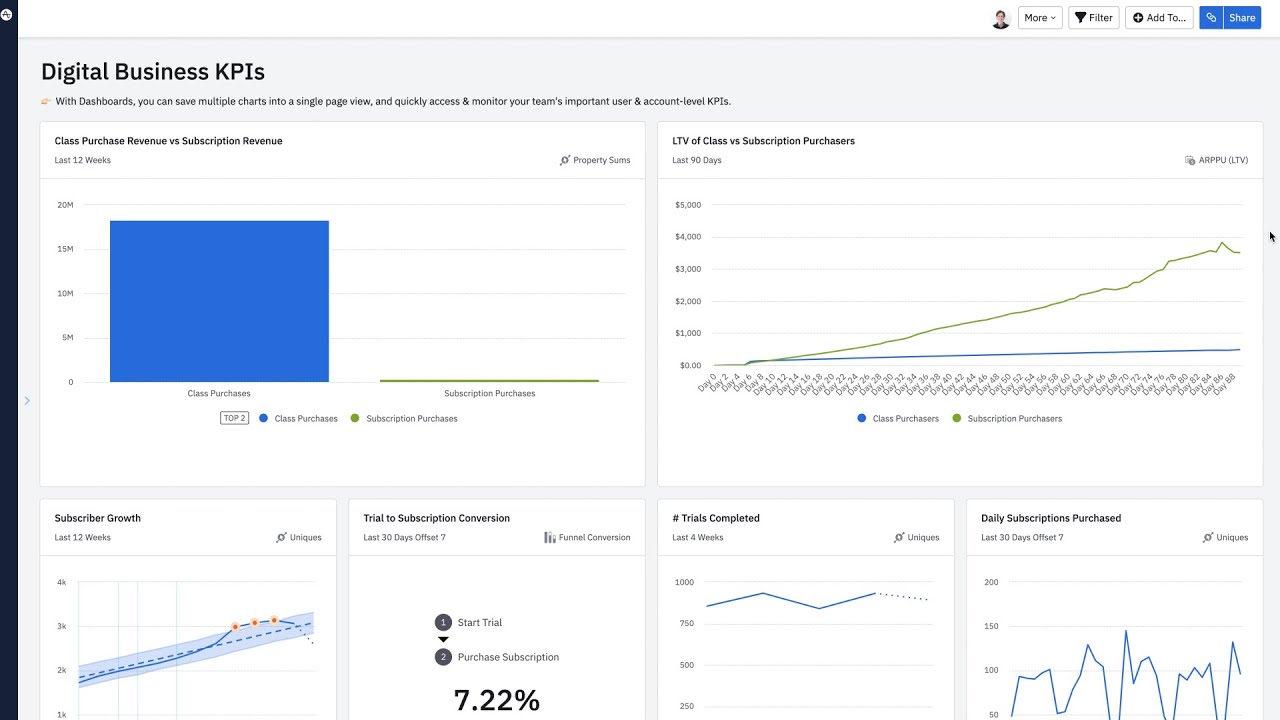
Enterprise-grade behavioral analytics with advanced experimentation capabilities. Comprehensive customer journey analysis for sophisticated teams.
Core Analytics Features
- Advanced funnels – detailed conversion tracking
- Retention analysis – cohort and stickiness measurement
- User segmentation – behavior-based grouping
- Pathfinder analytics – user journey mapping
Platform Integration
- Cross-platform SDKs – unified web and mobile tracking
- Data warehouse connections
- Marketing platform integrations
- API integration for custom workflows
Pricing Structure
Starter: Free up to 50K monthly users
Plus: From $49/month
Growth: Custom enterprise pricing
Volume discounts available for large implementations
Data Visualization
- Real-time dashboards
- Automated trend detection
- Data warehouse exports
- Advanced visualization options
Privacy & Compliance
- SOC 2 certified
- GDPR compliant
- Data residency controls
- Enterprise security features
Use Cases
Best for enterprise teams needing:
- User journey optimization
- Feature adoption tracking
- Advanced experimentation
- Predictive analytics
AppsFlyer

AI-powered mobile attribution with comprehensive marketing measurement across all platforms. Industry-leading solution for performance marketers.
Core Analytics Features
- Omnichannel attribution – mobile, web, TV, console tracking
- Real-time optimization – immediate campaign insights
- Fraud prevention – advanced protection suite
- Deep linking – seamless user experiences
Platform Integration
- Native mobile SDKs
- Major platform support – Facebook, Google, Apple, TikTok
- Email/CDP integrations
- Campaign management connections
Pricing Structure
Zero: Free basic features
Growth: $0.07/conversion (12K free first year)
Enterprise: Custom pricing + advanced fraud protection
Linear scaling at ~$0.03/conversion for enterprise
Data Visualization
- Custom dashboards with API access
- Real-time campaign performance
- Raw data exports
- Advanced analytics suite
Privacy & Compliance
- Enterprise fraud protection
- GDPR/CCPA compliance
- Data residency options
- Privacy-first attribution
Use Cases
Essential for teams running:
- Paid user acquisition
- Cross-platform campaigns
- Performance optimization
- Fraud prevention
Adjust

Mobile marketing analytics with powerful attribution and campaign optimization tools. Trusted solution for growth-driven marketers worldwide.
Core Analytics Features
- Attribution tracking – comprehensive channel measurement
- In-app analytics – user behavior insights
- Cohort analysis – retention measurement
- Fraud prevention – real-time protection
Platform Integration
- Cross-platform SDKs
- 11 countries support with 20+ languages
- Major ad networks – Google, Facebook, Twitter, Snap
- Unlimited lookback – complete data history
Pricing Structure
Base: Free up to 1,500 monthly attributions
Core: Mid-tier for growing businesses
Enterprise: 250K+ annual attributions
12-month free access included with Base plan
Data Visualization
- Datascape analytics platform
- Custom dashboards
- SKAdNetwork reporting
- Real-time insights
Privacy & Compliance
- ISO/IEC 27001 certified
- GDPR/CCPA compliant
- EU/US data centers
- Data residency choice
Use Cases
Perfect for marketers needing:
- Mobile attribution
- Campaign optimization
- User acquisition insights
- Performance measurement
Flurry Analytics

Professional-grade mobile analytics that’s completely free. Comprehensive insights platform designed for app growth optimization.
Core Analytics Features
- Complete user tracking – demographics, behavior, engagement
- Custom events – up to 500 trackable actions
- Funnel analysis – conversion optimization
- Real-time monitoring – instant performance insights
Platform Integration
- 5-minute SDK integration
- iOS and Android native support
- Lightweight implementation
- API access for data export
Pricing Structure
100% Free – no hidden costs or upgrade fees
Professional-grade features at zero cost
Data Visualization
- Custom dashboards
- Mobile app for on-the-go monitoring
- Export capabilities
- Multi-app views – up to 5 apps simultaneously
Privacy & Compliance
- No data hostage – export anytime
- Privacy-focused demographic estimation
- Secure infrastructure
- User consent controls
Use Cases
Ideal for developers wanting:
- Free comprehensive analytics
- App performance monitoring
- User behavior insights
- Growth optimization
Branch

Cross-platform attribution and deep linking solution for unified mobile measurement and user experiences across all devices and channels.
Core Analytics Features
- Deep linking – seamless user experiences
- Mobile attribution – cross-channel tracking
- User routing optimization
- Fraud detection – intelligent protection
Platform Integration
- Universal SDKs – iOS, Android, web support
- Marketing platform integrations
- Email/SMS provider connections
- Analytics tool compatibility
Pricing Structure
Essentials: Self-service with basic features
Pro: Advanced capabilities + dedicated support
Custom pricing based on usage and features
Data Visualization
- Advanced analytics dashboard
- Custom reporting
- Real-time tracking
- Export capabilities
Privacy & Compliance
- GDPR/CCPA/HIPAA compliant
- Enterprise security
- Data protection measures
- Privacy-first approach
Use Cases
Best for teams focused on:
- Cross-platform experiences
- Deep linking optimization
- User acquisition
- Attribution accuracy
Adobe Analytics

Enterprise-level digital analytics with comprehensive web and mobile app performance insights. Advanced customization for large organizations.
Core Analytics Features
- Real-time behavioral data collection
- Unlimited analysis capabilities
- AI-powered insights – automated anomaly detection
- Cross-channel integration – unified customer view
Platform Integration
- Adobe Experience Platform Mobile SDK
- Enterprise integrations
- Custom implementation support
- Advanced technical requirements
Pricing Structure
Select/Prime/Ultimate tiers – custom enterprise pricing
Typically $100K+ annually with implementation costs
Data Visualization
- Advanced reporting capabilities
- Custom dashboards
- Data visualization tools
- Enterprise exports
Privacy & Compliance
- Enterprise-grade security
- Global compliance standards
- Advanced privacy controls
- Data governance features
Use Cases
Designed for enterprises needing:
- Advanced customer analytics
- Cross-channel measurement
- Custom implementations
- Enterprise reporting
Crashlytics

Lightweight crash reporting tool integrated with Firebase for tracking, analyzing, and resolving app crashes efficiently.
Core Analytics Features
- Real-time crash reporting – instant issue detection
- Detailed crash logs – full stack traces
- User impact metrics – affected user counts
- Custom logging – contextual debugging
Platform Integration
- Firebase ecosystem integration
- Android, iOS, Unity support
- Google Analytics connection
- Third-party tools – Slack, Jira compatibility
Pricing Structure
Completely free – included in Firebase Spark and Blaze plans
No usage limits or upgrade costs
Data Visualization
- Firebase Console dashboard
- Crash grouping – similar issues clustered
- Priority insights – severity-based ranking
- Trend analysis – stability monitoring
Privacy & Compliance
- GDPR compliant data collection
- Privacy-focused architecture
- Secure processing – Google infrastructure
- Minimal data collection
Use Cases
Essential for developers needing:
- App stability monitoring
- Crash debugging
- Performance optimization
- Quality assurance
Singular

Next-generation mobile attribution and analytics platform providing unified marketing performance insights with advanced fraud prevention.
Core Analytics Features
- Cross-platform measurement – mobile, web, TV attribution
- Cost aggregation – unified spend tracking
- Creative analytics – ad performance insights
- SKAdNetwork – iOS attribution support
Platform Integration
- Thousands of integrations – comprehensive partner network
- Data warehouse connections – Redshift, Snowflake, BigQuery
- Marketing platform compatibility
- Enterprise ETL capabilities
Pricing Structure
Starter/Growth/Enterprise tiers with custom pricing
Free plan available for basic features
Data Visualization
- Unified dashboards – single source of truth
- Custom reporting capabilities
- Real-time analytics
- Advanced exports – flexible data access
Privacy & Compliance
- Enterprise security standards
- Global privacy compliance
- Fraud prevention – advanced detection
- Data protection measures
Use Cases
Perfect for marketers requiring:
- Unified attribution
- Marketing ROI analysis
- Fraud prevention
- Cross-platform insights
FAQ on Mobile App Analytics Tools
What are mobile app analytics tools and why do I need them?
Mobile analytics platforms track user behavior, performance metrics, and crash reporting across iOS and Android applications. They provide data-driven insights for optimizing user engagement, retention rates, and revenue optimization while identifying technical issues before they impact users.
Which mobile analytics tool is best for beginners?
Google Analytics for Firebase offers the most beginner-friendly experience with free unlimited usage and comprehensive documentation. The platform integrates seamlessly with mobile application development workflows and provides essential user behavior tracking without complex setup requirements.
How much do mobile app analytics tools typically cost?
Pricing varies dramatically from free (Firebase, Flurry) to $200,000+ annually (enterprise Braze, Adobe Analytics). Most behavioral analytics solutions use monthly active users or event-based pricing models, with mid-tier options like Mixpanel ranging $140-2,289 monthly.
What’s the difference between crash reporting and user analytics?
Crash reporting systems like Crashlytics focus on stability issues, error tracking, and technical debugging. User analytics platforms measure engagement metrics, conversion funnels, and behavioral patterns. Modern apps typically require both for comprehensive mobile intelligence.
Can I use multiple analytics tools simultaneously?
Yes, many development teams combine specialized tools for different purposes. Common combinations include Firebase for basic analytics, dedicated crash reporting tools, and user engagement platforms to create comprehensive mobile analytics ecosystems without vendor lock-in.
How do mobile analytics tools handle user privacy?
Most platforms comply with GDPR, CCPA, and other privacy regulations through data anonymization, user consent management, and configurable data retention policies. Tools like Countly offer self-hosted options for maximum privacy control and compliance.
What metrics should I track in my mobile app?
Core metrics include user acquisition costs, retention analysis, session duration monitoring, conversion tracking, and crash-free user rates. Advanced teams also monitor cohort analysis, lifetime value calculations, and custom event tracking for business-specific goals.
Do I need coding skills to implement mobile analytics?
Most modern platforms offer SDK integration requiring minimal software development knowledge. However, custom event tracking, advanced segmentation, and complex funnel analysis often require technical expertise or developer collaboration for optimal implementation.
How long does it take to see meaningful analytics data?
Basic metrics appear within hours of SDK integration. However, meaningful behavioral insights, cohort analysis, and predictive analytics typically require 2-4 weeks of data collection to identify statistically significant patterns and trends.
Which analytics tools work best for cross-platform apps?
Amplitude, Mixpanel, and Firebase provide excellent cross-platform app development support with unified user tracking across iOS, Android, and web platforms. These solutions maintain consistent user identification and behavioral analytics across different environments.
Conclusion
Selecting the right mobile app analytics tools directly impacts your application’s success, user retention, and revenue growth. The platforms covered in this guide range from free solutions like Firebase Analytics to enterprise-grade customer engagement platforms requiring significant investment.
Your choice depends on specific requirements: crash reporting needs, user segmentation complexity, and integration ecosystem preferences. Startups often begin with Firebase or Mixpanel’s free tiers before scaling to specialized solutions.
Consider these key factors when making your decision:
- Data privacy requirements and compliance needs
- Real-time analytics versus historical reporting preferences
- Custom event tracking and funnel analysis capabilities
- SDK integration complexity and software development process alignment
- Marketing automation and user engagement feature requirements
Remember that most successful mobile applications use multiple complementary tools rather than relying on a single platform. Start with essential crash reporting and basic user behavior tracking, then expand your analytics stack as your application grows and requirements evolve.
If you liked this article about mobile app Analytics, you should check out this article about the best IDE for Golang.
There are also similar articles discussing the best IDE for Linux, the best IDE for PHP, the best IDE for Rust, and the best IDE for Ruby.
And let’s not forget about articles on the best IDE for Scala, the best IDE for TypeScript, the best IDE for React, and the best IDE for Android.

- Swift Cheat Sheet - September 5, 2026
- What Core Web Vitals Mean for Your Website’s Ranking and Speed - September 5, 2026
- How to Disable GitHub Copilot in VS Code - September 4, 2026