
AI platforms like ChatGPT, Claude, Perplexity, and Gemini are crawling websites every day before answering user queries. These are not passive visits. When someone asks an AI chatbot which SaaS tool solves their problem, that chatbot has likely already fetched pages from your site to form its answer. The visit happened. You just could not see it.
Google Analytics is built around JavaScript tags that fire when a human browser loads a page. AI crawlers skip that entirely. Standard SEO rank trackers measure keyword positions in traditional search but have no mechanism to capture agent-level behavior. The result is a growing and commercially significant traffic channel with zero visibility for most teams.
That is exactly the problem these tools are built to solve.
Prompt Simulation vs Server-Side Analytics: Know the Difference
AI search behavior has changed how brands need to think about visibility. Two distinct approaches have emerged to help teams understand their presence in this new landscape, and they answer very different questions. If you are still building the foundations of your AI SEO strategy, it helps to first get a broader picture of the AI marketing tools available before narrowing in on measurement-specific solutions. Understanding which measurement approach fits your goals is the right place to start.
Prompt simulation tools work by querying AI platforms with pre-set prompts and checking whether your brand appears in the output. They are useful for tracking share-of-voice and estimating brand mention rates across large language model responses. The limitation is that they simulate rather than measure. Results depend entirely on prompt selection and tell you nothing about whether an AI agent actually visited your site, which pages it read, or whether that visit contributed to a real customer acquisition.
Server-side or CDN-level analytics takes the opposite approach. These tools read your actual server logs to record every request made by bots and crawlers. You get a factual record: which AI platforms visited, how often, which pages they fetched, and whether those agent visits turned into human referrals. This is the only method that allows you to properly measure AEO (Answer Engine Optimization) and GEO (Generative Engine Optimization) with real behavioral data.
Both approaches have a place. But for DevRel teams confirming documentation ingestion or growth marketers connecting agent activity to pipeline, server-side is non-negotiable.
Top Tools for Measuring AI Agent and Crawler Traffic
1. Siteline
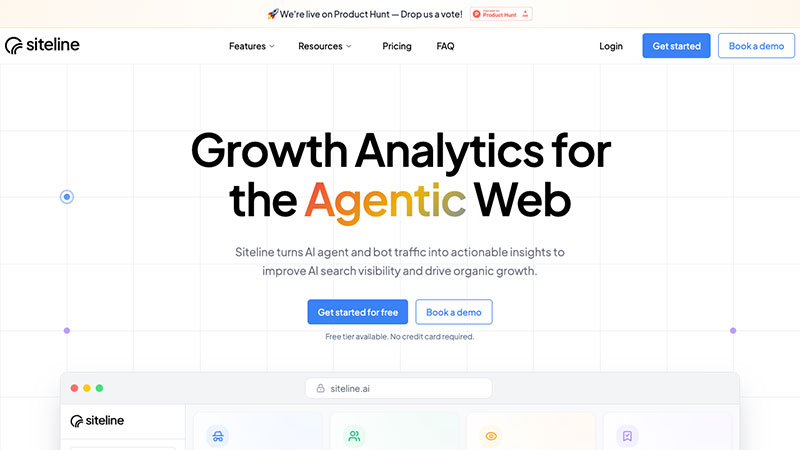
Siteline is the most purpose-built solution available for server-side AI agent analytics. It integrates directly with your CDN provider, including Cloudflare, Vercel, AWS CloudFront, and Azure, and reads your server logs to surface real agent-level data you cannot get anywhere else.
From the dashboard, you can see which AI platforms are visiting your site, which specific pages they are fetching, and how agent visits translate into human referrals and new customers. Knowing which of your pages agents are fetching is effectively knowing which content is being used to construct AI-generated answers, the foundation of any serious AEO strategy. If Claude is reading your API docs but not your integration pages, that gap shows up in the data, and you can act on it.
The citation monitoring feature shows which external sources AI chatbots reference when answering questions in your category, so you can see not just whether your brand appears but which of your pages are driving those citations. Siteline also delivers actionable recommendations to fix technical blockers and improve content discoverability for agents, ranked by impact and effort so your team knows where to start.
For B2B SaaS companies where knowing whether Claude is reading your API docs or Perplexity is citing your pricing page actually matters, this is the tool built for that job.
Best for: Growth marketing and DevRel teams that need page-level AI agent data, AEO and GEO measurement, and citation monitoring.
2. Cloudflare Bot Analytics
Cloudflare Bot Analytics provides network-edge visibility into bot and crawler traffic, including many AI agents. Because it operates at the infrastructure level, it can classify bots before they ever reach your application, making it fast and reliable for basic agent identification.
If your team is already on Cloudflare, this is a sensible first step for getting a high-level view of which bots are visiting. The key limitation is scope: Cloudflare is primarily a security and performance platform, and bot analytics is a feature within that broader offering, not a dedicated product. You get classification, but not much insight into which pages agents prefer, how visits connect to referrals, or what to optimize.
Best for: Teams already running on Cloudflare who want entry-level AI bot visibility without adding a new platform.
3. Datadog
Datadog is a broad infrastructure monitoring and observability platform. Through its log management and APM features, engineering teams can ingest server and CDN logs, build custom dashboards, and filter HTTP requests by user-agent to identify AI crawlers. It is a powerful and flexible tool for teams that already use it for infrastructure observability.
The trade-off is that none of this is AI-agent-specific out of the box. You need to build the taxonomy, write the queries, and maintain the dashboards yourself. For teams with Datadog already embedded in their stack and engineering resources to spare, it can work well. For teams looking for fast, purpose-built answers, it requires significant setup investment.
Best for: Engineering teams with existing Datadog infrastructure who want to extend it to cover AI crawler monitoring.
4. GoAccess and Server Log Analyzers
Open-source tools like GoAccess process raw server log files and visualize request data in real time. You can filter by user-agent to identify known AI crawlers, see which pages they accessed, and track request frequency. It requires no ongoing subscription and gives you full control of your data.
The gap is clear: there is no built-in taxonomy for AI agents, no automatic classification of which bots belong to which platforms, and no recommendations based on what you find. Every insight requires manual query-building and maintenance. This is a reasonable option for small technical teams with low budgets and high engineering capability, but it does not scale well as AI traffic complexity grows.
Best for: Technical teams who want direct access to raw log data and are comfortable building their own reporting layer.
5. Botify
Botify is an enterprise SEO platform with a dedicated log analysis module that shows how different bots crawl your site. It identifies bot types by user-agent, maps crawl frequency to page categories, and surfaces content that is being under-crawled or missed entirely.
While Botify was built for search engine crawl optimization, its log analysis layer is directly applicable to understanding AI agent behavior on larger sites. The platform is not purpose-built for AI agent analytics, so some of the framing and reporting are oriented toward traditional SEO use cases. It is most valuable for enterprise teams already invested in the platform who want to extend existing crawl data to cover AI agents.
Best for: Enterprise teams already using Botify for SEO who want to layer AI crawler insights on top of existing crawl reporting.
6. Profound
Profound is a prompt simulation tool designed for brand monitoring in AI-generated content. It tracks how often your brand appears in LLM responses across a set of tracked queries, gives you visibility scores over time, and flags when competitors are mentioned more frequently than you are.
It is useful and well-designed for what it does. But it is important to understand what it does not do. Profound cannot tell you which pages AI agents are crawling, whether your documentation is being ingested correctly, or how agent visits connect to human traffic. It measures AI output, not AI input. Think of it as a complement to server-side analytics for brand teams, rather than a substitute for technical teams who need crawl data.
Best for: Brand and content teams tracking AI share-of-voice and estimated mention rates across LLM responses.
Conclusion
The tools in this list fall into two camps: those that measure what AI agents actually do on your site, and those that estimate how your brand appears in AI outputs. Both serve a purpose, but they are not interchangeable. If your team needs to understand why an AI platform is not citing your content, or which pages are being fetched before a recommendation is made, server-side analytics is the only approach that gives you real answers. Start with data that reflects actual agent behavior, and layer on brand monitoring from there.
FAQs
What is AI bot analytics? It is the practice of measuring visits from AI agents, crawlers, and chatbots to your website using server-level or CDN-level log data, rather than JavaScript-based tools that are built for human visitor sessions.
How is AI agent traffic different from regular bot traffic? AI agents crawl your site with intent: to gather content that informs responses to real user queries. Unlike spam bots or SEO crawlers, their behavior directly affects whether your brand appears in AI-generated answers, making their activity commercially meaningful.
Can Google Analytics track AI crawler visits? No. Google Analytics requires a JavaScript tag to fire when a page loads in a browser. AI crawlers make direct HTTP requests that bypass this tag entirely, leaving their visits unrecorded in standard analytics setups.
What is the difference between AEO and GEO? AEO stands for Answer Engine Optimization, which focuses on making your content easy for AI platforms to find and cite when answering questions. GEO stands for Generative Engine Optimization, which covers a broader set of strategies for improving visibility in AI-generated content. Both require server-side analytics to measure accurately.

- How to Share GitHub Repository Access With Collaborators - October 25, 2026
- Build or Buy an AI Chatbot for E-commerce: The Costs Nobody Budgets For - October 24, 2026
- How to Run a React App in VS Code Step by Step - October 23, 2026