A disaster recovery plan for a managed client is only as good as the last restore somebody actually ran. Infrascale reports that 90.9% of the MSPs in its analysis call DR planning the biggest challenge when delivering DRaaS, and the cause is rarely the software. Every client has different systems, different tolerances and a different budget, so one template fits nobody. Cost is just as uneven. Infrascale’s page quotes downtime costs of up to $9,000 a minute, a figure it takes from another source, and plenty of small clients will never come near it.
Set recovery targets for each client before picking any tool
Start with the client, not the product catalog. The same order works for a ten-seat accounting firm and for a hospital group, though the effort per step differs a lot.
- List every system the client runs and rank each one by what the business loses when it is down for an hour.
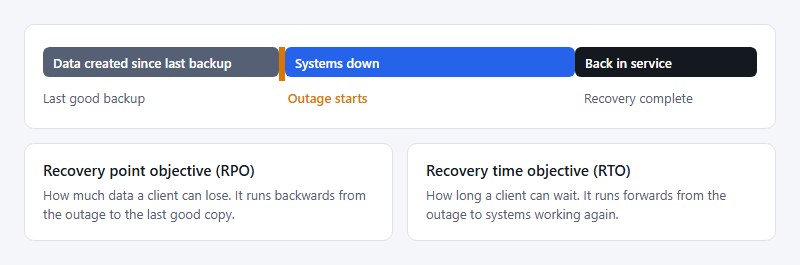
- Set a recovery time objective (RTO) and a recovery point objective (RPO) for each tier, and get the client to sign them.
- Match each tier to a method: file-level backup, image backup with replication, or a DRaaS failover.
- Write the runbook, including who calls whom and who may approve a failover.
- Restore something real into a clean environment and time it against the RTO.
- Repeat after every major change to the client’s infrastructure.
The sign-off in the second step matters more than it looks. An RPO of four hours means four hours of lost data is an agreed outcome, not a failure you explain afterwards.
Ransomware is the scenario that breaks naive plans. A backup kept on the same network as the infected machines can be encrypted along with them, and CISA keeps a page on malware, phishing and ransomware that is worth handing to a client who believes backups alone cover it.
Staffing is the other limit. If nobody on the team has built an inventory before, a free course such as BlueTally’s IT asset management foundations helps with the first step, since you cannot recover what you never listed. A longer disaster recovery planning guide covers the plan document itself.
For clients holding EU personal data, slow recovery is also a legal question
GDPR Article 32 asks for the ability to restore availability of and access to personal data in a timely manner after a physical or technical incident. It does not say how fast. That gap is yours and the client’s to fill, which is another reason the RTO goes in writing.
Fines for security failures under the regulation reach up to 10 million euros or 2% of worldwide annual turnover, whichever is higher. That is the cap, not the typical fine, and regulators weigh the circumstances of each case.
Backups that exist versus recoveries that work
Restores nobody has tried
A green status light in the backup console says the job finished. It says nothing about whether the data opens, whether the database is consistent, or whether the restore fits inside the RTO.
A lot of teams test the easy case, a single file, and call it done. The failure shows up at the full-server restore, where a missing driver, a license key or a lost encryption key stops the work for hours. Verification checks help, but only a restore is proof. Time it, write the number down and compare it with the RTO the client signed. If the two disagree, the RTO was fiction until now.
Environments that drift
A runbook written in January describes January’s network. By June the client has added a SaaS tool, moved a file server to the cloud and replaced a firewall. Who owns the update? Tie the runbook review to the change process, so that a change ticket which never touches the DR document stays open.
Failover that the client assumes is automatic
DRaaS platforms advertise automated failover and failback, but the decision to fail over usually belongs to a person, and failback is the slow part. Nobody wants to make that call at 3 a.m. without the authority to do it, which is why the fourth step above names an approver.
Some outages cannot be recovered inside any budget a client will approve.
The target itself should come from how much uptime the business actually needs, not from the platform’s brochure.
I’d skip the monthly full DR exercise for small clients and run a quarterly restore of the top tier instead. Monthly drills get postponed. Quarterly ones happen.
Keep the runbook where the outage cannot reach it
Store an offline copy of the contact list, the logins for the recovery tooling and the order of operations. A runbook that lives on the file server being recovered is no help to anyone.
Print the one-page version and hand the client a copy.

- Managed Detection and Response (MDR): Stopping Email-Led Ransomware Before It Spreads - November 24, 2026
- PyCharm Remote Development Over SSH: Setup Guide - November 23, 2026
- Migrating from Confluence Server to Cloud: What Dev Teams Lose and How to Get It Back - November 23, 2026