

Your phone probably contains at least a dozen native apps right now. Instagram, WhatsApp, Spotify. These apps feel smooth, load instantly, and work offline because they’re built specifically for your device’s operating system.
Understanding examples of native apps helps you recognize what makes mobile applications truly responsive. Native mobile apps leverage platform-specific capabilities that web apps simply can’t match.
This guide examines 20 popular native applications across social media platforms, productivity tools, gaming, and entertainment. You’ll see how companies like Netflix, Uber, and TikTok use iOS development and Android development to create experiences users expect.
Each example breaks down technical attributes, key features, and specific scenarios where native architecture provides clear advantages over alternatives.
Examples Of Native Apps
| Native App | Primary Function | Category | Key Features |
|---|---|---|---|
| Photo and video sharing | Social Media | Stories, Reels, filters, direct messaging | |
| Instant messaging and calling | Communication | End-to-end encryption, voice calls, video calls, group chats | |
| Spotify | Music streaming | Entertainment | Playlists, offline downloads, podcast support, personalized recommendations |
| Netflix | Video streaming | Entertainment | Original content, offline viewing, multiple profiles, HD streaming |
| Uber | Ride-hailing and delivery | Transportation | Real-time tracking, fare estimation, cashless payment, driver ratings |
| Twitter/X | Microblogging and news | Social Media | Tweet threads, trending topics, direct messaging, spaces |
| TikTok | Short-form video creation | Social Media | Video editing tools, effects, music library, algorithmic feed |
| Snapchat | Ephemeral messaging | Social Media | AR lenses, disappearing messages, stories, snap map |
| Microsoft Word | Document creation and editing | Productivity | Templates, formatting tools, collaboration, track changes |
| Adobe Photoshop | Image editing and design | Creative Tools | Layer-based editing, filters, brushes, color correction |
| Slack | Team communication | Productivity | Channels, direct messages, file sharing, app integrations |
| Zoom | Video conferencing | Communication | Screen sharing, virtual backgrounds, breakout rooms, recording |
| Pokemon GO | Augmented reality gaming | Gaming | Location-based gameplay, AR capture, raids, trading |
| Candy Crush | Puzzle gaming | Gaming | Match-three mechanics, level progression, power-ups, social features |
| Gmail | Email management | Communication | Labels, filters, search, spam protection, integration with Google services |
| Google Maps | Navigation and mapping | Navigation | Real-time traffic, turn-by-turn directions, local business info, street view |
| Apple Music | Music streaming | Entertainment | Curated playlists, lossless audio, lyrics display, radio stations |
| YouTube | Video streaming and sharing | Entertainment | Live streaming, subscriptions, comments, personalized recommendations |
| Social networking | Social Media | News feed, groups, marketplace, events, messenger integration | |
| Professional networking | Social Media | Job listings, professional profiles, industry news, endorsements |

Photo and video sharing platform that defines modern social media.
Primary Function
Platform: iOS and Android
Category: Social media
Purpose: Photo sharing, video content creation, messaging
Key Features
- Photo and video capture with filter application
- Stories that disappear after 24 hours
- Direct messaging with end-to-end encryption
- Reels for short-form video content
- Shopping integration for e-commerce
Technical Attributes
Built with Swift for iOS and Kotlin for Android. Uses React Native for some features to share code across platforms. Backend relies on Python with Django framework. Instagram uses Swift for iOS development and Kotlin for Android development, with GraphQL for API queries. Local photo editing happens using native image processing libraries and Core Image on iOS.
Performance optimized through native compilation and direct hardware access.
User Experience Benefits
Camera integration provides seamless photo capture without leaving the app. Offline functionality allows viewing cached content during connectivity issues. Push notifications deliver instant updates about likes, comments, and messages.
The native architecture enables smooth scrolling through infinite feeds. Touch gestures feel responsive because they’re processed directly by the operating system.
Use Cases
Content creators publish professional-quality photos with built-in editing tools. Businesses showcase products through shoppable posts and integrated checkout. Influencers build audiences through consistent story updates and engagement features.
Personal users maintain visual diaries through photo archives and highlights.

Messaging application focused on privacy and reliability.
Primary Function
Platform: iOS, Android, Windows, Mac
Category: Communication
Purpose: Text messaging, voice calls, video calls, file sharing
Key Features
- End-to-end encrypted messaging
- Voice and video calling
- Group chats up to 1024 participants
- Media sharing (photos, videos, documents)
- Status updates visible for 24 hours
Technical Attributes
WhatsApp uses Erlang for backend services with Mnesia database for data storage. The iOS app is built with Swift and Objective-C. Android version uses Java and Kotlin. Frontend uses SQLite for local message storage on devices.
YAWS web server handles multimedia data storage using HTML5 WebSockets for two-way communication. XMPP protocol manages message routing through Ejabberd server.
User Experience Benefits
Messages sync instantly because native apps maintain persistent connections to servers. Offline message queuing ensures delivery once connectivity returns. Device contacts integrate seamlessly through native API access.
Native notifications appear immediately without delay. Biometric authentication through Face ID or fingerprint scanners provides secure access.
Use Cases
International communication without SMS fees through internet connectivity. Business teams coordinate projects through group chats with file sharing. Families stay connected through video calls with reliable audio quality.
Remote workers conduct video meetings with screen sharing capabilities.
Spotify

Music streaming service with extensive catalog and personalization.
Primary Function
Platform: iOS, Android, desktop
Category: Entertainment
Purpose: Music streaming, podcast playback, audio content discovery
Key Features
- 100+ million song library access
- Personalized playlist recommendations
- Offline download for premium users
- Podcast streaming and downloads
- Social sharing of tracks and playlists
Technical Attributes
Core audio engine written in C++ for performance. Desktop uses Chromium Embedded Framework with React-based UI, while mobile apps are built with native Swift for iOS and Kotlin for Android. Communication with backend happens through proprietary protocols optimized for audio streaming.
Local caching stores frequently played songs. Audio processing handles equalization and normalization natively.
User Experience Benefits
Background playback continues while using other apps. Hardware controls on headphones and lock screens work through native audio session management. CarPlay and Android Auto integration provides safe driving experiences.
Offline mode accesses downloaded content without internet. Sleep timer integrates with system power management.
Use Cases
Commuters listen to curated playlists during travel. Fitness enthusiasts sync workouts to tempo-matched music. Podcast listeners discover new shows through recommendations.
Students study with focus playlists and concentration mixes. (Though at this point, I mostly use it to find that one song stuck in my head.)
Netflix

Video streaming platform with original content and licensed media.
Primary Function
Platform: iOS, Android, smart TVs, web browsers
Category: Entertainment
Purpose: Movie streaming, TV series viewing, documentary watching
Key Features
- 4K HDR video streaming support
- Offline download for mobile viewing
- Multiple user profiles per account
- Personalized content recommendations
- Interactive content experiences
Technical Attributes
Netflix uses Swift for iOS and Kotlin for Android native mobile applications, adopting Kotlin Multiplatform for sharing business logic across platforms. Backend services use Spring Boot, Zuul for API routing, and Eureka for service discovery.
Video playback relies on native media frameworks. Adaptive streaming adjusts quality based on network conditions. Local database stores viewing history and preferences.
User Experience Benefits
Picture-in-picture mode lets users watch while browsing other apps. Downloads enable viewing during flights or poor connectivity. HDR support on compatible devices provides enhanced visual quality.
Native video codecs ensure smooth playback with minimal battery drain. Background audio continues when screen locks during certain content types.
Use Cases
Travelers download episodes before long flights or road trips. Families create separate profiles to maintain individual watch histories. International viewers access region-specific content through native platform optimization.
Commuters watch during transit with automatic quality adjustment.
Uber

Ride-hailing platform connecting drivers with passengers.
Primary Function
Platform: iOS, Android
Category: Transportation
Purpose: Ride booking, driver navigation, payment processing
Key Features
- Real-time GPS tracking of drivers
- Fare estimation before booking
- Multiple ride options (UberX, Comfort, Black)
- In-app payment processing
- Driver rating and feedback system
Technical Attributes
Built using Swift and Objective-C for iOS, Java and Kotlin for Android, with some integration of React Native for code sharing. GPS sensors provide location data through native APIs. Backend uses Node.js, Python, Go, and Java for different services.
Maps integration uses Google Maps SDK on Android and MapKit on iOS. Payment processing handles credit cards, digital wallets, and regional payment methods.
User Experience Benefits
GPS location updates continuously for accurate pickup coordination. Background location tracking ensures driver finds passenger efficiently. Push notifications alert users when driver arrives.
Native contacts integration enables easy destination sharing. Biometric authentication speeds up login process.
Use Cases
Airport travelers book rides directly from terminals. Daily commuters schedule recurring trips to work. Groups split fares through shared ride options.
Late-night users access safe transportation when public transit closes.
Twitter/X
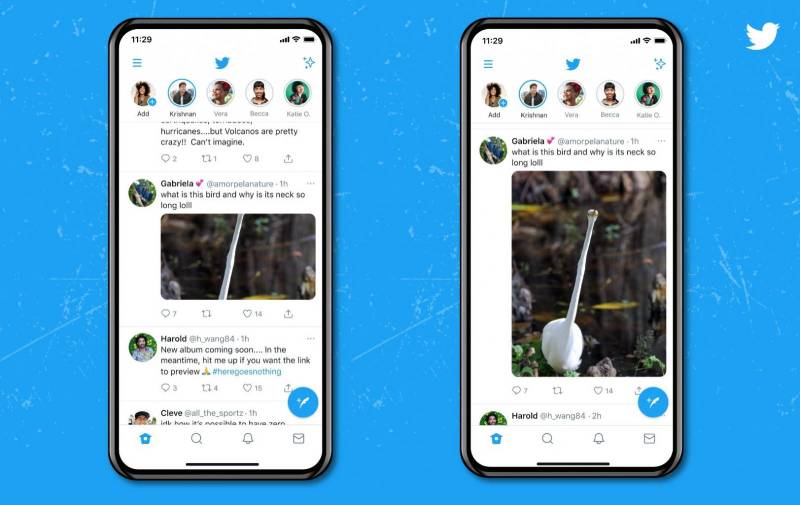
Social networking platform for real-time information sharing.
Primary Function
Platform: iOS, Android, web
Category: Social media
Purpose: Microblogging, news sharing, public conversation
Key Features
- 280-character text posts (tweets)
- Image and video sharing
- Trending topics and hashtags
- Direct messaging between users
- Spaces for live audio conversations
Technical Attributes
iOS app built with Swift. Android version uses Kotlin and Java. Mobile applications leverage platform-specific features including camera access, push notifications, and share extensions. Backend uses Scala for handling high-traffic loads.
Timeline scrolling optimized through native rendering. Media playback uses hardware acceleration for videos.
User Experience Benefits
Real-time timeline updates deliver breaking news instantly. Native sharing extensions post content from any app. Offline reading accesses cached tweets without connectivity.
Pull-to-refresh gesture feels responsive through native touch handling. System-level dark mode switches automatically.
Use Cases
Journalists break stories and gather sources. Businesses provide customer service through direct messages. Sports fans follow live game updates and commentary.
Political campaigns engage voters through town halls in Spaces.
TikTok

Short-form video platform with viral content discovery.
Primary Function
Platform: iOS, Android
Category: Social media
Purpose: Video creation, content discovery, entertainment
Key Features
- 15-second to 10-minute video recording
- AI-powered content recommendation (For You page)
- Built-in video editing with effects and filters
- Duet and stitch features for collaboration
- Live streaming capabilities
Technical Attributes
Built natively with Swift for iOS and Kotlin for Android. Video processing uses hardware acceleration through Metal (iOS) and OpenGL (Android). Computer vision algorithms run locally for effect application.
Camera integration provides professional-quality recording. Audio library accessed through native frameworks ensures synchronized playback.
User Experience Benefits
Smooth vertical scrolling through endless video feed. Hardware-accelerated video rendering maintains 60fps playback. Background video processing applies filters without lag.
Haptic feedback enhances like interactions. Face tracking for AR effects works in real-time.
Use Cases
Creators monetize content through creator fund and brand partnerships. Small businesses reach customers through viral product demonstrations. Educators share bite-sized learning content.
Musicians promote new releases through trending sound challenges.
Snapchat
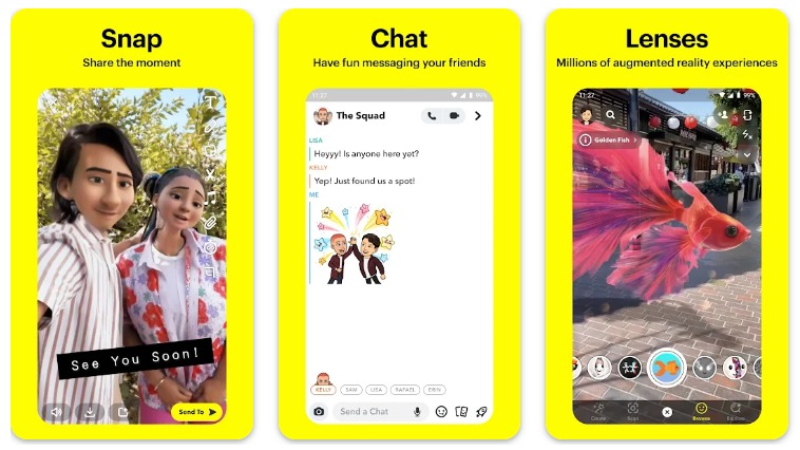
Ephemeral messaging app with augmented reality features.
Primary Function
Platform: iOS, Android
Category: Communication
Purpose: Photo messaging, video chat, AR experiences
Key Features
- Disappearing photo and video messages
- AR lenses and filters using face tracking
- Stories lasting 24 hours
- Snap Map for location sharing
- Spotlight for user-generated content
Technical Attributes
Built with Swift for iOS and Kotlin for Android. Camera processing happens entirely on-device through native APIs. AR filters use CoreML on iOS and ML Kit on Android for real-time face detection.
Video compression optimized for quick sending. Local caching stores friend data and recent snaps.
User Experience Benefits
Camera launches instantly when app opens. AR lenses apply smoothly during video recording. Location services integrate for geofilters and Snap Map.
Biometric locks protect sensitive conversations. Background uploading sends large videos without blocking usage.
Use Cases
Teenagers communicate through casual photo messages. Brands create sponsored AR lenses for product launches. Friends share location through Snap Map during events.
Content creators build audiences through consistent Story posting.
Microsoft Word

Document creation and editing application.
Primary Function
Platform: iOS, Android, Windows, Mac
Category: Productivity
Purpose: Text document creation, editing, formatting
Key Features
- Rich text formatting and styles
- Collaboration with real-time co-authoring
- Document templates for various purposes
- Track changes and comments for review
- Cloud sync through OneDrive integration
Technical Attributes
iOS version built with Swift utilizing native text rendering frameworks. Android uses Kotlin with platform-specific UI components. File format handling optimized for .docx compatibility.
Native keyboard integration provides autocorrect and text prediction. Handwriting recognition on tablets uses device stylus APIs.
User Experience Benefits
Files sync automatically across devices through cloud storage. Offline editing saves changes locally until connectivity returns. Split-screen multitasking enables reference document viewing.
System-level sharing sends documents to any app. Dark mode reduces eye strain during extended writing.
Use Cases
Students write essays and research papers. Professionals draft contracts and business proposals. Writers create manuscripts with formatting controls.
HR departments generate offer letters from templates.
Adobe Photoshop

Professional image editing and manipulation software.
Primary Function
Platform: iOS (iPad), Android, desktop
Category: Creative tools
Purpose: Photo editing, digital painting, graphic design
Key Features
- Layer-based editing workflow
- Advanced selection tools
- Content-aware fill and healing
- Typography and text effects
- Cloud document sync
Technical Attributes
iPad version built with native frameworks for Apple Pencil support. Uses Metal for GPU-accelerated rendering. Core image processing algorithms compiled natively for performance.
Pressure sensitivity through stylus integration. Multi-touch gestures for tool switching and canvas navigation.
User Experience Benefits
Apple Pencil provides precise brush control with tilt and pressure sensitivity. Hardware acceleration renders complex filters instantly. Background saving prevents work loss during crashes.
Files open immediately from local storage. Export presets optimize for web, print, or social media.
Use Cases
Photographers retouch wedding photos with healing brushes. Graphic designers create social media graphics. Digital artists paint illustrations with custom brushes.
Marketing teams design ad campaigns with brand templates.
Slack

Team communication and collaboration platform.
Primary Function
Platform: iOS, Android, desktop, web
Category: Productivity
Purpose: Team messaging, file sharing, project coordination
Key Features
- Channel-based organization by topic or team
- Direct messaging and group chats
- File sharing with preview capabilities
- Integration with third-party tools
- Voice and video calling
Technical Attributes
iOS app built with Swift using native navigation patterns. Android version uses Kotlin with Material Design components. Real-time message delivery through WebSocket connections.
Native notification systems deliver instant message alerts with rich previews. Local database caches messages for offline access.
User Experience Benefits
Messages sync instantly across all devices. Rich notifications show message previews without opening app. Background fetch updates content while app isn’t active.
Share extensions send files from any app into Slack channels. Biometric authentication secures sensitive work conversations.
Use Cases
Remote teams coordinate projects across time zones. Customer support departments triage tickets through dedicated channels. Engineering teams share code snippets and deployment updates.
Sales teams celebrate wins in company-wide announcement channels.
Zoom

Video conferencing platform for meetings and webinars.
Primary Function
Platform: iOS, Android, desktop
Category: Communication
Purpose: Video meetings, webinars, screen sharing
Key Features
- HD video and audio conferencing
- Screen sharing with annotation tools
- Virtual backgrounds and filters
- Breakout rooms for group discussions
- Meeting recording capabilities
Technical Attributes
Native mobile apps built with Swift for iOS and Kotlin for Android. Video encoding uses hardware acceleration for efficient battery usage. Audio processing includes noise cancellation through device APIs.
Camera switching between front and rear happens through native controls. Picture-in-picture mode allows multitasking during calls.
User Experience Benefits
CallKit integration on iOS provides native calling interface. Background audio continues when screen locks or switching apps. Calendar integration auto-joins scheduled meetings.
Screen sharing works with any app through system-level recording. Speaker view automatically highlights active speakers.
Use Cases
Businesses conduct remote client meetings. Educators teach virtual classes with screen sharing. Doctors perform telemedicine consultations.
Families host virtual reunions across continents.
Pokemon GO

Location-based augmented reality game.
Primary Function
Platform: iOS, Android
Category: Gaming
Purpose: AR gaming, outdoor exploration, social gameplay
Key Features
- AR capture of Pokemon in real world
- GPS-based gameplay requiring physical movement
- Gym battles at real-world locations
- Trading system between players
- Raid battles for cooperative play
Technical Attributes
Built with Unity game engine using C#, with native Swift (iOS) and Kotlin (Android) wrappers for platform integration. ARKit on iOS and ARCore on Android enable augmented reality features. Continuous GPS tracking through location services.
Camera feed processed in real-time for AR overlays. Accelerometer and gyroscope detect device movement and orientation.
User Experience Benefits
AR mode blends virtual Pokemon with real environment through camera. Background location tracking counts steps even when app closed. Push notifications alert players to nearby Pokemon.
Battery optimization modes reduce power consumption during extended play. Weather integration affects in-game spawns based on real conditions.
Use Cases
Players explore neighborhoods discovering new Pokemon species. Community day events gather players at parks for rare spawns. Fitness enthusiasts walk for exercise while hatching eggs.
Tourist attractions host sponsored PokeStops driving foot traffic.
Candy Crush

Match-three puzzle game with social features.
Primary Function
Platform: iOS, Android
Category: Gaming
Purpose: Casual gaming, puzzle solving, competition
Key Features
- Thousands of puzzle levels
- Lives system with time-based regeneration
- Boosters and power-ups for difficult levels
- Social leaderboards with Facebook friends
- Daily challenges and events
Technical Attributes
Built natively for iOS and Android using custom game engines. Graphics rendering uses Metal on iOS and Vulkan on Android for smooth animations. Touch input processed directly through native gesture recognizers.
Game state saves locally and syncs to cloud. In-app purchases processed through platform stores.
User Experience Benefits
Gameplay feels responsive with instant touch feedback. Animations run smoothly at 60fps through hardware acceleration. Progress syncs across devices automatically.
Push notifications remind players when lives refill. Haptic feedback enhances match interactions.
Use Cases
Commuters play during transit breaks. Casual gamers relax with daily puzzle sessions. Competitive players climb global leaderboards.
Social groups challenge friends through level completion races.
Gmail

Email client with intelligent organization and search.
Primary Function
Platform: iOS, Android, web
Category: Productivity
Purpose: Email management, message organization, communication
Key Features
- Unified inbox for multiple accounts
- Smart categorization (Primary, Social, Promotions)
- Powerful search with filters
- Snooze emails for later processing
- Smart Reply and Smart Compose
Technical Attributes
iOS app built with Swift utilizing native mail rendering. Android version uses Kotlin with Material Design. Push notifications deliver new email alerts instantly.
Background fetch updates inbox without opening app. Local caching enables offline email reading and drafting.
User Experience Benefits
Swipe gestures archive or delete messages quickly. Rich push notifications show email previews with quick actions. Biometric authentication protects sensitive communications.
Share extensions compose emails from any app. Widgets display unread count on home screen.
Use Cases
Professionals manage work email with smart filters. Students receive class updates and assignment notifications. Job seekers track application responses through categories.
Newsletter subscribers organize content into dedicated folders.
Google Maps

Navigation and location service with real-time traffic.
Primary Function
Platform: iOS, Android, web
Category: Navigation
Purpose: Route planning, navigation, location discovery
Key Features
- Turn-by-turn voice navigation
- Real-time traffic updates and rerouting
- Public transit schedules and routes
- Street View imagery
- Business information and reviews
Technical Attributes
Native apps built with platform-specific languages accessing GPS continuously. Location services run in background for accurate positioning. Map rendering uses vector tiles for smooth panning and zooming.
Uses GPS services with additional sensor data from accelerometer and compass for precise navigation. Offline map downloads stored locally for no-connectivity navigation.
User Experience Benefits
Voice guidance continues through Bluetooth car systems. Background navigation keeps screen off to save battery. Lock screen shows next turn information without unlocking.
CarPlay and Android Auto integration provides dashboard display. Haptic feedback confirms route selections.
Use Cases
Drivers navigate unfamiliar cities with traffic avoidance. Pedestrians find walking routes to destinations. Tourists discover nearby restaurants and attractions.
Commuters check transit schedules before leaving home.
Apple Music

Music streaming service integrated with Apple ecosystem.
Primary Function
Platform: iOS, Android, Mac, Windows
Category: Entertainment
Purpose: Music streaming, library management, audio playback
Key Features
- 100+ million song catalog
- Lossless and Hi-Res audio quality
- Spatial Audio with Dolby Atmos
- Radio stations with live DJs
- Music library syncing via iCloud
Technical Attributes
Built with Swift using native audio frameworks on iOS. Hardware integration with AirPods provides automatic device switching. Audio processing happens through system-level APIs for quality playback.
Siri integration enables voice control for playback. CarPlay provides safe in-vehicle control.
User Experience Benefits
Seamless handoff between iPhone, iPad, Mac, and Apple Watch. Background playback continues during other app usage. Widgets show now playing information on home screen.
Sleep timer integrates with system bedtime routines. Lyrics display syncs with playback timing.
Use Cases
Audiophiles stream lossless quality music through high-end headphones. Fitness users create workout playlists synced to Apple Watch. Families share subscription across six members.
DJs discover new music through curated playlists and radio shows.
YouTube

Video sharing platform with creator monetization.
Primary Function
Platform: iOS, Android, web, smart TVs
Category: Entertainment
Purpose: Video streaming, content creation, live broadcasting
Key Features
- Billions of videos across all topics
- Subscription feed from favorite creators
- Shorts for vertical short-form content
- Live streaming capabilities
- Background playback (Premium)
- Offline downloads (Premium)
Technical Attributes
Native apps use Swift for iOS and Kotlin for Android. Video playback through native media players with adaptive streaming. Camera integration for direct video uploads.
Picture-in-picture mode allows watching while using other apps (Premium). Hardware video decoding reduces battery consumption.
User Experience Benefits
Autoplay queues related content seamlessly. Casting sends videos to TVs with single tap. Voice search finds content without typing.
Chapter markers enable jumping to specific segments. Playback speed adjustment ranges from 0.25x to 2x.
Use Cases
Creators monetize content through ad revenue sharing. Educators host tutorial series on specific skills. Musicians release music videos reaching global audiences.
Gamers stream live gameplay with viewer interaction.

Social networking platform connecting people worldwide.
Primary Function
Platform: iOS, Android, web
Category: Social media
Purpose: Social networking, content sharing, group communication
Key Features
- News feed with friend updates
- Photo and video sharing
- Events and event planning
- Marketplace for local buying/selling
- Groups for community building
Technical Attributes
iOS app built with Swift and React Native hybrid approach. Android uses Kotlin and Java with React Native components. News feed rendering optimized for smooth scrolling.
Image uploads compressed efficiently through native APIs. Video autoplay uses intelligent buffering.
User Experience Benefits
Background notifications keep users informed of activity. Share extensions post content from any app. Multiple account switching enables personal and business profiles.
Location services find nearby events and marketplace items. Biometric login speeds up authentication.
Use Cases
Friends stay connected across distances through status updates. Event organizers coordinate gatherings with RSVP tracking. Small businesses advertise to local customers through marketplace.
Community groups organize around shared interests and causes.

Professional networking platform for career development.
Primary Function
Platform: iOS, Android, web
Category: Social networking
Purpose: Professional networking, job searching, B2B marketing
Key Features
- Professional profile with resume details
- Job board with applications
- Company pages and following
- Content feed with industry news
- InMail messaging for networking
- Skill endorsements and recommendations
Technical Attributes
Native apps built with platform-specific languages. Profile editing uses native forms and image selection. Document upload for resumes and portfolios through file picker integration.
Push notifications alert users to job opportunities and connection requests. Local caching enables offline profile viewing.
User Experience Benefits
Quick Apply uses saved resume for instant job applications. Native calendar integration schedules networking calls. Share extensions post professional content from articles.
Widgets display job recommendations on home screen. Biometric authentication secures professional information.
Use Cases
Job seekers apply to positions and track application status. Recruiters source candidates through advanced search filters. Professionals build personal brands through thought leadership posts.
Sales teams prospect leads through company research and connections.
FAQ on Examples Of Native Apps
What makes an app “native”?
Native apps are built specifically for one platform using platform-specific programming languages. iOS apps use Swift or Objective-C, while Android apps use Java or Kotlin.
They’re compiled into machine code that runs directly on the device’s operating system, accessing hardware features through native APIs without requiring intermediary layers or web browsers.
How do native apps differ from web apps?
Native applications install directly on your device and access system-level features like camera, GPS, and push notifications. Web apps run in browsers without installation.
Performance differs significantly because native apps execute compiled code, while web apps interpret JavaScript. Offline functionality works better in native mobile apps through local data storage.
Why do companies choose native app development?
Performance and user experience drive most decisions toward mobile application development using native approaches. Apps feel more responsive because they’re optimized for specific platforms.
Access to device features matters. Native apps integrate seamlessly with cameras, biometric sensors, and hardware acceleration that web-based solutions struggle to match efficiently.
Are hybrid apps the same as native apps?
No. Hybrid apps use web technologies wrapped in a native container, while true native applications are built entirely with platform-specific code.
Instagram and Netflix use native development for iOS and Android separately. Hybrid frameworks like React Native share code across platforms but sacrifice some performance benefits.
What are the disadvantages of native apps?
Development costs increase because you need separate codebases for iOS and Android platforms. Teams require expertise in multiple programming languages and development environments.
Maintenance becomes complex when pushing updates to two different apps. Bug fixes and new features require duplicate effort unless using shared backend services for business logic.
Can native apps work offline?
Yes, this represents one of their strongest advantages. Native mobile apps store data locally through SQLite databases or platform-specific storage APIs.
Instagram caches your feed, Spotify downloads songs, and Gmail stores recent messages. Offline functionality happens automatically through background sync when connectivity returns to update cached content.
Which programming languages build native apps?
Swift and Objective-C create iOS applications through Xcode IDE. Kotlin and Java power Android development using Android Studio.
Some companies use C++ for performance-critical components shared across platforms. Pokemon GO combines Unity’s C# with native Swift and Kotlin wrappers for platform integration.
How do native apps handle updates?
App store distribution requires submitting updates through Apple’s App Store or Google Play. Review processes take hours to days depending on the platform.
Push notifications inform users about available updates. Critical fixes can deploy through continuous deployment pipelines, though users must still download updated versions manually through stores.
Do all popular apps use native development?
Most top apps use primarily native approaches. WhatsApp, Uber, TikTok, and Snapchat rely on platform-specific languages for core functionality.
Some blend approaches. Facebook uses React Native for certain features while keeping performance-critical sections native. Netflix adopted Kotlin Multiplatform to share business logic while maintaining native UI layers.
What’s the future of native app development?
Native development remains dominant for apps requiring high performance and deep system integration. Gaming, AR experiences, and media streaming depend on hardware acceleration.
Cross-platform app development tools improve but can’t fully replace native capabilities yet. Companies balance code reusability against user experience quality when choosing their tech stack approach.
Conclusion
The examples of native apps we’ve explored demonstrate why platform-specific development remains the gold standard for mobile experiences. From social media platforms like TikTok and Snapchat to productivity tools like Slack and Microsoft Word, native applications consistently deliver superior performance and user engagement.
These apps succeed because they leverage device-specific features that alternatives struggle to match. Camera integration, GPS tracking, push notifications, and offline functionality work seamlessly through platform APIs.
The technical foundation matters. Swift and Kotlin enable developers to build applications that feel responsive and integrate naturally with iOS and Android ecosystems.
Whether you’re building a ride-hailing service like Uber or a streaming platform like Spotify, custom app development using native approaches provides competitive advantages. Users notice the difference.
Performance, reliability, and system integration separate truly successful mobile applications from mediocre ones. That’s why top companies continue investing in native development despite higher initial costs.

- 5 Best NinjaOne Alternatives for Focused Endpoint Management - October 10, 2026
- venv vs conda vs poetry: Which One for Which Project - October 9, 2026
- How to Prepare for a Web Design Project Before Hiring an Agency - October 9, 2026


