Technical SEO specialists work in your site’s code to make pages cheaper for browsers to load and easier for search engines to read. The usual changes are minifying JavaScript and CSS, adding structured data markup, improving Core Web Vitals, fixing mobile responsiveness and writing canonical tags for duplicate pages. If the code underneath is flawed, a well-designed site can still struggle to rank, because crawlers cannot reliably tell what each page offers.
How do specialists reduce JavaScript and CSS file size?
Modern sites depend on JavaScript and CSS to work and look right, but bulky files make browsers work harder before anything appears. Pages that take too long to display tend to perform worse in search, and visitors leave sooner.
Teams like StudioHawk’s technical SEO specialists start with minification. It strips characters the browser does not need, such as extra spaces, line breaks and comments, and shortens the file without changing what it does. Specialists usually pair it with removing unused code and deferring scripts that are not needed for the first screen. Smaller files load faster, which helps both visitors and ranking systems.
What structured data do specialists add?
Search engines are good at reading text but still need help with context. A block of words does not always tell a bot whether a page describes a product, a business or an article. Structured data markup, usually written as JSON-LD, gives the crawler that context directly. Specialists commonly add:
- Product markup for prices, availability and review ratings that can appear in search results
- Local business markup for opening hours, address and phone number
- Article markup to mark written content as a blog post or news article
Markup does not guarantee a rich result, but without it the page is not eligible for one. Test it with Google’s Rich Results Test after every template change.
How do they improve Core Web Vitals in code?
Google uses Core Web Vitals to measure how real visitors experience a page: loading, interactivity and visual stability. Specialists adjust how the page loads so the main content appears quickly. That typically means prioritizing above-the-fold content, delaying background scripts until the visitor starts reading, and giving images and embeds fixed dimensions so the layout does not jump. For the thresholds and what each metric measures, read this explainer on Core Web Vitals. Image weight is often the biggest single gain, covered in the piece on image optimization.
What code changes make a site mobile-first?
Google now uses the mobile version of a page for indexing and ranking, so your smartphone layout is the one that counts. If the code forces mobile users to pinch and zoom, visitors and rankings both suffer. Typical fixes:
- Touch target sizing: larger clickable areas on navigation buttons so they are easy to tap
- Responsive images: srcset and sizes attributes that serve compressed files to phones and save data
- Font scaling: text that adjusts so paragraphs stay readable on small screens
The principles behind these are laid out in responsive design for every device.
What is a canonical tag and why does it matter?
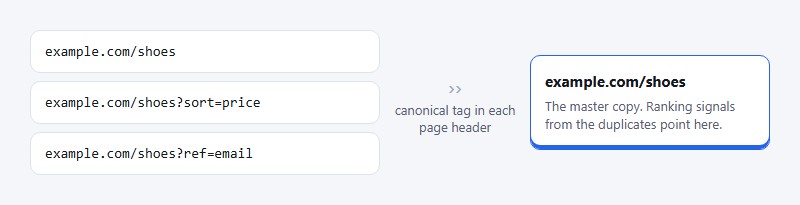
A canonical tag tells search engines which URL is the master copy of a page. Large sites often produce several web addresses for the same content, through sorting parameters, tracking parameters or print versions. Crawlers then have to guess which version to index, and ranking signals get split across weaker copies.
Specialists write a canonical tag into the head of each duplicate pointing to the preferred URL. Search engines then treat that page as the primary one and consolidate signals on it. That removes internal competition between your own pages and lets the main page rank higher. The tag is a strong hint rather than a command, so keep internal links and sitemaps consistent with it.
What should you do with this list?
Run your own quick check before hiring anyone. Test a few key pages in PageSpeed Insights, validate your markup, and look for duplicate URLs in Google Search Console. A written technical SEO checklist helps turn the results into tickets. For the bigger picture, see what technical SEO is and why it matters for your business. Then ask any specialist you hire which of these five changes they would make first on your site, and why.

- How Custom Software and Server Control Panel Tools Work Together - November 22, 2026
- Notepad++ Online: Can You Use It in a Browser? - November 21, 2026
- 5 Best customer loyalty software for consumer brands in 2027 - November 21, 2026