Steam is the default PC game launcher for most players, but it’s not the only option worth using.
Whether you’re looking for free weekly games, DRM-free ownership, a subscription model, or a better experience on Linux, there are solid apps like Steam that cover different needs, and in some cases, do specific things better.
This guide covers the 10 best PC gaming platforms worth installing right now, including Epic Games Store, GOG Galaxy, Xbox Game Pass, EA App, itch.io, and more.
Each platform is compared on library size, pricing, platform support, and community features, so you can find the right fit without having to try them all yourself.
Apps Like Steam
Steam still dominates PC game distribution. But locking your entire digital game library into one platform is a real risk that most players don’t think about until something breaks. Account bans, server outages, or a game getting delisted can wipe out years of purchases.
The good news: the PC gaming storefront space has matured a lot. The platforms below aren’t just backup options. Several have real advantages over Steam, whether that’s better pricing, DRM-free ownership, or a subscription model that makes buying individual games feel unnecessary.
Here’s a breakdown of the 10 best Steam alternatives worth installing right now.
| Platform | Best For | Pricing |
| Epic Games Store | Free weekly games, budget library building | Free |
| GOG Galaxy | DRM-free ownership, classic games | Free |
| Xbox Game Pass (PC) | Subscription access, day-one releases | From $9.99/mo |
| EA App | EA franchise players | Free + EA Play $4.99/mo |
| Ubisoft Connect | Ubisoft catalog, rewards system | Free + Ubisoft+ $17.99/mo |
| Battle.net | Blizzard and Activision titles | Free |
| itch.io | Indie games, experimental titles | Free |
| Humble Bundle | Discounted bundles, charity giving | Free + Choice $11.99/mo |
| Heroic Games Launcher | Linux/macOS users, multi-store management | Free (open source) |
| Playnite | Unified library across all platforms | Free (open source) |
Epic Games Store
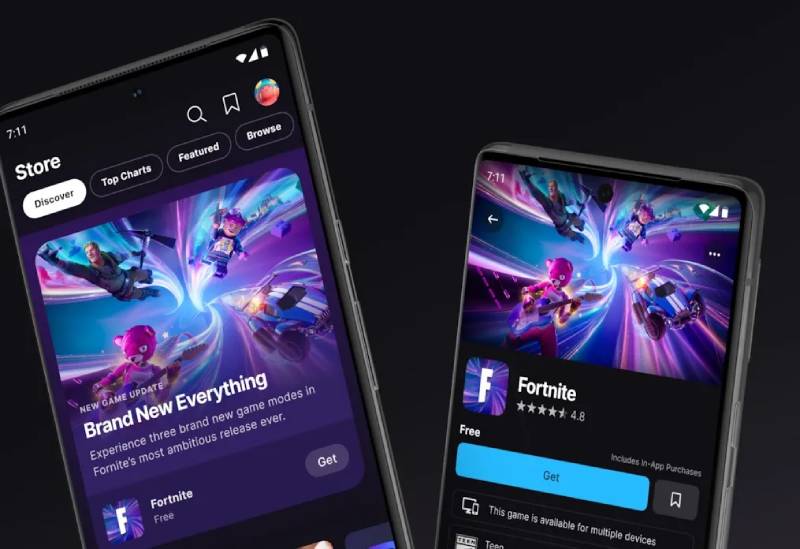
Epic Games Store is a digital game distribution platform that sells and distributes PC games for Windows and macOS, primarily targeting players who want free weekly titles and competitive pricing. It offers an 88% revenue split to developers (vs. Steam’s 70%) and supports cross-platform accounts.
What Does Epic Games Store Do?
Epic Games Store lets users buy, download, and play PC games through a desktop client on Windows and macOS, with a built-in free games program that gives away titles every week.
How Is Epic Games Store Similar to Steam?
Both are digital PC game storefronts with game libraries, cloud saves, achievement systems, and social features.
Both support cross-play for select titles and allow game gifting between users.
How Is Epic Games Store Different from Steam?
- Epic gave away 100 free games worth $2,316 in 2025, with 662 million free games claimed (Epic Games, 2026)
- PC players spent $1.16 billion on Epic in 2025, up 6% year over year
- Epic’s launcher is being rebuilt for faster load times, with rollout scheduled for summer 2026
- Smaller game library than Steam, limited mod support, fewer community features
Who Is Epic Games Store Best For?
Budget-conscious PC gamers building a digital game library from scratch, who don’t mind a thinner feature set in exchange for regular free games.
Key Features of Epic Games Store
- Free Games Program: 1 or more free titles every week, claimed permanently
- Cross-platform accounts: 972 million accounts across PC and mobile as of 2025
- Developer revenue share: 88% to developers vs. Steam’s 70%
- Social features: Friends list, voice chat (Q2 2026), cross-platform text chat
Pricing
- Free plan: Yes, full access to the store and free games program
- Paid plans: Per-game purchases only, no mandatory subscription
- Free trial: N/A
GOG Galaxy
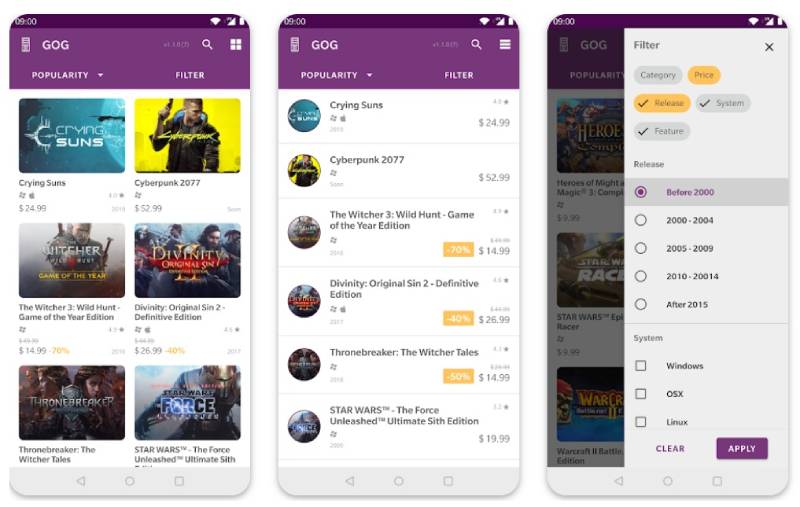
GOG Galaxy is a DRM-free game distribution platform and desktop client that lets PC gamers buy, download, and manage games without any digital rights management restrictions, targeting players who want true ownership of their titles. It also works as a multi-platform game library manager through GOG Galaxy 2.0.
What Does GOG Galaxy Do?
GOG Galaxy lets users buy DRM-free PC games and pull their libraries from Steam, Epic, Xbox, and other platforms into one unified interface.
How Is GOG Galaxy Similar to Steam?
Both are PC game storefronts with desktop clients for Windows, macOS, and Linux.
Both include cloud saves, achievement tracking, friends lists, and game update management.
How Is GOG Galaxy Different from Steam?
Key difference: Every game you buy on GOG is DRM-free. No forced launcher, no online activation check. You download it, back it up, and it’s yours permanently.
GOG introduced one-click mod support in June 2025 and launched the “Freedom to Buy” initiative in August 2025 after Steam and itch.io removed some titles due to payment processor pressure.
GOG’s catalog is smaller than Steam’s but leans heavily into classic PC games from the late 1990s and 2000s, patched to run on modern systems. GOG was sold by CD Projekt to co-founder Michal Kicinski in December 2025, giving the platform more independence.
Who Is GOG Galaxy Best For?
PC gamers who care about DRM-free ownership, classic game preservation, and having one launcher that pulls libraries from multiple platforms into a single view.
Key Features of GOG Galaxy
- DRM-free downloads: Offline installers available, no launcher required to play
- Cross-platform library: Connects Steam, Epic, Xbox, and more in GOG Galaxy 2.0
- 30-day refund policy: vs. Steam’s 14-day / 2-hour play limit
- Classic game support: Older titles patched with DOSBox and compatibility fixes
- One-click mod support: Added June 2025 for select titles
Pricing
- Free plan: Yes, full access including cross-platform library management
- Paid plans: Per-game purchases only
- Free trial: N/A
Xbox Game Pass (PC)

Xbox Game Pass is Microsoft’s game subscription service for PC and console, giving users access to hundreds of titles including day-one releases from Xbox Game Studios, targeting players who want broad access over individual purchases.
What Does Xbox Game Pass Do?
Xbox Game Pass gives subscribers access to a rotating library of 400+ PC games, including day-one releases, with cloud gaming and cross-save support across PC, console, and mobile.
How Is Xbox Game Pass Similar to Steam?
Both offer a large PC game library with cloud saves, achievements, social features, and multiplayer support. Both run as desktop clients on Windows.
How Is Xbox Game Pass Different from Steam?
| Attribute | Xbox Game Pass | Steam |
| Model | Monthly subscription | Per-game purchase |
| Day-one releases | Yes (Xbox Game Studios titles) | No |
| Game ownership | Access only, not owned | Purchased license |
| Cloud gaming | Yes (Xbox Cloud Gaming) | Limited (via Steam Link / GeForce Now) |
Game Pass reached 40 million subscribers by Q1 2026, up from 37 million in Q1 2025 (SQ Magazine). PC Game Pass subscriber base grew 30% in Q2 FY2025 alone.
Who Is Xbox Game Pass Best For?
Gamers who play many different titles per month and want day-one access to major Xbox Game Studios releases without paying $60+ per game.
Key Features of Xbox Game Pass
- Library size: 400+ PC games, including 85 new titles added in 2025
- Cloud gaming: 1.7 billion hours streamed in 2025 via xCloud, up 45% YoY
- Day-one releases: All Xbox Game Studios titles included at launch
- Cross-platform: PC, console, and mobile access under one subscription
Pricing
- Free plan: No
- PC Game Pass: $9.99/month
- Game Pass Ultimate: $29.99/month (PC + console + cloud + EA Play)
- Free trial: Occasional promotional trials available
EA App

The EA App is Electronic Arts’ official PC gaming client, replacing Origin as the primary platform for downloading, updating, and playing EA titles on Windows, targeting players who own or want to play EA’s game catalog. It handles purchases, social features, and subscriptions for EA’s full library.
What Does EA App Do?
EA App manages downloads, updates, and social features for EA-published games on PC. Even games bought on Steam often launch through the EA App automatically.
How Is EA App Similar to Steam?
Both are PC game clients with purchase history, cloud saves, friend lists, and achievement tracking.
Both include a subscription tier (EA Play vs. Steam’s various bundle options) and support digital game sales.
How Is EA App Different from Steam?
- Library is almost entirely EA-published titles: Battlefield, The Sims, FIFA (now EA Sports FC), Mass Effect, Star Wars Jedi series
- No third-party or indie game marketplace
- EA Play subscription grants 10-hour trials of new releases before purchase
- EA Play Pro (PC only) gives full access to all EA titles at launch
Who Is EA App Best For?
Players who primarily play EA franchises and want access to the full EA catalog without buying each title individually.
Key Features of EA App
- Game trials: 10-hour early access to new EA releases via EA Play
- EA Play Pro: Full PC game library access including day-one releases
- Playtime Controls: Time-tracking and parental controls
- Cross-device: Available on PC and mobile
Pricing
- Free plan: Yes, free to download and use for game management
- EA Play: $4.99/month or $29.99/year
- EA Play Pro (PC): $14.99/month or $99.99/year
- Free trial: No, but EA Play is included with Xbox Game Pass Ultimate
Ubisoft Connect

Ubisoft Connect is Ubisoft’s cross-platform gaming ecosystem for PC and console, handling game purchases, downloads, achievements, and cross-progression for Ubisoft titles. It targets Ubisoft’s player base with a rewards system built around completing in-game challenges.
What Does Ubisoft Connect Do?
Ubisoft Connect lets users buy, download, and play Ubisoft games on PC, while tracking achievements and distributing rewards (called Units) redeemable for cosmetic items across Ubisoft titles.
How Is Ubisoft Connect Similar to Steam?
Shared features: game purchases, achievement tracking, friends list, seasonal sales, cloud saves, and cross-progression across PC and console.
How Is Ubisoft Connect Different from Steam?
Ubisoft Connect is a first-party storefront. The entire library is Ubisoft titles: Assassin’s Creed, Far Cry, Rainbow Six Siege, Prince of Persia, Watch Dogs. No indie games, no third-party publishers.
The rewards system is the real hook here. You earn Units from in-game challenges and spend them on cosmetics or small DLC packs across Ubisoft’s catalog. Steam has nothing like that.
Who Is Ubisoft Connect Best For?
Players who consistently buy Ubisoft titles and want a subscription service that covers the full Ubisoft catalog plus day-one releases.
Key Features of Ubisoft Connect
- Cross-progression: Save data and progress sync across PC and consoles
- Rewards (Units): Earnable in-game currency redeemable across Ubisoft titles
- 100+ PC games: Full Ubisoft catalog including recent releases
- Ubisoft+: Subscription covering full library plus day-one access
Pricing
- Free plan: Yes, free client with per-game purchases
- Ubisoft+ Classics: Included with Xbox Game Pass Ultimate
- Ubisoft+: $17.99/month (full catalog + day-one releases)
- Free trial: Occasional free weekend access to select titles
Battle.net
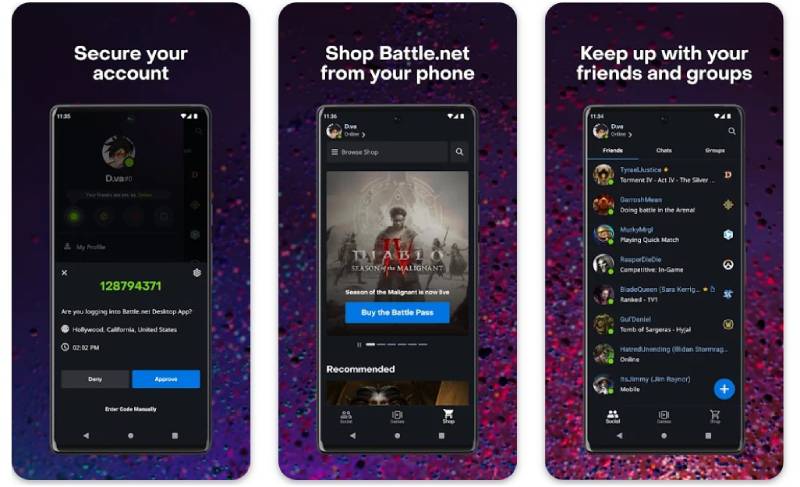
Battle.net is Blizzard Entertainment’s online gaming platform and desktop client for PC, covering game purchases, downloads, social features, and multiplayer matchmaking for Blizzard and Activision titles. It runs on Windows and macOS and is required to play most Blizzard games.
What Does Battle.net Do?
Battle.net handles game installation, updates, social networking, and multiplayer matchmaking for Blizzard and Activision titles on PC, with a friends list and voice chat built directly into the launcher.
How Is Battle.net Similar to Steam?
Both are desktop game clients with game library management, cloud saves, social features, and achievement systems.
Both offer free-to-play titles (World of Warcraft Starter Edition, Hearthstone, Overwatch 2, Warzone) and support multiplayer matchmaking.
How Is Battle.net Different from Steam?
- Exclusively Blizzard and Activision titles: World of Warcraft, Overwatch 2, Diablo IV, Starcraft II, Call of Duty, Hearthstone
- No third-party game sales or indie marketplace
- World of Warcraft requires a separate monthly subscription ($14.99/month) on top of game purchases
- Blizzard’s monthly active users peaked at 46 million in 2017 Q2 and had dropped to 26 million by Q2 2021, before Microsoft’s Activision acquisition changed the broader user picture
Who Is Battle.net Best For?
Players who primarily play Blizzard or Activision titles and need the dedicated launcher to access those games, particularly WoW, Diablo IV, or competitive Overwatch 2.
Key Features of Battle.net
- Built-in voice and text chat with friends list and group features
- Free-to-play titles: Overwatch 2, Hearthstone, Warzone, Starcraft II
- Automatic updates: Background patching with minimal interruption
- Cross-game social: One friends list shared across all Blizzard titles
Pricing
- Free plan: Yes, free client access and free-to-play games
- Game purchases: Per-title pricing varies
- WoW subscription: $14.99/month required
- Free trial: Free starter editions available for WoW and Hearthstone
itch.io

itch.io is an open indie game marketplace and platform for hosting, selling, and downloading games, targeting indie developers and players who want experimental, creative, or pay-what-you-want game experiences. Developers set their own pricing and revenue splits.
What Does itch.io Do?
itch.io lets developers upload games with custom pricing (including free and pay-what-you-want), and gives players a desktop app to download and manage those games across Windows, macOS, and Linux.
How Is itch.io Similar to Steam?
Both are PC game distribution platforms with desktop clients, game library management, and community-facing storefront pages.
Both support Windows, macOS, and Linux.
How Is itch.io Different from Steam?
itch.io is the best place on the internet for experimental and artistic indie games. Developers keep 100% of revenue by default (can choose to give itch.io a cut).
There’s no curation process. Anyone can publish. That’s both the appeal and the tradeoff. Quality varies wildly, but game jams regularly produce creative titles you won’t find anywhere else. itch.io also launched the “Freedom to Buy” initiative in August 2025 alongside GOG, in response to payment processor pressure on adult game content.
Who Is itch.io Best For?
Players looking for free or low-cost indie games, game jam entries, and experimental titles not available on Steam, and developers who want zero-barrier publishing.
Key Features of itch.io
- Pay-what-you-want pricing: Many games are free or set-your-own-price
- Developer revenue: 0% platform cut by default (developer-chosen)
- Bundles: Large charity bundles with 1,000+ games for $10-20
- Desktop app: Optional client for managing downloads and updates
- Non-game content: Supports game assets, tools, tabletop RPG content
Pricing
- Free plan: Yes, fully free to use
- Paid plans: Per-game purchases at developer-set prices
- Free trial: N/A (thousands of games are free by default)
Humble Bundle

Humble Bundle is a game bundle and digital storefront for PC, Mac, and Linux that sells games at discounted prices often bundled with charity donations, targeting budget-conscious players and those who want to support charitable causes through gaming. It includes a monthly subscription called Humble Choice.
What Does Humble Bundle Do?
Humble Bundle sells game bundles and individual titles at discounted prices, with a portion of each purchase going to charity, and offers a monthly subscription that gives subscribers a curated selection of games each month.
How Is Humble Bundle Similar to Steam?
Both sell PC games digitally across multiple genres, including RPG, action, strategy, indie, and simulation. Many Humble purchases deliver Steam keys directly to your Steam library.
How Is Humble Bundle Different from Steam?
Bundle pricing is the main draw. You pay a flat fee (often $10-$40) for a group of games, rather than buying titles individually. The Humble Choice subscription gives 6+ games per month at $11.99/month.
Many Humble games are fulfilled as Steam keys, so you end up back in Steam anyway. It’s less a Steam replacement and more a cheaper way to add games to your Steam library. Humble also donates a portion of every sale to charity.
Who Is Humble Bundle Best For?
Budget gamers who want to buy multiple titles at once and don’t mind a curated selection, especially those who want to support charity through their game purchases.
Key Features of Humble Bundle
- Humble Choice: 6+ games per month for $11.99/month
- Bundle pricing: Groups of 3-15 games at $10-$40 flat
- Charity donations: Portion of every purchase goes to charity
- Steam key delivery: Most purchases deliver keys to your Steam account
Pricing
- Free plan: Yes, free to browse and buy individual games or bundles
- Humble Choice: $11.99/month for curated monthly games
- Free trial: No
Heroic Games Launcher

Heroic Games Launcher is a free, open-source game launcher for Windows, macOS, and Linux that manages games from Epic Games Store, GOG, and Amazon Prime Gaming in one interface, primarily targeting Linux and macOS users who want native access to multi-store libraries.
What Does Heroic Games Launcher Do?
Heroic Games Launcher pulls your Epic, GOG, and Amazon Prime Gaming libraries into a single client and handles Wine/Proton configuration automatically on Linux and macOS, so games that weren’t designed for those systems run with minimal setup.
How Is Heroic Similar to Steam?
Both manage game downloads, updates, and library organization across multiple titles. Both support game launching with controller input and cloud save features for supported titles.
How Is Heroic Different from Steam?
Heroic doesn’t sell games. It’s purely a launcher that manages games you already own on Epic, GOG, and Amazon. No storefront, no community features, no trading cards.
The main advantage is cross-platform compatibility. Heroic handles Wine and Proton configuration automatically, so Windows-only Epic or GOG games run on Linux and macOS without manual setup. You can also add EA App and Ubisoft Connect games to your Heroic library for unified organization.
Who Is Heroic Games Launcher Best For?
Linux and macOS users who own games on Epic, GOG, or Amazon and want a unified launcher that handles compatibility layers automatically without using Steam’s Proton.
Key Features of Heroic Games Launcher
- Platform support: Windows, macOS, Linux (including Steam Deck)
- Wine/Proton integration: Automatic configuration for non-native games
- Multi-store support: Epic, GOG, Amazon Prime Gaming in one place
- Steam export: Add Heroic games to Steam library automatically
- Multi-account: Supports multiple Epic, GOG, and Amazon accounts
Pricing
- Free plan: Yes, fully free and open source
- Paid plans: None
- Free trial: N/A
Playnite

Playnite is a free, open-source game library manager for Windows that pulls your entire gaming collection from Steam, Epic, GOG, EA App, Battle.net, Ubisoft Connect, Xbox PC, itch.io, Humble Bundle, Amazon Games, and emulators into a single unified interface, targeting PC gamers with libraries spread across multiple platforms.
What Does Playnite Do?
Playnite aggregates game libraries from 10+ storefronts and dozens of emulators into one customizable interface, with metadata auto-fetching, cover art, playtime tracking, and a fullscreen controller-friendly mode.
How Is Playnite Similar to Steam?
Both include a game library with cover art, metadata, playtime tracking, and a controller-friendly fullscreen mode. Both support launching games directly from the interface.
How Is Playnite Different from Steam?
Playnite doesn’t sell games. It’s a game library management tool that sits on top of every other launcher. You log in to your various accounts during setup and it pulls everything together.
GOG Galaxy 2.0 tries to do something similar, but Playnite supports more platforms and has a more active plugin ecosystem. Playnite 11 (planned for 2026) will introduce Linux support via an Avalonia UI rewrite, according to developer Josef Nemec. Currently Windows-only.
Who Is Playnite Best For?
PC gamers with libraries spread across 3+ storefronts who want one interface to manage and launch everything, including emulated titles, without paying for LaunchBox’s premium tier.
Key Features of Playnite
- Supported platforms: Steam, Epic, GOG, EA App, Battle.net, Ubisoft Connect, Xbox, itch.io, Humble, Amazon
- Emulator support: RetroArch, Dolphin, PCSX2, and others via built-in scanner
- Fullscreen mode: Controller-friendly UI for TV/home theater setups
- Metadata: Auto-fetches cover art, descriptions, genres from IGDB and Steam
- Plugin ecosystem: Community-built addons for additional platforms and features
Pricing
- Free plan: Yes, fully free and open source
- Paid plans: None (Patreon supporters get early builds 2 weeks ahead)
- Free trial: N/A
What Makes a Gaming Platform a Real Alternative to Steam?
Steam controls 74-75% of the global PC digital distribution market as of 2025, according to Icon Era. Any platform calling itself an alternative has to clear a high bar.
Not every game launcher qualifies. A real Steam alternative covers most of what Steam does: game purchases or access, library management, updates, and some form of social or community layer.
| Criteria | What to Look At | Why It Matters |
| Library size | Total games available | More titles = less reliance on Steam |
| DRM policy | Owned vs. licensed access | Affects long-term access to purchases |
| Pricing model | Per-game vs. subscription | Determines total cost over 12 months |
| Platform support | Windows, macOS, Linux | Limits who can use it |
| Developer revenue split | % kept by platform | Drives which games appear where |
Steam takes a 30% cut from developers on most sales. That revenue split is the main reason studios launch exclusives on competing platforms, especially Epic (88% to developers) and GOG.
Social features matter too, but they’re secondary. A platform without achievements, friends lists, or community forums can still replace Steam for players who just want to launch games.
How Do Free Gaming Platforms Compare to Steam?
Four major free platforms go head-to-head with Steam’s digital game distribution model without charging a subscription fee: Epic Games Store, GOG Galaxy, itch.io, and Battle.net.
PC gaming generated $43.2 billion in software and services revenue in 2024 (Fortune Business Insights). Free storefronts capture a growing slice of that by removing the barrier to entry entirely.
Does Epic Games Store Have Fewer Games Than Steam?
Yes, significantly. Steam hosts over 120,000 titles. Epic maintains a curated library of around 4,000+ games, adding roughly 1,100 new titles in 2024 compared to Steam’s 18,600+.
But Epic’s smaller catalog is a deliberate choice, not a weakness.
- Curated approach means higher average quality per title
- Exclusivity deals bring games like Alan Wake 2 and Fortnite
- Free Games Program gave away 100 titles worth $2,316 in 2025 alone
Epic reached 317 million PC users in 2025, with a December peak of 78 million monthly active users (Epic Games 2025 Year in Review).
Which Free Steam Alternative Gives the Most Games?
itch.io wins on volume for free titles. Thousands of games on the platform are free by default, including charity bundle games. A single bundle in 2022 (Bundle for Ukraine) contained over 1,000 games for a $10 minimum donation.
GOG Galaxy wins on ownership. Every purchase is DRM-free with offline installers, a 30-day refund window, and no forced launcher. GOG introduced one-click mod support in June 2025 and launched its “Freedom to Buy” initiative in August 2025 after Steam and itch.io removed titles due to payment processor pressure.
Battle.net sits in its own category. The platform is required to play Blizzard and Activision titles (World of Warcraft, Overwatch 2, Diablo IV, Hearthstone) and offers free-to-play access to several of them. It’s not a general-purpose game store.
| Platform | Library Size | Free Games | DRM-Free | Note |
| Epic Games Store | 4,000+ | Weekly giveaways | No | Known for high-profile free “Mystery Games” |
| GOG Galaxy | 10,000+ | Occasional | Yes, always | Focuses on “Good Old Games” and preservation |
| itch.io | 1,000,000+ | Many by default | Varies by dev | Primary hub for indie devs and game jams |
| Battle.net | Restricted | F2P titles | No | Exclusive to Activision Blizzard & select partners |
Which Gaming Subscription Service Replaces Steam for PC?
Three subscription-based PC gaming platforms compete for the same spend players put into Steam purchases: Xbox Game Pass PC, EA Play Pro, and Ubisoft+.
Subscription services contributed $12.3 billion industrywide in 2024, growing at 5.2% annually (Fortune Business Insights). The shift from per-game purchasing to access models is real and accelerating.
Is Xbox Game Pass Better Than Steam for PC Gaming?
Depends entirely on how many games you play per month. Xbox Game Pass PC gives access to 400+ titles for $9.99/month. If you play 3+ different games monthly, the math favors Game Pass over buying each at $40-60.
Game Pass reached 40 million subscribers by Q1 2026, up from 37 million in Q1 2025 (SQ Magazine). PC subscribers grew 30% in Q2 FY2025 alone.
Where Game Pass beats Steam:
- Day-one releases from Xbox Game Studios included at no extra cost
- Cloud gaming via xCloud (1.7 billion hours streamed in 2025)
- Cross-platform access: PC, console, and mobile under one subscription
Where Steam beats Game Pass:
- Games you buy are owned permanently
- 120,000+ titles vs. Game Pass’s 400+
- No subscription cancellation risk on your library
EA Play Pro and Ubisoft+ are narrower bets. EA Play Pro at $14.99/month covers EA’s full PC catalog including day-one releases. Ubisoft+ at $17.99/month does the same for Ubisoft titles. Both are worth it only if you consistently play games from those publishers.
How Does Steam Handle Mods, Community, and Social Features Compared to Other Platforms?
This is where Steam has the clearest lead. No competing game distribution platform comes close on community infrastructure.
Steam Workshop is used by over 3,000 games with more than 50 million items uploaded, according to Valve’s own platform data. One-click mod installation, version history, and automatic updates are built in. Epic, EA App, and Ubisoft Connect have no equivalent.
The community layer goes deep:
- Steam Community: Forums, guides, user reviews, and community hubs per game
- Steam Market: Over $500 million in trades processed in 2024
- Achievements: Present on Steam, Xbox, GOG Galaxy, EA App, and Ubisoft Connect; absent on itch.io and Heroic
- Steam Overlay: In-game browser, screenshot tool, and voice chat; no native equivalent in Playnite or Heroic
GOG Galaxy 2.0 is the only multi-platform tool that partially bridges this gap. It pulls achievements and playtime stats from Steam, Epic, Xbox, and other platforms into one dashboard, but it can’t replicate Steam’s forums, trading cards, or mod hosting.
Titles like Skyrim and Cities: Skylines have mod ecosystems with tens of thousands of community-made items hosted on Steam Workshop. Those games exist on GOG too, but modding requires third-party tools like Nexus Mods rather than a built-in one-click system.
Which Platform Is Best for Linux and macOS PC Gaming?
Linux gaming on Steam hit 3.20% market share in November 2025, the highest ever recorded on the platform, up from 2.03% in November 2024 (Steam Hardware Survey via Command Linux). That’s roughly 4.22 million monthly active Linux gamers.
The growth is almost entirely driven by the Steam Deck (5.6 million units shipped by mid-2025) and Valve’s Proton compatibility layer.
Does Epic Games Store Work on Linux?
Not natively. Epic has no official Linux client. But Heroic Games Launcher solves this problem cleanly.
Heroic is an open-source launcher that manages Epic, GOG, and Amazon Prime Gaming libraries on Windows, macOS, and Linux. It handles Wine and Proton configuration automatically, so games that weren’t built for Linux run without manual setup.
Proton currently covers roughly 106,000 of Steam’s 117,000+ games on Linux, a 12x expansion from the approximately 9,000 with native Linux builds (Command Linux, November 2025). The 10% that don’t work are mostly titles with kernel-level anti-cheat (Valorant, Fortnite) that block Linux outright.
| Platform | Linux Support | macOS Support | Compatibility Method |
| Steam | Yes (Native + Proton) | Yes (Limited) | Proton (built-in) |
| Heroic | Yes | Yes | Wine/Proton auto-config |
| GOG Galaxy | Native Client (In Dev) | Yes | DRM-free; run via Heroic/Lutris |
| Epic Games Store | No client | Yes | Use Heroic instead |
For macOS, GOG Galaxy is available natively. Epic’s macOS client works but receives less attention than the Windows version. Steam on macOS covers 1.43% of the platform’s user base (Steam Hardware Survey 2025).
Lutris is the other major Linux option. It’s an open-source game manager supporting Wine, Proton, DXVK, and launchers including Battle.net and Ubisoft Connect through install scripts. It requires more manual setup than Heroic but covers more platforms.
How Do You Manage Games Across Multiple PC Gaming Platforms?
Most serious PC gamers end up with libraries split across 3 or more storefronts. Steam, Epic, GOG, Xbox, EA App, and Ubisoft Connect each require their own launcher. That’s a real problem.
Two tools address this directly: Playnite and GOG Galaxy 2.0.
Does Playnite Replace Steam?
No. Playnite doesn’t sell games or replace any launcher. It sits on top of them.
Playnite pulls libraries from Steam, Epic, GOG, EA App, Battle.net, Ubisoft Connect, Xbox PC, itch.io, Humble Bundle, and Amazon Games into one interface. Set up takes about four minutes of logging into accounts. Everything you own across all platforms appears in a single searchable list.
Key differences between Playnite and GOG Galaxy 2.0:
- Playnite: Open-source, Windows-only (Linux support planned for Playnite 11 in 2026 via Avalonia UI rewrite), supports emulators (RetroArch, Dolphin, PCSX2), extensive plugin ecosystem, controller-friendly fullscreen mode
- GOG Galaxy 2.0: Lighter install, available on Windows and macOS, no emulator support, cross-platform achievement and playtime sync, connects roughly 20 platforms natively
Playnite is the better choice for anyone with a large library spread across many storefronts, especially if emulated titles are part of the collection. GOG Galaxy 2.0 suits players who want a simpler unified view without heavy customization.
Both are completely free. Playnite supporter access via Patreon gives early builds two weeks ahead of public release, nothing more.
For players who prefer to explore gaming platforms like Roblox that combine social features with game access in a single ecosystem, the unified library approach of Playnite handles those cross-platform scenarios well too.
FAQ on Apps Like Steam
What is the best app like Steam for PC gaming?
Epic Games Store is the most popular Steam alternative, offering a large game library and a weekly free games program. GOG Galaxy is the best option if you want DRM-free ownership and cross-platform library management in one client.
Is there a free alternative to Steam?
Yes. Epic Games Store, GOG Galaxy, itch.io, Battle.net, and Heroic Games Launcher are all free to download and use. Most only charge when you purchase individual games or subscribe to optional plans like EA Play or Ubisoft+.
Which game launcher has the most games besides Steam?
Epic Games Store has one of the largest catalogs among Steam competitors, with 4,000+ titles. Humble Bundle and GOG also carry broad libraries, though neither matches Steam’s 120,000+ game count.
Can you play Steam games on other platforms?
Not directly. Steam games are tied to the Steam client and cannot be launched through Epic or GOG. However, tools like Playnite and GOG Galaxy 2.0 can display your Steam library alongside other platforms in one unified interface.
What is the best Steam alternative for Linux?
Steam with Proton remains the strongest option, covering roughly 90% of Windows games on Linux. Heroic Games Launcher is the best alternative, handling Epic and GOG libraries on Linux with automatic Wine and Proton configuration.
Is GOG Galaxy better than Steam?
For game ownership, yes. GOG sells DRM-free titles with a 30-day refund policy and no forced launcher. For library size, community features, and mod support, Steam is significantly ahead. The two serve different priorities.
Does Epic Games Store give free games?
Yes. Epic’s Free Games Program gave away 100 titles worth $2,316 in 2025, with 662 million free games claimed throughout the year. At least one free game is available every week, kept permanently once claimed.
Is Xbox Game Pass a good alternative to Steam?
For players who finish multiple games per month, yes. Xbox Game Pass PC offers 400+ titles for $9.99/month, including day-one releases from Xbox Game Studios. Unlike Steam purchases, access ends when the subscription ends.
What is itch.io and how does it compare to Steam?
itch.io is an open indie game marketplace where developers set their own pricing, including pay-what-you-want and free. It has no curation process and focuses on experimental titles. Steam has a larger library but far fewer free indie games.
Can you manage all your game libraries in one app?
Yes. Playnite connects Steam, Epic, GOG, EA App, Battle.net, Xbox, itch.io, Humble, and Amazon Games into one interface. GOG Galaxy 2.0 does something similar. Both are free game library managers and neither replaces your existing launchers.
Conclusion
This conclusion is for an article presenting apps like Steam, and the core takeaway is simple: no single platform beats Steam at everything, but most players don’t need it to.
If free games and developer-friendly pricing matter, Epic Games Store is the obvious pick. For DRM-free game ownership and classic titles, GOG Galaxy is hard to beat.
Subscribers who want day-one releases without per-game costs will find Xbox Game Pass PC more practical than building a Steam library from scratch.
Linux and macOS users have real options now too, with Heroic Games Launcher and Proton making cross-platform gaming more accessible than ever.
The right digital game distribution platform depends on how you play, what you buy, and which features actually matter to your setup.

- How to Run a React App in VS Code Step by Step - October 23, 2026
- Transactional or marketing email: which messages your app should send itself - October 23, 2026
- How Software Teams Write SOPs for Releases and Deployments - October 22, 2026