

Your pricing strategy can make or break your SaaS business. SaaS pricing models determine how you capture value, attract customers, and scale revenue in today’s competitive software market.
With subscription billing reaching $650 billion globally, choosing the right pricing approach directly impacts customer acquisition cost, monthly recurring revenue, and long-term growth potential.
Most founders struggle with pricing decisions because traditional models don’t always align with modern SaaS value delivery. Freemium converts only 2-5% of users, while usage-based pricing grows 50% faster than subscription alternatives.
This guide examines eleven proven pricing models used by successful companies like Salesforce, Slack, and Shopify. You’ll discover how each model works, when to implement specific approaches, and real pricing examples from leading SaaS platforms.
By the end, you’ll understand which pricing structure fits your business model, target market, and growth objectives. Whether you’re launching a new product or optimizing existing plans, these frameworks will help maximize revenue while delivering customer value.
SaaS Pricing Models
| Pricing Model | Core Attributes | Value Proposition | Implementation Context |
|---|---|---|---|
| Freemium | Limited features permanently free, premium features require payment | User acquisition through zero-friction onboarding | Consumer apps, productivity tools, collaboration platforms |
| Free Trial | Time-limited access to full functionality | Product validation before purchase commitment | Enterprise software, complex business tools, CRM systems |
| Flat Rate | Single fixed monthly/annual fee for all features | Pricing simplicity with predictable costs | Small business tools, niche software, creative applications |
| Per User | Cost scales linearly with seat count | Revenue growth aligned with customer expansion | Team collaboration, communication platforms, HR systems |
| Per Feature/Tier | Graduated pricing based on feature sets | Clear upgrade path with incremental value | Marketing automation, analytics platforms, design tools |
| Usage-Based | Pricing varies with consumption metrics | Cost optimization for variable usage patterns | API services, cloud infrastructure, email platforms |
| Pay-As-You-Go | Real-time billing for actual resource consumption | Zero waste with precise usage accountability | Cloud computing, data processing, serverless functions |
| Volume Discount | Reduced unit pricing at higher quantities | Enterprise incentivization through economies of scale | Database services, storage solutions, messaging platforms |
| Annual/Monthly Subscription | Recurring payments with temporal commitment tiers | Cash flow optimization through upfront payment incentives | Business software, professional services, media platforms |
| One-Time Purchase | Perpetual license with single payment transaction | Ownership certainty without recurring obligations | Desktop applications, specialized tools, legacy software |
| Custom/Enterprise Pricing | Bespoke pricing negotiation based on specific requirements | Maximum value extraction through personalized agreements | Large-scale deployments, complex integrations, white-label solutions |
Freemium
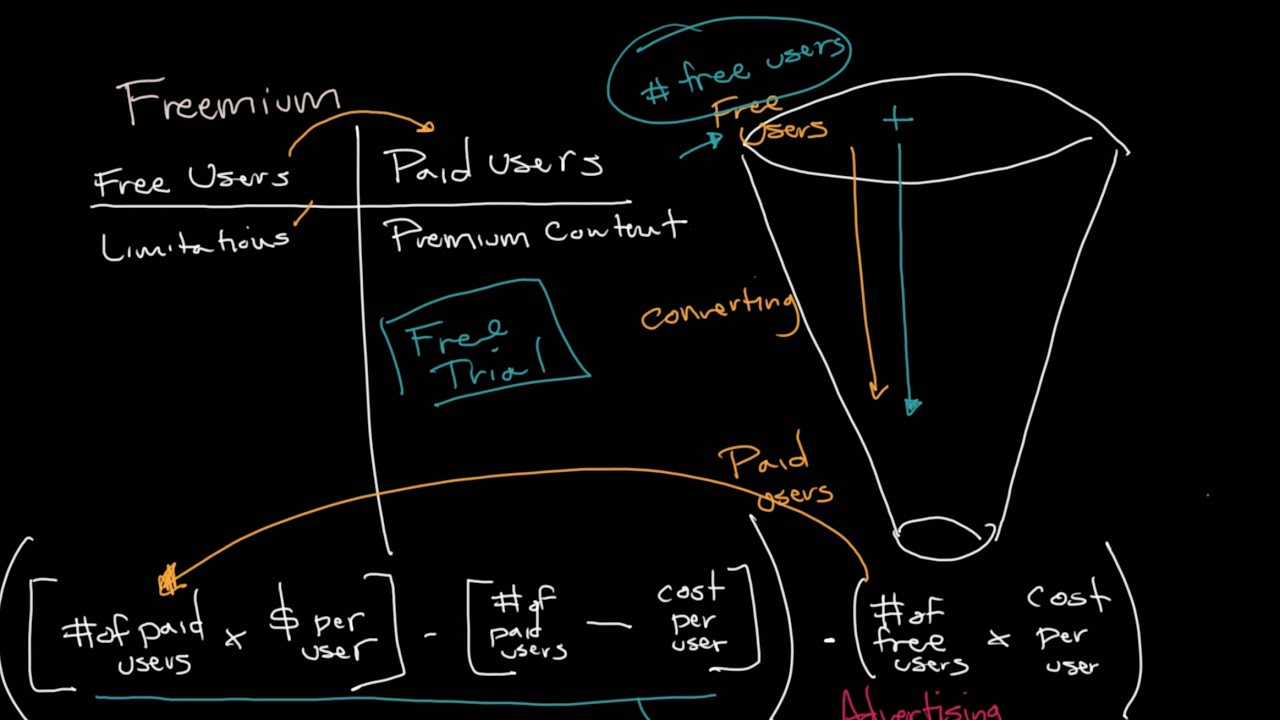
Freemium offers basic features at no cost while charging for advanced functionality. This customer acquisition strategy reduces barriers to entry and enables rapid user base growth across diverse market segments.
How Freemium Works
Companies provide unlimited access to core features while restricting premium capabilities, storage limits, or user seats. Free users experience product value firsthand before upgrading to paid tiers.
Feature-based restrictions lock advanced analytics. Capacity limits cap storage or bandwidth. Use-case boundaries separate personal from commercial usage.
Key Features and Benefits
- Low customer acquisition cost through viral growth
- Extended evaluation period builds confidence
- Natural upgrade path as users hit limitations
- Market validation through user feedback
Best Use Cases
Collaborative platforms benefit most from freemium approaches. Products with delayed gratification value propositions see higher conversion rates.
Knowledge management tools, design software, and communication platforms naturally align with freemium structures.
Pricing Structure Details
- Free tier: Core features with usage restrictions
- Pro tier: $10-25/month with expanded capabilities
- Business tier: $25-75/month for team features
- Annual discounts: 15-25% savings over monthly plans
Advantages and Disadvantages
Advantages:
- Massive user acquisition potential with minimal marketing spend
- Product-led growth enables organic expansion
- User feedback drives development priorities
Disadvantages:
- Less than 10% conversion rate from free to paid
- High infrastructure costs supporting non-revenue users
- Free users may perceive lower product value
Examples and Case Studies
Slack achieves 30% freemium conversion through strategic feature limitations. Users access free messages but hit 90-day search restrictions that prompt upgrades.
Dropbox limits free storage space while implementing referral bonuses. This expands platform reach while converting power users to paid plans.
Spotify pioneered freemium streaming with ad-supported tiers driving premium subscriptions for offline access.
Implementation Considerations
Freemium requires significant infrastructure investment for non-paying users. Success depends on converting free users within 6-12 months before churn increases.
Monitor conversion metrics and adjust feature gates based on user behavior. Focus onboarding on demonstrating premium value early.
Free Trial
Free trials provide temporary access to full product functionality, creating urgency-driven conversion opportunities. This time-limited approach allows prospects to experience complete value before purchasing decisions.
How Free Trial Works
Companies offer 7-30 day access to premium features without payment obligations. Users input credit card information upfront or register with basic contact details.
Trial periods vary by complexity – simple tools offer 14 days while enterprise solutions extend to 30+ days for thorough evaluation.
Key Features and Benefits
- Complete product experience removes purchase uncertainty
- Higher intent users demonstrate genuine interest through registration
- Urgency creation drives faster purchase decisions
- Sales qualification identifies serious prospects for follow-up
Best Use Cases
Complex software requiring user education benefits from trial periods. Professional tools, analytics platforms, and specialized vertical solutions see strong trial-to-paid conversion rates.
B2B products with longer sales cycles leverage trials for stakeholder buy-in and internal demonstrations.
Pricing Structure Details
- Trial duration: 7-30 days based on product complexity
- Credit card required: Reduces friction and improves conversion
- Feature access: Full or limited based on trial strategy
- Support level: Reduced or full customer success engagement
Advantages and Disadvantages
Advantages:
- Higher conversion rates than freemium models
- Qualified leads through intentional sign-up process
- Revenue predictability with defined conversion windows
Disadvantages:
- Limited viral growth compared to permanent free tiers
- Higher pressure sales tactics may alienate prospects
- Credit card requirements create registration friction
Examples and Case Studies
Adobe Creative Cloud offers 7-day trials across all applications, enabling users to evaluate design workflows before subscription commitments.
HubSpot provides 14-day CRM trials with full feature access, allowing sales teams to import data and test automation capabilities.
Zoom’s free trial converts enterprise prospects by demonstrating scalability and integration capabilities during extended evaluation periods.
Implementation Considerations
Trial length should match product complexity and learning curves. Software development teams must balance feature access with conversion optimization.
Implement progressive onboarding sequences guiding users through key workflows. Track trial engagement metrics to identify conversion predictors and optimize accordingly.
Flat Rate
Flat rate pricing charges a single monthly fee for complete product access regardless of usage volume or user count. This simplified structure eliminates billing complexity while appealing to predictability-focused customers.
How Flat Rate Works
Customers pay fixed monthly or annual fees for unlimited access to all features and capabilities. No usage tracking or variable cost calculations required.
Billing remains constant regardless of team size, data consumption, or feature utilization levels.
Key Features and Benefits
- Pricing transparency eliminates billing surprises
- Sales simplification focuses conversations on value rather than usage
- Customer budgeting enables accurate cost forecasting
- Reduced billing complexity minimizes operational overhead
Best Use Cases
Companies serving similar-sized organizations with predictable usage patterns benefit from flat rate structures. Tools with unlimited value potential (content creation, unlimited storage, cloud storage) align well with fixed pricing.
Early-stage products testing market fit often start with flat rates before transitioning to usage-based models.
Pricing Structure Details
- Monthly rate: $50-500 depending on market positioning
- Annual discounts: 10-20% savings for upfront payment
- Feature access: Complete functionality without restrictions
- Support inclusion: Standard customer success and technical support
Advantages and Disadvantages
Advantages:
- Simple customer communication and sales processes
- Predictable revenue streams for financial planning
- No usage monitoring infrastructure required
Disadvantages:
- Revenue potential limited by single price point
- Difficulty capturing value from high-usage customers
- Challenges scaling with customer growth stages
Examples and Case Studies
Buffer’s Awesome plan historically offered unlimited social media scheduling for $99/month, simplifying pricing decisions for marketing teams.
Basecamp charges flat $99/month for unlimited users and projects, targeting companies wanting predictable collaboration costs.
CartHook provides complete ecommerce recovery functionality for $300/month, removing complexity from feature-based decisions.
Implementation Considerations
Flat rate pricing works best when customer value doesn’t correlate strongly with measurable usage metrics. Monitor customer satisfaction to ensure pricing captures appropriate value levels.
Consider hybrid approaches combining flat base rates with usage overages for high-consumption customers.
Per User
Per user pricing scales costs with team size, charging monthly fees for each individual accessing the software. This model aligns pricing with organizational growth and provides clear cost scaling.
How Per User Works
Companies charge $5-100 per user monthly depending on feature tiers and market positioning. Each team member requires individual licensing regardless of usage frequency.
Billing calculations multiply user count by per-seat pricing, creating predictable scaling costs as organizations grow.
Key Features and Benefits
- Scalable pricing grows with customer expansion
- Revenue predictability through user-based forecasting
- Budget clarity enables accurate department cost allocation
- Growth alignment increases revenue as customer success drives adoption
Best Use Cases
Collaboration between dev and ops teams and communication platforms naturally benefit from per-user models. CRM systems, project management tools, and team productivity software align costs with user value.
B2B products where individual access drives organizational benefits see strong per-user adoption.
Pricing Structure Details
- Starter tier: $5-15/user/month for basic functionality
- Professional tier: $15-35/user/month with advanced features
- Enterprise tier: $35-100/user/month for premium capabilities
- Minimum user requirements: Often 5-10 seats for business plans
Advantages and Disadvantages
Advantages:
- Natural revenue expansion as customer teams grow
- Clear value correlation between price and organizational benefit
- Simplified billing calculations and customer communication
Disadvantages:
- Customers may limit user additions to control costs
- Shared login attempts to circumvent per-seat charges
- Less effective for products with varying usage patterns
Examples and Case Studies
Slack charges $7.25-12.50 per user monthly, demonstrating how communication tools scale value with team size. Their active user billing ensures customers only pay for engaged team members.
Zoom employs seat-based pricing where each user requires separate licensing for hosting or participating in meetings, aligning costs with access needs.
Asana and Monday.com charge per user for project management, recognizing that team collaboration tools provide value proportional to participant count.
Implementation Considerations
Consider per active user pricing to address customer concerns about paying for inactive team members. Implement seat management features enabling easy user addition and removal.
Monitor for login sharing behaviors and consider usage-based alternatives if per-user models create adoption friction.
Per Feature/Tier
Tiered pricing packages features into distinct plans, enabling customers to select functionality levels matching their requirements and budgets. This approach captures diverse customer segments through differentiated value propositions.
How Per Feature/Tier Works
Companies create 3-5 pricing tiers with progressively advanced features and capabilities. Basic plans offer core functionality while premium tiers unlock specialized tools and integrations.
Feature gates control access to advanced analytics, API integration capabilities, or enterprise-specific functionality based on subscription level.
Key Features and Benefits
- Multiple customer segments served through varied price points
- Clear upgrade paths drive natural expansion revenue
- Value demonstration through feature differentiation
- Market penetration via accessible entry-level pricing
Best Use Cases
Products with diverse functionality sets benefit from tiered structures. Marketing automation, analytics platforms, and design tools naturally segment features by user sophistication levels.
Companies serving SMB through enterprise markets leverage tiers to address varying complexity needs and budget constraints.
Pricing Structure Details
- Starter tier: $10-25/month with essential features
- Professional tier: $25-75/month adding advanced capabilities
- Business tier: $75-200/month with team collaboration features
- Enterprise tier: Custom pricing for large-scale deployments
Advantages and Disadvantages
Advantages:
- Maximizes market coverage across customer segments
- Natural upselling opportunities as customer needs evolve
- Clear value positioning through feature comparison
Disadvantages:
- Complex pricing communication and sales conversations
- Feature cannibalization risk across tier boundaries
- Customer confusion with too many options
Examples and Case Studies
Zoom offers multiple pricing tiers starting with “Pro” plan for 100 meeting participants, upgrading to “Business” or “Business Plus” for growing needs.
HubSpot segments marketing automation across Starter ($20), Professional ($800), and Enterprise ($3,200) tiers, aligning features with customer maturity levels.
Salesforce pioneered tiered SaaS pricing with Lightning Professional ($25), Enterprise ($165), and Unlimited ($330) plans serving different organizational complexity levels.
Implementation Considerations
Limit tiers to 3-4 options preventing decision paralysis. Ensure clear value differentiation between levels with 2-3x price differences reflecting capability gaps.
Monitor customer tier distribution and upgrade patterns to optimize feature placement and pricing boundaries.
Usage-Based
Usage-based pricing charges customers for actual consumption of services or resources, aligning costs with value delivered. This pay-as-you-go approach provides transparency and scalability for variable usage patterns.
How Usage-Based Works
Companies track measurable consumption metrics like API calls, data storage, processing time, or transactions processed. Billing calculations apply unit pricing to actual usage volumes each billing cycle.
Usage-based pricing charges customers based on how much of a service they use, with costs scaling with activity such as API calls, data storage, or user sessions.
Key Features and Benefits
- Cost alignment with actual value received by customers
- Scalability supports customer growth without pricing friction
- Transparency eliminates uncertainty about resource consumption
- Expansion revenue grows naturally with customer success
Best Use Cases
Infrastructure and platform services naturally align with usage models. Cloud computing, API integration platforms, and data processing tools benefit from consumption-based pricing.
Products with highly variable usage patterns or serving customers with unpredictable resource needs see strong adoption.
Pricing Structure Details
- Metered billing tracks consumption in real-time
- Tiered rates offer volume discounts at higher usage levels
- Minimum commitments ensure baseline revenue predictability
- Overage charges handle usage spikes beyond plan limits
Advantages and Disadvantages
Advantages:
- Perfect alignment between customer value and pricing
- Natural expansion revenue as usage grows with success
- Lower barrier to entry for cost-conscious customers
Disadvantages:
- Unpredictable revenues and budgeting challenges for both customers and vendors
- Complex billing infrastructure and usage tracking requirements
- Customer anxiety about unpredictable costs
Examples and Case Studies
Amazon Web Services charges based on exact resource usage, with EC2 instances billed per second and storage per gigabyte, demonstrating pure consumption pricing.
Twilio charges per API call or message sent, aligning communication platform costs with customer engagement levels.
Stripe processes millions of transactions at 2.9% + 30¢ per charge, scaling costs with customer payment volume and success.
Implementation Considerations
Implement usage monitoring and billing infrastructure before launching consumption models. Provide customers with real-time usage dashboards and spending alerts.
Consider hybrid models combining base subscriptions with usage overages to balance revenue predictability with consumption alignment.
Pay-as-you-go

Pay-as-you-go eliminates upfront commitments, charging customers only for resources consumed during specific time periods. This flexible approach reduces entry barriers while scaling costs with actual usage.
How Pay-as-you-go Works
Customers access services without long-term contracts or minimum commitments. Usage tracking measures consumption in real-time, applying posted rates to generate monthly billing.
No capacity planning or resource reservation required – customers scale usage up or down based on immediate needs.
Key Features and Benefits
- Zero upfront costs eliminate financial barriers to entry
- Elastic scaling matches costs to actual requirements
- No waste from unused capacity or subscriptions
- Experimentation friendly enables low-risk testing
Best Use Cases
Cloud-based app development and infrastructure services benefit from on-demand pricing. Seasonal businesses or companies with unpredictable workloads prefer pay-as-you-go flexibility.
Startups and small businesses appreciate the ability to scale costs with growth rather than making large upfront commitments.
Pricing Structure Details
- On-demand rates apply to immediate usage without commitments
- Graduated pricing reduces unit costs at higher volume levels
- Real-time billing tracks consumption as it occurs
- No minimum fees though some services may have small baseline charges
Advantages and Disadvantages
Advantages:
- Maximum flexibility for customers with variable needs
- Easy customer acquisition with no commitment barriers
- Perfect cost alignment with actual resource consumption
Disadvantages:
- Higher unit costs compared to committed usage plans
- Revenue unpredictability for service providers
- Customer budget uncertainty with fluctuating usage
Examples and Case Studies
Microsoft Azure employs pay-as-you-go pricing giving businesses flexibility to scale resources according to needs without upfront costs.
Google Cloud Platform charges per minute for compute instances and per gigabyte for storage, enabling precise cost control for development teams.
Zapier’s automation platform charges per task execution, allowing customers to start small and scale workflow automation with business growth.
Implementation Considerations
Provide clear pricing calculators and usage forecasting tools helping customers estimate costs. Implement spending alerts and budget controls preventing unexpected charges.
Consider offering committed use discounts for customers seeking cost predictability while maintaining pay-as-you-go flexibility.
Volume Discount

Volume discount pricing reduces unit costs as usage or commitment levels increase, rewarding larger customers with better rates. This approach encourages expansion while improving gross margins through scale economics.
How Volume Discount Works
Tiered pricing structures apply lower rates to incremental usage above specific thresholds. Customers benefit from reduced per-unit costs as consumption increases beyond baseline levels.
Annual commitment plans offer substantial discounts in exchange for guaranteed minimum usage, providing predictable revenue for providers.
Key Features and Benefits
- Customer loyalty through increasing value at higher usage levels
- Revenue predictability via annual commitments and minimum guarantees
- Competitive moats make switching costs prohibitive for large customers
- Margin improvement through operational efficiencies at scale
Best Use Cases
Infrastructure services, data storage, and communication platforms naturally benefit from volume economics. Enterprise software with per-user or per-transaction models see strong volume discount adoption.
Companies serving diverse customer sizes use volume discounts to compete for large accounts while maintaining profitability.
Pricing Structure Details
- Usage tiers: Progressive discounts at 100, 1000, 10000+ unit levels
- Annual discounts: 15-30% savings for committed usage plans
- Enterprise negotiations: Custom rates for large volume commitments
- Retroactive discounts: Apply to all usage once thresholds are reached
Advantages and Disadvantages
Advantages:
- Encourages customer expansion and reduces churn risk
- Improves gross margins through operational scale benefits
- Creates competitive advantages with large customer relationships
Disadvantages:
- Complex pricing communication and calculation requirements
- May cannibalize revenue from customers willing to pay higher rates
- Administrative overhead for tracking and applying discounts
Examples and Case Studies
Amazon Web Services provides volume discounts and savings plans for select services alongside pay-as-you-go options.
Salesforce offers significant discounts for customers committing to annual contracts with minimum user counts, improving revenue predictability.
Twilio provides volume pricing tiers reducing SMS and voice costs for high-volume customers, encouraging platform consolidation.
Implementation Considerations
Structure discount tiers to encourage meaningful usage increases rather than arbitrary thresholds. Monitor customer behavior to optimize tier boundaries and discount percentages.
Consider retroactive discounting to reward customers who exceed thresholds unexpectedly, improving satisfaction and expansion potential.
Annual/Monthly Subscription

Subscription billing offers customers choice between monthly flexibility and annual savings, balancing cash flow needs with commitment preferences. This dual approach maximizes customer acquisition while encouraging longer-term relationships.
How Annual/Monthly Subscription Works
Customers select billing frequency during sign-up with annual plans typically offering 15-25% discounts compared to monthly rates. Subscription management systems handle automated billing and renewal processes.
Annual subscriptions improve customer lifetime value and reduce churn while monthly options lower initial commitment barriers.
Key Features and Benefits
- Customer choice between flexibility and savings
- Cash flow improvement through annual prepayments
- Reduced churn with annual commitment psychology
- Lower processing costs with consolidated annual billing
Best Use Cases
Established products with proven value propositions benefit from annual subscription discounts. Professional tools, productivity software, and business applications see strong annual adoption rates.
Companies targeting price-sensitive customers offer monthly options while encouraging annual upgrades through significant savings.
Pricing Structure Details
- Monthly rates: Standard pricing with month-to-month flexibility
- Annual savings: 15-25% discount for upfront annual payment
- Quarterly options: Some companies offer 6-month terms with moderate discounts
- Enterprise terms: Multi-year contracts with custom pricing and terms
Advantages and Disadvantages
Advantages:
- Improved cash flow and revenue predictability with annual plans
- Lower customer acquisition costs through reduced churn
- Simplified billing operations with fewer transaction fees
Disadvantages:
- Higher refund exposure with annual prepayments
- Monthly plans increase churn risk and billing complexity
- Customer preference conflicts between savings and flexibility
Examples and Case Studies
Slack Pro pricing costs $8.75 per user when paid monthly, but only $7.25 annually, demonstrating typical annual discount structures.
Adobe Creative Cloud offers monthly subscriptions at $52.99 or annual plans at $239.88 (62% savings), encouraging longer commitments.
HubSpot provides 10% annual discounts across all pricing tiers while maintaining monthly flexibility for smaller customers.
Implementation Considerations
Balance annual discounts to improve cash flow without cannibalizing too much monthly revenue. Monitor payment failure rates and implement dunning management for subscription retention.
Consider offering quarterly payment options for customers wanting moderate savings without full annual commitments.
One-time Purchase
One-time purchase pricing provides perpetual software access for a single upfront payment, eliminating ongoing subscription costs. This traditional model appeals to customers preferring ownership over rental relationships.
How One-time Purchase Works
Customers pay a single fee for permanent software licensing and usage rights. Additional costs may apply for major version upgrades, premium support, or extended maintenance.
Revenue recognition occurs immediately upon purchase rather than over subscription periods, creating different financial dynamics.
Key Features and Benefits
- Customer ownership eliminates ongoing payment obligations
- Predictable costs for customers with stable requirements
- Higher upfront revenue per customer compared to monthly subscriptions
- Reduced billing complexity with single transaction processing
Best Use Cases
Specialized tools with stable feature sets benefit from one-time pricing. Desktop software, development tools, and niche applications where ongoing development costs are minimal work well.
Price-sensitive markets or customers with budget constraints prefer elimination of recurring fees.
Pricing Structure Details
- Base software: $99-2,999 depending on market positioning and complexity
- Upgrade pricing: 30-50% of full price for major version updates
- Support plans: Optional annual maintenance at 15-25% of purchase price
- Volume licensing: Discounts for multiple license purchases
Advantages and Disadvantages
Advantages:
- Higher immediate revenue per customer transaction
- Appeals to cost-conscious customers avoiding subscription fatigue
- Simplified pricing communication and sales processes
Disadvantages:
- No recurring revenue for ongoing business sustainability
- Difficult to fund continuous development and improvements
- Limited expansion revenue opportunities from existing customers
Examples and Case Studies
Sketch charges $99 for permanent design tool access with optional $49 annual updates, targeting individual designers and small teams.
Software development tools like Sublime Text offer lifetime licenses appealing to developers preferring ownership models.
Adobe historically used perpetual licensing before transitioning to Creative Cloud subscriptions, demonstrating market evolution toward recurring models.
Implementation Considerations
One-time pricing works best for feature-complete products with minimal ongoing development needs. Consider hybrid approaches combining base purchase with optional subscription add-ons.
Plan for version upgrade cycles and maintenance revenue to support long-term business sustainability.
Custom/Enterprise Pricing
Custom enterprise pricing tailors solutions and costs to large organization requirements through individualized negotiations. This approach maximizes revenue from high-value customers while accommodating complex enterprise needs.
How Custom/Enterprise Pricing Works
Sales teams work directly with enterprise prospects to understand specific requirements, usage patterns, and budget constraints. Pricing proposals incorporate volume discounts, custom integrations, and specialized support levels.
Negotiations may include multi-year commitments, minimum guarantees, and success-based pricing tied to customer outcomes.
Key Features and Benefits
- Maximum revenue capture from large customer segments
- Tailored solutions addressing specific enterprise requirements
- Competitive differentiation through personalized approach
- Long-term partnerships with strategic customer relationships
Best Use Cases
Complex enterprise software requiring customization benefits from individual pricing approaches. Companies serving Fortune 500 organizations or government agencies typically employ custom pricing strategies.
Products with high implementation costs or extensive professional services components naturally align with enterprise pricing models.
Pricing Structure Details
- Base platform: Starting at $10,000-100,000+ annually
- Professional services: Implementation and training costs
- Custom development: Bespoke feature development pricing
- Support tiers: Premium SLAs and dedicated account management
Advantages and Disadvantages
Advantages:
- Highest possible revenue per customer through value-based pricing
- Deep customer relationships improving retention and expansion
- Competitive advantage through customization capabilities
Disadvantages:
- High sales costs and lengthy negotiation cycles
- Complex delivery requirements and customer success obligations
- Limited scalability compared to standardized pricing models
Examples and Case Studies
Most SaaS companies keep their enterprise pricing models secret, requiring individual quotes based on specific customer needs.
Salesforce Enterprise editions start at $165/user/month but enterprise customers often negotiate custom rates based on user counts and feature requirements.
Snowflake provides custom enterprise pricing for large data warehousing implementations, considering data volume, compute requirements, and support needs.
Implementation Considerations
Develop clear enterprise sales processes and pricing frameworks to guide negotiations. Train sales teams on value-based selling techniques and competitive positioning.
Create standardized enterprise feature sets while maintaining flexibility for customer-specific requirements and pricing adjustments.
FAQ on SaaS Pricing Models
What’s the most popular SaaS pricing model?
Tiered pricing dominates the market with 85% of SaaS companies using multiple pricing packages. This approach serves different customer segments from startups to enterprise clients. Companies like Salesforce and HubSpot demonstrate successful tier implementation across diverse markets.
How do I choose between freemium and free trial?
Freemium works best for viral products with network effects, while free trials suit complex software requiring full evaluation. Freemium converts 2-5% of users but builds larger audiences. Free trials achieve 15-20% conversion rates with qualified prospects.
When should I use usage-based pricing?
Usage-based pricing fits products where customer value correlates with consumption metrics. Infrastructure services, API platforms, and data processing tools benefit most. AWS and Twilio demonstrate successful consumption-based pricing scaling with customer growth and success.
What’s the difference between per-user and per-seat pricing?
Per-user pricing charges for each individual account while per-seat pricing may allow sharing. Slack pioneered per-active-user billing, charging only for engaged team members. This reduces customer acquisition barriers while maintaining revenue predictability.
How much should I discount annual subscriptions?
Annual discounts typically range 15-25% compared to monthly rates. This improves cash flow and reduces churn while remaining attractive to customers. Slack offers 17% annual savings, while Adobe provides more aggressive discounts for longer commitments.
What’s enterprise pricing and when do I need it?
Enterprise pricing involves custom quotes for large organizations requiring specialized features, integrations, or support levels. Implement when serving Fortune 500 companies or deals exceeding $100K annually. Most enterprise customers expect personalized pricing discussions.
Can I combine multiple pricing models?
Hybrid pricing models work effectively for different customer segments. Many companies combine freemium with tiered subscriptions, or flat rates with usage overages. Zoom offers both per-user subscriptions and pay-per-minute options for flexibility.
How often should I change my pricing?
Review pricing annually but avoid frequent changes that confuse customers. Monitor competitor pricing, customer feedback, and revenue metrics quarterly. Grandfather existing customers when raising prices to maintain satisfaction and reduce churn risks.
What metrics should I track for pricing optimization?
Focus on customer lifetime value, conversion rates, monthly recurring revenue, and churn by pricing tier. Track average revenue per user and expansion revenue from upgrades. Monitor competitor pricing and customer acquisition costs across different models.
Should I show prices publicly or use contact sales?
Display prices for standard plans but use “contact sales” for enterprise tiers. Transparency builds trust with smaller customers while custom pricing appeals to large organizations. Balance accessibility with perceived value through strategic pricing page design.
Conclusion
Selecting the right SaaS pricing models requires understanding your customer segments, value proposition, and competitive landscape. No single approach fits every business situation.
Subscription billing remains the foundation for predictable revenue streams. Layer usage-based components for customers with variable consumption patterns.
Freemium works for viral products needing network effects. Enterprise pricing captures maximum value from large organizations requiring customization.
Monitor key metrics like customer lifetime value, churn rates, and expansion revenue. These indicators reveal pricing effectiveness better than simple conversion numbers.
Test pricing changes carefully with new customers before affecting existing subscribers. Grandfather pricing protects relationships while enabling growth.
The most successful companies like Stripe and Zoom combine multiple approaches. Start simple, then evolve based on customer feedback and business maturity.
Your pricing strategy should scale with your platform growth while maintaining clear value communication. Regular optimization drives sustainable revenue expansion.

- Top Demand Side Platform Companies to Use For Programmatic Advertising - September 26, 2025
- What Is Nearshoring and How You Can Benefit from It - September 24, 2025
- MVP Tests You Can Do To Validate Your Idea - September 22, 2025


