

To add an AI support agent to a SaaS product, start with clean historical tickets and current documentation, connect the agent to accounts and billing through scoped APIs, and set guardrails: confidence thresholds, human handoff, policy rules and personal data protection. Launch on low-risk request types first and track automation rate, escalation rate and customer satisfaction. Support agents are moving from answering questions to taking action inside the product, such as changing plans, cancelling subscriptions and applying policies, so the work is less about picking a model and more about the data it learns from, the systems it can touch and the limits around it.
What does an AI support agent do in a SaaS product?
An AI support agent resolves customer requests on its own, and the more capable ones act as well as answer. A basic chatbot points to a help article. An agent can look up the account, check the plan, apply your policy and complete the change, then hand over to a person only when the case is unusual. Teams comparing approaches can read about gen AI agents in customer support and the tradeoffs in building or buying an AI chatbot.
Analysts expect rapid growth. Gartner predicts that by 2029 agentic AI will autonomously resolve 80% of common customer service issues without human intervention, leading to a 30% reduction in operational costs. That is a forecast, not a measurement. Customers are already used to delegating to AI: in Gartner’s 2026 survey of 3,566 customers, 58% of those who use GenAI had used it to complete a task on their behalf, rising to 74% in B2B.
What data does an AI support agent need?
An agent is only as good as the material it learns from. It needs four inputs: historical tickets, product documentation, feature workflows and your policies. Ekreative’s saas product development experts built an agent like this for Templify. According to the case study, it was trained on historical tickets, documentation, feature workflows and platform knowledge, and integrated into subscription management so it can handle cancellations and plan changes instead of only answering questions. The case study reports that more than 48% of support requests are now resolved automatically end to end, and that operational costs tied to third-party support tooling fell by 89%. Those are the vendor’s figures.
Each input needs preparation before the agent sees it:
- Historical tickets. Remove duplicates, tag how each case was resolved and strip personal data. Tickets show the language customers actually use and the cases that come up most.
- Product documentation. Keep one current source of truth. If the help center contradicts the product, the agent repeats the contradiction.
- Feature workflows. Write down step by step how common account actions work: where a setting lives, what a plan change affects, what happens on cancellation.
- Policies. Refund rules, plan change rules and escalation criteria should exist in writing, not only in the heads of senior agents.
Plan for upkeep too. Products change, and an agent trained once will drift. Give the documentation an owner and feed product updates into the agent’s knowledge as part of the release process. If you are deciding how to give the model your content, RAG versus fine-tuning is the usual first decision.
How do you integrate the agent with accounts, billing and subscriptions?
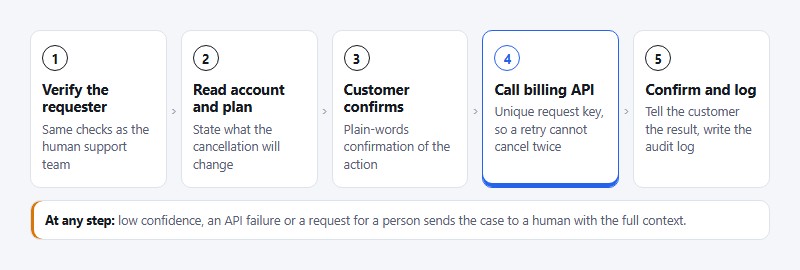
Integrate through scoped APIs and give the agent the least access that lets it do the job. Reading account data is low risk. Changing a plan or cancelling a subscription is not, so those actions need extra checks. A safe cancellation flow looks like this:
- Verify who is asking, using the same checks as your regular support team.
- Read the account and plan, and state what the cancellation will change.
- Ask the customer to confirm the action in plain words.
- Call the billing or subscription API with a unique request key, so a retry cannot cancel twice.
- Confirm the result to the customer and record the action in an audit log.
A few engineering habits make this reliable. Start with read-only access and add write actions one at a time. Test every action in a sandbox with realistic accounts before it touches production. Log what the agent saw, decided and did, so any case can be reviewed later. Keep business rules such as refund limits in code that the model cannot override, not only in its instructions.
Handle failure paths as well. APIs time out, accounts have unusual states and customers change their minds mid-flow. Define what the agent says and does in each case, and make sure a failed action never leaves a customer unsure whether their plan changed.
Which guardrails keep an AI support agent safe?
Guardrails keep the agent useful without letting it do harm, and most of them live outside the model.
- Confidence thresholds. Gartner’s guidance is that GenAI should attempt resolution only when confidence is high, with a clear path to human support. When unsure, the agent should say so and escalate.
- Human handoff. Customers expect it. In Gartner’s 2026 survey, 87% said it is essential to be able to reach a human agent when a company uses GenAI for service.
- Policy rules. Enforce refund amounts, allowed plan changes and required approvals in code.
- Personal data protection. Redact personal data before it reaches the model, scope API permissions and keep logs access-controlled.
- Action limits. Cap how many sensitive actions the agent can take per customer or per hour, and require confirmation for destructive ones.
- An evaluation set. Keep real, anonymized cases with known good outcomes and run them before launch and after every change to prompts, data or tools.
Regulated products need more. See AI agent development for healthcare and financial services for compliance considerations.
How should the agent hand over to a human?
A good handoff means the customer never starts again. The agent passes along the full conversation, the account details it checked, what it tried and why it stopped, so the human can continue in one step.
- Clear triggers. Escalate on low confidence, on sensitive topics such as legal or security complaints, on repeated frustration and whenever the customer asks for a person.
- Context in the ticket. Include a short summary and relevant account data, not only a transcript.
- Routing. Send cases to the right queue by topic and urgency, and tell customers what to expect, such as a rough response time.
- Feedback loop. Let human agents mark whether an escalation was needed. That data is the best material for tuning thresholds and training data.
How do you launch the agent and know it works?
Launch in phases. Begin with high-volume, low-risk request types such as password, plan or billing questions, let the agent handle them while people watch, and widen the scope only when the numbers hold. Track a small set of metrics from day one:
| Metric | What it tells you | Watch for |
| Automation rate | Share of requests resolved without a person | A high rate with falling satisfaction means the agent closes cases badly |
| Escalation rate | How often the agent hands over | Too low can mean it should have escalated; too high means weak data or tools |
| Reopen rate | Cases that come back after being closed | Rising reopens point to wrong or partial fixes |
| Customer satisfaction (CSAT) | How customers rate the interaction | Compare agent-handled and human-handled cases |
| Cost per resolved ticket | The economic effect | Include model, tooling and review time |
Review a sample of conversations every week, including successful ones. Numbers show that something changed, but only reading the cases shows why. If you are still selecting tooling, this list of the best AI customer service software is a place to compare options.
Frequently asked questions
Can an AI agent replace human support?
For common requests it can resolve many cases, but customers expect a human option, so design for handoff.
Which tickets should be automated first?
High-volume, low-risk, well-documented requests such as password, plan or billing questions.
How do you stop the agent from making things up?
Ground answers in your documentation, set confidence thresholds and send low-confidence cases to a person.
How do you protect customer data?
Redact personal data before it reaches the model, scope API permissions, log every action and keep humans in the loop for destructive changes.
How much data do you need?
Enough representative tickets and current documentation to cover your top request types. Quality and freshness matter more than volume.
Where should you start with a support agent?
A good AI support agent is built more than it is bought: clean data, narrow and well-tested access to your systems and clear limits. Pick one low-risk request type, write its workflow and policy down, connect read-only access first and measure the results for a few weeks. The agent earns more scope as the evidence builds.
Sources: Gartner press release on customer use of third-party GenAI (July 2026); Gartner predictions on agentic AI in customer service; Ekreative’s Templify case study.

- How Custom Software and Server Control Panel Tools Work Together - November 22, 2026
- Notepad++ Online: Can You Use It in a Browser? - November 21, 2026
- 5 Best customer loyalty software for consumer brands in 2027 - November 21, 2026


