

SAP S/4HANA Cloud Public Edition receives two major releases per year, in February and August. Three weeks after SAP upgrades the test system, production follows, so regression testing in SAP has to fit into these three weeks. In this window, your QA team retests scoped business processes, and repeatable test cases are automated with SAP test automation tools.
This guide explains what SAP regression testing covers and why integrated modules need it. It then describes challenges and SAP regression testing strategies, followed by tool types and metrics.
What Is Regression Testing in SAP?
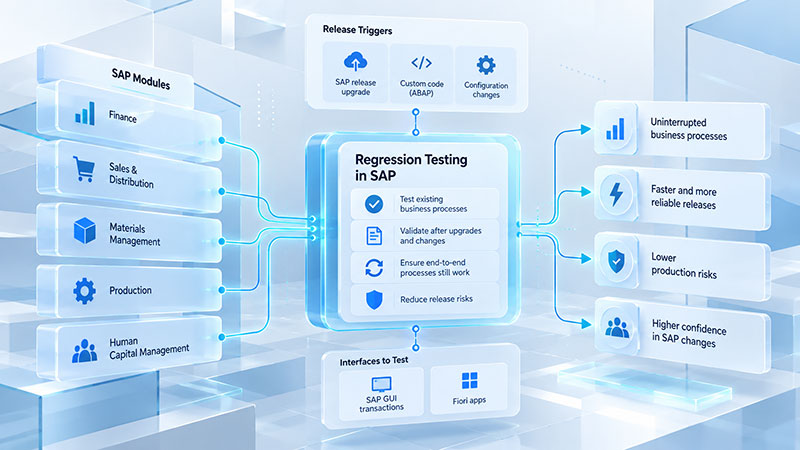
Regression testing in SAP is the repeated testing of existing business processes after a release upgrade or a transport with custom ABAP code or configuration. With these tests, your team confirms that processes which passed before the change still work.
The regression scope covers end-to-end processes across modules, like order-to-cash. These processes run in SAP GUI transactions and in Fiori apps, so your regression suite needs test cases for both interfaces. In a test management platform like aqua cloud, these test cases can be grouped under the same business process.
Why Is Regression Testing Important for SAP Systems?
SAP regression testing is important because SAP modules share master data and documents. A pricing condition in Sales and Distribution, for example, is copied into the billing document, which is then posted to Finance as an accounting document.
ECC migrations also require a full regression run on the new software. According to SAP, it ends mainstream maintenance for ECC at the end of 2027. Customers on enhancement package 6 or higher can opt into extended maintenance until 2030.
Common Challenges in SAP Regression Testing
In SAP regression testing, the process scope is large, and SAP fixes the upgrade dates. The following challenges increase test effort or make test results less reliable:
- Short upgrade windows: According to SAP Learning, Public Edition production is upgraded three weeks after the test system, which sets the regression deadline.
- Custom code: Predelivered SAP test cases cover standard processes only, so your team maintains tests for Z-transactions.
- SAP GUI scripting setup: Before tools like OpenText Functional Testing (formerly UFT One) run SAP GUI tests, the Basis team sets sapgui/user_scripting to TRUE.
- Fiori UI updates: After a release, scripts with hard-coded Fiori element IDs can fail without a functional defect.
- Test data after refresh: A system refresh overwrites test data, so customer and material master data for order-to-cash tests has to be loaded again.
Best Practices for Faster and More Reliable SAP Regression Testing
To shorten regression runs, limit the test scope to the processes that a release affects. For reliable results, your team also needs stable test data and easy-to-update scripts. Both points are covered by these practices:
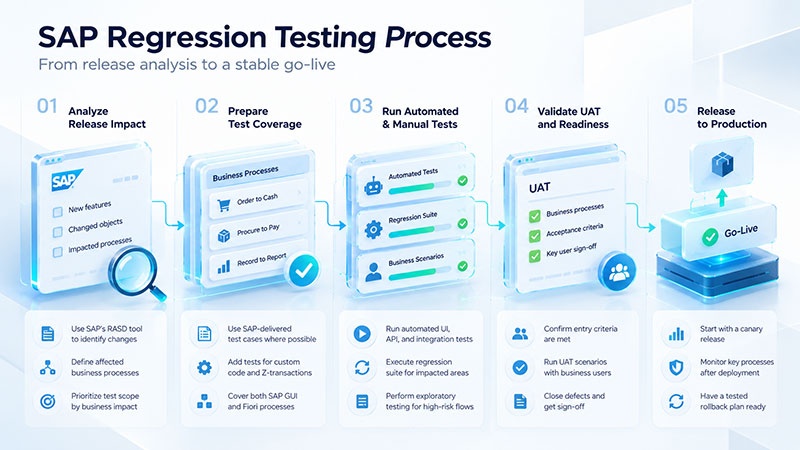
- Scope by release impact: Check how a Public Edition release affects your processes in the free Release Assessment and Scope Dependency (RASD) tool.
- Reuse predelivered test cases: According to SAP, automated test cases exist for all Public Edition processes, and only the test data needs adapting.
- Keep one regression test plan: Create a regression test plan in SAP Cloud ALM and reuse it for later releases.
- Prepare test data per process: Store data sets in a form that can be loaded again after a system refresh.
- Link tests to processes: Map test cases to business processes and requirements, so your QA lead can report coverage before go-live.
How to Choose SAP Test Automation Tools
When you compare SAP regression testing tools, check support for SAP GUI and Fiori first. Next, compare SAP Cloud ALM integration and script maintenance after releases. The following tool types can be combined in one SAP test setup:
- SAP-delivered tools, such as eCATT in on-premise systems or the free Test Automation Tool for Public Edition.
- SAP solution extensions, such as SAP Enterprise Continuous Testing by Tricentis, which can be provisioned from an SAP Cloud ALM tenant.
- Commercial UI automation tools, such as OpenText Functional Testing, for SAP GUI and web interfaces.
- Open-source web frameworks, such as Selenium, for Fiori apps in the browser.
- Test management platforms for coverage reports per business process.
Before a final decision, automate one end-to-end process, like order-to-cash, with the shortlisted tool. After the next release upgrade, rerun the scripts and count the steps that needed updates. This number then shows the maintenance effort on your system.
How to Measure the Success of SAP Regression Testing
You can measure SAP regression testing by production defects and by the duration of a full regression run. Track these metrics across releases:
| Metric | What it shows |
| Defect leakage | Production defects compared with defects found in regression testing |
| Regression run time | Duration of a full run compared with the upgrade window |
| Process coverage | Share of business processes with at least one regression test |
In Public Edition projects, the regression run time has to stay below the three-week upgrade window.
Conclusion
With SAP regression testing, your team keeps integrated processes stable during upgrades and ECC migrations. Impact analysis in RASD and predelivered SAP test cases reduce the test scope, and automated SAP GUI and Fiori tests shorten repeatable runs. Finally, defect leakage and regression run time show whether the regression process fits the three-week upgrade window.

- The Best Notepad++ Alternative for Every Platform - November 25, 2026
- SAP Regression Testing: Importance & Automation Strategies - November 25, 2026
- Managed Detection and Response (MDR): Stopping Email-Led Ransomware Before It Spreads - November 24, 2026


