Clients increasingly ask their development partners for the same thing: a button that turns a prompt, a product photo or a short brief into a video. Marketing platforms want automatic social clips, e-commerce tools want animated product shots, and learning platforms want short explainers generated from lesson outlines. The models that make this possible are now good enough for production use, so the question has moved from “can it be done” to “how do we build it so it is reliable, affordable and safe”.
The good news for engineering teams is that most of the work is familiar. A video generation feature is a long-running background job with an external dependency, a storage requirement and a cost per request. The patterns that work for payment processing, file conversion or report generation apply here too. This article walks through the architecture, the cost controls and the testing approach we would recommend for a first production release.
Why video generation must be asynchronous
Image generation can sometimes be handled inside a single HTTP request. Video almost never can. Rendering a clip takes from tens of seconds to several minutes depending on length, resolution and provider load, and video APIs reflect that by working with tasks: you submit a request, receive a task identifier and then check back until the result is ready.
That means the feature should never block a user-facing request while a video renders. Instead, the application accepts the request, stores a job record, hands the work to a background worker and returns immediately with a job ID that the interface can display as “in progress”. Everything else in the design follows from this decision.
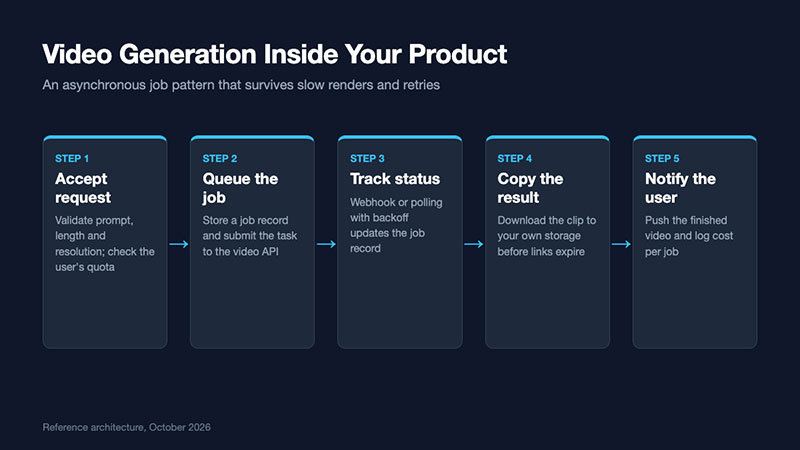
The five building blocks
- Request validation. Before anything reaches the provider, check the prompt length, the requested clip duration, the resolution and any reference files. Reject unsupported combinations early with a clear message. This is also where quota checks belong: does this user or workspace still have generation credit left this month?
- A job table. Create a record for every request with a status field (queued, submitted, running, succeeded, failed), the provider task ID, the parameters used, timestamps and an estimated cost. The job table becomes the single source of truth for support, billing and analytics, so it is worth designing carefully.
- Status tracking. Providers offer either webhooks, polling or both. Webhooks are more efficient but require a public endpoint, signature verification and idempotent handling, because the same notification may arrive more than once. Polling is simpler and works behind firewalls; use exponential backoff, starting at a few seconds and capping at around thirty, and stop after a sensible maximum wait. Many teams implement both, with polling as a safety net for missed webhooks.
- Result storage. Generated video links from providers are usually temporary. As soon as a task succeeds, download the file to your own object storage, generate a thumbnail and store the permanent location on the job record. Never show users a provider link directly.
- Notification and logging. Tell the user the video is ready through the interface, email or a push message, and log the final cost, duration and parameters for each job.
Choosing a model with integration in mind
When development teams evaluate models, they often focus on visual quality. For a product feature, the shape of the API matters just as much. Fewer endpoints and fewer model identifiers mean less code to maintain. Clear limits on clip length and resolution make validation straightforward. Predictable per-second pricing makes cost controls possible.
Alibaba’s Wan 3.0 is a useful example of an integration-friendly design. A single model identifier covers generation from a prompt with optional image, video and audio references, a first-and-last-frame mode, and generation from a file or webpage. Clips run from 2 to 30 seconds at 480P, 720P or 1080P, and an optional soundtrack does not change the price. For teams prototyping a feature, the Wan 3.0 API on APIMart lists pay-as-you-go rates of about $0.033 per second at 480P, $0.066 at 720P and $0.13 at 1080P, roughly 20 percent below official list prices. When a reference video is supplied, its seconds are added to the generated seconds for billing. These are planning estimates, and final charges follow actual output.
Cost guardrails that belong in the code
Per-second pricing is easy to understand, but it also means a single misconfigured request can cost many times more than expected. Cost control should be enforced by the application, not left to a monthly invoice review. The simplest approach is to map each product tier to a maximum clip length and resolution, which gives you a known worst-case cost per request.
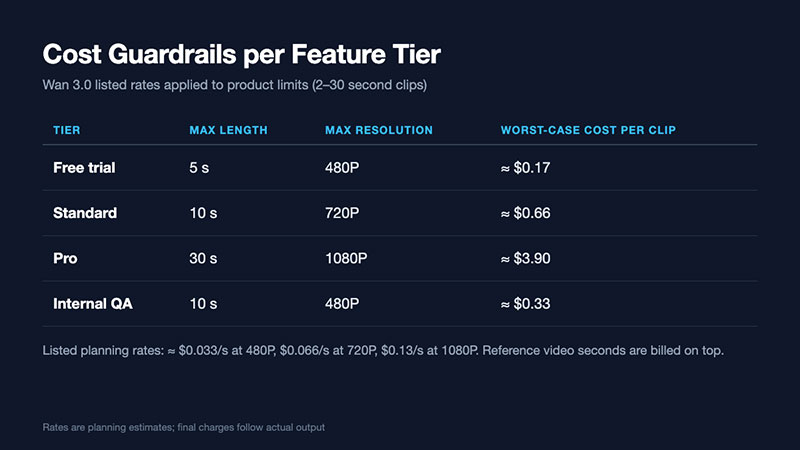
With limits like these in place, several further controls become easy to add:
- Per-workspace monthly budgets. Sum the estimated cost of jobs in the current period and refuse new jobs once the budget is reached.
- Draft-first workflows. Default to a low resolution for previews and only allow full resolution once the user confirms. This alone can cut spending substantially.
- Reference length caps. Because reference video seconds are billed, limit the length of uploaded reference clips or trim them automatically.
- Retry limits. Retry provider errors once or twice with backoff, but never loop indefinitely. Failed jobs should surface to the user with an option to try again.
- Alerting. Send an alert when daily spend exceeds a threshold, so a bug or abuse pattern is caught within hours rather than at month end.
Testing and quality assurance
Generative features are harder to test than deterministic code, but they are not untestable. A practical QA plan has three layers.
| Layer | What to test | How |
| Integration | Job lifecycle, retries, webhook handling, storage copy | Mock provider responses in automated tests, including timeouts and duplicate webhooks |
| Contract | Request parameters and limits still accepted by the provider | A small scheduled job that submits one low-resolution clip daily |
| Output review | Prompt adherence, artefacts, safety | A fixed set of test prompts reviewed by a person after each model or prompt change |
| Load | Queue behaviour under bursts | Simulated job spikes against the mock provider |
The output review layer deserves particular attention. Keep a library of twenty to thirty representative prompts covering your client’s real use cases, and review the results whenever you change models, prompt templates or default settings. Store the outputs so reviewers can compare versions side by side.
Safety, moderation and user trust
If end users can write prompts or upload references, moderation is part of the feature. Filter prompts before submission, scan uploaded images and videos, and review a sample of outputs. Record which user requested each video and keep generation logs for an agreed retention period. Where the generated video will be published or used in advertising, add a simple disclosure field so the client can label AI-generated content where required.
It also helps to set expectations in the interface. Show an estimated wait time, explain that results may vary, and make regeneration easy. Users are far more forgiving of an imperfect first result when trying again takes one click.
A sensible first release
For most client projects, a first release can be small: one entry point, two resolution options, a fixed maximum length, polling-based status checks and storage copies. Add webhooks, advanced reference options and higher tiers once real usage data shows where demand is. Keep the model name in configuration so it can be changed without a deployment, because video models are being updated quickly and switching to a better or cheaper version should be routine.
Built this way, an AI video feature is less exotic than it first appears. It is a background job with a clear cost per unit, a dependency to monitor and outputs to review. Development teams that already handle those concerns well are in a strong position to deliver it.

- MongoDB Cheat Sheet - October 20, 2026
- Adding AI Video Generation to a Software Product: Architecture, Cost Guardrails and QA - October 20, 2026
- Show Hidden Characters, Spaces, and Line Endings in Notepad++ - October 19, 2026