Clearsight
The default. A blue-gray background, never pure black, with text at about 13:1. Background #151a20.

Clearsight is an accessible, colorblind-friendly VS Code theme. Every syntax color, comments included, passes the WCAG AA contrast minimum, and keywords, strings, types and diff colors stay apart under color vision deficiency. It is free, in dark, soft and light.
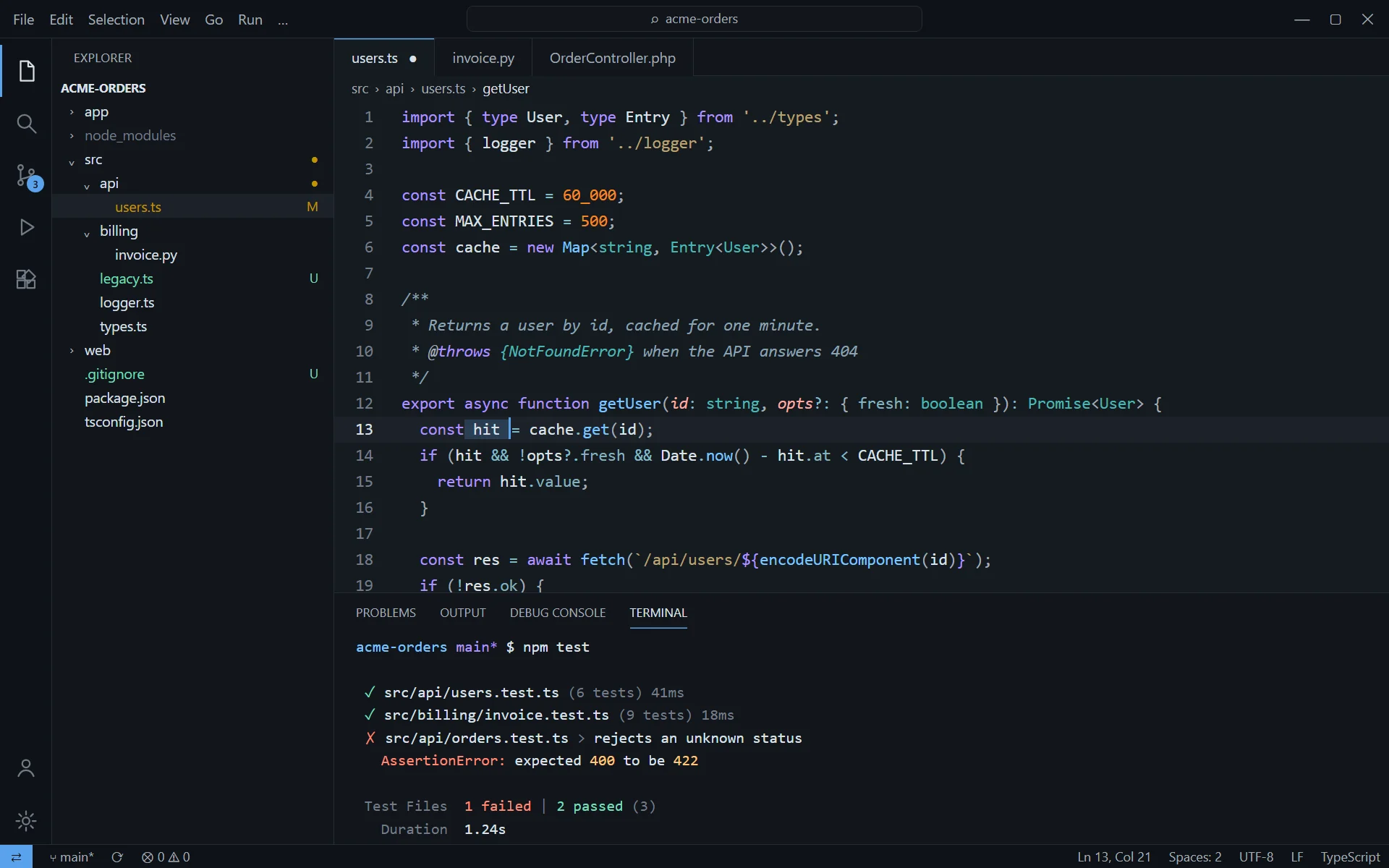
This preview uses the same theme files and the same TextMate grammars as VS Code. Switch the variant, the language, or see the code the way a colorblind developer would.
import { type User, type Entry } from '../types';
import { logger } from '../logger';

const CACHE_TTL = 60_000;
const MAX_ENTRIES = 500;
const cache = new Map<string, Entry<User>>();

/**
 * Returns a user by id, cached for one minute.
 * @throws {NotFoundError} when the API answers 404
 */
export async function getUser(id: string, opts?: { fresh: boolean }): Promise<User> {
  const hit = cache.get(id);
  if (hit && !opts?.fresh && Date.now() - hit.at < CACHE_TTL) {
    return hit.value;
  }

  const res = await fetch(`/api/users/${encodeURIComponent(id)}`);
  if (!res.ok) {
    logger.warn('user lookup failed', { id, status: res.status });
    throw new NotFoundError(`User ${id} not found`);
  }

  const user = (await res.json()) as User;
  cache.set(id, { at: Date.now(), value: user });
  return user;
}
from dataclasses import dataclass, field
from datetime import date, timedelta
from decimal import Decimal
@dataclass
class Invoice:
"""An invoice that becomes overdue after `terms` days."""
number: str
total: Decimal
issued: date
terms: int = 30
paid: bool = False
tags: list[str] = field(default_factory=list)
@property
def due(self) -> date:
return self.issued + timedelta(days=self.terms)
def is_overdue(self, today: date | None = None) -> bool:
# unpaid and past the due date
today = today or date.today()
return not self.paid and today > self.due
def apply_discount(self, percent: float) -> Decimal:
if not 0 <= percent <= 100:
raise ValueError(f"invalid discount: {percent}")
self.total *= Decimal(1 - percent / 100)
return self.total.quantize(Decimal("0.01"))<?php
declare(strict_types=1);
namespace App\Http\Controllers;
use App\Models\Order;
use Illuminate\Http\JsonResponse;
final class OrderController extends Controller
{
private const PER_PAGE = 25;
public function __construct(private readonly OrderService $orders) {}
public function show(int $id): JsonResponse
{
// 404 when the order does not exist
$order = Order::with('items')->findOrFail($id);
return response()->json([
'id' => $order->id,
'status' => $order->status->label(),
'total' => round($order->total, 2),
'paid' => $order->paid_at !== null,
]);
}
}package main
import (
"errors"
"fmt"
)
// Server listens on a TCP port.
type Server struct {
Port int
Name string
}
var ErrClosed = errors.New("server closed")
func (s *Server) Start(retries int) error {
for i := 0; i < retries; i++ {
fmt.Printf("starting %s on :%d\n", s.Name, s.Port)
}
return ErrClosed
}<!doctype html>
<html lang="en">
<head>
<meta charset="utf-8">
<title>Orders</title>
<style>
.btn:hover { background: var(--accent); padding: 0.5rem 1rem; }
#orders > li::before { content: "#"; color: #8a94a6; }
</style>
</head>
<body>
<!-- order list renders here -->
<ul id="orders" data-page="1"></ul>
<button class="btn primary" type="submit" disabled>Load more</button>
</body>
</html>The color vision simulations use the Machado, Oliveira and Fernandes (2009) model at full severity.
Before building Clearsight, we measured what developers actually use. We took the 20 most installed color themes on the VS Code Marketplace, highlighted the same TypeScript, Python, PHP, HTML, CSS and Go files with each one, and measured every color against the editor background.
Across all 141 variants the 20 extensions ship, 85% draw comments below 4.5:1. Low-contrast comments are usually a deliberate choice, meant to push them into the background. The problem is that comments are often the part of unfamiliar code you most need to read.
| # | Theme | Installs | Comment contrast | Comments pass AA | Code below AA | Colorblind collisions |
|---|---|---|---|---|---|---|
| 1 | GitHub Theme GitHub Dark Default | 20.7M | 6.15:1 | Yes | 0.0% | 2 |
| 2 | One Dark Pro One Dark Pro | 12.9M | 3.73:1 | No | 20.5% | 5 |
| 3 | Dracula Theme Official Dracula Theme | 11.2M | 3.03:1 | No | 8.9% | 2 |
| 4 | Atom One Dark Theme Atom One Dark | 7.4M | 2.32:1 | No | 18.2% | 5 |
| 5 | Ayu Ayu Dark | 4.3M | 3.15:1 | No | 8.6% | 4 |
| 6 | Monokai Pro Monokai Pro | 4.2M | 2.88:1 | No | 9.2% | 1 |
| 7 | Winter is Coming Theme Winter is Coming (Dark Blue) | 3.8M | 6.44:1 | Yes | 0.3% | 4 |
| 8 | Night Owl Night Owl | 3.6M | 3.87:1 | No | 8.0% | 3 |
| 9 | Tokyo Night Tokyo Night | 3.0M | 2.50:1 | No | 11.2% | 4 |
| 10 | One Monokai Theme One Monokai | 3.0M | 2.76:1 | No | 25.4% | 2 |
| 11 | Palenight Theme Palenight Theme | 2.7M | 2.84:1 | No | 12.7% | 2 |
| 12 | SynthWave '84 SynthWave '84 | 2.6M | 4.66:1 | Yes | 12.4% | 2 |
| 13 | Shades of Purple Shades of Purple | 2.4M | 3.85:1 | No | 7.2% | 0 |
| 14 | Cobalt2 Theme Official Cobalt2 | 1.9M | 3.62:1 | No | 10.1% | 0 |
| 15 | Andromeda Andromeda | 1.7M | 4.29:1 | No | 30.3% | 2 |
| 16 | Theme (by tal7aouy) Theme | 1.6M | 3.73:1 | No | 35.7% | 4 |
| 17 | Bearded Theme Bearded Theme Monokai Metallian | 1.5M | 2.39:1 | No | 17.9% | 2 |
| 18 | Catppuccin for VSCode Catppuccin Mocha | 1.5M | 5.81:1 | Yes | 0.0% | 3 |
| 19 | Atom One Light Theme Atom One Light | 1.5M | 2.47:1 | No | 44.8% | 3 |
| 20 | Noctis Noctis | 1.4M | 3.97:1 | No | 11.5% | 3 |
How we measured: the six files were highlighted with Shiki, which runs the same grammars and theme rules as VS Code, without language-server semantic highlighting. "Code below AA" is the share of code characters drawn in a color under 4.5:1. A colorblind collision is a pair of roles (for example keyword and function) that differ by at least 0.07 in OKLab with normal vision and by less than 0.07 in a protanopia, deuteranopia or tritanopia simulation. Clearsight was designed against these same checks, so it is not ranked in the table. Data collected on 23 November 2026.
The palette lives in one file. A script checks it on every change and fails the build when a color breaks a rule, so the theme cannot drift.
Keywords, strings, functions, types and comments all clear the WCAG AA minimum on the editor background and on the highlighted current line.
Comments stay quieter than the code around them, but never drop below 4.5:1. In the default variant they sit at 6.59:1.
Pairs that carry meaning are separated by lightness as well as hue, then checked in protanopia, deuteranopia and tritanopia simulations.
Syntax colors are capped below the contrast of plain text, so code reads as text with accents rather than a wall of neon.
Colors are also measured with APCA, a newer perceptual contrast model that judges text on dark backgrounds more realistically than the WCAG 2 formula.
The terminal colors, Git and diff views, bracket pairs, inline AI suggestions, chat, notebooks and debugging are covered, not only the editor.
Click any color to copy its hex value.
The default. A blue-gray background, never pure black, with text at about 13:1. Background #151a20.
Lower contrast for long sessions and light sensitivity. Every token still passes 4.5:1. Background #20242a.
For daylight and bright rooms. Tuned on its own, not an inverted dark theme. Background #f8f7f2.
Ctrl+Shift+X (Cmd+Shift+X on macOS).Ctrl+K then Ctrl+T, and pick Clearsight, Clearsight Soft or Clearsight Light.Themes cannot set your font. Clearsight looks best with a typeface that has clear shapes, such as JetBrains Mono, Fira Code or Cascadia Code. Our guide on how to change the font in VS Code walks through the settings.
To adjust a single color, add an override to your settings.json. If you have not edited it before, here is how to open settings.json in VS Code.
"workbench.colorCustomizations": {
  "[Clearsight]": {
    "editor.lineHighlightBackground": "#1f252d"
  }
},
"editor.tokenColorCustomizations": {
  "[Clearsight]": {
    "comments": "#9fb3c2"
  }
}For more editor tips, see the VS Code workflow cheat sheet and our VS Code guides.
Yes. Clearsight is free and open source under the MIT license, and it is published on the Visual Studio Code Marketplace.
Three: Clearsight (dark), Clearsight Soft (lower contrast) and Clearsight Light. Each one also comes in a No Italics version, so six themes in total.
Comments are text you have to read, especially in code you did not write. In Clearsight they stay quieter than the code around them, but every comment color is above the 4.5:1 WCAG AA minimum. In our test of the 20 most installed themes, the median comment contrast was 3.67:1.
It was built for them. Pairs that carry meaning, such as keywords and functions, strings and numbers, added and deleted lines, errors and warnings, were checked under protanopia, deuteranopia and tritanopia simulations and separated by lightness as well as hue. Simulations are a model, not a person, so feedback from colorblind developers is welcome on GitHub.
Open the Command Palette, run Preferences: Color Theme and pick a variant whose name ends in No Italics.
Those editors install extensions from Open VSX. Clearsight is being published there as well; until that listing is live, VS Code is the supported editor.
Yes. Semantic highlighting is enabled, and the semantic token colors follow the same palette as the TextMate rules, so a language server never pulls a color outside the checked set.