Discord built something genuinely useful: a free platform for voice chat, text channels, and community servers that works across every device. But it’s no longer the only option worth considering.
Age verification rollouts, privacy concerns, and Nitro paywalls have pushed millions of users to look for apps like Discord that offer similar features without the trade-offs.
Some alternatives beat Discord on voice quality. Others win on data ownership, business integrations, or just a cleaner, lighter experience.
This guide covers the 10 best Discord alternatives across every use case, including gaming-focused VoIP tools, open-source community platforms, and team communication apps built for professional workflows.
Apps Like Discord
Discord built its reputation on community servers, voice channels, and a freemium model that works well for gaming groups and casual communities. But between its 2026 age verification rollout and ongoing privacy concerns, searches for alternatives spiked by over 10,000% in early 2026 (AI News Network).
The good news: there are solid options across every use case, whether you want a business chat tool, a gaming-first voice app, or an open-source platform with full data control.
| Platform | Best for | Free plan | Starting paid price |
|---|---|---|---|
| Slack | Business teams | Yes (90-day history) | $7.25/user/mo |
| Telegram | Large communities | Yes | $4.99/mo (Premium) |
| Microsoft Teams | Microsoft 365 orgs | Yes | $4/user/mo |
| TeamSpeak | Competitive gaming | Yes (client) | $30/server/yr |
| Signal | Privacy-first messaging | Yes | Free |
| Element | Decentralized comms | Yes | Custom |
| Mumble | Low-latency voice | Yes (open source) | Free |
| Revolt / Stoat | Discord-like experience | Yes | Free |
| Rocket.Chat | Self-hosted teams | Yes (up to 50 users) | $8/user/mo |
| GameVox | Gaming communities | Yes | Tiered |
Slack

Slack is a team messaging app that organizes workplace communication through channels and direct messages for business teams and remote-first organizations. It offers far deeper productivity integrations than Discord and supports Windows, macOS, Linux, Android, and iOS.
What Does Slack Do?
Slack lets teams communicate through organized channels, direct messages, and threaded conversations, with connections to over 2,600 third-party tools including Jira, Salesforce, and Google Drive.
How Is Slack Similar to Discord?
- Channel-based text communication with both public and private rooms
- Voice and video calling built in
- Free tier available
- Supports large organizations and small groups alike
How Is Slack Different from Discord?
Productivity focus: Slack is built for structured workplace workflows, not community hangouts. Its Workflow Builder, AI-powered message summaries, and deep app integrations make it a proper work hub.
Discord offers always-on voice channels and gaming-oriented social features that Slack simply does not have.
Slack caps video meetings at 50 participants even on the highest paid tier.
Who Is Slack Best For?
Business teams with 5 to 500+ users who need structured, searchable communication and integrations with their existing tool stack.
Key Features of Slack
- 2,600+ app integrations: Connects with Jira, GitHub, Salesforce, and more
- Slack AI: Conversation summaries, daily recaps, and AI search included on all plans as of 2026
- Workflow Builder: No-code automation for routine tasks
- Channels and threads: Keeps conversations organized by topic or project
Pricing
- Free plan: Yes, 90-day message history, 10 app integrations
- Paid plans: From $7.25/user/month (annual billing)
- Free trial: Yes, available on paid plans
Telegram

Telegram is a cloud-based messaging app that supports massive group communities, broadcast channels, and sophisticated bots for casual users and content creators. It handles up to 200,000 members per group and runs on all major platforms.
What Does Telegram Do?
Telegram lets users send text, voice, and video messages inside groups of up to 200,000 people, with a bot platform that supports automation, polling, and community management.
How Is Telegram Similar to Discord?
Both support large group communication, bots, and file sharing. Telegram’s broadcast channels function similarly to Discord’s announcement channels.
Both apps are free and mobile-first.
How Is Telegram Different from Discord?
No server structure. Telegram does not have Discord-style servers with multiple channels inside one space. Each group or channel is its own entity.
There are also no permanent voice channels. Voice chats are temporary and require manual setup per session.
Who Is Telegram Best For?
Content creators, large community builders, and international audiences who need mobile-first group communication without an account requirement on some clients.
Key Features of Telegram
- 200,000-member groups: Handles large communities without performance issues
- Bot platform: Extensive automation options built into group management
- Cloud sync: Messages accessible on all devices simultaneously
- Self-destructing messages: Optional timed message deletion for privacy
Pricing
- Free plan: Yes, full feature access
- Paid plans: Telegram Premium at $4.99/month (larger file uploads, faster downloads, exclusive features)
- Free trial: No
Microsoft Teams

Microsoft Teams is a collaboration and video conferencing platform designed for businesses and organizations already using Microsoft 365. It integrates natively with Outlook, SharePoint, OneDrive, and the full Office app suite.
What Does Microsoft Teams Do?
Teams lets users hold video meetings for up to 300 participants, chat through organized channels, share and co-edit Office files in real time, and manage tasks through Microsoft Planner.
How Is Microsoft Teams Similar to Discord?
- Channel-based group messaging
- Voice and video calling built in
- Free plan available
- Supports both small and large organizations
How Is Microsoft Teams Different from Discord?
Enterprise-grade integration: Teams is deeply tied to the Microsoft 365 ecosystem. Organizations using Outlook, SharePoint, or OneDrive get a unified workspace that Discord cannot replicate.
Discord is casual and community-driven. Teams is structured and compliance-focused. Teams also offers meeting recordings, transcripts, and advanced admin controls that Discord does not provide.
Who Is Microsoft Teams Best For?
Organizations already on Microsoft 365 who need a structured communication platform with enterprise compliance, meeting recording, and Office app integration.
Key Features of Microsoft Teams
- 300-participant video meetings: With up to 10,000 view-only attendees on paid plans
- Office co-editing: Real-time collaboration on Word, Excel, and PowerPoint inside Teams
- Meeting recordings: Stored automatically to OneDrive or SharePoint
- Admin controls: Granular security policies and compliance tooling
Pricing
- Free plan: Yes, group meetings up to 60 minutes, 100 participants, 5 GB storage
- Paid plans: From $4/user/month (Teams Essentials, annual billing)
- Free trial: Yes
TeamSpeak

TeamSpeak is a voice-over-IP (VoIP) communication app purpose-built for gaming and competitive team coordination. It delivers ultra-low latency audio with self-hosted server control on Windows, macOS, Linux, Android, and iOS.
What Does TeamSpeak Do?
TeamSpeak provides high-quality, low-latency voice chat through self-hosted or cloud-hosted servers, with granular channel permissions and background noise suppression.
How Is TeamSpeak Similar to Discord?
- Channel-based server structure
- Voice and text chat
- Role and permission management
- Free client download
How Is TeamSpeak Different from Discord?
Voice-first design. TeamSpeak does not support emojis, stickers, or GIFs in text chat. Its entire architecture is optimized for audio performance, not social features.
It also requires users to either self-host a server or pay for server licensing, which Discord does not.
Esports teams have used TeamSpeak for over a decade precisely because its audio quality and latency outperform Discord in competitive scenarios.
Who Is TeamSpeak Best For?
Competitive gamers, esports teams, and organizations that prioritize audio quality and server control above community features.
Key Features of TeamSpeak
- Ultra-low latency audio: Optimized for real-time competitive communication
- Self-hosting: Full control over server infrastructure and data
- Granular permissions: Channel-level and user-level access controls
- Noise suppression: Background noise reduction built in
Pricing
- Free plan: Yes, client is free; public servers available
- Paid plans: From $30/server/year for licensed hosting
- Free trial: No formal trial, free client available
Signal
Signal is an encrypted messaging and calling app built for privacy-focused users who want secure text, voice, and video communication. It is available on Windows, macOS, Linux, Android, and iOS.
What Does Signal Do?
Signal delivers end-to-end encrypted messages, voice calls, video calls, and group chats, with no ads, no data tracking, and no third-party data sharing. It is funded by donations.
How Is Signal Similar to Discord?
- Group text and voice messaging
- File and media sharing
- Free to use
- Cross-platform availability
How Is Signal Different from Discord?
Privacy architecture. Signal applies end-to-end encryption to everything by default. Discord uses server-side encryption, meaning Discord can technically access message content.
Signal has no server structure, no roles, no bots, and no community discovery tools. It is a messaging app, not a community platform.
Who Is Signal Best For?
Privacy-conscious users and small groups who need secure one-on-one and group messaging without community management features.
Key Features of Signal
- End-to-end encryption: Applied to all messages, calls, and file transfers by default
- Disappearing messages: Configurable auto-delete per conversation
- No ads, no tracking: Supported entirely by donations
- Custom sticker packs: Without any paid subscription requirement
Pricing
- Free plan: Yes, fully featured
- Paid plans: None
- Free trial: Not applicable
Element (Matrix)

Element is a secure communication platform built on the decentralized Matrix protocol. It is used by the French government, the German military (Bundeswehr), and NATO for sensitive communications.
What Does Element Do?
Element lets users send encrypted messages, make voice and video calls, and bridge existing platforms like Slack, Teams, and WhatsApp into a single interface, with self-hosting available for full data sovereignty.
How Is Element Similar to Discord?
- Channel and room-based messaging structure
- Voice and video calling
- Open-source codebase
- Free tier available
How Is Element Different from Discord?
Decentralization. Matrix has no single point of failure. Users on different servers can communicate seamlessly through federation, something Discord cannot offer.
Element’s interface leans professional rather than casual. Setup complexity is higher than Discord, especially for self-hosted deployments.
Who Is Element Best For?
Privacy advocates, open-source communities, and organizations with strict data residency or sovereignty requirements.
Key Features of Element
- Matrix federation: Cross-server messaging without centralized control
- End-to-end encryption: Via the Olm/Megolm cryptographic protocol
- Platform bridges: Connect Slack, Teams, WhatsApp, and others
- Self-hosting: Deploy on your own infrastructure or use Element Cloud
Pricing
- Free plan: Yes, public Matrix homeservers available
- Paid plans: Custom enterprise pricing via Element
- Free trial: Available for enterprise plans
Mumble

Mumble is a free, open-source VoIP application focused entirely on low-latency, high-quality voice communication for gaming communities. It runs on Windows, macOS, Linux, Android, and iOS.
What Does Mumble Do?
Mumble delivers encrypted, low-latency group voice chat through self-hosted servers called Murmur, with positional audio support that adjusts sound based on players’ in-game positions.
How Is Mumble Similar to Discord?
Both support multi-channel server structures with role and permission controls, and both target gaming communities.
Mumble is also free and runs across all major platforms.
How Is Mumble Different from Discord?
Voice only. Mumble has no emoji, GIF, sticker, or media-sharing features worth mentioning. Its text chat is functional but basic.
Positional audio (hearing players based on their in-game location) is a unique feature Discord does not offer. Setup is more technical than Discord’s one-click login.
Who Is Mumble Best For?
Gamers who want the best possible voice quality with zero cost and full server control, and who do not need social or media features.
Key Features of Mumble
- Positional audio: In-game spatial sound for supported titles like FiveM
- Self-hosted servers: Full data control via Murmur
- End-to-end encryption: Built in by default
- Minimal resource usage: Lightweight client with low CPU overhead
Pricing
- Free plan: Yes, fully open source
- Paid plans: None
- Free trial: Not applicable
Revolt / Stoat

Stoat (formerly Revolt, rebranded in late 2025 after a cease-and-desist on the name) is an open-source, privacy-first chat platform that mirrors Discord’s three-column layout almost exactly. After Discord’s 2026 age verification rollout, searches for Stoat spiked by 9,900% in 48 hours (AI News Network).
What Does Stoat Do?
Stoat provides servers, text channels, voice chat, roles, permissions, custom emoji, and bot support with full self-hosting available, at zero cost and with no data tracking.
How Is Stoat Similar to Discord?
Practically everything in the interface is familiar: server list on the left, channels in the middle, chat and user list on the right. Roles, permissions, and channel categories all work the same way.
It also supports custom emoji, GIF search via Tenor, direct messages, and group DMs.
How Is Stoat Different from Discord?
No paywalls. There is no equivalent of Discord Nitro. Every feature is free for every user, including file uploads up to 20 MB, custom emoji, and Markdown formatting.
Stoat has a much smaller bot ecosystem than Discord. Mobile apps are improving but still rough in some areas, and screen sharing is still in development as of early 2026.
Who Is Stoat Best For?
Privacy-conscious Discord users, gaming communities, and small-to-medium groups who want a near-identical Discord experience without data tracking or mandatory age verification.
Key Features of Stoat
- Discord-like UX: Near-zero learning curve for existing Discord users
- No tracking: GDPR-compliant, no behavioral data collection
- Self-hosting: Full control via official Docker setup
- Open source: AGPL-3.0 license, fully auditable codebase
Pricing
- Free plan: Yes, all features included
- Paid plans: None (possible future subscription for video features)
- Free trial: Not applicable
Rocket.Chat
Rocket.Chat is an open-source, self-hosted team communication platform that supports real-time messaging, voice, video, and omnichannel customer engagement. Organizations like the US Navy, Deutsche Bahn, and Audi Business Innovation use it for secure internal communications.
What Does Rocket.Chat Do?
Rocket.Chat lets teams run a fully customizable messaging platform on their own servers or in the cloud, with channels, threads, end-to-end encryption, and connections to WhatsApp, live chat, and SMS from a single interface.
How Is Rocket.Chat Similar to Discord?
- Channel-based messaging with roles and permissions
- Voice and video calling
- Free self-hosted plan
- Open-source codebase
How Is Rocket.Chat Different from Discord?
Omnichannel support. Rocket.Chat connects internal team messaging with external customer communication channels like WhatsApp and live chat. Discord has no equivalent.
It also requires server infrastructure knowledge to run self-hosted. Teams without a sysadmin may find setup tricky.
Who Is Rocket.Chat Best For?
Tech-savvy teams and businesses that need full data sovereignty, compliance with GDPR or HIPAA, or a unified internal and external communication platform.
Key Features of Rocket.Chat
- Self-hosting: Full data control on your own infrastructure
- Omnichannel: WhatsApp, SMS, and live chat built into the same workspace
- White-labeling: Custom branding for the entire interface
- MIT open-source license: Free to fork, audit, and modify
Pricing
- Free plan: Yes, self-hosted up to 50 users
- Paid plans: From $8/user/month (51-500 users)
- Free trial: Yes, available on cloud plans
GameVox
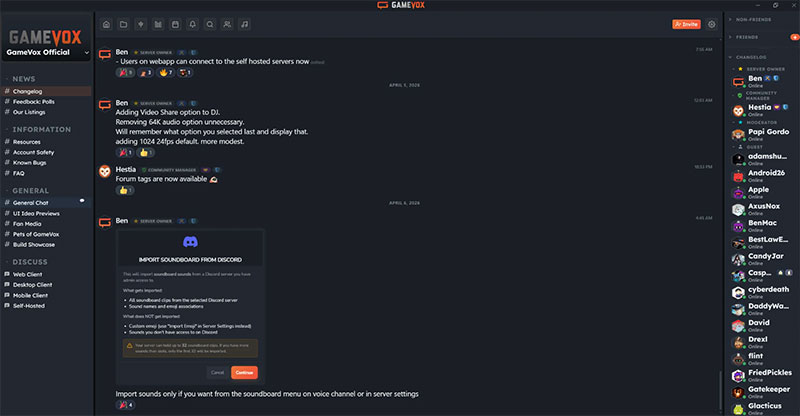
GameVox is a free voice, video, and text chat platform built specifically for gaming communities, combining low-latency voice quality with modern community features in a lightweight desktop client. It supports Windows, macOS, and Linux (no mobile app yet as of early 2026).
What Does GameVox Do?
GameVox provides voice and text chat for gaming groups of up to 50 users on the free tier, with screen sharing at 1080p 30fps, rich text formatting (including tables and code blocks), and positional audio support for games like FiveM and RedM.
How Is GameVox Similar to Discord?
- Server and channel structure similar to Discord
- Voice, video, and text in one app
- Free to use
- Screen sharing included
How Is GameVox Different from Discord?
Built natively. Unlike Discord’s Electron-based client, GameVox uses a native webview through Wails v3, which makes it lighter and faster with less RAM usage.
It is still in beta, which shows. No mobile app, no age verification requirement (which is currently a draw for users), and a content filter that blocks profanity even Discord permits. The bot ecosystem is also very limited compared to Discord.
Who Is GameVox Best For?
Small gaming groups (up to 50 users on the free tier) who want a lightweight, fast alternative to Discord without mandatory age verification.
Key Features of GameVox
- Native client: Lighter than Electron-based apps, lower RAM usage
- 1080p screen sharing: Up to 1440p 60fps on higher-tier servers
- Positional audio: Supports FiveM, RedM, RAGE:MP, and alt:V
- Rich text formatting: Headings, tables, code blocks, and task lists in chat
Pricing
- Free plan: Yes, servers up to 50 users
- Paid plans: Tiered server pricing (not per-user)
- Free trial: Free tier functions as the trial
What Is Discord and Why Do Users Look for Alternatives?
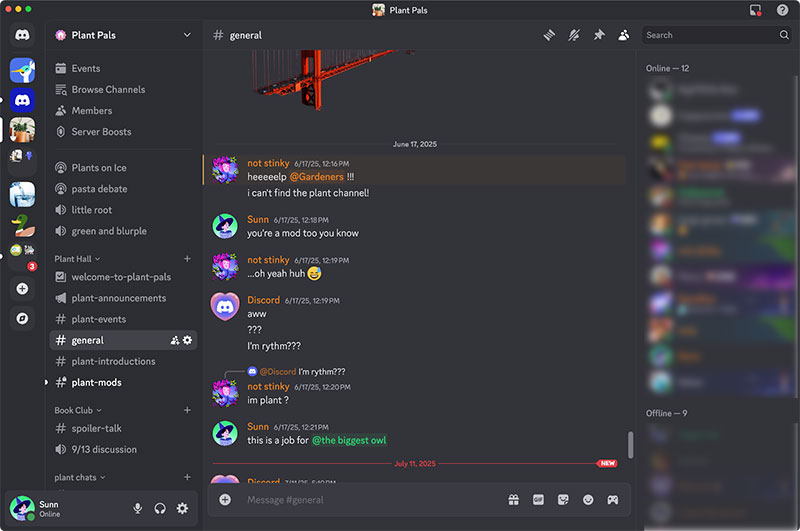
Discord is a free voice, video, and text communication platform built around community servers and organized channels.
It launched in 2015 as a gaming communication tool and has since grown to 690 million registered users and around 200 million monthly active users worldwide as of 2026 (Resourcera).
Users log 4 billion voice minutes daily and send over 25 billion messages per month across 28.9 million active servers (Social Shepherd).
Why users stay:
- Always-on voice channels with no call setup required
- Server and channel structure for organized communities
- Free tier covers most use cases
- 32.6 million servers across gaming, education, tech, and creative communities
Why users leave:
- 2026 global age verification rollout requiring government ID or facial scan to access age-gated servers
- Closed-source architecture with server-side encryption (messages are accessible to Discord)
- Lack of productivity integrations for business use cases
- Nitro paywalls locking HD video, larger file uploads, and custom emoji behind a subscription
Searches for Discord alternatives spiked by 10,000% in 48 hours after the age verification announcement in early 2026 (AI News Network).
The platform’s core demographic is 25 to 34 years old, making up 53.4% of the user base (Statista). That same group tends to be the most vocal about privacy and platform ownership.
How Do Apps Like Discord Differ by Use Case?
Not every Discord alternative does the same job. The right choice depends on what Discord feature you actually need replaced.
| Use Case | Best Platforms | Key Reason |
|---|---|---|
| Gaming voice | TeamSpeak, Mumble, GameVox | Ultra-low latency, self-hosted |
| Business teams | Slack, Microsoft Teams | Workflow integrations, compliance |
| Privacy / open source | Stoat, Element, Rocket.Chat | Self-hosting, data sovereignty |
| Large communities | Telegram | 200,000-member groups, bots |
| Secure messaging | Signal | End-to-end encryption, no ads |
The team collaboration software market was valued at $24.6 billion in 2024 and is projected to reach $67.1 billion by 2033 (SkyQuest). That growth reflects demand across all three segments: gaming, business, and privacy-focused communication.
Apps Like Discord for Gaming Communities
Voice quality and latency are the only things that matter for competitive gaming.
A 2025 Esports Insider report found 20% of pro teams still use TeamSpeak specifically for audio purity, even though Discord dominates casual gaming.
Mumble delivers sub-20ms latency in ideal conditions with positional audio. GameVox handles 1080p screen sharing with a native client that uses less RAM than Electron-based apps.
These three cover the gap Discord leaves when audio performance is the priority.
Apps Like Discord for Business Teams
Microsoft Teams reached 320 million monthly active users in 2024, driven primarily by bundled inclusion in Microsoft 365 subscriptions (Business of Apps).
Slack serves a different profile. 77% of Fortune 100 companies use Slack, and it holds around 18.6% of the global collaboration platform market (Unthread).
Neither platform supports the kind of open community servers Discord offers. Both are purpose-built for internal team workflows, not public or semi-public communities.
Apps Like Discord for Privacy-Focused Users
Stoat (formerly Revolt) saw a 9,900% search spike in 48 hours after Discord’s age verification rollout (AI News Network). That number reflects a specific audience: users who want Discord’s structure without Discord’s data collection.
Element runs on the decentralized Matrix protocol. The French government, German military (Bundeswehr), and NATO use Element for secure communications.
Rocket.Chat is the enterprise-grade self-hosted option. Organizations like the US Navy and Deutsche Bahn run it on their own infrastructure.
What Features Should You Compare When Choosing a Discord Alternative?
Switching communication platforms affects everyone in your community or team. The decision criteria go beyond just feature parity.
Voice Quality and Latency Across Discord Alternatives
Latency benchmarks across platforms:
- Mumble: Sub-20ms in ideal conditions, positional audio, AES encryption by default
- TeamSpeak: Ultra-low latency, Opus codec at up to 128kbps, AES server-side encryption
- Discord: Low-latency mode with AI-powered Krisp noise suppression (2025 update)
- GameVox: Native Wails v3 client, lighter RAM usage than Electron-based apps
Discord’s voice quality is solid for casual gaming. For competitive play in FPS and MOBA titles, TeamSpeak and Mumble still have the edge in raw latency.
Mumble supports positional audio for games like FiveM, RedM, and RAGE:MP. TeamSpeak 5 added 3D positional audio as well, closing a gap that previously favored Mumble exclusively.
Free Plans and Pricing Models Compared
Discord’s free tier covers nearly everything casual users need. The Nitro paywall activates for HD video, larger file uploads, and animated custom emoji.
| Platform | Free Plan Limits | Paid Starting Price |
|---|---|---|
| Discord | Most features free, Nitro for extras | $9.99/month (Nitro) |
| Slack | 90-day message history, 10 integrations | $7.25/user/month |
| Microsoft Teams | 60-min group calls, 5 GB storage | $4/user/month |
| Telegram | Fully featured free tier | $4.99/month (Premium) |
| Stoat | All features free, no paywall | Free |
| Signal | Fully featured, donation-funded | Free |
| Mumble | Fully open source | Free |
| TeamSpeak | Client free, server from $30/year | $30/server/year |
| Rocket.Chat | Self-hosted up to 50 users | $8/user/month |
Stoat’s model is worth noting. There is no equivalent of Discord Nitro. Every feature including custom emoji, file uploads up to 20 MB, and Markdown formatting is free for every user.
Which App Like Discord Is Best for Gaming?
The gaming voice chat decision comes down to two variables: how competitive you are and how technical your group can handle.
TeamSpeak has been the trusted option for professional and semi-professional teams for over a decade. The new TeamSpeak 5 client introduced a modernized interface, cloud sync, and 3D positional audio. A 2025 Esports Insider report noted 20% of pro esports teams choose TeamSpeak specifically for audio purity. Server licensing starts at $30/year for up to 64 slots.
Mumble achieves sub-20ms latency in ideal conditions and supports spatial audio for FiveM, RedM, and Squad. A Squad clan tracked 25% better coordination in 40-player matches after switching to Mumble, credited to 20ms latency and 3D audio (gaming chat apps testing, 2025). It is completely free and open source. Setup requires more technical knowledge than Discord.
GameVox targets the casual end of gaming communities. Built with Wails v3 (not Electron), it consumes less CPU and RAM than Discord. Screen sharing runs at 1080p 30fps for all users. The platform is still in beta as of early 2026, no mobile app exists yet, and its content filter blocks language that even Discord allows.
Stoat is closest to Discord’s UX. If your group just wants to recreate the Discord experience without mandatory age verification or data tracking, Stoat requires nearly zero learning curve. The bot ecosystem is still small and screen sharing is in development.
| Platform | Latency | Positional Audio | Mobile App | Cost |
|---|---|---|---|---|
| TeamSpeak | Ultra-low | Yes (TS5) | Yes | $30/server/year |
| Mumble | Sub-20ms | Yes | Yes (third-party) | Free |
| GameVox | Low | Yes (FiveM, RedM) | No | Free tier |
| Stoat | Standard | No | Yes (improving) | Free |
Bottom line: TeamSpeak for competitive or esports use. Mumble for pure voice quality with zero cost. GameVox for small groups wanting lightweight Discord without age verification. Stoat for communities wanting to replicate Discord’s full structure.
Which App Like Discord Is Best for Business Teams?
Discord was not built for business workflows. Its lack of productivity integrations, searchable message history limits, and absence of compliance tooling make it a poor fit for professional teams past a certain size.
Slack vs. Microsoft Teams for Discord-Migrating Teams
Slack holds 18.6% of the global collaboration platform market in 2025, with Microsoft Teams dominating at 37% (Q3Tech via Statista).
Slack strengths:
- 2,600+ app integrations including Jira, Salesforce, and GitHub
- AI features (summaries, daily recaps, file summaries) included on all plans in 2026
- 77% of Fortune 100 companies use it
- Free plan available, paid from $7.25/user/month
Microsoft Teams strengths:
- 320 million monthly active users in 2024
- Bundled free in Microsoft 365 subscriptions
- Native integration with Outlook, SharePoint, OneDrive, and Office apps
- 300-participant video meetings, meeting recording stored to OneDrive
The clearest dividing line is ecosystem alignment. Microsoft-centric organizations get Teams at no additional cost and gain native Office co-editing inside the same interface. Teams that run on Google Workspace, GitHub, and third-party SaaS tools tend to prefer Slack’s integration library.
One limitation worth knowing: Slack caps video meetings at 50 participants even on the Enterprise Grid plan. For large all-hands meetings, Teams handles up to 300 interactive participants and 10,000 view-only attendees.
For self-hosted teams: Rocket.Chat is the open-source business option. Organizations like the US Navy and Deutsche Bahn use it for internal communications requiring full data sovereignty. The free self-hosted plan supports up to 50 users. Paid plans start at $8/user/month for 51 to 500 users.
For regulated industries: Element (Matrix) is used by the French government and NATO. It supports self-hosting, end-to-end encryption, and bridges to Slack, Teams, and WhatsApp from a single interface. Pricing is custom for enterprise deployments.
Is There a Free Open-Source Alternative to Discord?
Yes. Several options exist, each with different trade-offs on UX, federation, and technical setup requirements.
Stoat is the most direct replacement. Before rebranding from Revolt in late 2025, the platform surpassed 600,000 registered users. After Discord’s age verification announcement, searches for Stoat spiked 9,900% in 48 hours (AI News Network). Every feature is free. The codebase is AGPL-3.0 licensed and fully auditable. Self-hosting works via official Docker setup. The three-column layout (server list, channels, chat) mirrors Discord so closely that users typically spend no time on onboarding.
Gaps in 2026: the mobile app is still improving, screen sharing is in development, and the bot ecosystem is a fraction of Discord’s.
Element (Matrix) takes a different architectural approach. The Matrix protocol is decentralized and federated, meaning users on different servers can communicate across instances without a central company controlling the network. Governments use it for exactly this reason. Setup is more complex than Stoat. The Cinny client provides a Discord-like interface for users who find Element’s default UI too corporate.
Mumble covers voice only. Open source, MIT licensed, free to run on your own server via Murmur. Encryption is built in by default. No social features, no text channel ecosystem.
Rocket.Chat covers team messaging with full data control. It is MIT licensed, supports omnichannel communication (WhatsApp, SMS, live chat), and is free for self-hosted deployments up to 50 users.
| Platform | License | Self-Hosted | Discord UX Match | Voice |
|---|---|---|---|---|
| Stoat | AGPL-3.0 | Yes | High | Yes |
| Element | Apache-2.0 | Yes | Medium (Cinny client) | Yes |
| Mumble | BSD/MIT | Yes | Low | Only |
| Rocket.Chat | MIT | Yes | Medium | Yes |
The practical question is whether your priority is UX parity (Stoat), federation and data sovereignty (Element), voice quality with zero cost (Mumble), or full-featured team messaging with omnichannel support (Rocket.Chat).
FAQ on Apps Like Discord
What is the best free alternative to Discord?
Stoat (formerly Revolt) is the closest free alternative. It mirrors Discord’s three-column layout, supports servers, channels, roles, and custom emoji, and has no paywall. Every feature is free. Self-hosting is available via Docker.
What app is most similar to Discord for gaming?
TeamSpeak and Mumble are the top picks for competitive gaming. Both offer ultra-low latency voice chat, self-hosted servers, and AES encryption. GameVox is a newer option with a lighter native client and positional audio support.
Is there a Discord alternative without age verification?
Yes. Stoat, Mumble, TeamSpeak, and Telegram do not require age verification. Signal also has none. If avoiding mandatory ID checks or facial scans is the priority, any of these platforms work as a direct replacement.
Which Discord alternative is best for business teams?
Slack and Microsoft Teams are the two dominant options. Slack integrates with 2,600+ tools and suits agile teams. Microsoft Teams fits organizations already using Microsoft 365, with native Outlook and SharePoint integration included at no extra cost.
Is there an open-source Discord alternative?
Several exist. Stoat uses the AGPL-3.0 license. Element is built on the open Matrix protocol. Mumble and Rocket.Chat are both MIT licensed. All four support self-hosting, giving organizations full control over their data and infrastructure.
What Discord alternative has the best privacy?
Element and Signal lead on privacy. Element uses the decentralized Matrix protocol with end-to-end encryption. Signal applies end-to-end encryption to everything by default and collects no metadata. Both are open source and funded independently of advertising revenue.
Can I use Discord alternatives on mobile?
Yes. Slack, Telegram, Microsoft Teams, Signal, and Stoat all have Android and iOS apps. Mumble has third-party mobile clients. GameVox has no mobile app as of early 2026, making it desktop-only for now.
What is the best Discord alternative for large communities?
Telegram handles groups of up to 200,000 members and supports broadcast channels, bots, and cloud-synced messaging. It is free, mobile-first, and widely used outside North America. Rocket.Chat scales well for large organizations needing self-hosted infrastructure.
Are there Discord alternatives with voice and video chat?
Yes. Slack, Microsoft Teams, Element, Rocket.Chat, and Stoat all support voice and video. TeamSpeak and Mumble focus on voice only. Signal supports encrypted group video calls. GameVox covers voice and 1080p screen sharing.
What is the cheapest Discord alternative for teams?
Stoat, Mumble, Signal, and Telegram are completely free with no paid tiers. Rocket.Chat is free for self-hosted deployments up to 50 users. For paid tools, Microsoft Teams Essentials starts at $4 per user per month, the lowest among full-featured business platforms.
Conclusion
There is no single best pick among apps like Discord. The right platform depends entirely on what you actually use Discord for.
Competitive gamers who need low-latency voice chat will get more out of TeamSpeak or Mumble than any general-purpose messaging app.
Teams migrating from informal Discord servers to structured workflows will find Slack or Microsoft Teams handle productivity integrations, compliance, and meeting recordings far better.
Privacy-conscious communities have real options now. Stoat, Element, and Rocket.Chat all offer self-hosted community servers with open-source codebases and zero data harvesting.
Pick based on use case, not hype. Test the free tier before committing. And if your group spans multiple needs, running two lightweight platforms side by side is often the most practical solution.

- Application Performance Monitoring Beyond the Code: Why Infrastructure Matters - October 26, 2026
- How to Share GitHub Repository Access With Collaborators - October 25, 2026
- Streamlining Client Projects: Modern Cloud ERP Solutions - October 25, 2026